Tool bar troubles

Spadez

New member
Local time
12:03 AM
Messages
3
I would like to state now, this is not my task bar I'm having issues with.


When purchasing a computer with Windows 7, it comes (at least mine did) with a tool bar at the top of the screen with messaging, sound, internet, music, games options and a few more I can't remember. Well anyways, mine decided to suddenly disappear. I've looked in the Control Panel for options regarding this problem, with no luck (obviously). Any ideas on a fix for this?


Side note - My sound is also acting up, it wont play sound over the speakers (which I know are not blown) and will only play sound through headphones. This computer is taken care of very well, I never leave it on for more than 5 hours, I keep it clean using suggested cleaning products, I've never put the music above half of the volume bar.


Please help me, I would really appreciate it.

Spadez
 

My Computer

OS
windows 7 64bit
For most of the tool bars, if you right click on any there is a choice of which to show.
 

My Computer

Computer type
PC/Desktop
Computer Manufacturer/Model Number
Dell XPS 420
OS
Windows 10, Home Clean Install
CPU
Intel Core2 processsor Q8200(2.33Ghz 1333FSB) Quad Core Tech
Motherboard
Dell
Memory
6 gb
Graphics Card(s)
ATI Radeon 256MB HD3650
Sound Card
Intergrated 7.1 Channel Audio
Monitor(s) Displays
Dell SP2009W 20"
Hard Drives
640 GB Serial ATA Hard drive
Cooling
Fan
Keyboard
Dell USB Keyboard
Mouse
Dell Premium Optical USB
Internet Speed
DSL 2.85
Welcome to the Seven Forums! Spadez

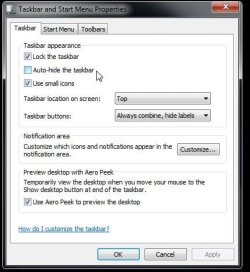
Finding the taskbar is easy enough by simply running the mouse cursor over the top of the screen since the taskbar is likely checked off in the properties to auto hide itself. It should pop right up immediately where you can right click on it and choose properties to uncheck that option.

As far as the sound problem that may only be the need to go into the Control Panel>Sound sub there and reset the speakers as the default playback device depending on the type of head phones you use. If a usb headset for Skype or messenger is used that would be one small item to correct.

The sound mixer portion of the software may have become muted or a driver lost where an update would be another thought since the fresh install would insure all drivers are fresh and active.

Since you haven't filled out your systems specifications or listed the make and model desktop or laptop you use looking up the particular audio chip and usual application like SoundMax would be a help here.
 

Attachments

  • Taskbar Autohide.jpg
    Taskbar Autohide.jpg
    38.5 KB · Views: 3

My Computers

System One System Two

  • Computer type
    PC/Desktop
    Computer Manufacturer/Model Number
    Custom builds = 2
    OS
    W7 Ultimate x64/W10 Pro x64/W11 Pro Triple Boot - Main PC W7 Remote PC Micro ATX W7 Pro x64/W11 Pro
    CPU
    AMD Phenom II X4 975 Deneb 3.6ghz - 965 2nd remote pc
    Motherboard
    Gigabyte GA-790XTA-UD4-Gigabyte GA-880GM-D2H remote pc
    Memory
    Kingston Hyper X DDR3 1600 1.5v 16gb - Hyper X Fury 8gb 2nd
    Graphics Card(s)
    MSI HD Radeon 5750 1gb - MSI HD Radeon 6450 on mini tower
    Sound Card
    Creative Labs X-Fi Xtreme Audio P - Realtek onooard 2nd case
    Monitor(s) Displays
    ASUS VW199T-P 19" HP 2082a Main-HP 2082a 20" remote pc
    Screen Resolution
    Asus 1440x900 - HP 1600x900
    Hard Drives
    WD Black 1TB HD per OS W7, W10, and pending W11 presently on 500gb OS Drive - Pending Triple 1TB HDs for Spanned Storage/backup volume
    Single 2TB external USB enclosure, single 1TB System 7 Host/Boot drive, Pending 8TB external HD for system image b
    PSU
    Corsair 750TX - primary / Corsair CX600 - second
    Case
    Antec 900-2 - SSD compatible / NZXT Vulcan mini tower
    Cooling
    Zalman CNPS9900A
    Keyboard
    AZIO L70 Backlit Letters Gaming - ONN Cordless/USB
    Mouse
    MSI DS200 Programmable, Logitech Cordless
    Internet Speed
    30mbps upgrade - primary hard wired - mini tower usb WiFi
    Antivirus
    GFI VIPRE Internet Security 2014 on W7 2016 beta on W10,
    Browser
    Cyberfox, WaterFox 64bit FF variants, FireFox x64, Pale Moon
    Other Info
    Accomdata fan cooled usb 2.0 PIDE/Sata II, III external enclosure.
    Sambient usb/eSata PATA/Sata II, III external enclosure.
  • Computer type
    PC/Desktop
    System Manufacturer/Model Number
    CUSTOM ASSEMBLY
    OS
    W7 Pro x64/W11 Pro
    CPU
    AMD Deneb 3.6ghz - 965
    Motherboard
    Gigabyte GA-880GM-D2H remote pc
    Memory
    Kingston Hyper X Fury 8gb
    Graphics Card(s)
    MSI HD Radeon 6450 DVI Output
    Sound Card
    Realtek onooard Creative or Other separate PENDING
    Monitor(s) Displays
    VIZIO 32" LCD TV Separate LCD Pending
    Screen Resolution
    1600x1080
    Hard Drives
    WD 500GB OS Host/Boot WD Green 1TB Storage/Backup
    PSU
    Corsair 600W - THERMALTAKE 600W spare case
    Case
    NZXT Vulcan mini tower
    Cooling
    Twin 120mm Top Fans - 240mm Side Cover
    Keyboard
    ONN Cordless/USB Logitech Cordless
    Mouse
    ONN USB/Cordless - Logitech Cordless
    Internet Speed
    DSL 5G
    Browser
    MS Edge, FireFox, WaterFox x64, FireFox Nightly
    Other Info
    OS Testing-Remote Access to Main TeamViewer
I would like to state now, this is not my task bar I'm having issues with.


When purchasing a computer with Windows 7, it comes (at least mine did) with a tool bar at the top of the screen with messaging, sound, internet, music, games options and a few more I can't remember. Well anyways, mine decided to suddenly disappear. I've looked in the Control Panel for options regarding this problem, with no luck (obviously). Any ideas on a fix for this?


Side note - My sound is also acting up, it wont play sound over the speakers (which I know are not blown) and will only play sound through headphones. This computer is taken care of very well, I never leave it on for more than 5 hours, I keep it clean using suggested cleaning products, I've never put the music above half of the volume bar.


Please help me, I would really appreciate it.

Spadez

Was it by any chance a Dell System and did the 'toolbar' look like this ?
Dell Dock.png

If that is the case, then you can get it here
Download The Dell Dock

On a side note,
Update your System Specs here. You can get the details using Speccy. Download Speccy, run it and fill in the details here on the site.
 

My Computer

Computer type
Laptop
Computer Manufacturer/Model Number
HP EliteBook 8530w Mobile Workstation
OS
Windows 7 Ultimate x64 (XP, 98SE, 95, 3.11, DOS 7.10 on VM) + Ubuntu 10.04 LTS Lucid Lynx
CPU
Intel Core 2 Duo Processor P8600 (2.40 GHz, 3 MB L2 cache)
Motherboard
Mobile Intel PM45 Express Chipset ICH9M-Enhanced
Memory
4GB 800 MHz DDR2 SDRAM
Graphics Card(s)
ATI Mobility FireGL V5700 with 256 MB
Sound Card
SoundMAX Integrated Digital HD Audio
Monitor(s) Displays
15.4-inch WXGA anti-glare (1280 x 800 resolution)
Screen Resolution
1280 x 800
Hard Drives
500GB + 1TB
Mouse
Synaptics PS/2 Port Touchpad, USB Mouse
Internet Speed
4 Mbps
Antivirus
MSE
Browser
Firefox, Chrome, IE
Other Info
Authentec AES2810 Fingerprint Reader
Welcome to the Seven Forums! Spadez

Finding the taskbar is easy enough by simply running the mouse cursor over the top of the screen since the taskbar is likely checked off in the properties to auto hide itself. It should pop right up immediately where you can right click on it and choose properties to uncheck that option.

As far as the sound problem that may only be the need to go into the Control Panel>Sound sub there and reset the speakers as the default playback device depending on the type of head phones you use. If a usb headset for Skype or messenger is used that would be one small item to correct.

The sound mixer portion of the software may have become muted or a driver lost where an update would be another thought since the fresh install would insure all drivers are fresh and active.

Since you haven't filled out your systems specifications or listed the make and model desktop or laptop you use looking up the particular audio chip and usual application like SoundMax would be a help here.

I got the sound working again although, I don't think you fully understood which item I'm trying to get back. I attached a picture of this below (sorry about the bad picture quality, it was the only one I could find via google.)
 

Attachments

  • toolbar.png
    toolbar.png
    13.4 KB · Views: 1

My Computer

OS
windows 7 64bit
I'm not aware of the "posting rules" on this forum so sorry if double posting is bad.

After finding the name "Dell Dock" I was able to solve this problem, Thanks for your help guys.
 

My Computer

OS
windows 7 64bit
Welcome to the Seven Forums! Spadez

Finding the taskbar is easy enough by simply running the mouse cursor over the top of the screen since the taskbar is likely checked off in the properties to auto hide itself. It should pop right up immediately where you can right click on it and choose properties to uncheck that option.

As far as the sound problem that may only be the need to go into the Control Panel>Sound sub there and reset the speakers as the default playback device depending on the type of head phones you use. If a usb headset for Skype or messenger is used that would be one small item to correct.

The sound mixer portion of the software may have become muted or a driver lost where an update would be another thought since the fresh install would insure all drivers are fresh and active.

Since you haven't filled out your systems specifications or listed the make and model desktop or laptop you use looking up the particular audio chip and usual application like SoundMax would be a help here.

I got the sound working again although, I don't think you fully understood which item I'm trying to get back. I attached a picture of this below (sorry about the bad picture quality, it was the only one I could find via google.)

That is RocketDock.

Once you fill in your System Specs, it would be easy to solve many problems. Here, if you had the System Specs filled, then Richc and Night Hawk would have known that you have a Dell system and given you details accordingly.
 

My Computer

Computer type
Laptop
Computer Manufacturer/Model Number
HP EliteBook 8530w Mobile Workstation
OS
Windows 7 Ultimate x64 (XP, 98SE, 95, 3.11, DOS 7.10 on VM) + Ubuntu 10.04 LTS Lucid Lynx
CPU
Intel Core 2 Duo Processor P8600 (2.40 GHz, 3 MB L2 cache)
Motherboard
Mobile Intel PM45 Express Chipset ICH9M-Enhanced
Memory
4GB 800 MHz DDR2 SDRAM
Graphics Card(s)
ATI Mobility FireGL V5700 with 256 MB
Sound Card
SoundMAX Integrated Digital HD Audio
Monitor(s) Displays
15.4-inch WXGA anti-glare (1280 x 800 resolution)
Screen Resolution
1280 x 800
Hard Drives
500GB + 1TB
Mouse
Synaptics PS/2 Port Touchpad, USB Mouse
Internet Speed
4 Mbps
Antivirus
MSE
Browser
Firefox, Chrome, IE
Other Info
Authentec AES2810 Fingerprint Reader
Ahhaaa RocketDock! That works the same way! or you go into the Start menu folder if you forgot to check off the startup with Windows option!

To rephrase that a bit if you didn't bring up the setting screen after you first installed RD you go into the Start>All Programs>RocketDock folder if you have the folder view applied and click on the main icon for it. Once it reappears the yellow flag icon on the toolbar itself is for the settings.

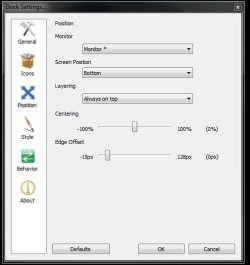
You won't need it later once the bar is populated however. A simple right click inbetween any shortcuts dragged onto it will still bring the settings screen where you set the behavior for things like auto hide or leave that unchecked, mouseover popup to see it unhide when passed over by the cursor, additional styles, and the works.

Note if you run a dual monitor setup you would select the monitor * option rather then monitor #1 or #2 to center it if you have a lot going onto it.

:eek: (I tend to keep busy here. :D )
 

Attachments

  • RocketDock Maxed Out.jpg
    RocketDock Maxed Out.jpg
    84 KB · Views: 4
  • RocketDock Position Setting.jpg
    RocketDock Position Setting.jpg
    29.9 KB · Views: 2
Last edited:

My Computers

System One System Two

  • Computer type
    PC/Desktop
    Computer Manufacturer/Model Number
    Custom builds = 2
    OS
    W7 Ultimate x64/W10 Pro x64/W11 Pro Triple Boot - Main PC W7 Remote PC Micro ATX W7 Pro x64/W11 Pro
    CPU
    AMD Phenom II X4 975 Deneb 3.6ghz - 965 2nd remote pc
    Motherboard
    Gigabyte GA-790XTA-UD4-Gigabyte GA-880GM-D2H remote pc
    Memory
    Kingston Hyper X DDR3 1600 1.5v 16gb - Hyper X Fury 8gb 2nd
    Graphics Card(s)
    MSI HD Radeon 5750 1gb - MSI HD Radeon 6450 on mini tower
    Sound Card
    Creative Labs X-Fi Xtreme Audio P - Realtek onooard 2nd case
    Monitor(s) Displays
    ASUS VW199T-P 19" HP 2082a Main-HP 2082a 20" remote pc
    Screen Resolution
    Asus 1440x900 - HP 1600x900
    Hard Drives
    WD Black 1TB HD per OS W7, W10, and pending W11 presently on 500gb OS Drive - Pending Triple 1TB HDs for Spanned Storage/backup volume
    Single 2TB external USB enclosure, single 1TB System 7 Host/Boot drive, Pending 8TB external HD for system image b
    PSU
    Corsair 750TX - primary / Corsair CX600 - second
    Case
    Antec 900-2 - SSD compatible / NZXT Vulcan mini tower
    Cooling
    Zalman CNPS9900A
    Keyboard
    AZIO L70 Backlit Letters Gaming - ONN Cordless/USB
    Mouse
    MSI DS200 Programmable, Logitech Cordless
    Internet Speed
    30mbps upgrade - primary hard wired - mini tower usb WiFi
    Antivirus
    GFI VIPRE Internet Security 2014 on W7 2016 beta on W10,
    Browser
    Cyberfox, WaterFox 64bit FF variants, FireFox x64, Pale Moon
    Other Info
    Accomdata fan cooled usb 2.0 PIDE/Sata II, III external enclosure.
    Sambient usb/eSata PATA/Sata II, III external enclosure.
  • Computer type
    PC/Desktop
    System Manufacturer/Model Number
    CUSTOM ASSEMBLY
    OS
    W7 Pro x64/W11 Pro
    CPU
    AMD Deneb 3.6ghz - 965
    Motherboard
    Gigabyte GA-880GM-D2H remote pc
    Memory
    Kingston Hyper X Fury 8gb
    Graphics Card(s)
    MSI HD Radeon 6450 DVI Output
    Sound Card
    Realtek onooard Creative or Other separate PENDING
    Monitor(s) Displays
    VIZIO 32" LCD TV Separate LCD Pending
    Screen Resolution
    1600x1080
    Hard Drives
    WD 500GB OS Host/Boot WD Green 1TB Storage/Backup
    PSU
    Corsair 600W - THERMALTAKE 600W spare case
    Case
    NZXT Vulcan mini tower
    Cooling
    Twin 120mm Top Fans - 240mm Side Cover
    Keyboard
    ONN Cordless/USB Logitech Cordless
    Mouse
    ONN USB/Cordless - Logitech Cordless
    Internet Speed
    DSL 5G
    Browser
    MS Edge, FireFox, WaterFox x64, FireFox Nightly
    Other Info
    OS Testing-Remote Access to Main TeamViewer
Back
Top