

- Local time
- 6:15 PM
- Messages
- 1,363
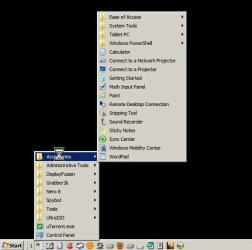
I miss the classic start menu so have created a new toolbar to sit next to the start menu.
In the screenshot you see the number "1", that's because I created a new toolbar and named it "1". I would prefer that "1" to be a blank, but cannot figure out how to do it. If you unselect "show title" then you get the name or icon of the first subfolder within the folder "1", and the drop down menu starts with the next subfolder. So first question is, is it possible to make this toolbar have more of a start button or be blank with no button at all.
Question #2 is, can I make the control panel item (its just above the sideways arrow) automatically expand as a menu to the right? Right now I have to double click it and then it opens as a new window. Thanks
In the screenshot you see the number "1", that's because I created a new toolbar and named it "1". I would prefer that "1" to be a blank, but cannot figure out how to do it. If you unselect "show title" then you get the name or icon of the first subfolder within the folder "1", and the drop down menu starts with the next subfolder. So first question is, is it possible to make this toolbar have more of a start button or be blank with no button at all.
Question #2 is, can I make the control panel item (its just above the sideways arrow) automatically expand as a menu to the right? Right now I have to double click it and then it opens as a new window. Thanks
Attachments
My Computer
At a glance
Win7 pro x64stock i7 7700kCorsair Vengeance LPX 16GB (2x8GB) DDR4 @ 320...integrated Intel HD 630
- Computer type
- PC/Desktop
- Computer Manufacturer/Model Number
- diy
- OS
- Win7 pro x64
- CPU
- stock i7 7700k
- Motherboard
- Gigabyte Z270N-WIFI mini-ITX
- Memory
- Corsair Vengeance LPX 16GB (2x8GB) DDR4 @ 3200MHz
- Graphics Card(s)
- integrated Intel HD 630
- Sound Card
- onboard Realtek ALC1220
- Monitor(s) Displays
- two vertically mounted samsung 55" 4k un55mu8000
- Screen Resolution
- 1920x1280
- Hard Drives
- 256GB Samsung EVO 960 M.2 pci-e NVMe SSD
- PSU
- SilverStone Nightjar ST45NF 450Watt Fanless
- Case
- No case. Motherboard is mounted directly onto power supply
- Cooling
- Evercool low profile 815EP with Panaflow 12L fan at 7v
- Keyboard
- Ortek MCK-86 mini
- Mouse
- Belkin 5-button USB
- Internet Speed
- spectrum 400mbps


