ToolBar to the left??

SCiFi

New member
Local time
9:03 PM
Messages
4
All I am wanting to do is move a new toolbar which ive just created and place it on the left hand side of the taskbar!!

To my horror i can only move one side of the marked parts of the toolbar which is next to the name of my toolbar is marked B, the other is next to the start button marked A and that one you cant move.

taskbar1.jpg


The only way you can move the toolbar over is when you move B over to A and this happens:

taskbar2.jpg


Now you would think, thats good you've done it. Only thing is when you lock the ruddy taskbar it does this:

taskbar3.jpg


You can see the 1st program sticking out slightly, which is so ruddy stupid and needs fixing!!! I like things to be tidy and for me its lazy programming..

The other problem with this is that you cant just drop a folder onto the taskbar and create a new toolbar, if you do it just says its gonna pin it to windows explorer which we dont want. Many ways windows 7 is very good and the rest of the time its ruddy stupid, is there common sense department at microsoft?!?!?!

Does anyone know how to move the toolbar over without this sort of thing happening...
 

My Computer

OS
windows 7 32 bit
I had the same problem. I just deleted that toolbar and recreated it - was done in 2 minutes.
 

My Computer

Computer Manufacturer/Model Number
HP, Dell, Gateway, Toshiba - 4 laptops and 2 desktops
OS
Vista, Windows7, Mint Mate, Zorin, Windows 8
CPU
from 1.6GHz Duo to i7
Monitor(s) Displays
2x HP w2207
Hard Drives
5x HDD, 7x SSD, 12x Externals
Keyboard
with trackball - no mices
Mouse
Trackball mice
Internet Speed
DSL 6000
Does it really??? I dont think so...

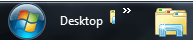
The problem is that when you lock the taskbar, the fuzzy bits you grab hold on to move the toolbar to the left disappear, when this happens the name of the toolbar moves slightly to the left and reveals part of the 1st programs icon!!!
 

My Computer

OS
windows 7 32 bit
Exactly, that was my problem too. But I fixed it as I said.
 

My Computer

Computer Manufacturer/Model Number
HP, Dell, Gateway, Toshiba - 4 laptops and 2 desktops
OS
Vista, Windows7, Mint Mate, Zorin, Windows 8
CPU
from 1.6GHz Duo to i7
Monitor(s) Displays
2x HP w2207
Hard Drives
5x HDD, 7x SSD, 12x Externals
Keyboard
with trackball - no mices
Mouse
Trackball mice
Internet Speed
DSL 6000
you might have been lucky cos ive done it 10 times and 10 times its done exactly the same..

Althought what i did though was change 1 of the icons to an invisible one and that worked ;)

Im just peeved that we cant just drop a folder onto it and create a toolbar, instead it just adds it to the explorer which isnt wot ppl want to do and its something that microsoft has put a stop to it for some reason.
 

My Computer

OS
windows 7 32 bit

My Computer

Computer type
PC/Desktop
Computer Manufacturer/Model Number
Self built custom
OS
64-bit Windows 11 Pro for Workstations
CPU
Intel i7-8700K OC'd to 5 GHz
Motherboard
ASUS ROG Maximus XI Formula Z390
Memory
64 GB (4x16GB) G.SKILL TridentZ RGB DDR4 3600 MHz
Graphics Card(s)
ASUS ROG-STRIX-GTX1080TI-O11G-GAMING
Sound Card
Integrated
Monitor(s) Displays
2 x Samsung Odyssey G7 27"
Screen Resolution
2560x1440
Hard Drives
1TB Samsung 990 PRO M.2,
4TB Samsung 990 PRO PRO M.2,
TerraMaster F8 SSD Plus NAS
PSU
Seasonic Prime Titanium 850W
Case
Thermaltake Core P3
Cooling
Corsair Hydro H115i
Keyboard
Logitech wireless K800
Mouse
Logitech MX Master 4
Internet Speed
2 Gb/s Download and 100 Mb/s Upload
Antivirus
Malwarebyte Anti-Malware Premium
Browser
Google Chrome
Other Info
Logitech Z625 speaker system,
Logitech BRIO 4K Pro webcam,
HP Color LaserJet Pro MFP M477fdn,
APC SMART-UPS RT 1000 XL - SURT1000XLI,
Galaxy S23 Plus phone
I am sorry my method did not work out for you. Maybe my system is more cooperative.
 

My Computer

Computer Manufacturer/Model Number
HP, Dell, Gateway, Toshiba - 4 laptops and 2 desktops
OS
Vista, Windows7, Mint Mate, Zorin, Windows 8
CPU
from 1.6GHz Duo to i7
Monitor(s) Displays
2x HP w2207
Hard Drives
5x HDD, 7x SSD, 12x Externals
Keyboard
with trackball - no mices
Mouse
Trackball mice
Internet Speed
DSL 6000
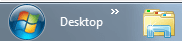
OK. Try this. Create your toolbar as usual and move it to the left on your Taskbar. Don't lock the taskbar yet. Right-click just under the new toolbar name (you will need to do this for each option) and deselect both Show Title and Show text. Now move the handle as far left as you can. Again, right-click and this time select Show Title. You can now lock the taskbar and the partial icon will no longer be there.

Before
Capture.PNG

After
Capture1.PNG
 

My Computer

Computer type
PC/Desktop
Computer Manufacturer/Model Number
Dwarf Dwf/11/2012 r09/2013
OS
Windows 8.1 Pro RTM x64
CPU
Intel Core-i5-3570K 4-core @ 3.4GHz (Ivy Bridge) (OC 4.4GHz)
Motherboard
ASRock Z77 Extreme4-M
Memory
4 x 4GB DDR3-1600 Corsair Vengeance CMZ8GX3M2A1600C9B (16GB)
Graphics Card(s)
MSI GeForce GTX770 Gaming OC 2GB
Sound Card
Realtek High Definition on board solution (ALC 898)
Monitor(s) Displays
ViewSonic VA1912w Widescreen (VGA)
Screen Resolution
1440x900
Hard Drives
OCZ Agility 3 SSD 120GB SATA III x2 (RAID 0)
Samsung HD501LJ 500GB SATA II x2
Hitachi HDS721010CLA332 1TB SATA II
Iomega 1.5TB Ext USB 2.0
WD 2.0TB Ext USB 3.0
PSU
XFX Pro Series 850W Semi-Modular
Case
Gigabyte IF233
Cooling
1 x 120mm Front Inlet 1 x 120mm Rear Exhaust
Keyboard
Microsoft Comfort Curve Keyboard 3000 (USB)
Mouse
Microsoft Comfort Mouse 3000 for Business (USB)
Internet Speed
NetGear DG834Gv3 ADSL Modem/Router (Ethernet) ~4.0 Mb/s (O2)
Antivirus
Avast! 8.0.1497
Browser
IE 11
Other Info
Optical Drive: HL-DT-ST BD-RE BH10LS30 SATA Bluray
Lexmark S305 Printer/Scanner/Copier (USB)
WEI Score: 8.1/8.1/8.5/8.5/8.25
Asus Eee PC 1011PX Netbook (Windows 7 x86 Starter)
  • Like
Reactions: whs
OK. Try this. Create your toolbar as usual and move it to the left on your Taskbar. Don't lock the taskbar yet. Right-click just under the new toolbar name (you will need to do this for each option) and deselect both Show Title and Show text. Now move the handle as far left as you can. Again, right-click and this time select Show Title. You can now lock the taskbar and the partial icon will no longer be there.

Before
View attachment 103418

After
View attachment 103419

Cheers that worke and whs, Im not one to take the micky so Im sorry if you felt like i was. Im no techie and appreciate all advise you guys reply with.
 

My Computer

OS
windows 7 32 bit
You can actually turn this around and use it to your advantage. On the toolbar that I created, the top shortcut points to another folder that I need to access frequently, and that folder is the icon that is partially visible as stated above. But I positioned it so that the folder icon is fully visible. So it becomes an another folder shortcut that is available on the taskbar, in addition to the toolbar.
 

My Computer

OS
Windows 7 Professional x64
Back
Top