
Toolbar will not change color!

MontHiro

New member
Local time
10:03 AM
Messages
3
I know someone has already posted about this but im not sure if they are having the same problem as me. So, here is my problem!

When i open the personalize option it gives me the right screen
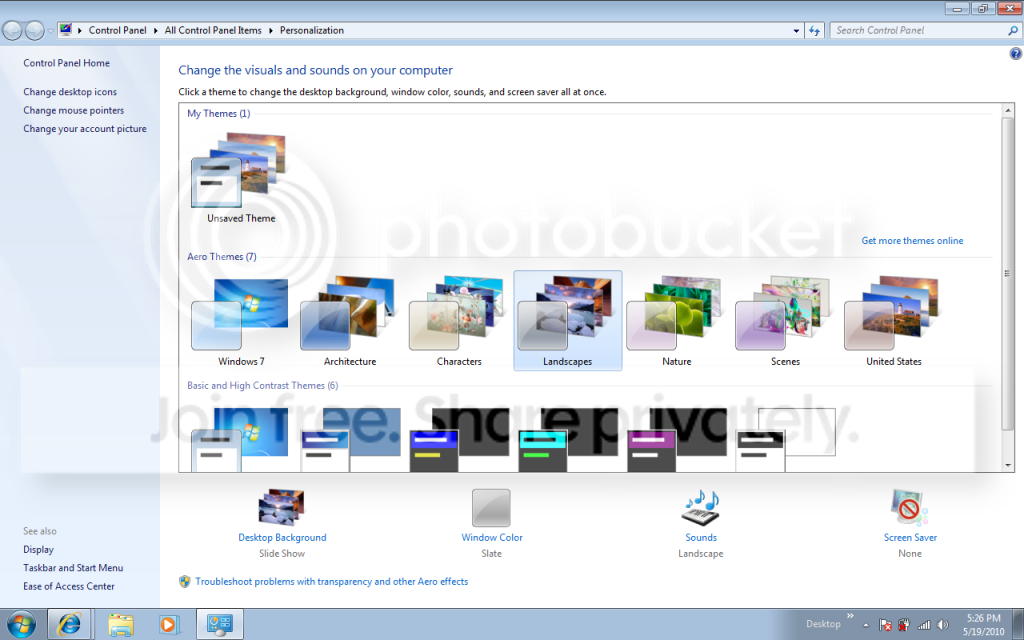
Desktop1.png


but then when i click "Windows Color" it gives me this screen
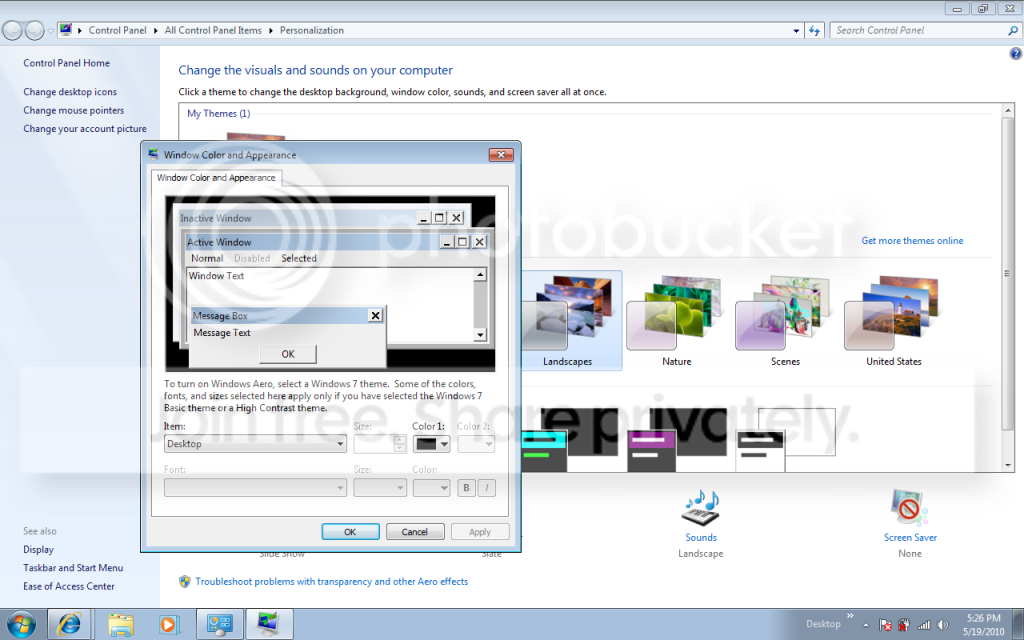
desktop2.png


can someone please tell me how to change this, i really want my toolbar to be black!
 

My Computer

Computer Manufacturer/Model Number
Dell Inspiron 6000
OS
Windows 7
CPU
ACPI x86 based PC
Memory
1 Gb Ram
Graphics Card(s)
ATI Radeon X300
Sound Card
SigmaTel C-Major Audio
I think i may have found the problem, for some reason my ATI card is not working with AERO transparent themes, looking at a different driver for the WDM and maybe that will work. Will post back when i find out!
 

My Computer

Computer Manufacturer/Model Number
Dell Inspiron 6000
OS
Windows 7
CPU
ACPI x86 based PC
Memory
1 Gb Ram
Graphics Card(s)
ATI Radeon X300
Sound Card
SigmaTel C-Major Audio
Hello MontHiro, and welcome to Seven Forums.

In addition, double check to make sure that you WEI score has been ran or updated after installing the driver. Without a a WEI score, Aero may not be turned on yet.

Hope this helps,
Shawn
 

My Computer

Computer type
PC/Desktop
Computer Manufacturer/Model Number
Self built custom
OS
64-bit Windows 11 Pro for Workstations
CPU
Intel i7-8700K OC'd to 5 GHz
Motherboard
ASUS ROG Maximus XI Formula Z390
Memory
64 GB (4x16GB) G.SKILL TridentZ RGB DDR4 3600 MHz
Graphics Card(s)
ASUS ROG-STRIX-GTX1080TI-O11G-GAMING
Sound Card
Integrated
Monitor(s) Displays
2 x Samsung Odyssey G7 27"
Screen Resolution
2560x1440
Hard Drives
1TB Samsung 990 PRO M.2,
4TB Samsung 990 PRO PRO M.2,
TerraMaster F8 SSD Plus NAS
PSU
Seasonic Prime Titanium 850W
Case
Thermaltake Core P3
Cooling
Corsair Hydro H115i
Keyboard
Logitech wireless K800
Mouse
Logitech MX Master 4
Internet Speed
2 Gb/s Download and 100 Mb/s Upload
Antivirus
Malwarebyte Anti-Malware Premium
Browser
Google Chrome
Other Info
Logitech Z625 speaker system,
Logitech BRIO 4K Pro webcam,
HP Color LaserJet Pro MFP M477fdn,
APC SMART-UPS RT 1000 XL - SURT1000XLI,
Galaxy S23 Plus phone
Well, im not completely sure of the video problem at the moment. But for right now im looking at why my AC adapter turns off when the battery is plugged in. and i think my friend has found the problem, no matter what adapter we use the adapter turns off. So id assume its the motherboard. And as for the my video card it may not be high enough to support the transparency. Still working on it, getting a different Vista driver for the card itself to see if that will help. Currently running off a XP driver for the video card.
 

My Computer

Computer Manufacturer/Model Number
Dell Inspiron 6000
OS
Windows 7
CPU
ACPI x86 based PC
Memory
1 Gb Ram
Graphics Card(s)
ATI Radeon X300
Sound Card
SigmaTel C-Major Audio
MontHiro,

Here are some items to check to be able to have Aero.
Hope this may help.
 

My Computer

Computer type
PC/Desktop
Computer Manufacturer/Model Number
Self built custom
OS
64-bit Windows 11 Pro for Workstations
CPU
Intel i7-8700K OC'd to 5 GHz
Motherboard
ASUS ROG Maximus XI Formula Z390
Memory
64 GB (4x16GB) G.SKILL TridentZ RGB DDR4 3600 MHz
Graphics Card(s)
ASUS ROG-STRIX-GTX1080TI-O11G-GAMING
Sound Card
Integrated
Monitor(s) Displays
2 x Samsung Odyssey G7 27"
Screen Resolution
2560x1440
Hard Drives
1TB Samsung 990 PRO M.2,
4TB Samsung 990 PRO PRO M.2,
TerraMaster F8 SSD Plus NAS
PSU
Seasonic Prime Titanium 850W
Case
Thermaltake Core P3
Cooling
Corsair Hydro H115i
Keyboard
Logitech wireless K800
Mouse
Logitech MX Master 4
Internet Speed
2 Gb/s Download and 100 Mb/s Upload
Antivirus
Malwarebyte Anti-Malware Premium
Browser
Google Chrome
Other Info
Logitech Z625 speaker system,
Logitech BRIO 4K Pro webcam,
HP Color LaserJet Pro MFP M477fdn,
APC SMART-UPS RT 1000 XL - SURT1000XLI,
Galaxy S23 Plus phone
Back
Top