
You are using an out of date browser. It may not display this or other websites correctly.
You should upgrade or use an alternative browser.
You should upgrade or use an alternative browser.
toolbar
- Thread starter sayan7
- Start date

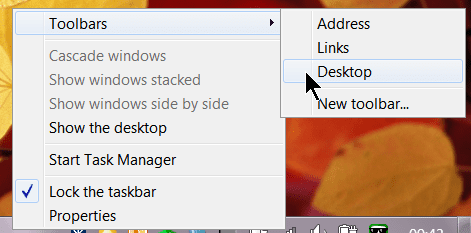
from where i can get desktop tool bar
Hi and welcome,
It should be at the bottom of your Windows desktop screen.
If you right mouse click on any desktop icon or program you should select PIN to TASKBAR.
See my picture.
Or are you talking about a desktop dock software?
Please clarify.
Thank you
Last edited:
My Computer
- Computer type
- PC/Desktop
- Computer Manufacturer/Model Number
- Self Built
- OS
- Windows 10 Pro
- CPU
- Intel i5
- Motherboard
- I have a fatherboard
- Memory
- I'm old and lost a few chips
- Graphics Card(s)
- Yup
- Sound Card
- Yup
- Monitor(s) Displays
- Samsung 32" UHD
- Screen Resolution
- 3840 x 2160
- Hard Drives
- Samsung 860 EVO drives
- PSU
- 450 Watt and some fans that blow
- Case
- Small tower
- Cooling
- Yes I am cool. lol
- Keyboard
- Who needs a keyboard?
- Mouse
- Logitech Laser G7 wireless
- Internet Speed
- Zippy fast UP and DOWN
- Antivirus
- I got a shot
- Browser
- The new Improved EDGE 2020
My Computer
- Computer Manufacturer/Model Number
- Toshiba Satellite S875D-S7239 laptop
- OS
- MS Windows 7 Ultimate SP1 64-bit
- CPU
- AMD A10-4600M
- Motherboard
- AMD Pumori (Socket FT1)
- Memory
- 6.00 GB Dual-Channel DDR3 @ 798MHz (11-11-12-28)
- Graphics Card(s)
- AMD Radeon HD 7660G
- Sound Card
- High Definition Audio Device
- Monitor(s) Displays
- Generic PnP Monitor (1600x900@60Hz)
- Screen Resolution
- 1600x900@60Hz
- Hard Drives
- SSD 119GB Corsair CSSD-V128GB2 ATA Device
- Keyboard
- Standard PS/2 Keyboard
- Mouse
- HP Wireless Optical Mobile Mouse Model FHA-3410
- Internet Speed
- What the local pub, local coffee shop offers.
- Other Info
- Optical Drive:MATSHITA BD-CMB UJ160B ATA Device
Also have an Asus ha1002xp netbook with Win 7 Ultimate installed.