
You are using an out of date browser. It may not display this or other websites correctly.
You should upgrade or use an alternative browser.
You should upgrade or use an alternative browser.
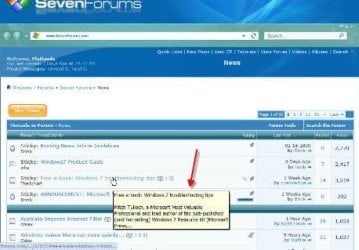
Tooltip balloons
- Thread starter Flatlands
- Start date


MyWin7
New member
pull your browser window a bit wider - you'll then see blue-ish side pads where you can place the mouse and scroll without tooltips popping up

My Computer
- Computer Manufacturer/Model Number
- self built
- OS
- Win7 x86
- CPU
- PhenomII x2 550 (unlocked 4 cores)
- Motherboard
- Gigabyte GA-MA770T-UD3P
- Memory
- 2x 2GB Kingston 1333
- Graphics Card(s)
- Gigabyte HD4850 1GB
- Sound Card
- onboard Realtek
- Monitor(s) Displays
- Samsung 2233
- Screen Resolution
- 1920x1080
- Hard Drives
- 2x WD 512GB green sata2
- PSU
- Corsair 620
- Case
- Armor MX+
- Cooling
- all stock
- Keyboard
- MS Digital Media 3000
- Mouse
- MS Mouse 3000
- Internet Speed
- adsl2+
MyWin7
New member
I believe it's an option in the forum software to disable it but I don't think it will happen 
My Computer
- Computer Manufacturer/Model Number
- self built
- OS
- Win7 x86
- CPU
- PhenomII x2 550 (unlocked 4 cores)
- Motherboard
- Gigabyte GA-MA770T-UD3P
- Memory
- 2x 2GB Kingston 1333
- Graphics Card(s)
- Gigabyte HD4850 1GB
- Sound Card
- onboard Realtek
- Monitor(s) Displays
- Samsung 2233
- Screen Resolution
- 1920x1080
- Hard Drives
- 2x WD 512GB green sata2
- PSU
- Corsair 620
- Case
- Armor MX+
- Cooling
- all stock
- Keyboard
- MS Digital Media 3000
- Mouse
- MS Mouse 3000
- Internet Speed
- adsl2+

Hello Flatlands,
Yes, these settings are controlled by each individual website. We have them turned on here to make it easy to quickly view a highlight pop-up of the original post in that thread without having to actually open the thread to see what it is about. This saves a lot of time and most likely will not be turned off. Sorry.
Yes, these settings are controlled by each individual website. We have them turned on here to make it easy to quickly view a highlight pop-up of the original post in that thread without having to actually open the thread to see what it is about. This saves a lot of time and most likely will not be turned off. Sorry.
My Computer
- Computer type
- PC/Desktop
- Computer Manufacturer/Model Number
- Self built custom
- OS
- 64-bit Windows 11 Pro for Workstations
- CPU
- Intel i7-8700K OC'd to 5 GHz
- Motherboard
- ASUS ROG Maximus XI Formula Z390
- Memory
- 64 GB (4x16GB) G.SKILL TridentZ RGB DDR4 3600 MHz
- Graphics Card(s)
- ASUS ROG-STRIX-GTX1080TI-O11G-GAMING
- Sound Card
- Integrated
- Monitor(s) Displays
- 2 x Samsung Odyssey G7 27"
- Screen Resolution
- 2560x1440
- Hard Drives
- 1TB Samsung 990 PRO M.2,
4TB Samsung 990 PRO PRO M.2,
TerraMaster F8 SSD Plus NAS
- PSU
- Seasonic Prime Titanium 850W
- Case
- Thermaltake Core P3
- Cooling
- Corsair Hydro H115i
- Keyboard
- Logitech wireless K800
- Mouse
- Logitech MX Master 4
- Internet Speed
- 2 Gb/s Download and 100 Mb/s Upload
- Antivirus
- Malwarebyte Anti-Malware Premium
- Browser
- Google Chrome
- Other Info
- Logitech Z625 speaker system,
Logitech BRIO 4K Pro webcam,
HP Color LaserJet Pro MFP M477fdn,
APC SMART-UPS RT 1000 XL - SURT1000XLI,
Galaxy S23 Plus phone
That the most obnoxious part of web design around, usually blocks what you are trying to see and forces a person to surf different or complete stop visiting a site. It is the same as having POPUP ads shoved in your face at every movement of the mouse
My Computer
- OS
- Windows XP & 7

Sometimes there are things added to a forum such as Seven Forums to help speed up the viewers ability to move from post to post. Either you can learn to use it or just place your pointer to one side until you find a post that you want to read. In a forum of this size all viewers and members must be taken into consideration, and not just one. 
My Computer
- Computer Manufacturer/Model Number
- HP Pavilion a4302f
- OS
- Win 7 Pro x64, VM Win XP, Win7 Pro Sandbox, Kubuntu 11
- CPU
- AMD Athlon(tm) II X4 640 @ 3.0 Gbz
- Memory
- 12GB 1066MHz DDR3 SDRAM - 2x4GB, 2x2GB
- Graphics Card(s)
- ATI Radeon HD 4350 HD Graphics/Audio with 512MB
- Sound Card
- Realtek High Definition Audio
- Monitor(s) Displays
- 1. Dell 23" SP2307, 2. Mitsublishi 40" HDTV, Hannspree 25"
- Screen Resolution
- 1. 2048x1152, 2. 1920-1080, 3. 1920x1200
- Hard Drives
- Int: 1 120 Gig SSD i
1 - 2.5" 500 USB External HDD
1 -1 Tb USB External HDD
- Case
- Mid Tower
- Cooling
- Standard Fans - 5 fans (very quiet)
- Keyboard
- Microsoft Wireless 2000
- Mouse
- Microsoft Wireless Mouse 5000
- Internet Speed
- 10 Mbit (realistically 500 Kbit - 1.2 Mbit)
- Other Info
- Speakers - Bose Desktop (Excellent Sound)
1 external CD|DVD\Blue-ray Recorders/Players (Sony)

I kinda like em.Then I'm a little off kilter most of the time anyways.
My Computer
- Computer Manufacturer/Model Number
- Self Built
- OS
- Windows 7 ultimate 64 bit / XP Home sp3
- CPU
- intel Core 2 Duo E8400 3.0ghz
- Motherboard
- Asus P5ND bios 1401
- Memory
- 8 gigs 1066 OCZ Fata1ty
- Graphics Card(s)
- EVGA GTX 580 Call of Duty Black Ops Edition
- Sound Card
- Creative Soundblaster Audigy 2zs
- Monitor(s) Displays
- Asus 24in LCD's 2MS X2
- Screen Resolution
- 1920x1080p @60Hz
- Hard Drives
- WD Caviar 500 Black/ WD Caviar 200 Blue
- PSU
- OCZ 700W GameXtreme
- Case
- NZXT Apollo
- Cooling
- Corsair H50 CPU/120mm x3 /60mm x2 /Corsair Dominator Ram
- Keyboard
- Logitech Bluetooth Wireless MX5000
- Mouse
- Logitech Bluetooth Wireless MX1000
- Internet Speed
- Download 19.83 Upload 0.97
- Other Info
- Logitech Z2300 Speakers/ Bose Noise Cancelling Headphones/Avermedia PCI-e Hybrid TV Bravo/Epson NX415 all in one/ 4 Port Powered USB Hub/ LG 10x Bluray Burner /TSST Corp DVDRW External
Some time ago I disabled such website nonsense using Firefox+Greasemonkey and a script for offending sites. Can't remember the details sadly, but at least you know it's possible.
Otherwise, if you can track the offending servers to a not too long list then adding something like this to your hosts file may be enough..............
[REMOVED BY ADMIN]
Otherwise, if you can track the offending servers to a not too long list then adding something like this to your hosts file may be enough..............
[REMOVED BY ADMIN]
My Computer
- OS
- Windows 7
Found a way, dumped Chrome and use less IE 8 for SeaMonkey 2.0.1. There just untick use tooltips. Opera works also, but with it's page rendering problems i find I can't hardly stand it any longer
My Computer
- OS
- Windows XP & 7