Darklighter
New member
- Local time
- 12:01 PM
- Messages
- 3
Howdy...
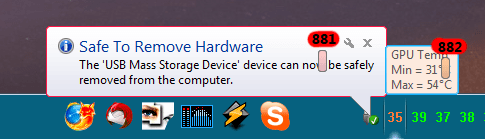
Even after several attempts of changing the colors in advanced display properties the default light grey font/white background remains for the tooltips... anyone know why? or how to change it?
Even after several attempts of changing the colors in advanced display properties the default light grey font/white background remains for the tooltips... anyone know why? or how to change it?
My Computer
- Computer Manufacturer/Model Number
- Darklighter Enterprises
- OS
- Windows 7 64bit
- CPU
- Athlon64 X2 6400+
- Motherboard
- ASUS M2N32-SLI Deluxe Wi-Fi
- Memory
- 4GB Crucial Ballistix Tracer DDR2800 4-4-4-12
- Graphics Card(s)
- XFX GTX260 XXX Edition
- Sound Card
- Soundblaster X-Fi Xtreme Music
- Monitor(s) Displays
- LG WA226 22" LCD
- Screen Resolution
- 1680x1050
- Hard Drives
- 2 x WD Caviar Black 1TB Dual Proc 4.2ms
- PSU
- Silverstone Decathalon 850w
- Case
- Silverstone TJ05
- Cooling
- CPU = Xigmatek 1283, Case = 2 x 120mm/3 x 80mm
- Keyboard
- Logitech G15
- Mouse
- Logitech G5v2
- Internet Speed
- Shaw Ultra High Speed
- Other Info
- Listed system is primary desktop, also have a MSI GX660-053US Laptop w/Win7x64.