Top 770 GPU ?

VXER

█║▌│║▌
Member
VIP
Local time
8:35 AM
Messages
158
Yeah i found out a way to Mod my Alienware's case in order to upgrade the PSU along with the GPU,now i need some info on what should i go with for a 770 is it the Gigabyte or EVGA (not interested in other than these two) ? and whats the difference with the following : Dual Classified ? Dual Classified FTW ? Dual SC ? Superclocked ? W/ ? ACX Cooler ? and whats the best to go with with those specifications ? (whatever they mean)
thanks.
http://www.evga.com/Products/Product.aspx?pn=04G-P4-3778-KR
 

My Computer

Computer type
PC/Desktop
Computer Manufacturer/Model Number
Custom Build
OS
Windows 7 Home Premium
CPU
Intel Core i7 4790
Motherboard
Asus MAXIMUS VII RANGER z97
Memory
Kingston HyperX Beast 16GB 2400Mhz
Graphics Card(s)
Gigabyte 970 4GB G1 GAMING
Monitor(s) Displays
LG 23 Cinema 3D 1080p
Screen Resolution
1920x1080 60Hz
Hard Drives
Samsung 840 EVO 250GB SSD / WD Blue 500GB HDD / Seagate 1TB HDD USB
PSU
EVGA SuperNova 850w G2 Gold
Case
Corsair 300R Custom
Cooling
Corsair Hydro H80i
Keyboard
Alienware TactX
Mouse
Alienware TactX
Antivirus
Bitdefender
Browser
Mozilla FireFox
Other Info
Razer Vespula
Hi bud, well I have the Dual Classified 780, the dual bit means it has dual bios so if you like flashing custom bios then if it goes wrong you can switch to the other one and fix it. The first bios is called "Normal" and the second is called "LN2", I don't know why they called it LN2 as I don't think many people use liquid nitrogen on them lol but it is useful to have 2 bios.

As far as the card itself, the Classified has much tougher parts on it and can cope very well with overclocking and extra voltage. I used to do a fair bit of benchmarking on mine and it would run fine at 1333MHz on air.

The ACX Cooling on them is pretty darn good, and keeps temps down nicely.

It's a beast of a card and I really think the Classified is an awesome card. To the point that the next card I get will hopefully be another Classified if I can afford it.

I expect the 770 is the same. I recon if you want the best go for the Dual Classified if you can, you won't be disappointed! EVGA also have excellent support and warranty.

Hope this helps.
 

My Computer

OS
Windows 7 Professional 64 bit
As per your last thread, when I was looking at PSUs for your system it was advised in a few places that the motherboard could only handle up to a 350W PSU. How true that is I don't know, but make sure you've got all the info before you go ahead. If that is the case then any 770 won't run on that PSU.
 

My Computer

Computer type
PC/Desktop
Computer Manufacturer/Model Number
Custom Build
OS
W7 Pro x64 SP1 | W10 Pro IP x64 | W8.1 Pro x64 VM | Linux Mint VM
CPU
i7-4790k @ 4GHz (4.4GHz Boost)
Motherboard
ASUS Sabertooth Z87 (BIOS Rev 2004)
Memory
16GB DDR3 Kingston HyperX Fury @ 1600MHz CL 9-9-9-27
Graphics Card(s)
EVGA GTX 980 Classified
Sound Card
Realtek Onboard
Monitor(s) Displays
Samsung S27D390
Screen Resolution
1920 x 1080
Hard Drives
240GB Intel 520 Series SSD |
Samsung 850 EVO 120GB SSD |
2TB WD Caviar Black |
2TB WD Caviar Green
PSU
Corsair HX850-80 Gold Modular
Case
Cooler Master Silencio 650
Cooling
Corsair H80i w/2 x Corsair SP120 | 2 x 120mm Noctua NF-S12B
Keyboard
Microsoft Sidewinder X4
Mouse
Gigabyte M6900 optical
Internet Speed
152mb
Antivirus
F-Secure
Browser
Firefox 38.0
Other Info
Backup Rig: Win 7 Pro 64-bit | AMD A10-5800k | ASUS F2A85-V Pro | 8GB Samsung DDR3 @1600MHz | 120GB Toshiba SDD | 2TB Seagate HDD | Cooler Master Silencio 550
@paulpicks21: Thanks for the info,ill be getting this one : EVGA GEFORCE GTX 770 SC ACX 2GB PCI-E if you or anyone else can please tell me if this has a cooler ? cuz it only says "ACX" so is that a cooler or ? and what is meant by "SC"? "PCI-E"?

@Boozad :
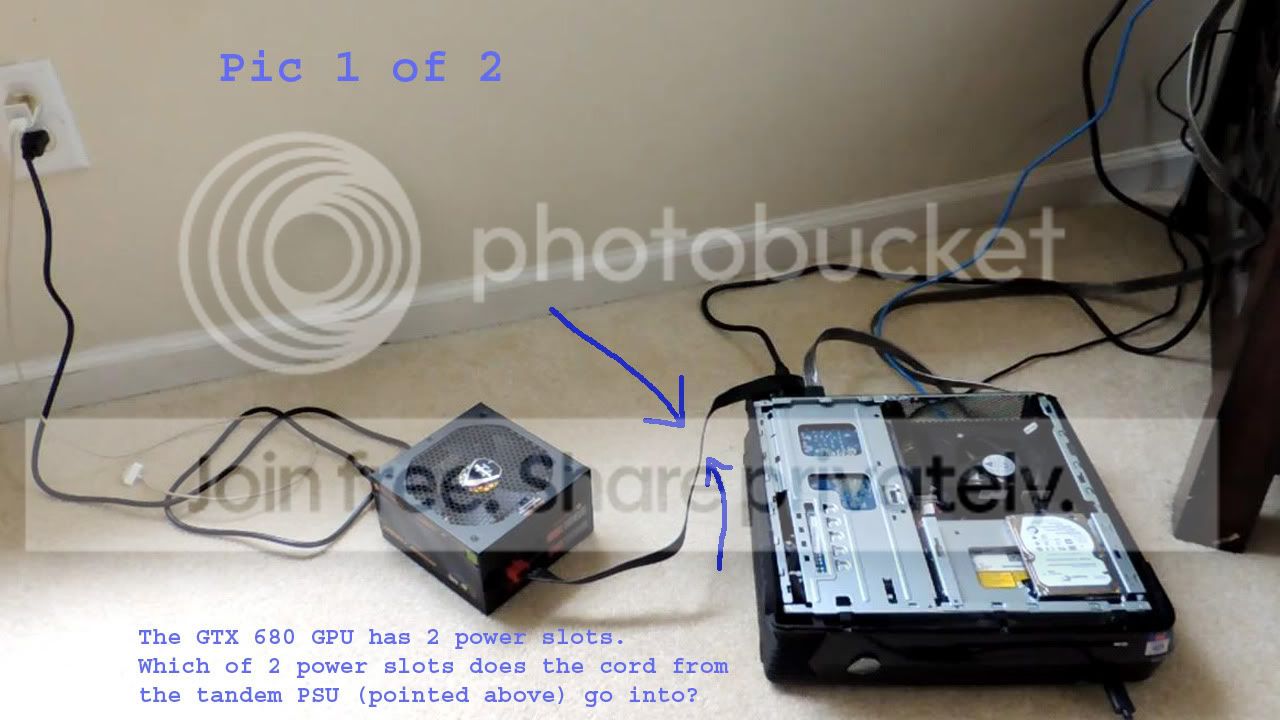
The only PSU it has which is an adapter of 330W max but what will ill be doing is making a hole in the back of the case in order to get the New PSU cable through to the GPU and will remove the old power cable that the GPU takes power from the motherboard,so it will be a direct link from the added(New) PSU (Which will be outside of the case) to the GPU.
 

My Computer

Computer type
PC/Desktop
Computer Manufacturer/Model Number
Custom Build
OS
Windows 7 Home Premium
CPU
Intel Core i7 4790
Motherboard
Asus MAXIMUS VII RANGER z97
Memory
Kingston HyperX Beast 16GB 2400Mhz
Graphics Card(s)
Gigabyte 970 4GB G1 GAMING
Monitor(s) Displays
LG 23 Cinema 3D 1080p
Screen Resolution
1920x1080 60Hz
Hard Drives
Samsung 840 EVO 250GB SSD / WD Blue 500GB HDD / Seagate 1TB HDD USB
PSU
EVGA SuperNova 850w G2 Gold
Case
Corsair 300R Custom
Cooling
Corsair Hydro H80i
Keyboard
Alienware TactX
Mouse
Alienware TactX
Antivirus
Bitdefender
Browser
Mozilla FireFox
Other Info
Razer Vespula
I am pretty certain ACX is the cooling system by evga google it and it should show you.

The SC is for super clock which means the card is factory overclocked. And PCIe is the type of card it is, it will need a PCIe slot on your motherboard to fit. Usually a PCIe X 16 slot which nearly all motherboards have at least 1 of.
 

My Computer

OS
Windows 7 Professional 64 bit
This is what i have in the alienware, it links the GPU to the Motherboard
mHohWbAa-ro6qLXcI612pZw.jpg

Will the 770 fit in this or ? atm i have the gtx 660 on it....
 

My Computer

Computer type
PC/Desktop
Computer Manufacturer/Model Number
Custom Build
OS
Windows 7 Home Premium
CPU
Intel Core i7 4790
Motherboard
Asus MAXIMUS VII RANGER z97
Memory
Kingston HyperX Beast 16GB 2400Mhz
Graphics Card(s)
Gigabyte 970 4GB G1 GAMING
Monitor(s) Displays
LG 23 Cinema 3D 1080p
Screen Resolution
1920x1080 60Hz
Hard Drives
Samsung 840 EVO 250GB SSD / WD Blue 500GB HDD / Seagate 1TB HDD USB
PSU
EVGA SuperNova 850w G2 Gold
Case
Corsair 300R Custom
Cooling
Corsair Hydro H80i
Keyboard
Alienware TactX
Mouse
Alienware TactX
Antivirus
Bitdefender
Browser
Mozilla FireFox
Other Info
Razer Vespula
@Boozad :
The only PSU it has which is an adapter of 330W max but what will ill be doing is making a hole in the back of the case in order to get the New PSU cable through to the GPU and will remove the old power cable that the GPU takes power from the motherboard,so it will be a direct link from the added(New) PSU (Which will be outside of the case) to the GPU.

I wasn't talking about it pysically fitting, more about the system handling the power. I've found numerous posts where people have said the system can't handle more than 330W.

Capture.PNG

Plus I believe you'd have to modify connectors on the motherboard.
 

My Computer

Computer type
PC/Desktop
Computer Manufacturer/Model Number
Custom Build
OS
W7 Pro x64 SP1 | W10 Pro IP x64 | W8.1 Pro x64 VM | Linux Mint VM
CPU
i7-4790k @ 4GHz (4.4GHz Boost)
Motherboard
ASUS Sabertooth Z87 (BIOS Rev 2004)
Memory
16GB DDR3 Kingston HyperX Fury @ 1600MHz CL 9-9-9-27
Graphics Card(s)
EVGA GTX 980 Classified
Sound Card
Realtek Onboard
Monitor(s) Displays
Samsung S27D390
Screen Resolution
1920 x 1080
Hard Drives
240GB Intel 520 Series SSD |
Samsung 850 EVO 120GB SSD |
2TB WD Caviar Black |
2TB WD Caviar Green
PSU
Corsair HX850-80 Gold Modular
Case
Cooler Master Silencio 650
Cooling
Corsair H80i w/2 x Corsair SP120 | 2 x 120mm Noctua NF-S12B
Keyboard
Microsoft Sidewinder X4
Mouse
Gigabyte M6900 optical
Internet Speed
152mb
Antivirus
F-Secure
Browser
Firefox 38.0
Other Info
Backup Rig: Win 7 Pro 64-bit | AMD A10-5800k | ASUS F2A85-V Pro | 8GB Samsung DDR3 @1600MHz | 120GB Toshiba SDD | 2TB Seagate HDD | Cooler Master Silencio 550
How is this relevant with the system ? the X51 has an ac adapter which can handle max 330w as what MARIA A said cuz that's how dell made it the PSU cant even fit inside the case cuz of how small they made it so ofc they will say that it cant handle more than 330w cuz it wont unless you mod it as shown in the ss below, cant see anything to do with the system unless you are saying that the system has a power limit which makes no sense to me cuz the GPU will be having its own power line.
this method has already been done and it works perfect.


ignore the text in the picture,its just some dude asking how its done.
x51withgtx6801a.jpg
 

My Computer

Computer type
PC/Desktop
Computer Manufacturer/Model Number
Custom Build
OS
Windows 7 Home Premium
CPU
Intel Core i7 4790
Motherboard
Asus MAXIMUS VII RANGER z97
Memory
Kingston HyperX Beast 16GB 2400Mhz
Graphics Card(s)
Gigabyte 970 4GB G1 GAMING
Monitor(s) Displays
LG 23 Cinema 3D 1080p
Screen Resolution
1920x1080 60Hz
Hard Drives
Samsung 840 EVO 250GB SSD / WD Blue 500GB HDD / Seagate 1TB HDD USB
PSU
EVGA SuperNova 850w G2 Gold
Case
Corsair 300R Custom
Cooling
Corsair Hydro H80i
Keyboard
Alienware TactX
Mouse
Alienware TactX
Antivirus
Bitdefender
Browser
Mozilla FireFox
Other Info
Razer Vespula
I have no idea about this system thing. I can't answer that. Hopefully Boozad can share some more light on it.

But regarding your post #6 yes, if a GTX 660 is currently in it then a 770 will fit just fine.
 

My Computer

OS
Windows 7 Professional 64 bit
I've no idea really Paul, I've just read lots of info where people have said 'the system won't support more than 330W'. I've really no idea what that means to be honest, can motherboards be capped to what power supply they're safe with?
 

My Computer

Computer type
PC/Desktop
Computer Manufacturer/Model Number
Custom Build
OS
W7 Pro x64 SP1 | W10 Pro IP x64 | W8.1 Pro x64 VM | Linux Mint VM
CPU
i7-4790k @ 4GHz (4.4GHz Boost)
Motherboard
ASUS Sabertooth Z87 (BIOS Rev 2004)
Memory
16GB DDR3 Kingston HyperX Fury @ 1600MHz CL 9-9-9-27
Graphics Card(s)
EVGA GTX 980 Classified
Sound Card
Realtek Onboard
Monitor(s) Displays
Samsung S27D390
Screen Resolution
1920 x 1080
Hard Drives
240GB Intel 520 Series SSD |
Samsung 850 EVO 120GB SSD |
2TB WD Caviar Black |
2TB WD Caviar Green
PSU
Corsair HX850-80 Gold Modular
Case
Cooler Master Silencio 650
Cooling
Corsair H80i w/2 x Corsair SP120 | 2 x 120mm Noctua NF-S12B
Keyboard
Microsoft Sidewinder X4
Mouse
Gigabyte M6900 optical
Internet Speed
152mb
Antivirus
F-Secure
Browser
Firefox 38.0
Other Info
Backup Rig: Win 7 Pro 64-bit | AMD A10-5800k | ASUS F2A85-V Pro | 8GB Samsung DDR3 @1600MHz | 120GB Toshiba SDD | 2TB Seagate HDD | Cooler Master Silencio 550
Great,@Boozad that's true it only supports 330w on its original state but with this method you can shove a Titan z with a 1600w psu
and its not the system,the system has nothing to do with it ..they mean that the whole x51 system as in a whole PC cant handle it cuz it uses a AC adapter of 330w max(DEll though its better not to make anything higher than 330w for it, a so called "GAMING PC") ,but with this case mod that problem is overriding and any GPU/PSU can be used with it.
Ill be sure to open a thread about it here once i'm done with it.
 

My Computer

Computer type
PC/Desktop
Computer Manufacturer/Model Number
Custom Build
OS
Windows 7 Home Premium
CPU
Intel Core i7 4790
Motherboard
Asus MAXIMUS VII RANGER z97
Memory
Kingston HyperX Beast 16GB 2400Mhz
Graphics Card(s)
Gigabyte 970 4GB G1 GAMING
Monitor(s) Displays
LG 23 Cinema 3D 1080p
Screen Resolution
1920x1080 60Hz
Hard Drives
Samsung 840 EVO 250GB SSD / WD Blue 500GB HDD / Seagate 1TB HDD USB
PSU
EVGA SuperNova 850w G2 Gold
Case
Corsair 300R Custom
Cooling
Corsair Hydro H80i
Keyboard
Alienware TactX
Mouse
Alienware TactX
Antivirus
Bitdefender
Browser
Mozilla FireFox
Other Info
Razer Vespula
id just buy a new case.. if your investing in a new psu and a new gpu a little bit more money will get you a new case.. without having to mod anything. Its also the perfect time to do cable management as youre getting a new psu..
cant see things being cooled very well, and or vastly safe with half a psu sticking out the back..
just my 2 cents..
 

My Computer

Computer type
PC/Desktop
Computer Manufacturer/Model Number
Built by badgers!!!
OS
Windows 7 Ultimate x64, & Mac OS X 10.9.2
CPU
Intel Core i5 2500k
Motherboard
Asus P8z68 LE
Memory
Corsair Vengence 8gb 1866mhz
Graphics Card(s)
Nvidia GTX 770 OC
Monitor(s) Displays
2x ASUS LED 22" IPS
Screen Resolution
3840x1080
Hard Drives
240GB Crucial M500 SSD
120gb Corsair Force 3 SSD
1TB Western Digital
PSU
Corsair HX650w Modular
Case
Corsair Air 540
Cooling
Corsair H60 Push/Pull
Keyboard
Corsair K70/ Logitech G27 wheel
Mouse
Saitek R.A.T 9
Internet Speed
Too slow!
Other Info
AMD fusion E350N Home server-Windows Home Server 2011 (also made by badgers!)
2011 Macbook 2.4ghz Core2Duo, 4gb ddr3, 120gb Ocz Vertex SSD
I've no idea really Paul, I've just read lots of info where people have said 'the system won't support more than 330W'. I've really no idea what that means to be honest, can motherboards be capped to what power supply they're safe with?

I don't know what they mean by "system" mate, I am guessing as a whole but I am not aware of a motherboard that would limit what power of GPU you put in provided the PSU was adequate.
 

My Computer

OS
Windows 7 Professional 64 bit
id just buy a new case.. if your investing in a new psu and a new gpu a little bit more money will get you a new case.. without having to mod anything. Its also the perfect time to do cable management as youre getting a new psu..
cant see things being cooled very well, and or vastly safe with half a psu sticking out the back..
just my 2 cents..

Good advice, even a relatively cheap case would do the job much better than you have right now.
 

My Computer

OS
Windows 7 Professional 64 bit
I've no idea really Paul, I've just read lots of info where people have said 'the system won't support more than 330W'. I've really no idea what that means to be honest, can motherboards be capped to what power supply they're safe with?

I don't know what they mean by "system" mate, I am guessing as a whole but I am not aware of a motherboard that would limit what power of GPU you put in provided the PSU was adequate.

Nor me mate, I about gave up on reading about it to be honest as it wasn't making much sense. I understood the physical constraints of the case and knew a rough-as-arseholes modification would allow the PSU to 'fit', but I couldn't find anything about anyone doing it successfully either and just kept seeing that message.

I'd go with Badger's advice though and buy a new case.
 

My Computer

Computer type
PC/Desktop
Computer Manufacturer/Model Number
Custom Build
OS
W7 Pro x64 SP1 | W10 Pro IP x64 | W8.1 Pro x64 VM | Linux Mint VM
CPU
i7-4790k @ 4GHz (4.4GHz Boost)
Motherboard
ASUS Sabertooth Z87 (BIOS Rev 2004)
Memory
16GB DDR3 Kingston HyperX Fury @ 1600MHz CL 9-9-9-27
Graphics Card(s)
EVGA GTX 980 Classified
Sound Card
Realtek Onboard
Monitor(s) Displays
Samsung S27D390
Screen Resolution
1920 x 1080
Hard Drives
240GB Intel 520 Series SSD |
Samsung 850 EVO 120GB SSD |
2TB WD Caviar Black |
2TB WD Caviar Green
PSU
Corsair HX850-80 Gold Modular
Case
Cooler Master Silencio 650
Cooling
Corsair H80i w/2 x Corsair SP120 | 2 x 120mm Noctua NF-S12B
Keyboard
Microsoft Sidewinder X4
Mouse
Gigabyte M6900 optical
Internet Speed
152mb
Antivirus
F-Secure
Browser
Firefox 38.0
Other Info
Backup Rig: Win 7 Pro 64-bit | AMD A10-5800k | ASUS F2A85-V Pro | 8GB Samsung DDR3 @1600MHz | 120GB Toshiba SDD | 2TB Seagate HDD | Cooler Master Silencio 550
I have no idea why a motherboard would care if one uses a power supply with lots of watts.
The power supply will only give the motherboard what the motherboard ask for.
If the needed upgrade in power supply doesn't fit in the case; get another case. It's that simple.
 

My Computer

Computer type
PC/Desktop
Computer Manufacturer/Model Number
Home made Desktop
OS
Windows 10 Pro. 64/ version 1709 Windows 7 Pro/64
CPU
Intel i7-6800K @ 4.3
Motherboard
ASUS X-99 Deluxe II
Memory
Corsair Platinum 16 gig @2400
Graphics Card(s)
EVGA GTX 1070 OC
Monitor(s) Displays
Asus 27" LED LCD/VE278Q
Screen Resolution
1920-1080 or 1280-720 HDMI
Hard Drives
INTEL SSD 730-240 Gb Sata 3.0/
PSU
EVGA Platium 1200W
Case
Phanteks Luxe Tempered Glass 8 fans/ one radiator
Cooling
XSPC/ Water Cooled CPU
Keyboard
Das 4 Professional
Mouse
Logitech M705/MX Anywhere 2-S
Internet Speed
100 mbits
Antivirus
Microsoft Security Essentials/ Malwarebytes Premium 3.0/ SAS
Browser
I.E. 11 default/Firefox/ ISP Time Warner Cable/Spectrum
Other Info
LG BluRay Burner/
Sound system-KLipsch-THX/
Icy Dock ssd Hot Swap bays.

My Computer

Computer type
PC/Desktop
Computer Manufacturer/Model Number
Skylake Special #666
OS
Windows 10 Pro x64
CPU
Intel Core i7 6700K
Motherboard
Asus Sabertooth Z170 Mark 1
Memory
GSkill TridentZ RGB 16GB 3600 16-16-16-36
Graphics Card(s)
EVGA GTX 980 Ti SC x2
Sound Card
Realtek High Definition
Monitor(s) Displays
AOC G2460PG
Screen Resolution
1920 x 1080 144Hz
Hard Drives
Samsung 860 Pro 256GB, Seagate Barracuda 4TB x2
PSU
EVGA 1000 P2, EVGA White Custom Braided Cables
Case
Corsair Vengeance C70 Gunmetal Black
Cooling
Corsair H100i v2, Corsair ML120 x2, Thermal Grizzly Kryonaut
Keyboard
Logitech G910 Orion Spectrum
Mouse
Logitech G700s
Internet Speed
Verizon Fios Quantum Gateway 75/75
Antivirus
Windows Defender, Malwarebytes Free 3.8.3
Browser
Chrome
Other Info
Corsair SP120 x4, LG Blu-ray Drive, Durabrand HT-395 100 Watt Dolby Digital Amp, Corsair H2100 Wireless 7.1 Headset
I am pretty certain ACX is the cooling system by evga google it and it should show you.

Yep. The ACX is EVGA's own aftermarket 2 fan, dual slot cooler. Pretty quiet and effective by all accounts. (Wish I'd waited an extra month for them to come into stock when I got my 780s... :p )

I don't know what they mean by "system" mate, I am guessing as a whole but I am not aware of a motherboard that would limit what power of GPU you put in provided the PSU was adequate.

You got it. By system, I'm pretty sure the OP is referring to the fact that the current total system draw capability is 330W because of the low power Dell PSU. Nothing to do with the motherboard at all.

I understood the physical constraints of the case and knew a rough-as-arseholes modification would allow the PSU to 'fit',

:roflmao:

That is a much better description that "ghetto mod".


OP, I also echo the sentiments about getting a new case rather than spending time modding the Dell case. Plenty of cheap mid/full tower cases out there.

However double check your current motherboard is either m-ATX or ATX form factor and not Dells BTX. If it's a BTX it will not fit an ATX case because the motherboard holes are different.
 

My Computer

Computer type
PC/Desktop
Computer Manufacturer/Model Number
Systems by SmartEyeball
OS
8 Pro x64
CPU
i7 3770K 4.6GHz
Motherboard
ASUS P8Z77 WS
Memory
16GB G.Skill Trident X 2666mhz
Graphics Card(s)
x2 EVGA 780 Ti Superclocked SLI
Sound Card
SB X-FI Surround 5.1 PRO USB / ATH-AD900 Headphones
Monitor(s) Displays
x3 Dell U2410 / 58" Samsung
Screen Resolution
5760*1200/ 1920*1200
Hard Drives
2x Intel 520 240GB (RAID 0) * 2x WD Caviar Blacks 2TB (RAID 0) * 2TB WD Caviar Black * Sony Optirac DVD
PSU
Silverstone Strider Evolution 1200W
Case
Thermaltake Level 10 GT Snow Edition
Cooling
Noctua NH-D14
Keyboard
Topre Realforce // Ducky Shine MX Black // Filco Ninja TKL
Mouse
Thermaltake Theron (Highly Recommended) + Razer Imperator
Antivirus
MSE
Browser
IE, FF, WaterFox
Other Info
GT Extreme V2 Sim Racing Cockpit + 40" LCD and K/B Mouse stand ▼
Fanatec CSR Elite Wheel + Clubsport V1 Pedals + CSR shifter/7G-H ▼Saitek X52 Pro ▼ TrackIR 5 Pro
Buttkicker v2 Seat Rumbler with Dedicated 5.1 and Sub Woofer attached to frame ▼
=
Bloody Big Grin
I wouldn`t waste a dime upgrading a Dell computer. :banghead:

Other then adding memory or an ssd, and the video card you could always use on a future build.
 

My Computer

Computer type
PC/Desktop
Computer Manufacturer/Model Number
Skylake Special #666
OS
Windows 10 Pro x64
CPU
Intel Core i7 6700K
Motherboard
Asus Sabertooth Z170 Mark 1
Memory
GSkill TridentZ RGB 16GB 3600 16-16-16-36
Graphics Card(s)
EVGA GTX 980 Ti SC x2
Sound Card
Realtek High Definition
Monitor(s) Displays
AOC G2460PG
Screen Resolution
1920 x 1080 144Hz
Hard Drives
Samsung 860 Pro 256GB, Seagate Barracuda 4TB x2
PSU
EVGA 1000 P2, EVGA White Custom Braided Cables
Case
Corsair Vengeance C70 Gunmetal Black
Cooling
Corsair H100i v2, Corsair ML120 x2, Thermal Grizzly Kryonaut
Keyboard
Logitech G910 Orion Spectrum
Mouse
Logitech G700s
Internet Speed
Verizon Fios Quantum Gateway 75/75
Antivirus
Windows Defender, Malwarebytes Free 3.8.3
Browser
Chrome
Other Info
Corsair SP120 x4, LG Blu-ray Drive, Durabrand HT-395 100 Watt Dolby Digital Amp, Corsair H2100 Wireless 7.1 Headset
Which ever graphics card you get, it needs to be as close to reference as possible, at least physical size and it must use a blower style cooler. An aftermarket shroud and cooler will not work in this small form factor.

So do not get the EVGA ACX model.


And for fyi, the Alienware x51 is a mini-ITX system, standard mini-ITX can easily swap the board if you wanted.
 

My Computer

Computer type
PC/Desktop
Computer Manufacturer/Model Number
Alienware Aurora ALX R4
OS
Windows 10 Pro (x64)
CPU
Intel Core i7-3930K (3.2GHz - 4.5GHz)
Motherboard
Alienware Aurora-R4 x79
Memory
4x Samsung 4GB PC3-12800 DDR3 (16GB 1600MHz)
Graphics Card(s)
Nvidia Geforce GTX 690
Sound Card
SteelSeries Siberia Elite
Monitor(s) Displays
Dell UltraSharp U3011
Screen Resolution
2560x1600
Hard Drives
Samsung 850 Pro 256 GB, Seagate 1TB Desktop Hybrid HDD, 2x Western Digital 4TB Green HDD
PSU
875W Some Dell PSU <.<
Case
Alienware Aurora ALX
Cooling
Custom Liquid Cooling (EK CPU & GPU blocks) dual EK 480RAD
Keyboard
Logitech G710+ Mechanical
Mouse
Logitech G700s
Internet Speed
Verizon Fios (50 mbps average)
Other Info
Server: Intel NUC D54250WYK: i5-4250U, 16GB, 256 GB mSATA, Windows Server 2012 R2
Back
Top