Toshiba C655 USB

castler

New member
Local time
10:27 PM
Messages
6
My usb ports went out a couple weeks ago and am lost at how else to use USB devices without those ports.

Any other solutions to this? I have a ethernet port but this pc is rather basic.

Toshiba c655 s5512

Also I've uninstalled and reinstalled drivers under DM, so don't ask about that.
 

My Computer

Computer type
Laptop
Computer Manufacturer/Model Number
Toshiba
OS
Win7 HP 64bit
CPU
2.2Ghz
Memory
4GB
Graphics Card(s)
Intel HD Graphics
Hard Drives
320GB
If you connect some device, do you see if it is receiving power? (mice light up, HDDs start vibrating and whirring, or some lights flash)

Can you check the manual that there isn't some key or key combination that disables/enables the ports?

Can you install the latest chipset driver from here (I know it says it is not USB drivers, but the chipset is the component actually controlling USB ports anyway)?
 

My Computer

Computer type
PC/Desktop
Computer Manufacturer/Model Number
custom built
OS
Win 7 Pro 64-bit 7601
CPU
AMD Phenom 9650 QuadCore, revision DR-B3
Motherboard
ASUS M4A78
Memory
5 GB yes I run 2x 2GB and 1x 1GB, different brand, spank me.
Graphics Card(s)
NVIDIA GeForce 9800 GT 512 Mb, unknown manufacturer.
Sound Card
Crappy Realtek Integrated Audio
Monitor(s) Displays
Fujitsu Siemens P19-3P
Screen Resolution
1280 x 1024 x 32 bits @ 60 Hz Oh yeah, 4:3 rocks!
Hard Drives
(1) MAXTOR S TM3320613AS SATA Disk Device (2) STM35004 18AS SATA Disk Device (3) TOSHIBA USB 2.5"-HDD
PSU
whatever, around 450w
Case
Scavenged from old company PC, 10+ years old
Cooling
CPU fan, GPU fan, case fan, nothing fancy
Keyboard
Microsoft, PS/2, white.
Mouse
Optical, logitec.
Internet Speed
effective max speeds: 70-ish kB/s down 30-ish kB/s up
Antivirus
Avira, free edition.
Browser
Firefox with FXChrome to make it look like Google Chrome :P
Other Info
Was discarded by previous owner due to "horrible performance".
Was running Win Xp from a IDE drive. Yeah. Was a pain.
SATA II drive and Win7 and it zips away! Yay!
If ALL your USB connections are indeed DEAD, you need the laptop repaired.

All you need is one for a USB hub like this one:

TOSHIBA Model PA3627U-1ETC Notebook accessory - Newegg.com

Item sold at Walmart or Target or....

No such thing as Ethernet to USB A Female connecter to my knowledge.
 

My Computer

Computer type
PC/Desktop
Computer Manufacturer/Model Number
Self Built Custom
OS
Windows 7 Ultimate Retail Box (64-bit installed) + Service Pack 1
CPU
AMD FX-8350 CPU v1.15 (or 1.0F) BIOS was required!
Motherboard
MSI 890FXA-GD70
Memory
8G CAS-7 G-Skill DDR3 @1333 (2 fours) [mobo nonOC max rec'd]
Graphics Card(s)
Radeon HD 7950 [3 gigs of GDDR5] MSI Twin Frozr model
Sound Card
Realtek High Definition Audio (onboard mobo, ALC-889 chip)
Monitor(s) Displays
2 WS LED Monitors: One LG One Viewsonic
Screen Resolution
1920 by 1080
Hard Drives
SSD for OS: Samsung 840 Pro
SSD for VM and utilities: Adata SX900
7200 RPM SATA HDs for the rest: Hitachi and Seagate
PSU
Corsair TX850 - 850W max, in service since August 2010.
Case
Thermaltake Armor A90
Cooling
Thermaltake Spin Q CPU Cooler, in service since August 2010
Keyboard
Logitech G11
Mouse
Logitech M310 Wireless
Internet Speed
100 Megabit broadband supposedly upgraded from 50 (Cable)
Antivirus
Bitdefender Internet Security 2014 suite
Browser
Pale Moon 64-bit main, also IceDragon, Opera, and Maxthon.
Other Info
CompTIA A+ certified (220-800 series) in July 2013.
Mate have you tried the official toshiba site for the machine for drivers? I ahve been using Toshibas for soem time and find the Windoes updating lacking.

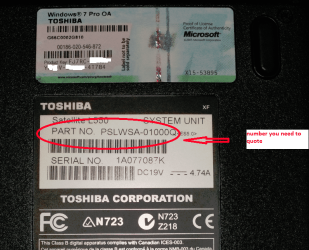
If you go looking for the model ir will need the PART No quoted under the machine just the model will not cut it. The PART No. is all about where it was made and where it is bound for:)

See my pic of my main Toshy for what I mean.

If yo intend taking it apart go here Taking apart Toshiba laptops and notebooks. DIY guides. Disassembly instructions. read thoroughly the front guide before going to the disassembly guides it is important to know about the small locking tabs on the ribbon cables especially when replacing them - believe me!!
 

Attachments

  • TOSHX.PNG
    TOSHX.PNG
    219.4 KB · Views: 0

My Computer

Computer type
PC/Desktop
Computer Manufacturer/Model Number
Own build (new) Desk1 / Asus ROG Win 7 / Desk2 1st build
OS
Desk1 7 Home Prem / Desk2 10 Pro / Main lap Asus ROG 10 Pro 2 laptop Toshiba 7 Pro Asus P2520 7 & 10
CPU
Desk1 i5 3750K / Laptop i7 GTX 860M / Desk2 i5 2500
Motherboard
Desk1 Asus P877-V / Desk2 Gigabyte H67 UD3H / Laptop ?
Memory
Desk1 8GB (1866) / Desk2 16GB (1333) / Laptop 8Gb DDR3
Graphics Card(s)
Desk 1& 2NVidia GTX 650 & Laptops on board Intel
Sound Card
Desk 1 & 2 -XONAR DG Realtek High Def audio Laptop
Monitor(s) Displays
Desk 1 Benq HD 2450 / Desk2 Philips 24" / Laptop 17.5"
Screen Resolution
1920x1080 D1 & D2 & Laptop 1
Hard Drives
Desk1 Samsung 120GB 830 SSD
Asus ROG 256GB 850 Pro SSD
Desk2 Samsung 840 256 SSD
Toshiba 120GB EVO
PSU
Desk 1 Corsair HX 1050/ Laptop ? / Desk 2 Corsair HX 650
Case
Desk 1 Cooler HAF XM ? Toshiba laptop / Desk2 Coolermaster
Cooling
Fans on all Desk1 -2 Desk2 - all Coolermasters 5 Laptop ?
Keyboard
Desk 1 MS Sidewinder X6 Desk 2 MS Sidewinder X 4
Mouse
Desk 1&2 - Gigabyte MS 900 gamer - laptop - Logitec wireless
Internet Speed
ADSL2+
Other Info
One other Desktop (tester) and spare Toshba laptop both with SSD's
Running Kaspersky 2016 ISS on all machines config'd identically
Logitec audio stereo systems on each machine (x3)
Canon MG5250MFC
Router/modem TP-Link running WPA2SK
He did refer to his USB ports as having went out weeks ago and USB ports aren't exactly FRUs.

All devices show no signs of life (lights on) when plugged into any of the USB ports, OP?
 

My Computer

Computer type
PC/Desktop
Computer Manufacturer/Model Number
Self Built Custom
OS
Windows 7 Ultimate Retail Box (64-bit installed) + Service Pack 1
CPU
AMD FX-8350 CPU v1.15 (or 1.0F) BIOS was required!
Motherboard
MSI 890FXA-GD70
Memory
8G CAS-7 G-Skill DDR3 @1333 (2 fours) [mobo nonOC max rec'd]
Graphics Card(s)
Radeon HD 7950 [3 gigs of GDDR5] MSI Twin Frozr model
Sound Card
Realtek High Definition Audio (onboard mobo, ALC-889 chip)
Monitor(s) Displays
2 WS LED Monitors: One LG One Viewsonic
Screen Resolution
1920 by 1080
Hard Drives
SSD for OS: Samsung 840 Pro
SSD for VM and utilities: Adata SX900
7200 RPM SATA HDs for the rest: Hitachi and Seagate
PSU
Corsair TX850 - 850W max, in service since August 2010.
Case
Thermaltake Armor A90
Cooling
Thermaltake Spin Q CPU Cooler, in service since August 2010
Keyboard
Logitech G11
Mouse
Logitech M310 Wireless
Internet Speed
100 Megabit broadband supposedly upgraded from 50 (Cable)
Antivirus
Bitdefender Internet Security 2014 suite
Browser
Pale Moon 64-bit main, also IceDragon, Opera, and Maxthon.
Other Info
CompTIA A+ certified (220-800 series) in July 2013.
OK mate I'll leave this to you then.
 

My Computer

Computer type
PC/Desktop
Computer Manufacturer/Model Number
Own build (new) Desk1 / Asus ROG Win 7 / Desk2 1st build
OS
Desk1 7 Home Prem / Desk2 10 Pro / Main lap Asus ROG 10 Pro 2 laptop Toshiba 7 Pro Asus P2520 7 & 10
CPU
Desk1 i5 3750K / Laptop i7 GTX 860M / Desk2 i5 2500
Motherboard
Desk1 Asus P877-V / Desk2 Gigabyte H67 UD3H / Laptop ?
Memory
Desk1 8GB (1866) / Desk2 16GB (1333) / Laptop 8Gb DDR3
Graphics Card(s)
Desk 1& 2NVidia GTX 650 & Laptops on board Intel
Sound Card
Desk 1 & 2 -XONAR DG Realtek High Def audio Laptop
Monitor(s) Displays
Desk 1 Benq HD 2450 / Desk2 Philips 24" / Laptop 17.5"
Screen Resolution
1920x1080 D1 & D2 & Laptop 1
Hard Drives
Desk1 Samsung 120GB 830 SSD
Asus ROG 256GB 850 Pro SSD
Desk2 Samsung 840 256 SSD
Toshiba 120GB EVO
PSU
Desk 1 Corsair HX 1050/ Laptop ? / Desk 2 Corsair HX 650
Case
Desk 1 Cooler HAF XM ? Toshiba laptop / Desk2 Coolermaster
Cooling
Fans on all Desk1 -2 Desk2 - all Coolermasters 5 Laptop ?
Keyboard
Desk 1 MS Sidewinder X6 Desk 2 MS Sidewinder X 4
Mouse
Desk 1&2 - Gigabyte MS 900 gamer - laptop - Logitec wireless
Internet Speed
ADSL2+
Other Info
One other Desktop (tester) and spare Toshba laptop both with SSD's
Running Kaspersky 2016 ISS on all machines config'd identically
Logitec audio stereo systems on each machine (x3)
Canon MG5250MFC
Router/modem TP-Link running WPA2SK
If you connect some device, do you see if it is receiving power? (mice light up, HDDs start vibrating and whirring, or some lights flash)

Can you check the manual that there isn't some key or key combination that disables/enables the ports?

Can you install the latest chipset driver from here (I know it says it is not USB drivers, but the chipset is the component actually controlling USB ports anyway)?

Sorry 4 late responses - but the odd thing is: nothing powers on: USB mouse, external HDD or ipod - HOWEVER, my Nikon camera powers on, but after awhile the power from either port (I only have 2) will short in power supply thus disconnecting the device momentarily B4 reconnecting. If I transfer pics - it can go from 4.5MB/s down to 1.25MB/s in under 1min.

I have installed the chipset and it didn't correct the issue.
 

My Computer

Computer type
Laptop
Computer Manufacturer/Model Number
Toshiba
OS
Win7 HP 64bit
CPU
2.2Ghz
Memory
4GB
Graphics Card(s)
Intel HD Graphics
Hard Drives
320GB
I was looking at USB over ethernet hubs such as this one - but will this work even if I don't have this notebook on a network? I take it - it just plugs into the ethernet or it might be wireless, and I can plug just about any USB device: Ipod, external HDD, camera into that device - then route it to my computer. I was looking at a battery operated device that would perform the same as I don't want to be tethered to the wall as this is a notebook computer, but if that's the next best solution, that may be the last resort.

Thoughts?
 

My Computer

Computer type
Laptop
Computer Manufacturer/Model Number
Toshiba
OS
Win7 HP 64bit
CPU
2.2Ghz
Memory
4GB
Graphics Card(s)
Intel HD Graphics
Hard Drives
320GB
Mate have you tried the official toshiba site for the machine for drivers? I ahve been using Toshibas for soem time and find the Windoes updating lacking.

If you go looking for the model ir will need the PART No quoted under the machine just the model will not cut it. The PART No. is all about where it was made and where it is bound for:)

See my pic of my main Toshy for what I mean.

If yo intend taking it apart go here Taking apart Toshiba laptops and notebooks. DIY guides. Disassembly instructions. read thoroughly the front guide before going to the disassembly guides it is important to know about the small locking tabs on the ribbon cables especially when replacing them - believe me!!

Thanks for the heads up on that - sadly, my Part No underneath is rather faded due to the extensive use of the computer haha, Can't make out the last 3 numbers/letters.

I am downloading the Piriform version of the speccy to get that.
 

My Computer

Computer type
Laptop
Computer Manufacturer/Model Number
Toshiba
OS
Win7 HP 64bit
CPU
2.2Ghz
Memory
4GB
Graphics Card(s)
Intel HD Graphics
Hard Drives
320GB
Try this, also try following this tutorial. There is also people that said they solved it by disconnecting the battery and the power cable, then pressing the power button for a few seconds and then connecting battery and cable again.

But from the amount of people having issues with usb ports on that laptop I see on the net, I think it's an hardware issue.

There are wifi hubs as well, for a similar or lower price, still not self-powered. Have no idea of how they work though. Might be a good idea to post the question in the networking section of the forum to attract the attention of people that know more.

If you don't mind paying for an additional battery pack for that device, you can, as long as you know what input jack you need for the device and what voltage it needs.

But frankly, I'd start saving up for a new laptop.
 

My Computer

Computer type
PC/Desktop
Computer Manufacturer/Model Number
custom built
OS
Win 7 Pro 64-bit 7601
CPU
AMD Phenom 9650 QuadCore, revision DR-B3
Motherboard
ASUS M4A78
Memory
5 GB yes I run 2x 2GB and 1x 1GB, different brand, spank me.
Graphics Card(s)
NVIDIA GeForce 9800 GT 512 Mb, unknown manufacturer.
Sound Card
Crappy Realtek Integrated Audio
Monitor(s) Displays
Fujitsu Siemens P19-3P
Screen Resolution
1280 x 1024 x 32 bits @ 60 Hz Oh yeah, 4:3 rocks!
Hard Drives
(1) MAXTOR S TM3320613AS SATA Disk Device (2) STM35004 18AS SATA Disk Device (3) TOSHIBA USB 2.5"-HDD
PSU
whatever, around 450w
Case
Scavenged from old company PC, 10+ years old
Cooling
CPU fan, GPU fan, case fan, nothing fancy
Keyboard
Microsoft, PS/2, white.
Mouse
Optical, logitec.
Internet Speed
effective max speeds: 70-ish kB/s down 30-ish kB/s up
Antivirus
Avira, free edition.
Browser
Firefox with FXChrome to make it look like Google Chrome :P
Other Info
Was discarded by previous owner due to "horrible performance".
Was running Win Xp from a IDE drive. Yeah. Was a pain.
SATA II drive and Win7 and it zips away! Yay!
I am still looking into the wifi hubs - I would prefer that over IP hubs.
 

My Computer

Computer type
Laptop
Computer Manufacturer/Model Number
Toshiba
OS
Win7 HP 64bit
CPU
2.2Ghz
Memory
4GB
Graphics Card(s)
Intel HD Graphics
Hard Drives
320GB

My Computer

Computer type
PC/Desktop
Computer Manufacturer/Model Number
Own build (new) Desk1 / Asus ROG Win 7 / Desk2 1st build
OS
Desk1 7 Home Prem / Desk2 10 Pro / Main lap Asus ROG 10 Pro 2 laptop Toshiba 7 Pro Asus P2520 7 & 10
CPU
Desk1 i5 3750K / Laptop i7 GTX 860M / Desk2 i5 2500
Motherboard
Desk1 Asus P877-V / Desk2 Gigabyte H67 UD3H / Laptop ?
Memory
Desk1 8GB (1866) / Desk2 16GB (1333) / Laptop 8Gb DDR3
Graphics Card(s)
Desk 1& 2NVidia GTX 650 & Laptops on board Intel
Sound Card
Desk 1 & 2 -XONAR DG Realtek High Def audio Laptop
Monitor(s) Displays
Desk 1 Benq HD 2450 / Desk2 Philips 24" / Laptop 17.5"
Screen Resolution
1920x1080 D1 & D2 & Laptop 1
Hard Drives
Desk1 Samsung 120GB 830 SSD
Asus ROG 256GB 850 Pro SSD
Desk2 Samsung 840 256 SSD
Toshiba 120GB EVO
PSU
Desk 1 Corsair HX 1050/ Laptop ? / Desk 2 Corsair HX 650
Case
Desk 1 Cooler HAF XM ? Toshiba laptop / Desk2 Coolermaster
Cooling
Fans on all Desk1 -2 Desk2 - all Coolermasters 5 Laptop ?
Keyboard
Desk 1 MS Sidewinder X6 Desk 2 MS Sidewinder X 4
Mouse
Desk 1&2 - Gigabyte MS 900 gamer - laptop - Logitec wireless
Internet Speed
ADSL2+
Other Info
One other Desktop (tester) and spare Toshba laptop both with SSD's
Running Kaspersky 2016 ISS on all machines config'd identically
Logitec audio stereo systems on each machine (x3)
Canon MG5250MFC
Router/modem TP-Link running WPA2SK
yup, Speccy did the trick - did a search and so far everything is current - I have given up on this - but am still trying to find another solution for getting music sync'd to the ipod via another method as it is a newish device that hasn't been connected to this pc thus I can't do the sync over wifi :( - Surely there is another method.
 

My Computer

Computer type
Laptop
Computer Manufacturer/Model Number
Toshiba
OS
Win7 HP 64bit
CPU
2.2Ghz
Memory
4GB
Graphics Card(s)
Intel HD Graphics
Hard Drives
320GB
Hum sorry castler I'm not into that app stuff myself but there must be someone inhere who is.
 

My Computer

Computer type
PC/Desktop
Computer Manufacturer/Model Number
Own build (new) Desk1 / Asus ROG Win 7 / Desk2 1st build
OS
Desk1 7 Home Prem / Desk2 10 Pro / Main lap Asus ROG 10 Pro 2 laptop Toshiba 7 Pro Asus P2520 7 & 10
CPU
Desk1 i5 3750K / Laptop i7 GTX 860M / Desk2 i5 2500
Motherboard
Desk1 Asus P877-V / Desk2 Gigabyte H67 UD3H / Laptop ?
Memory
Desk1 8GB (1866) / Desk2 16GB (1333) / Laptop 8Gb DDR3
Graphics Card(s)
Desk 1& 2NVidia GTX 650 & Laptops on board Intel
Sound Card
Desk 1 & 2 -XONAR DG Realtek High Def audio Laptop
Monitor(s) Displays
Desk 1 Benq HD 2450 / Desk2 Philips 24" / Laptop 17.5"
Screen Resolution
1920x1080 D1 & D2 & Laptop 1
Hard Drives
Desk1 Samsung 120GB 830 SSD
Asus ROG 256GB 850 Pro SSD
Desk2 Samsung 840 256 SSD
Toshiba 120GB EVO
PSU
Desk 1 Corsair HX 1050/ Laptop ? / Desk 2 Corsair HX 650
Case
Desk 1 Cooler HAF XM ? Toshiba laptop / Desk2 Coolermaster
Cooling
Fans on all Desk1 -2 Desk2 - all Coolermasters 5 Laptop ?
Keyboard
Desk 1 MS Sidewinder X6 Desk 2 MS Sidewinder X 4
Mouse
Desk 1&2 - Gigabyte MS 900 gamer - laptop - Logitec wireless
Internet Speed
ADSL2+
Other Info
One other Desktop (tester) and spare Toshba laptop both with SSD's
Running Kaspersky 2016 ISS on all machines config'd identically
Logitec audio stereo systems on each machine (x3)
Canon MG5250MFC
Router/modem TP-Link running WPA2SK
Back
Top