
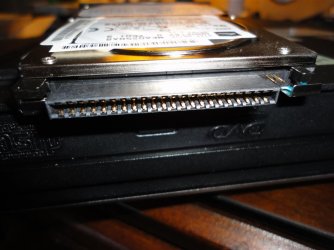
I have a Toshiba MK6025GAS HDD2189 B hard drive out of my Toshiba Laptop. I want to recover some files from it but I am unable to find an adapter/interface to usb to do that. If I search just on the MK60... part number, it shows various interfaces, straight pins, SATA type interface, IDE interface etc. This drive has a female connector on the hard drive (2 rows of 22) that slides over the mother board male connection. This HD has a black plastic cover over those pins, while some on the internet do not show that cover at all and just have male pins sticking out. Don't know if this plastic cover is in itself an adapter hiding those pins? It does not seem to move with mild force. Enclosures for this do not show the pin configuration at all. Appreciate any feedback from someone who has a solution for this.
Attachments

My Computer
- Computer type
- PC/Desktop
- Computer Manufacturer/Model Number
- Self Build
- OS
- Windows 7 Professional X64 Service Pack 1
- CPU
- AMD Phenom II X4 955 3.20GHz
- Motherboard
- Gigabyte GA-MA790X-UD4P
- Memory
- 8G
- Graphics Card(s)
- GX550 Ti
- Sound Card
- On board
- Monitor(s) Displays
- Asus VW246H & Syncmaster 2243swx
- Screen Resolution
- 1920x1080 & 1920x1080
- Hard Drives
- M4-CT128 SSD2, Samsung 840 256GB, 1 WDC 1TB
- PSU
- Corsair TX750W-V2
- Case
- Antec
- Cooling
- 2 120mm fan
- Keyboard
- Microsoft Wireless 3050
- Mouse
- Microsoft Wireless 5000
- Internet Speed
- 72/6Mbs (Cable)
- Other Info
- Asus AC1900 router, 8 port Trendnet Switch - Logitech Webcam Pro 9000

 Not only do I want to recover some files, but I wanted to check it for virus/malware and check the drive for operation. When installed, the system acts very very slow and I ran malwarebytes but after 6 hrs, very little progress and closed it. Future plans were to get a new HDD, clean install etc. but finding a replacement looks dim.