Toshiba Laptop Boot Menu Loading Instead of Startup

farhaj

New member
Member
VIP
Local time
1:12 PM
Messages
127
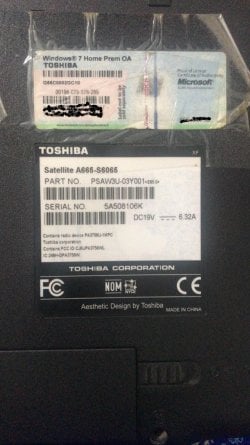
I opened Toshiba Laptop - (Toshiba Satellite A665-S6065) maybe after a period of around 4.5 Years.

All my very Important Data is in it and I want to get it.

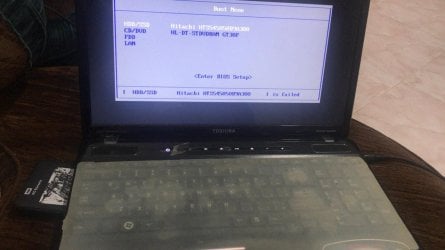
But, now when Opening the Laptop; the Screen goes on to the Boot Menu and asks for the Option to either go on to the Hard Drive or the CD/ DVD Option.

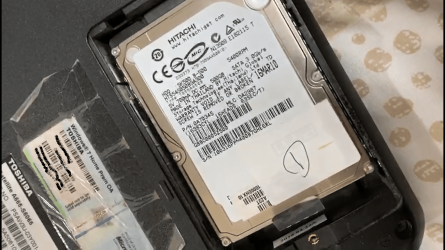
The Hard Drive which Shows up the name is ( Hitachi HTS545050B9A300).

Specs:

1) Windows 7
2) Toshiba Satellite A665-S6065
3) Hitachi HTS545050B9A300

Please, tell me a Solution to the Problem where I will be able to login to the startup Screen Easily without losing my internal Data.

Attached are some of the images of the Laptop Screen and the Laptop ID details..
 

Attachments
  • IMG-20200322-WA0003.jpg
    IMG-20200322-WA0003.jpg
    77.2 KB · Views: 3
  • IMG-20200322-WA0010-2.jpg
    IMG-20200322-WA0010-2.jpg
    125.1 KB · Views: 0
Last edited:

My Computer My Computer

At a glance

Windows 7 Home Premium 64bit
Computer type
Laptop
Computer Manufacturer/Model Number
Toshiba
OS
Windows 7 Home Premium 64bit
Hard Drives
Hitachi
You might need to repair the boot loader. But before you try that, in the boot screen there, is the hard drive selected as the first boot device?

All is not lost. You can access all of your unencrypted data by attacking the hard drive to a USB to SATA connector and accessing it via another computer.

I would delete that screenshot of your Windows product key unless that's OEM.

Edit-

Okay, I see from the screenshot that the hard drive is the first boot device. Follow these two tutorials.


MBR - Restore Windows 7 Master Boot Record

Troubleshooting Windows 7 Failure to Boot

Before you try that, open the bottom of the computer and reseat the RAM slots. You may need to read your manual, but the RAM should be in the bottom of the computer and the plastic cover comes off with a few screws. Do not touch the RAM copper contacts. Hold the RAM on the sides.
 

My Computer My Computer

At a glance

Windows 7 Ultimate x64
Computer type
PC/Desktop
OS
Windows 7 Ultimate x64
You might need to repair the boot loader. But before you try that, in the boot screen there, is the hard drive selected as the first boot device?

All is not lost. You can access all of your unencrypted data by attacking the hard drive to a USB to SATA connector and accessing it via another computer.

I would delete that screenshot of your Windows product key unless that's OEM.

Edit-

Okay, I see from the screenshot that the hard drive is the first boot device. Follow these two tutorials.


MBR - Restore Windows 7 Master Boot Record

Troubleshooting Windows 7 Failure to Boot

Before you try that, open the bottom of the computer and reseat the RAM slots. You may need to read your manual, but the RAM should be in the bottom of the computer and the plastic cover comes off with a few screws. Do not touch the RAM copper contacts. Hold the RAM on the sides.

I changed the Screen shot with the KEY... is it ok or it needs some more editing also
 

My Computer My Computer

At a glance

Windows 7 Home Premium 64bit
Computer type
Laptop
Computer Manufacturer/Model Number
Toshiba
OS
Windows 7 Home Premium 64bit
Hard Drives
Hitachi
The boot menu screenshot says at the bottom that...


[ HDD/SSD Hitachi HTS545050B9A300 ] is failed


...which suggests that the bios cannot boot from the drive and has displayed the boot menu to let you choose another device to boot from.


You may be able to recover your files by following F22 Simpilot's suggestion to use a usb adapter to read the drive on another PC.
 

My Computers My Computers

  • At a glance

    Windows 7 Home Premium x64AMD V1204GB
    Computer type
    Laptop
    Computer Manufacturer/Model Number
    Toshiba satellite C650D
    OS
    Windows 7 Home Premium x64
    CPU
    AMD V120
    Memory
    4GB
    Internet Speed
    150 Mbps
    Antivirus
    MSE
    Browser
    IE11, Edge, Firefox
    Other Info
    I also have W7 Pro on my System Two, and several W7 Hyper-V VMs. My other machines run Windows 10/11. Their specs are in my Ten Forums & Eleven Forum profiles.
  • At a glance

    Windows 7 Pro x64Intel i5-3320M8 GB
    Computer type
    Laptop
    System Manufacturer/Model Number
    Lenovo Thinkpad T430
    OS
    Windows 7 Pro x64
    CPU
    Intel i5-3320M
    Memory
    8 GB
    Hard Drives
    250GB Samsung SSD 860 EVO
    Antivirus
    MSE
The boot menu screenshot says at the bottom that...


[ HDD/SSD Hitachi HTS545050B9A300 ] is failed


...which suggests that the bios cannot boot from the drive and has displayed the boot menu to let you choose another device to boot from.


You may be able to recover your files by following F22 Simpilot's suggestion to use a usb adapter to read the drive on another PC.

A usb Adaptor .. how and connect to another PC..?
 

My Computer My Computer

At a glance

Windows 7 Home Premium 64bit
Computer type
Laptop
Computer Manufacturer/Model Number
Toshiba
OS
Windows 7 Home Premium 64bit
Hard Drives
Hitachi
You might need to repair the boot loader. But before you try that, in the boot screen there, is the hard drive selected as the first boot device?

All is not lost. You can access all of your unencrypted data by attacking the hard drive to a USB to SATA connector and accessing it via another computer.

I would delete that screenshot of your Windows product key unless that's OEM.

Edit-

Okay, I see from the screenshot that the hard drive is the first boot device. Follow these two tutorials.


MBR - Restore Windows 7 Master Boot Record

Troubleshooting Windows 7 Failure to Boot

Before you try that, open the bottom of the computer and reseat the RAM slots. You may need to read your manual, but the RAM should be in the bottom of the computer and the plastic cover comes off with a few screws. Do not touch the RAM copper contacts. Hold the RAM on the sides.

You Mentioned "You can access all of your unencrypted data by attacking the hard drive to a USB to SATA connector and accessing it via another computer."...

What is the way to do it..? Can you explain that out to me..?
 

My Computer My Computer

At a glance

Windows 7 Home Premium 64bit
Computer type
Laptop
Computer Manufacturer/Model Number
Toshiba
OS
Windows 7 Home Premium 64bit
Hard Drives
Hitachi

My Computers My Computers

  • At a glance

    Windows 7 Home Premium x64AMD V1204GB
    Computer type
    Laptop
    Computer Manufacturer/Model Number
    Toshiba satellite C650D
    OS
    Windows 7 Home Premium x64
    CPU
    AMD V120
    Memory
    4GB
    Internet Speed
    150 Mbps
    Antivirus
    MSE
    Browser
    IE11, Edge, Firefox
    Other Info
    I also have W7 Pro on my System Two, and several W7 Hyper-V VMs. My other machines run Windows 10/11. Their specs are in my Ten Forums & Eleven Forum profiles.
  • At a glance

    Windows 7 Pro x64Intel i5-3320M8 GB
    Computer type
    Laptop
    System Manufacturer/Model Number
    Lenovo Thinkpad T430
    OS
    Windows 7 Pro x64
    CPU
    Intel i5-3320M
    Memory
    8 GB
    Hard Drives
    250GB Samsung SSD 860 EVO
    Antivirus
    MSE
The boot menu screenshot says at the bottom that...


[ HDD/SSD Hitachi HTS545050B9A300 ] is failed


...which suggests that the bios cannot boot from the drive and has displayed the boot menu to let you choose another device to boot from.


You may be able to recover your files by following F22 Simpilot's suggestion to use a usb adapter to read the drive on another PC.

[ HDD/SSD Hitachi HTS545050B9A300 ] is failed

Does this mean that now AT ALL THAT I CANNOT BOOT MY LAPTOP itself from the Boot Menu or some other way without the need to open the Laptop
 

My Computer My Computer

At a glance

Windows 7 Home Premium 64bit
Computer type
Laptop
Computer Manufacturer/Model Number
Toshiba
OS
Windows 7 Home Premium 64bit
Hard Drives
Hitachi
F22 Simpilot & Bree...

1) do you think that opening a laptop after 4.5 years; can make the boot file go away from the Laptop and now it won't open up till the start up..?

2) If Not, what else could be the problem behind it..?

3) can You advise and also answer remaining of my queries which I asked earlier.
 

My Computer My Computer

At a glance

Windows 7 Home Premium 64bit
Computer type
Laptop
Computer Manufacturer/Model Number
Toshiba
OS
Windows 7 Home Premium 64bit
Hard Drives
Hitachi
You can use a 2.5" HDD as an external usb drive and connect it to another PC with an adapter cable such as this one on Amazon
or an external enclosure like this one.

Both of the Links which you showed, does it require manually to pull out the hard drive from the Laptop and then insert it into the case and access it with the cable.:shock:

Is, their any way to access the Laptop Hard Drive without the need to Extract the HD manually from inside it...

and what is SATA HD... the Laptop's HD is Called as SATA..?
 

My Computer My Computer

At a glance

Windows 7 Home Premium 64bit
Computer type
Laptop
Computer Manufacturer/Model Number
Toshiba
OS
Windows 7 Home Premium 64bit
Hard Drives
Hitachi
Both of the Links which you showed, does it require manually to pull out the hard drive from the Laptop and then insert it into the case and access it with the cable.:shock:

Yes, if you remove the HDD you could connect it to another PC. If the drive is not corrupt and still readable you could recover your files and documents from it.

Is, their any way to access the Laptop Hard Drive without the need to Extract the HD manually from inside it...
Only by booting from something else, either on a CD/DVD or bootable USB. You can boot the Windows install media and get a command prompt, for example. You could then copy files from the drive, if it can be read. Or you could boot from Kyhi's bootable rescue drive which gives you a Window-like environment including useful tools like Recuva, should they be needed.
Windows 10 Recovery Tools - Bootable Rescue Disk Solved - Windows 10 Forums

and what is SATA HD... the Laptop's HD is Called as SATA..?
The standard interface used by most modern drives.

Serial ATA (SATA, abbreviated from Serial AT Attachment) is a computer bus interface that connects host bus adapters to mass storage devices such as hard disk drives, optical drives, and solid-state drives.
Serial ATA - Wikipedia
 

My Computers My Computers

  • At a glance

    Windows 7 Home Premium x64AMD V1204GB
    Computer type
    Laptop
    Computer Manufacturer/Model Number
    Toshiba satellite C650D
    OS
    Windows 7 Home Premium x64
    CPU
    AMD V120
    Memory
    4GB
    Internet Speed
    150 Mbps
    Antivirus
    MSE
    Browser
    IE11, Edge, Firefox
    Other Info
    I also have W7 Pro on my System Two, and several W7 Hyper-V VMs. My other machines run Windows 10/11. Their specs are in my Ten Forums & Eleven Forum profiles.
  • At a glance

    Windows 7 Pro x64Intel i5-3320M8 GB
    Computer type
    Laptop
    System Manufacturer/Model Number
    Lenovo Thinkpad T430
    OS
    Windows 7 Pro x64
    CPU
    Intel i5-3320M
    Memory
    8 GB
    Hard Drives
    250GB Samsung SSD 860 EVO
    Antivirus
    MSE
Yes, if you remove the HDD you could connect it to another PC. If the drive is not corrupt and still readable you could recover your files and documents from it.


Only by booting from something else, either on a CD/DVD or bootable USB. You can boot the Windows install media and get a command prompt, for example. You could then copy files from the drive, if it can be read. Or you could boot from Kyhi's bootable rescue drive which gives you a Window-like environment including useful tools like Recuva, should they be needed.
Windows 10 Recovery Tools - Bootable Rescue Disk Solved - Windows 10 Forums


The standard interface used by most modern drives.

Serial ATA - Wikipedia


I think now I have one more issue to it.. I think the Hard Drive has been formatted and then placed in my Laptop..
Is their any way to extract those data which was once their and now the drive is also not booting.,...:cry::cry::cry:
 

My Computer My Computer

At a glance

Windows 7 Home Premium 64bit
Computer type
Laptop
Computer Manufacturer/Model Number
Toshiba
OS
Windows 7 Home Premium 64bit
Hard Drives
Hitachi

My Computers My Computers

  • At a glance

    Windows 7 Home Premium x64AMD V1204GB
    Computer type
    Laptop
    Computer Manufacturer/Model Number
    Toshiba satellite C650D
    OS
    Windows 7 Home Premium x64
    CPU
    AMD V120
    Memory
    4GB
    Internet Speed
    150 Mbps
    Antivirus
    MSE
    Browser
    IE11, Edge, Firefox
    Other Info
    I also have W7 Pro on my System Two, and several W7 Hyper-V VMs. My other machines run Windows 10/11. Their specs are in my Ten Forums & Eleven Forum profiles.
  • At a glance

    Windows 7 Pro x64Intel i5-3320M8 GB
    Computer type
    Laptop
    System Manufacturer/Model Number
    Lenovo Thinkpad T430
    OS
    Windows 7 Pro x64
    CPU
    Intel i5-3320M
    Memory
    8 GB
    Hard Drives
    250GB Samsung SSD 860 EVO
    Antivirus
    MSE
Recuva claims to be able to recover files from formatted disks. It would be simplest to install Recuva on another working PC, then remove the drive from this PC and attach it to the other PC by usb.


Download Recuva | Recover deleted files, free!


Recuva may also help with your other WD drive that may also have been formatted.


WD External Hard Drive Not Showing on My PC


Can you tell me that does formating have to do anything with a hidden partition which if deleted, cannot be done anything about recovery from a formatted Drive...

And I checked with 2 other programs for the recovery mode which didn't work out for me ( For a 7 GB flash Drive which was also formatted and was asking to format , the moment inserted inside the laptop )..

Those 2 programs were:
1) easeus recovery
2) data drill recovery..

But, both of those; I used it the freeware version
..

Now , I need your guys comments and reviews on this one..
 

My Computer My Computer

At a glance

Windows 7 Home Premium 64bit
Computer type
Laptop
Computer Manufacturer/Model Number
Toshiba
OS
Windows 7 Home Premium 64bit
Hard Drives
Hitachi
After around 4.5 Years your CMOS battery must has discharged. Enter BIOS to check if it has the current date.
Your HDD has a problem. It can be dead, or partially damaged.
Install on an external enclosure and attach on another computer to try to retrieve your data.
 

My Computers My Computers

  • At a glance

    Windows 7 HP 64i5 6600K - 800MHz to 4200MHz4+4G GSkill DDR4 3000IG - Intel 530
    Computer type
    PC/Desktop
    Computer Manufacturer/Model Number
    custom build
    OS
    Windows 7 HP 64
    CPU
    i5 6600K - 800MHz to 4200MHz
    Motherboard
    GA-Z170-HD3P
    Memory
    4+4G GSkill DDR4 3000
    Graphics Card(s)
    IG - Intel 530
    Monitor(s) Displays
    Samsung 226BW
    Screen Resolution
    1680x1050
    Hard Drives
    (1) -1 SM951 – 128GB M.2 AHCI PCIe SSD drive for Windows 7 and Lubuntu
    (2) -1 WD SATA 3 - 1T for Data
    (3) -1 WD SATA 3 - 1T for backup
    PSU
    Thermaltake 450W TR2 gold
    Keyboard
    Old and good Chicony mechanical keyboard
    Mouse
    Logitech mX performance - 9 buttons (had to disable some)
    Internet Speed
    500Mb/s
    Browser
    Firefox 64
    Other Info
    TinyWall firewall
  • At a glance

    Windows 7 Proi7-4500U 800MHz to 3.0GHz(4+4)G DDR3 1600IG intel 4400 + NVIDIA GeForce GT 745M
    Computer type
    Laptop
    System Manufacturer/Model Number
    Asus Q550LF
    OS
    Windows 7 Pro
    CPU
    i7-4500U 800MHz to 3.0GHz
    Motherboard
    Asus Q550LF
    Memory
    (4+4)G DDR3 1600
    Graphics Card(s)
    IG intel 4400 + NVIDIA GeForce GT 745M
    Sound Card
    Realtek
    Monitor(s) Displays
    LG Display LP156WF4-SPH1
    Screen Resolution
    1920 x 1080
    Hard Drives
    BX500 120G SSD for Windows and programs +
    1T HDD for data
    Internet Speed
    500 Mb/s
    Browser
    Firefox
    Other Info
    TinyWall firewall
After around 4.5 Years your CMOS battery must has discharged. Enter BIOS to check if it has the current date.
Your HDD has a problem. It can be dead, or partially damaged.
Install on an external enclosure and attach on another computer to try to retrieve your data.

I think their was more than that...
I guess the data in the Hard Drive has been FOrmatted... And I want to retrieve the Data in it .. is their any way to do it now...
 

My Computer My Computer

At a glance

Windows 7 Home Premium 64bit
Computer type
Laptop
Computer Manufacturer/Model Number
Toshiba
OS
Windows 7 Home Premium 64bit
Hard Drives
Hitachi
With what computer are you working now, a desktop or a laptop?

Your options:
- Remove the HDD from the laptop and install it on a desktop or on a USB caddy so you can test it.
- Boot from a USB drive with the tolls to test it in same laptop. This is a good tool
 

My Computers My Computers

  • At a glance

    Windows 7 HP 64i5 6600K - 800MHz to 4200MHz4+4G GSkill DDR4 3000IG - Intel 530
    Computer type
    PC/Desktop
    Computer Manufacturer/Model Number
    custom build
    OS
    Windows 7 HP 64
    CPU
    i5 6600K - 800MHz to 4200MHz
    Motherboard
    GA-Z170-HD3P
    Memory
    4+4G GSkill DDR4 3000
    Graphics Card(s)
    IG - Intel 530
    Monitor(s) Displays
    Samsung 226BW
    Screen Resolution
    1680x1050
    Hard Drives
    (1) -1 SM951 – 128GB M.2 AHCI PCIe SSD drive for Windows 7 and Lubuntu
    (2) -1 WD SATA 3 - 1T for Data
    (3) -1 WD SATA 3 - 1T for backup
    PSU
    Thermaltake 450W TR2 gold
    Keyboard
    Old and good Chicony mechanical keyboard
    Mouse
    Logitech mX performance - 9 buttons (had to disable some)
    Internet Speed
    500Mb/s
    Browser
    Firefox 64
    Other Info
    TinyWall firewall
  • At a glance

    Windows 7 Proi7-4500U 800MHz to 3.0GHz(4+4)G DDR3 1600IG intel 4400 + NVIDIA GeForce GT 745M
    Computer type
    Laptop
    System Manufacturer/Model Number
    Asus Q550LF
    OS
    Windows 7 Pro
    CPU
    i7-4500U 800MHz to 3.0GHz
    Motherboard
    Asus Q550LF
    Memory
    (4+4)G DDR3 1600
    Graphics Card(s)
    IG intel 4400 + NVIDIA GeForce GT 745M
    Sound Card
    Realtek
    Monitor(s) Displays
    LG Display LP156WF4-SPH1
    Screen Resolution
    1920 x 1080
    Hard Drives
    BX500 120G SSD for Windows and programs +
    1T HDD for data
    Internet Speed
    500 Mb/s
    Browser
    Firefox
    Other Info
    TinyWall firewall
With what computer are you working now, a desktop or a laptop?

Your options:
- Remove the HDD from the laptop and install it on a desktop or on a USB caddy so you can test it.
- Boot from a USB drive with the tolls to test it in same laptop. This is a good tool

what I feel now, is that the Hard Drive of the laptop has been formatted and their is no BIOS file in it.. and I want to recover the lost data now from it...
SO, what steps should I go for now..

Here is the internal Hard Drive Image..
it is Hitachi..
hard disk image.png
 
Last edited:

My Computer My Computer

At a glance

Windows 7 Home Premium 64bit
Computer type
Laptop
Computer Manufacturer/Model Number
Toshiba
OS
Windows 7 Home Premium 64bit
Hard Drives
Hitachi
Back
Top