
We're having a problem with my son's computer that we haven't been able to solve or find an online solution. He has a Toshiba Satellite L755 with a 500 GB hard drive. He was using it to play xBox live using the ethernet connection and after some time, he noticed the computer screen was blank with a movable cursor. He turned off the computer hoping that the problem would resolve itself when rebooted. He shut it down with the power button but when he powered it back on it went to the Windows Error Recovery screen. He launched Startup Repair but that resulted in a black screen with the mouse cursor. Starting Windows normally brought him back to the Windows Error Recovery Screen after sitting on the "Starting Windows" screen for a minute or so.
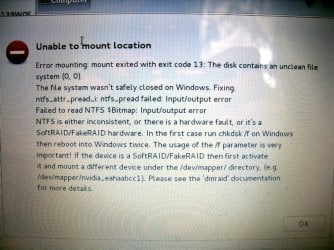
Using a Windows 7 install disk to attempt a repair install only brings up the same black screen with the mouse cursor. Booting from a Linux thumb drive gives "error mounting" message when trying to access the hard drive and says "a file system wasn't safely closed on Windows."
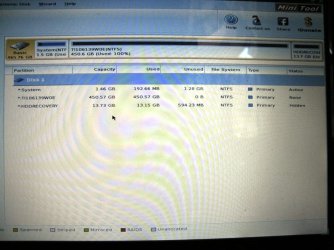
We've followed the "Troubleshooting Windows 7 Failure to Start" guide on this forum and nothing has worked to load or repair Windows until Step 9. Partition Wizard boots and shows the hard drive with 3 partitions. A screen image is attached. His main partition is full but we can see all of his files when we explore that partition. We were able to copy the two smaller partitions to an external hard drive but get an "out of memory" error when trying to copy the 450 GB main partition.
Obviously the full hard drive is a problem and we wonder if the computer may have gone into hibernation and is an additional complication to accessing the hard drive. We've thought that if we could delete some files on the hard drive maybe Windows would boot but we can't access the drive to delete them.
At this point, with a full hard drive and seemingly no way to back up his files, we're looking for help before trying to make changes to the drive which might further put his data in jeopardy. As you may have guessed, he has no backup of his important files so we want to make sure we are doing the right thing before we proceed.
Thanks.
Using a Windows 7 install disk to attempt a repair install only brings up the same black screen with the mouse cursor. Booting from a Linux thumb drive gives "error mounting" message when trying to access the hard drive and says "a file system wasn't safely closed on Windows."
We've followed the "Troubleshooting Windows 7 Failure to Start" guide on this forum and nothing has worked to load or repair Windows until Step 9. Partition Wizard boots and shows the hard drive with 3 partitions. A screen image is attached. His main partition is full but we can see all of his files when we explore that partition. We were able to copy the two smaller partitions to an external hard drive but get an "out of memory" error when trying to copy the 450 GB main partition.
Obviously the full hard drive is a problem and we wonder if the computer may have gone into hibernation and is an additional complication to accessing the hard drive. We've thought that if we could delete some files on the hard drive maybe Windows would boot but we can't access the drive to delete them.
At this point, with a full hard drive and seemingly no way to back up his files, we're looking for help before trying to make changes to the drive which might further put his data in jeopardy. As you may have guessed, he has no backup of his important files so we want to make sure we are doing the right thing before we proceed.
Thanks.
Attachments
My Computer
At a glance
Windows 7 Home Premium
- Computer type
- Laptop
- Computer Manufacturer/Model Number
- Toshiba
- OS
- Windows 7 Home Premium


