toshiba satellite a500-18x turns off while gaming

redcherry

New member
Local time
8:25 PM
Messages
12
I have a 4 year old toshiba satellite a500-18x and ever since i bought it i have never been able to play games (counter strike, call of duty etc) whilst plugged into the mains as it would just switch itself off. Sometimes i could play hours before it switches off other times just a few minutes. When i would play on the battery it would work fine but this obviously isnt very practical as battery doesnt last very long when gaming. But now i cant even do that as i have recently had to buy a new battery and now when i play on battery within a minute of playing it beeps and says low battery and then turns off saying 0% battery power but when i reboot it no longer says low battery and goes back to whatever percent it was on..

Please if anyone could help solve either issue (why it switches off when plugged in and why it says battery depleted when i play on battery and its fully charged) i would much appreciate it! thanks in advance!!

Vick
 

My Computer My Computer

At a glance

windows 7
OS
windows 7
Hiyya redcherry mate a few things first up run Speccy for a look at the temps mate Speccy - Download < from piriform.

Now I can tell you now the power adaptor is cactus or the power jack is broken more likely the former. Now if you can test the volts on the adaptor and then take out the battery and with the power adaptor plugged in see what the volts are at the battery connections.


Now being four years old if it has never been cleaned then I am guessing it is sort of quite dirty inside. But the temps will show up any irregularities.

Now lastly are you capable of working on the machine if need be? I can guide you through a bit if you are happy with that.
 

My Computer My Computer

At a glance

Desk1 7 Home Prem / Desk2 10 Pro / Main lap A...Desk1 i5 3750K / Laptop i7 GTX 860M / Desk2 i...Desk1 8GB (1866) / Desk2 16GB (1333) / Laptop...Desk 1& 2NVidia GTX 650 & Laptops on board Intel
Computer type
PC/Desktop
Computer Manufacturer/Model Number
Own build (new) Desk1 / Asus ROG Win 7 / Desk2 1st build
OS
Desk1 7 Home Prem / Desk2 10 Pro / Main lap Asus ROG 10 Pro 2 laptop Toshiba 7 Pro Asus P2520 7 & 10
CPU
Desk1 i5 3750K / Laptop i7 GTX 860M / Desk2 i5 2500
Motherboard
Desk1 Asus P877-V / Desk2 Gigabyte H67 UD3H / Laptop ?
Memory
Desk1 8GB (1866) / Desk2 16GB (1333) / Laptop 8Gb DDR3
Graphics Card(s)
Desk 1& 2NVidia GTX 650 & Laptops on board Intel
Sound Card
Desk 1 & 2 -XONAR DG Realtek High Def audio Laptop
Monitor(s) Displays
Desk 1 Benq HD 2450 / Desk2 Philips 24" / Laptop 17.5"
Screen Resolution
1920x1080 D1 & D2 & Laptop 1
Hard Drives
Desk1 Samsung 120GB 830 SSD
Asus ROG 256GB 850 Pro SSD
Desk2 Samsung 840 256 SSD
Toshiba 120GB EVO
PSU
Desk 1 Corsair HX 1050/ Laptop ? / Desk 2 Corsair HX 650
Case
Desk 1 Cooler HAF XM ? Toshiba laptop / Desk2 Coolermaster
Cooling
Fans on all Desk1 -2 Desk2 - all Coolermasters 5 Laptop ?
Keyboard
Desk 1 MS Sidewinder X6 Desk 2 MS Sidewinder X 4
Mouse
Desk 1&2 - Gigabyte MS 900 gamer - laptop - Logitec wireless
Internet Speed
ADSL2+
Other Info
One other Desktop (tester) and spare Toshba laptop both with SSD's
Running Kaspersky 2016 ISS on all machines config'd identically
Logitec audio stereo systems on each machine (x3)
Canon MG5250MFC
Router/modem TP-Link running WPA2SK
Hi! Thanks for the answer! I will run speccy and let you know what it says..

What do you mean by cactus? And how do I test the volts on the adapter?

It has never been cleaned no but that was something I am going to do this week anyway.

What do you mean by working on the machine? If you mean capable of taking it apart and things id rather not but if you mean working on it as in software and program wise then ye id be fine.

Vick
 

My Computer My Computer

At a glance

windows 7
OS
windows 7

Ok Vick cactus means - has had the Richard - eaten the biscuit - gone to God- dropped its bundle -thrown in the towel etc etc LOL!

Seriously all you need is a multimeter a digital one very cheap these daysand plug the adaptor in and set the meter to say 100v on its dial put the twoprobes usually red and a black one to one of the adaptors output lead terminalsone to the other and see what the reading is. If it measures up at about 19v(typically) it is ok then then do the same on the battery terminals in thebattery bay and see if the supply is coming through.

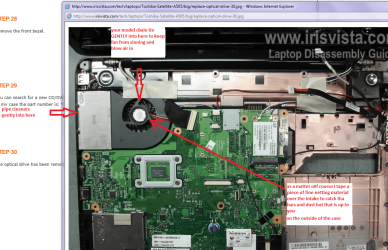
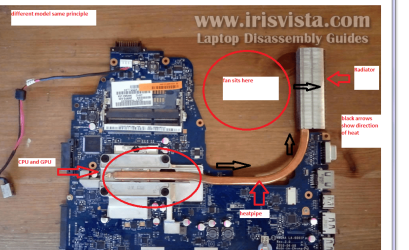
Well just one thing you can do is overturn the machine onto its lid - shinea very bright light into that air intake where the small fan is and look to seeif there is a lot of dust on the fan. Then keeping the light source there lookinto the exhaust vents on the side of the machine and see if any light iscoming through that small radiator. If there is very litle light coming throughthen the cooing "rad" is blocked and the high temps will cause theCPU to shut itself down.

Now as for cleaning you can suck from the fan aperture using a vacuumcleaner and / or blow it with a can of compressed air - cheap to buy . Cleaningthe rad you can use pipe cleaners to GENTLY push the dust lose form the outside.

but one word of WARNING ifyou blow the air into that fan opening please place say the end of a cable tieinto the blades first because the compressed air will spin the fan at more thanit s designed speed and could wreck the bearing !!

To take it apart is easy for me and at a shop expensive for you take a lookat this

http://www.irisvista.com/tech/laptops/Toshiba-Satellite-A505/removing-optical-drive-1.htm

In the pics the rad and heatsinks are from another model but most are fairly similar and typical

The CPU temp I should myself like to see below 5-C at least when you run Speccy.
 

Attachments

  • FAN.PNG
    FAN.PNG
    336.2 KB · Views: 0
  • FAN2.PNG
    FAN2.PNG
    288.5 KB · Views: 0

My Computer My Computer

At a glance

Desk1 7 Home Prem / Desk2 10 Pro / Main lap A...Desk1 i5 3750K / Laptop i7 GTX 860M / Desk2 i...Desk1 8GB (1866) / Desk2 16GB (1333) / Laptop...Desk 1& 2NVidia GTX 650 & Laptops on board Intel
Computer type
PC/Desktop
Computer Manufacturer/Model Number
Own build (new) Desk1 / Asus ROG Win 7 / Desk2 1st build
OS
Desk1 7 Home Prem / Desk2 10 Pro / Main lap Asus ROG 10 Pro 2 laptop Toshiba 7 Pro Asus P2520 7 & 10
CPU
Desk1 i5 3750K / Laptop i7 GTX 860M / Desk2 i5 2500
Motherboard
Desk1 Asus P877-V / Desk2 Gigabyte H67 UD3H / Laptop ?
Memory
Desk1 8GB (1866) / Desk2 16GB (1333) / Laptop 8Gb DDR3
Graphics Card(s)
Desk 1& 2NVidia GTX 650 & Laptops on board Intel
Sound Card
Desk 1 & 2 -XONAR DG Realtek High Def audio Laptop
Monitor(s) Displays
Desk 1 Benq HD 2450 / Desk2 Philips 24" / Laptop 17.5"
Screen Resolution
1920x1080 D1 & D2 & Laptop 1
Hard Drives
Desk1 Samsung 120GB 830 SSD
Asus ROG 256GB 850 Pro SSD
Desk2 Samsung 840 256 SSD
Toshiba 120GB EVO
PSU
Desk 1 Corsair HX 1050/ Laptop ? / Desk 2 Corsair HX 650
Case
Desk 1 Cooler HAF XM ? Toshiba laptop / Desk2 Coolermaster
Cooling
Fans on all Desk1 -2 Desk2 - all Coolermasters 5 Laptop ?
Keyboard
Desk 1 MS Sidewinder X6 Desk 2 MS Sidewinder X 4
Mouse
Desk 1&2 - Gigabyte MS 900 gamer - laptop - Logitec wireless
Internet Speed
ADSL2+
Other Info
One other Desktop (tester) and spare Toshba laptop both with SSD's
Running Kaspersky 2016 ISS on all machines config'd identically
Logitec audio stereo systems on each machine (x3)
Canon MG5250MFC
Router/modem TP-Link running WPA2SK
Check this DIY. This laptop looks fairly easy to work on. Cleaning four years of dust should help with temps. Like Prof.Tinkerer Tink said, check the voltage from the power supply.
 

My Computer My Computer

At a glance

Win8/8.1,Win7-U64, Vista U64, uncounted Linux...AMD and Intell, 9590, 8350, i5 3570kCorsair G SkillCrossfired Sapphire HD 7950 Vapor-X, ASUS R9 ...
Computer type
PC/Desktop
Computer Manufacturer/Model Number
Custom, Dell and Lenono LT's
OS
Win8/8.1,Win7-U64, Vista U64, uncounted Linux distor's
CPU
AMD and Intell, 9590, 8350, i5 3570k
Motherboard
CFVFZ, GA990FXA, Z77e-itx
Memory
Corsair G Skill
Graphics Card(s)
Crossfired Sapphire HD 7950 Vapor-X, ASUS R9 280X TOP
Sound Card
Realtek ALC889
Monitor(s) Displays
ViewSonic VX2770SMH 27" / ViewSonic VX2433 LCD 24"
Screen Resolution
1080i HD
Hard Drives
Samsung SSD 840 Pro
OCZ Agility 3's
OCZ Vector's
WD's Blue, red, green, Velociraptors
Seagate USB3 & Hybrid's
ASUS Blu-Ray
ASUS DVD
PSU
Corsair AX1200i, Seasonice 850 Gold
Case
Cooler Master HAF 922 & HAF 932, Lian Li Train case.
Cooling
Air, Glacer 240L expanded, custom EK loop with duel D5's
Keyboard
Microsoft SideWinder X4 USB Keyboard / Logitech 250 PS2
Mouse
Logitech G500 / MS wireless 5000
Internet Speed
Best of 5ms / 75+ dn / 12+ up More or less.
Antivirus
MS esentials-MalwareBytes
Browser
Firefox Chromebook
just ran speccy and cpu read this:


CPU
Intel Mobile Core 2 Duo P8700
Cores 2
Threads 2
Name Intel Mobile Core 2 Duo P8700
Code Name Penryn
Package Socket P (478)
Technology 45nm
Specification Intel Core2 Duo CPU P8700 @ 2.53GHz
Family 6
Extended Family 6
Model 7
Extended Model 17
Stepping A
Revision R0
Instructions MMX, SSE, SSE2, SSE3, SSSE3, SSE4.1, Intel 64, NX, VMX
Virtualization Supported, Enabled
Hyperthreading Not supported
Bus Speed 266,0 MHz
Rated Bus Speed 1064,1 MHz
Stock Core Speed 2533 MHz
Stock Bus Speed 266 MHz
Average Temperature 76 °C
Caches
L1 Data Cache Size 2 x 32 KBytes
L1 Instructions Cache Size 2 x 32 KBytes
L2 Unified Cache Size 3072 KBytes
Core 0
Core Speed 2527,3 MHz
Multiplier x 9,5
Bus Speed 266,0 MHz
Rated Bus Speed 1064,1 MHz
Temperature 69 °C
Thread 1
APIC ID 0
Core 1
Core Speed 2527,3 MHz
Multiplier x 9,5
Bus Speed 266,0 MHz
Rated Bus Speed 1064,1 MHz
Temperature 82 °C
Thread 1
APIC ID 1


temp is quite high isnt it?and i only just turned on the pc bout 15 mins ago..
 

My Computer My Computer

At a glance

windows 7
OS
windows 7
Check this DIY. This laptop looks fairly easy to work on. Cleaning four years of dust should help with temps. Like Prof.Tinkerer Tink said, check the voltage from the power supply.
Yep a site I use a fair bit too Mad and like you say the things are reasonably easy to work on and the first tim is always the worst LOL!! Plus there is usually a few Youtubes that will help but avoid the nine year olds mate they use Klingon for a language LOL!!

Now some TIPS Vick if you decide to give it a go I ALWAYS work on top of a spread out white bath towel taped to the hard surface top to stop those small screws from skidding onto the floor and the Abyss because you will invariably lose one or two if they do get on the floor. Plus get a reasonably strong magnet (the ones you get out of hard drives are really good) for magnetising the screwdrivers by stroking the blades along the magnet :)
 

My Computer My Computer

At a glance

Desk1 7 Home Prem / Desk2 10 Pro / Main lap A...Desk1 i5 3750K / Laptop i7 GTX 860M / Desk2 i...Desk1 8GB (1866) / Desk2 16GB (1333) / Laptop...Desk 1& 2NVidia GTX 650 & Laptops on board Intel
Computer type
PC/Desktop
Computer Manufacturer/Model Number
Own build (new) Desk1 / Asus ROG Win 7 / Desk2 1st build
OS
Desk1 7 Home Prem / Desk2 10 Pro / Main lap Asus ROG 10 Pro 2 laptop Toshiba 7 Pro Asus P2520 7 & 10
CPU
Desk1 i5 3750K / Laptop i7 GTX 860M / Desk2 i5 2500
Motherboard
Desk1 Asus P877-V / Desk2 Gigabyte H67 UD3H / Laptop ?
Memory
Desk1 8GB (1866) / Desk2 16GB (1333) / Laptop 8Gb DDR3
Graphics Card(s)
Desk 1& 2NVidia GTX 650 & Laptops on board Intel
Sound Card
Desk 1 & 2 -XONAR DG Realtek High Def audio Laptop
Monitor(s) Displays
Desk 1 Benq HD 2450 / Desk2 Philips 24" / Laptop 17.5"
Screen Resolution
1920x1080 D1 & D2 & Laptop 1
Hard Drives
Desk1 Samsung 120GB 830 SSD
Asus ROG 256GB 850 Pro SSD
Desk2 Samsung 840 256 SSD
Toshiba 120GB EVO
PSU
Desk 1 Corsair HX 1050/ Laptop ? / Desk 2 Corsair HX 650
Case
Desk 1 Cooler HAF XM ? Toshiba laptop / Desk2 Coolermaster
Cooling
Fans on all Desk1 -2 Desk2 - all Coolermasters 5 Laptop ?
Keyboard
Desk 1 MS Sidewinder X6 Desk 2 MS Sidewinder X 4
Mouse
Desk 1&2 - Gigabyte MS 900 gamer - laptop - Logitec wireless
Internet Speed
ADSL2+
Other Info
One other Desktop (tester) and spare Toshba laptop both with SSD's
Running Kaspersky 2016 ISS on all machines config'd identically
Logitec audio stereo systems on each machine (x3)
Canon MG5250MFC
Router/modem TP-Link running WPA2SK
What about the battery problem?the fact that it says its flat after a minute of playing and then when i reboot it says its full again? this only happens when i play. if i use the pc normally running on battery its fine. Do you think i should take battery back and get a new one?
 

My Computer My Computer

At a glance

windows 7
OS
windows 7
Mate th CPU is running too hot for my liking the Tcase is 105C and that does not give you a lot of leeway especially in a hot ambient temperature plus what you have I would be careful in giving the thing a hammering. ARK | Intel® Core

It would be interesting to see what the temp is with Core Temp Core Temp as we could see the cores differently.

The battery well if the charge is going in and the battery isn't going to full charge and the board is telling you different then maybe the board is going south.:(
 

My Computer My Computer

At a glance

Desk1 7 Home Prem / Desk2 10 Pro / Main lap A...Desk1 i5 3750K / Laptop i7 GTX 860M / Desk2 i...Desk1 8GB (1866) / Desk2 16GB (1333) / Laptop...Desk 1& 2NVidia GTX 650 & Laptops on board Intel
Computer type
PC/Desktop
Computer Manufacturer/Model Number
Own build (new) Desk1 / Asus ROG Win 7 / Desk2 1st build
OS
Desk1 7 Home Prem / Desk2 10 Pro / Main lap Asus ROG 10 Pro 2 laptop Toshiba 7 Pro Asus P2520 7 & 10
CPU
Desk1 i5 3750K / Laptop i7 GTX 860M / Desk2 i5 2500
Motherboard
Desk1 Asus P877-V / Desk2 Gigabyte H67 UD3H / Laptop ?
Memory
Desk1 8GB (1866) / Desk2 16GB (1333) / Laptop 8Gb DDR3
Graphics Card(s)
Desk 1& 2NVidia GTX 650 & Laptops on board Intel
Sound Card
Desk 1 & 2 -XONAR DG Realtek High Def audio Laptop
Monitor(s) Displays
Desk 1 Benq HD 2450 / Desk2 Philips 24" / Laptop 17.5"
Screen Resolution
1920x1080 D1 & D2 & Laptop 1
Hard Drives
Desk1 Samsung 120GB 830 SSD
Asus ROG 256GB 850 Pro SSD
Desk2 Samsung 840 256 SSD
Toshiba 120GB EVO
PSU
Desk 1 Corsair HX 1050/ Laptop ? / Desk 2 Corsair HX 650
Case
Desk 1 Cooler HAF XM ? Toshiba laptop / Desk2 Coolermaster
Cooling
Fans on all Desk1 -2 Desk2 - all Coolermasters 5 Laptop ?
Keyboard
Desk 1 MS Sidewinder X6 Desk 2 MS Sidewinder X 4
Mouse
Desk 1&2 - Gigabyte MS 900 gamer - laptop - Logitec wireless
Internet Speed
ADSL2+
Other Info
One other Desktop (tester) and spare Toshba laptop both with SSD's
Running Kaspersky 2016 ISS on all machines config'd identically
Logitec audio stereo systems on each machine (x3)
Canon MG5250MFC
Router/modem TP-Link running WPA2SK
with core temp its readin mid 60's for both core 0 and core 1.

The battery is going to full charge though and works fine. its only when i start playing that it beeps and turns off saying it has no battery and then when i turn back on it shows the charge again and i can carry on using it on battery just not to play.
 

My Computer My Computer

At a glance

windows 7
OS
windows 7
Hmm Vick mate I think perhaps the battery is probably a dud mate because whether you play or just surf the net it should last for at least two hours I would have thought.
It could possibly be that the machine is reporting it fully charged and is wrong but I think the battery is faulty. Just how long does it last when playing?

Is it a well known brand or some after market item - I only ask because I had not end of problems with Samsung phones the genuine battery - good the after market pretty darn ordinary and well not worth a whistle.
 

My Computer My Computer

At a glance

Desk1 7 Home Prem / Desk2 10 Pro / Main lap A...Desk1 i5 3750K / Laptop i7 GTX 860M / Desk2 i...Desk1 8GB (1866) / Desk2 16GB (1333) / Laptop...Desk 1& 2NVidia GTX 650 & Laptops on board Intel
Computer type
PC/Desktop
Computer Manufacturer/Model Number
Own build (new) Desk1 / Asus ROG Win 7 / Desk2 1st build
OS
Desk1 7 Home Prem / Desk2 10 Pro / Main lap Asus ROG 10 Pro 2 laptop Toshiba 7 Pro Asus P2520 7 & 10
CPU
Desk1 i5 3750K / Laptop i7 GTX 860M / Desk2 i5 2500
Motherboard
Desk1 Asus P877-V / Desk2 Gigabyte H67 UD3H / Laptop ?
Memory
Desk1 8GB (1866) / Desk2 16GB (1333) / Laptop 8Gb DDR3
Graphics Card(s)
Desk 1& 2NVidia GTX 650 & Laptops on board Intel
Sound Card
Desk 1 & 2 -XONAR DG Realtek High Def audio Laptop
Monitor(s) Displays
Desk 1 Benq HD 2450 / Desk2 Philips 24" / Laptop 17.5"
Screen Resolution
1920x1080 D1 & D2 & Laptop 1
Hard Drives
Desk1 Samsung 120GB 830 SSD
Asus ROG 256GB 850 Pro SSD
Desk2 Samsung 840 256 SSD
Toshiba 120GB EVO
PSU
Desk 1 Corsair HX 1050/ Laptop ? / Desk 2 Corsair HX 650
Case
Desk 1 Cooler HAF XM ? Toshiba laptop / Desk2 Coolermaster
Cooling
Fans on all Desk1 -2 Desk2 - all Coolermasters 5 Laptop ?
Keyboard
Desk 1 MS Sidewinder X6 Desk 2 MS Sidewinder X 4
Mouse
Desk 1&2 - Gigabyte MS 900 gamer - laptop - Logitec wireless
Internet Speed
ADSL2+
Other Info
One other Desktop (tester) and spare Toshba laptop both with SSD's
Running Kaspersky 2016 ISS on all machines config'd identically
Logitec audio stereo systems on each machine (x3)
Canon MG5250MFC
Router/modem TP-Link running WPA2SK
I got a friend of mine to clean it out and the amount of dust that was removed was crazy! Lol so that solves the heating issue. I also updated the bios. I then tried playing again and it carries on shutting down when plugged in first it shut down within minutes then second time after half hour then after 20 mins..I also tried removing battery and using another power supply from my boyfriends laptop which is basically the same but same thing continued to happen! :-(
 

My Computer My Computer

At a glance

windows 7
OS
windows 7
Ok matew I sorta reckoned it would be dusty as people don't realise how close to dusty surfaces the air intake actually comes and their laps!! and also the other case vents. So just a tip I am sending a pic of what I do with my lappies I don't as a rule cover the other vents but you might be able to make out the small "filter" I have over the fan intake. It is just a piece of sheer curtain material - you don't want too fine and held in place with some cloth duct tape.

Now to eliminate stuff now run these two if you haven't already


http://www.sevenforums.com/tutorials/1538-sfc-scannow-command-system-file-checker.html

http://www.sevenforums.com/tutorials/433-disk-check.html
 

Attachments

  • TOSH FILTER.PNG
    TOSH FILTER.PNG
    329.7 KB · Views: 0

My Computer My Computer

At a glance

Desk1 7 Home Prem / Desk2 10 Pro / Main lap A...Desk1 i5 3750K / Laptop i7 GTX 860M / Desk2 i...Desk1 8GB (1866) / Desk2 16GB (1333) / Laptop...Desk 1& 2NVidia GTX 650 & Laptops on board Intel
Computer type
PC/Desktop
Computer Manufacturer/Model Number
Own build (new) Desk1 / Asus ROG Win 7 / Desk2 1st build
OS
Desk1 7 Home Prem / Desk2 10 Pro / Main lap Asus ROG 10 Pro 2 laptop Toshiba 7 Pro Asus P2520 7 & 10
CPU
Desk1 i5 3750K / Laptop i7 GTX 860M / Desk2 i5 2500
Motherboard
Desk1 Asus P877-V / Desk2 Gigabyte H67 UD3H / Laptop ?
Memory
Desk1 8GB (1866) / Desk2 16GB (1333) / Laptop 8Gb DDR3
Graphics Card(s)
Desk 1& 2NVidia GTX 650 & Laptops on board Intel
Sound Card
Desk 1 & 2 -XONAR DG Realtek High Def audio Laptop
Monitor(s) Displays
Desk 1 Benq HD 2450 / Desk2 Philips 24" / Laptop 17.5"
Screen Resolution
1920x1080 D1 & D2 & Laptop 1
Hard Drives
Desk1 Samsung 120GB 830 SSD
Asus ROG 256GB 850 Pro SSD
Desk2 Samsung 840 256 SSD
Toshiba 120GB EVO
PSU
Desk 1 Corsair HX 1050/ Laptop ? / Desk 2 Corsair HX 650
Case
Desk 1 Cooler HAF XM ? Toshiba laptop / Desk2 Coolermaster
Cooling
Fans on all Desk1 -2 Desk2 - all Coolermasters 5 Laptop ?
Keyboard
Desk 1 MS Sidewinder X6 Desk 2 MS Sidewinder X 4
Mouse
Desk 1&2 - Gigabyte MS 900 gamer - laptop - Logitec wireless
Internet Speed
ADSL2+
Other Info
One other Desktop (tester) and spare Toshba laptop both with SSD's
Running Kaspersky 2016 ISS on all machines config'd identically
Logitec audio stereo systems on each machine (x3)
Canon MG5250MFC
Router/modem TP-Link running WPA2SK
Back
Top