Toshiba Satellite S855, trying to install Windows 7

Camx84

New member
Local time
7:37 AM
Messages
13
My fiance surprised me with a new laptop today, a Toshiba S855. It came with Windows 8 and I want to use Windows 7 Ultimate 64bit. I finally got it to boot up using the W7 install DVD but now I'm stuck again.
windows cannot be installed to disc 0 partition 1
There are 5 partitions and I get that message with all of them. I tried a Google search but the answers are conflicting. Some people say that deleting the partitions works but others advise against it. I'm not very tech savvy and I don't want to do anything that I'll regret.
Any help would be very much appreciated! I have a picture of my laptop with showing the error but I'm unable to upload it here because I'm on my (Windows 8) phone.
 

My Computer My Computer

At a glance

Windows 8
Computer type
Laptop
Computer Manufacturer/Model Number
Toshiba Satellite S855
OS
Windows 8
I forgot to mention that it is a S855D-S5120 model. If I am able to install Windows 7, will I need to find new drivers? I googled the model name + Windows 7 drivers and found nothing.
 

My Computer My Computer

At a glance

Windows 8
Computer type
Laptop
Computer Manufacturer/Model Number
Toshiba Satellite S855
OS
Windows 8
Hi Cam before you go and wipe out Windows 8 from your laptop. You might want to create a Recovery Discs from within Windows 8.

If you want to downgrade to Windows 8 to 7 . Take a look at this tutorial Downgrade Windows 8 to Windows 7

To install Windows 7 you would need a valid Windows 7 key . Hopefully you have that Legit key . The one on the back of the laptop or behind the battery will not work either due to its a Windows 8 Key.

This will help you as well http://www.sevenforums.com/tutorials/219487-clean-reinstall-factory-oem-windows-7-a.html#post1839164

I am not able to locate the model S855D-S5120 on Toshiba's website .

If you would like to Install Windows 7 under UEFI take a look here http://www.sevenforums.com/tutorial...e-firmware-interface-install-windows-7-a.html

If you want to do a clean install take a look here http://www.sevenforums.com/tutorials/1649-clean-install-windows-7-a.html

This tutorial Secure Boot - Enable or Disable in UEFI
 

My Computer My Computer

At a glance

Windows 7 Ultimate 32-Bit & Windows 7 Ultimat...Intel Core i7 CPU 950 @ 3.07GHzOCZ 6GB (3 x 2GB) 240-Pin DDR3 SDRAM DDR3 160...ATI Radeon HD 5700 Series
Computer Manufacturer/Model Number
Custom Built
OS
Windows 7 Ultimate 32-Bit & Windows 7 Ultimate 64-Bit
CPU
Intel Core i7 CPU 950 @ 3.07GHz
Motherboard
ASUS P6T DELUXE V2
Memory
OCZ 6GB (3 x 2GB) 240-Pin DDR3 SDRAM DDR3 1600 OCZ3X1600R2
Graphics Card(s)
ATI Radeon HD 5700 Series
Sound Card
OnBoard
Hard Drives
WD6400AACS-00M3B0 (640GB SATA )
PSU
CORSAIR 850w
Case
NZXT LEXA
Cooling
Intel Stock Heatsink Fan
Keyboard
Microsoft Wireless Laser Keyboard 7000
Mouse
Microsoft Wireless Laser Mouse 7000
Thank you so much! I'm going to give it a try following the tutorial. I'm sorry for missing that, I guess I didn't look closely enough before I asked my question.
 

My Computer My Computer

At a glance

Windows 8
Computer type
Laptop
Computer Manufacturer/Model Number
Toshiba Satellite S855
OS
Windows 8
No Problem. If you need any help we are here.
 

My Computer My Computer

At a glance

Windows 7 Ultimate 32-Bit & Windows 7 Ultimat...Intel Core i7 CPU 950 @ 3.07GHzOCZ 6GB (3 x 2GB) 240-Pin DDR3 SDRAM DDR3 160...ATI Radeon HD 5700 Series
Computer Manufacturer/Model Number
Custom Built
OS
Windows 7 Ultimate 32-Bit & Windows 7 Ultimate 64-Bit
CPU
Intel Core i7 CPU 950 @ 3.07GHz
Motherboard
ASUS P6T DELUXE V2
Memory
OCZ 6GB (3 x 2GB) 240-Pin DDR3 SDRAM DDR3 1600 OCZ3X1600R2
Graphics Card(s)
ATI Radeon HD 5700 Series
Sound Card
OnBoard
Hard Drives
WD6400AACS-00M3B0 (640GB SATA )
PSU
CORSAIR 850w
Case
NZXT LEXA
Cooling
Intel Stock Heatsink Fan
Keyboard
Microsoft Wireless Laser Keyboard 7000
Mouse
Microsoft Wireless Laser Mouse 7000
Hum Camx am just wondering maybe an idea to check out your warranty with Toshiba too as they may not be that impressed with you changing the OS. Mind you if you are successful at least you will not have the bloat they throw on them.

I say this as from experience with this brand the repair costs are not cheap!!
 

My Computer My Computer

At a glance

Desk1 7 Home Prem / Desk2 10 Pro / Main lap A...Desk1 i5 3750K / Laptop i7 GTX 860M / Desk2 i...Desk1 8GB (1866) / Desk2 16GB (1333) / Laptop...Desk 1& 2NVidia GTX 650 & Laptops on board Intel
Computer type
PC/Desktop
Computer Manufacturer/Model Number
Own build (new) Desk1 / Asus ROG Win 7 / Desk2 1st build
OS
Desk1 7 Home Prem / Desk2 10 Pro / Main lap Asus ROG 10 Pro 2 laptop Toshiba 7 Pro Asus P2520 7 & 10
CPU
Desk1 i5 3750K / Laptop i7 GTX 860M / Desk2 i5 2500
Motherboard
Desk1 Asus P877-V / Desk2 Gigabyte H67 UD3H / Laptop ?
Memory
Desk1 8GB (1866) / Desk2 16GB (1333) / Laptop 8Gb DDR3
Graphics Card(s)
Desk 1& 2NVidia GTX 650 & Laptops on board Intel
Sound Card
Desk 1 & 2 -XONAR DG Realtek High Def audio Laptop
Monitor(s) Displays
Desk 1 Benq HD 2450 / Desk2 Philips 24" / Laptop 17.5"
Screen Resolution
1920x1080 D1 & D2 & Laptop 1
Hard Drives
Desk1 Samsung 120GB 830 SSD
Asus ROG 256GB 850 Pro SSD
Desk2 Samsung 840 256 SSD
Toshiba 120GB EVO
PSU
Desk 1 Corsair HX 1050/ Laptop ? / Desk 2 Corsair HX 650
Case
Desk 1 Cooler HAF XM ? Toshiba laptop / Desk2 Coolermaster
Cooling
Fans on all Desk1 -2 Desk2 - all Coolermasters 5 Laptop ?
Keyboard
Desk 1 MS Sidewinder X6 Desk 2 MS Sidewinder X 4
Mouse
Desk 1&2 - Gigabyte MS 900 gamer - laptop - Logitec wireless
Internet Speed
ADSL2+
Other Info
One other Desktop (tester) and spare Toshba laptop both with SSD's
Running Kaspersky 2016 ISS on all machines config'd identically
Logitec audio stereo systems on each machine (x3)
Canon MG5250MFC
Router/modem TP-Link running WPA2SK
Thank you both! I'm in a fortunate position where if I manage to break anything, it can still be exchanged without a hassle. I would really prefer to not break it though lol :)
I'm making my recovery disc now (having issues with that too but I think I can figure it out) and then I'll go ahead with the W7 install.
But should I be worried about the apparent lack of W7 drivers for this specific model? I'm sorry if that's a dumb question. And thanks again for all the help!
 

My Computer My Computer

At a glance

Windows 8
Computer type
Laptop
Computer Manufacturer/Model Number
Toshiba Satellite S855
OS
Windows 8
Well at least you have done the right thing Camx - making the recovery disk as it is something one sees all too often in fixes (that I do) but I blame that on the retailers because all they are interested in is the sale. I do set ups for my co workers when they get new machines and so they all get those disks and it saves so much time and hassle when something goes really south.

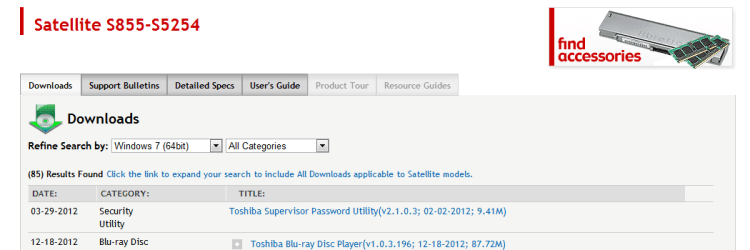
Nice little machine you have there but from experience with Toshiba's just be careful with handing them as I have had a few in that have had broken power input and USB sockets that are the pits to repair if at all. See - Toshiba Satellite S855-S5254 Overview & User Reviews - Laptops - CNET Reviews This is mainly because Toshiba once a really top brand in my view sadly have dropped the quality for numbers.

Having said that my two Toshibas I have fitted SSD's and more RAM to plus an OEM 7 OS and they perform really well especially without all that bloat.
 

My Computer My Computer

At a glance

Desk1 7 Home Prem / Desk2 10 Pro / Main lap A...Desk1 i5 3750K / Laptop i7 GTX 860M / Desk2 i...Desk1 8GB (1866) / Desk2 16GB (1333) / Laptop...Desk 1& 2NVidia GTX 650 & Laptops on board Intel
Computer type
PC/Desktop
Computer Manufacturer/Model Number
Own build (new) Desk1 / Asus ROG Win 7 / Desk2 1st build
OS
Desk1 7 Home Prem / Desk2 10 Pro / Main lap Asus ROG 10 Pro 2 laptop Toshiba 7 Pro Asus P2520 7 & 10
CPU
Desk1 i5 3750K / Laptop i7 GTX 860M / Desk2 i5 2500
Motherboard
Desk1 Asus P877-V / Desk2 Gigabyte H67 UD3H / Laptop ?
Memory
Desk1 8GB (1866) / Desk2 16GB (1333) / Laptop 8Gb DDR3
Graphics Card(s)
Desk 1& 2NVidia GTX 650 & Laptops on board Intel
Sound Card
Desk 1 & 2 -XONAR DG Realtek High Def audio Laptop
Monitor(s) Displays
Desk 1 Benq HD 2450 / Desk2 Philips 24" / Laptop 17.5"
Screen Resolution
1920x1080 D1 & D2 & Laptop 1
Hard Drives
Desk1 Samsung 120GB 830 SSD
Asus ROG 256GB 850 Pro SSD
Desk2 Samsung 840 256 SSD
Toshiba 120GB EVO
PSU
Desk 1 Corsair HX 1050/ Laptop ? / Desk 2 Corsair HX 650
Case
Desk 1 Cooler HAF XM ? Toshiba laptop / Desk2 Coolermaster
Cooling
Fans on all Desk1 -2 Desk2 - all Coolermasters 5 Laptop ?
Keyboard
Desk 1 MS Sidewinder X6 Desk 2 MS Sidewinder X 4
Mouse
Desk 1&2 - Gigabyte MS 900 gamer - laptop - Logitec wireless
Internet Speed
ADSL2+
Other Info
One other Desktop (tester) and spare Toshba laptop both with SSD's
Running Kaspersky 2016 ISS on all machines config'd identically
Logitec audio stereo systems on each machine (x3)
Canon MG5250MFC
Router/modem TP-Link running WPA2SK
OEM's vary in whether they will support a Clean Reinstall but they cannot void the hardware warranty - only insist it has the factory install on it to support it or service the warranty.

Then with a Win8 PC you need to disable Secure Boot to either install Win7 in UEFI mode as already provided, or choose Legacy BIOS to Bypass UEFI to Install WIn7.

Win7 is driver complete so you shouldn't have to provide any drivers after all rounds of Important and Optional Updates are done following the steps in Clean Reinstall - Factory OEM Windows 7. But if so you will most likely be able to use Win8 drivers or Win7 drivers will searchable on the web. Let us know if you need any further help.
 
Downgrade Windows 8 to Windows 7

You need to do all of the step 3 first.


theog said:
3) Reset BIOS to default, and reboot to BIOS make sure Secure Boot is disabled.
Make sure CSM is ENABLED, & set to UEFI boot.
NOTE: Check your manufacturer's uEFI BIOS manual for settings.

Take a look at this post.
UEFI Bootable USB Flash Drive - Create in Windows - Page 7

Found this on Toshiba Support site.

How to enable CSM for a Toshiba.(Satellite Pro C870, Satellite Pro L830, Satellite Pro C850, Satellite Pro R950, Portege R930, Portege Z930)

Toshiba said:
To downgrade from a installed Windows 8 OS to a Windows 7 OS, using a Windows 7 recovery media, follow these steps:

1) Boot unit and press F2 to get into BIOS

2) Go to "Security" tab and disable "Safe Boot"

3) Go to "Advanced" tab, select "System Configuration" then change boot mode from "UEFI" to "CSM"

4) Press F10 to save changes and exit.

5) Boot unit from recovery media (Press F12 on bootup to boot from USB or DVD media)


Steps to Install Windows 7 on a Windows 8 Unit
Necessary changes in the UEFI Firmware (BIOS) for a successful downgrade from Windows 8 to Windows 7


Toshiba How-To: Resetting your UEFI Bios Firmware on Windows 8 - YouTube
How To: Enter the system BIOS or UEFI in Windows 8 - Toshiba Forums

How to make Toshiba Recovery disks.


Toshiba How-To: Understanding Windows 8 system recovery options - YouTube

http://cdgenp01.csd.toshiba.com/con.../detailed_specs/Satellite_Pro_C640-SP4015.pdf
Toshiba How-To: Create System Recovery Media on a USB Flash Drive - YouTube

Toshiba Satellite Pro C640/C650 with Windows 8, make recovery disc, page 68

http://cdgenp01.csd.toshiba.com/con...8349/GMAD00253010_SatProC640-C650_10Apr09.pdf
 

My Computer My Computer

At a glance

ME/XP/Vista/Win7
OS
ME/XP/Vista/Win7
Thanks to everyones help, I now have Windows 7 running! It does look like I need some drivers though and I can't even find my model listed on Toshiba Support. As soon as I get a chance, I'm going to hook up the Ethernet cord and try to update the drivers that way. If that doesn't work, would it be worth trying the drivers from a similar model? I'm surprised by the amount of help I have received here! Thank you all so much!
 

My Computer My Computer

At a glance

Windows 8
Computer type
Laptop
Computer Manufacturer/Model Number
Toshiba Satellite S855
OS
Windows 8
Hi Camx84,

If you would be so kind and provide the screen shots of the items you need . I would need you to right-click on each of the items in Device Manager choose Properties click on the Details tab in the Property area click on the down arrow and choose Hardware IDs.
 

My Computer My Computer

At a glance

Windows 7 Ultimate 32-Bit & Windows 7 Ultimat...Intel Core i7 CPU 950 @ 3.07GHzOCZ 6GB (3 x 2GB) 240-Pin DDR3 SDRAM DDR3 160...ATI Radeon HD 5700 Series
Computer Manufacturer/Model Number
Custom Built
OS
Windows 7 Ultimate 32-Bit & Windows 7 Ultimate 64-Bit
CPU
Intel Core i7 CPU 950 @ 3.07GHz
Motherboard
ASUS P6T DELUXE V2
Memory
OCZ 6GB (3 x 2GB) 240-Pin DDR3 SDRAM DDR3 1600 OCZ3X1600R2
Graphics Card(s)
ATI Radeon HD 5700 Series
Sound Card
OnBoard
Hard Drives
WD6400AACS-00M3B0 (640GB SATA )
PSU
CORSAIR 850w
Case
NZXT LEXA
Cooling
Intel Stock Heatsink Fan
Keyboard
Microsoft Wireless Laser Keyboard 7000
Mouse
Microsoft Wireless Laser Mouse 7000
Not all drivers are in the Win7 installer. That's why I said you need to connect to Windows Updates to run all rounds of Important and Optional Updates after enabling Automatically deliver drivers via Windows Update (Step 3).

This is explained in Clean Reinstall - Factory OEM Windows 7 along with other tips to get a perfect install based on helping with thousands of them here.

After all Updates are installed report back any drivers still missing if you can't readily find them on the Toshiba Support Downloads webpage for your model.
 
Last edited:
That is not his model I believe .
 

My Computer My Computer

At a glance

Windows 7 Ultimate 32-Bit & Windows 7 Ultimat...Intel Core i7 CPU 950 @ 3.07GHzOCZ 6GB (3 x 2GB) 240-Pin DDR3 SDRAM DDR3 160...ATI Radeon HD 5700 Series
Computer Manufacturer/Model Number
Custom Built
OS
Windows 7 Ultimate 32-Bit & Windows 7 Ultimate 64-Bit
CPU
Intel Core i7 CPU 950 @ 3.07GHz
Motherboard
ASUS P6T DELUXE V2
Memory
OCZ 6GB (3 x 2GB) 240-Pin DDR3 SDRAM DDR3 1600 OCZ3X1600R2
Graphics Card(s)
ATI Radeon HD 5700 Series
Sound Card
OnBoard
Hard Drives
WD6400AACS-00M3B0 (640GB SATA )
PSU
CORSAIR 850w
Case
NZXT LEXA
Cooling
Intel Stock Heatsink Fan
Keyboard
Microsoft Wireless Laser Keyboard 7000
Mouse
Microsoft Wireless Laser Mouse 7000
I've attached a picture of the missing drivers. I just noticed that one is for the Ethernet, so I'm assuming I won't be able to do a Windows Update since I can't get online. If I'm missing something really obvious, please let me know :)
I really appreciate all of the assistance!

The full model number is S855D-S5120

1pcfhl.jpg
 
Last edited:

My Computer My Computer

At a glance

Windows 8
Computer type
Laptop
Computer Manufacturer/Model Number
Toshiba Satellite S855
OS
Windows 8
Right click on each of them with the :warn: sign and click on Properties and in the properties window click on the tab " Details " click on the down arrow under Property and click on Hardware IDs ( I would need the picture of that to locate the drivers for you ) .
 

My Computer My Computer

At a glance

Windows 7 Ultimate 32-Bit & Windows 7 Ultimat...Intel Core i7 CPU 950 @ 3.07GHzOCZ 6GB (3 x 2GB) 240-Pin DDR3 SDRAM DDR3 160...ATI Radeon HD 5700 Series
Computer Manufacturer/Model Number
Custom Built
OS
Windows 7 Ultimate 32-Bit & Windows 7 Ultimate 64-Bit
CPU
Intel Core i7 CPU 950 @ 3.07GHz
Motherboard
ASUS P6T DELUXE V2
Memory
OCZ 6GB (3 x 2GB) 240-Pin DDR3 SDRAM DDR3 1600 OCZ3X1600R2
Graphics Card(s)
ATI Radeon HD 5700 Series
Sound Card
OnBoard
Hard Drives
WD6400AACS-00M3B0 (640GB SATA )
PSU
CORSAIR 850w
Case
NZXT LEXA
Cooling
Intel Stock Heatsink Fan
Keyboard
Microsoft Wireless Laser Keyboard 7000
Mouse
Microsoft Wireless Laser Mouse 7000
Camx on the bottom of the machine there will be a sticker with your model Satellite on it and under it there will be a PART NO AAAKKK-#######D (mine is PSLWSA-01000Q) this is what you need to know when looking for parts and specs etc etc

It is the PART NO that tells the Toshiba people where the machine was manufactured for. I did a Qosmio just a while ago and was bogged down until I remembered this fact. In fact the PART NO for her machine was in fact a machine made for the US. It so happened the workmate bought it from a US site!!
 

My Computer My Computer

At a glance

Desk1 7 Home Prem / Desk2 10 Pro / Main lap A...Desk1 i5 3750K / Laptop i7 GTX 860M / Desk2 i...Desk1 8GB (1866) / Desk2 16GB (1333) / Laptop...Desk 1& 2NVidia GTX 650 & Laptops on board Intel
Computer type
PC/Desktop
Computer Manufacturer/Model Number
Own build (new) Desk1 / Asus ROG Win 7 / Desk2 1st build
OS
Desk1 7 Home Prem / Desk2 10 Pro / Main lap Asus ROG 10 Pro 2 laptop Toshiba 7 Pro Asus P2520 7 & 10
CPU
Desk1 i5 3750K / Laptop i7 GTX 860M / Desk2 i5 2500
Motherboard
Desk1 Asus P877-V / Desk2 Gigabyte H67 UD3H / Laptop ?
Memory
Desk1 8GB (1866) / Desk2 16GB (1333) / Laptop 8Gb DDR3
Graphics Card(s)
Desk 1& 2NVidia GTX 650 & Laptops on board Intel
Sound Card
Desk 1 & 2 -XONAR DG Realtek High Def audio Laptop
Monitor(s) Displays
Desk 1 Benq HD 2450 / Desk2 Philips 24" / Laptop 17.5"
Screen Resolution
1920x1080 D1 & D2 & Laptop 1
Hard Drives
Desk1 Samsung 120GB 830 SSD
Asus ROG 256GB 850 Pro SSD
Desk2 Samsung 840 256 SSD
Toshiba 120GB EVO
PSU
Desk 1 Corsair HX 1050/ Laptop ? / Desk 2 Corsair HX 650
Case
Desk 1 Cooler HAF XM ? Toshiba laptop / Desk2 Coolermaster
Cooling
Fans on all Desk1 -2 Desk2 - all Coolermasters 5 Laptop ?
Keyboard
Desk 1 MS Sidewinder X6 Desk 2 MS Sidewinder X 4
Mouse
Desk 1&2 - Gigabyte MS 900 gamer - laptop - Logitec wireless
Internet Speed
ADSL2+
Other Info
One other Desktop (tester) and spare Toshba laptop both with SSD's
Running Kaspersky 2016 ISS on all machines config'd identically
Logitec audio stereo systems on each machine (x3)
Canon MG5250MFC
Router/modem TP-Link running WPA2SK
If you had the ethernet cable plugged in during install its driver should have been provided.

If not install the WiFi driver from Model Content Page

The download will be a zip file, rightclick on it to Extract All files then rightclick Setup to run as Administrator.

Connect to your network from the bottom right system tray network icon, then immediately enable Automatically deliver drivers via Windows Update (Step 3) and run all Important and Optional Updates until they are exhausted. You can set up your desktop and install Adobe Reader, Flash Player, Office, etc while they are installing.

After all Updates are installed check Device Manager and find any missing drivers on the same Toshiba webpage.
 
Back
Top