Solved Toshiba sattelite m45 cann't boot, BLACK SCREEN

kutujenggot

New member
Member
Local time
6:04 AM
Messages
57
greetings for all master,

I found a laptop owned by my friend "Toshiba Satellite M45 S2692" the problem is when i want to install it, I did not find any one medium to boot, because the optical drive is damaged, FDD was not detected at all.

steps later I did was try to clone from another computer. results are only "the usual black screen (before the bootscreen)"

The next step I did was put another hard drive that contains seven. same result just a black screen before the boot screen.

I just see a black screen (wait:sleepy:) for me to sit in front of him.:cry:
[i don't said this is BSOD]

i worriest about VGA because in LCD screen is same

thank you:confused:
 

My Computer My Computer

At a glance

windows 7 x86notebook1024 mb ramnone
Computer Manufacturer/Model Number
Advance
OS
windows 7 x86
CPU
notebook
Motherboard
notebook
Memory
1024 mb ram
Graphics Card(s)
none
Sound Card
-
Monitor(s) Displays
-
Screen Resolution
1280 x 800 px
Try disabling the display adapter in safe mode.
http://www.sevenforums.com/tutorials/69585-safe-mode.html?ltr=S

Why is my screen black when I start Windows 7?

   Information
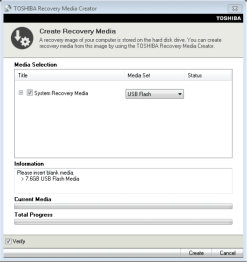
We always assume you have made your Recovery Disks using the OEM manufacturer's Recovery Media Creator app the first day you had your new PC.
& made the Startup Repair CD.
startup repair disc-create


Did you make the OEM manufacturer's Recovery Disks?

Toshiba USB.PNG

How to use Toshiba Recovery.
How to use the Toshiba HDD Recovery Utility

You can order Toshiba Recovery disks from here:
https://www.csd.toshiba.com/cgi-bin/tais/support/jsp/serviceUnitVerification.jsp
 

My Computer My Computer

At a glance

ME/XP/Vista/Win7
OS
ME/XP/Vista/Win7
You cannot count on WIn7 starting on new hardware unless it is first SysPrepped on the old hardware, or on the new hardware you boot Paragon Adaptive Restore CD to prepare it first.

For imaging or cloning to new hardware you need Acronis Universal Restore add-on, or running Startup Repair repeatedly on the clone/image with it's partition marked Active - on the chance that it only needs the boot repaired.

Since you need a bootable installer for repairs anyway, I would write the DVD ISO (extracted using ImgBUrn) to flash stick using Universal USB Installer with Win7 in the dropdown menu. Boot it under USB, Removable or HD's using the one-time BIOS Boot Menu key.

Or you can replace the DVD drive since you'll need one anyway and they're inexpensive.

Either way, disable the FDD in BIOS or physically unplug it as it can interfere later and is not from this era.
 
hmmmmmmmmmm.... yes I used sysprep... I am very enthusiastic about it
but the problem is after BIOS screen..
my screen be dark (my led LCd is on for the light) no text, no picture, as if can not display the bootscreen.
I using hdd under 7, and hdd under xp result is same.:)

/*
yes i know about set active drive, that can make the drive boot there [ntldr potition right?] */

any idea booting for other media. or how to format my fdd [hpw 250 4gb] so can booting in this old lappy...
<worries about my VGA>
 

My Computer My Computer

At a glance

windows 7 x86notebook1024 mb ramnone
Computer Manufacturer/Model Number
Advance
OS
windows 7 x86
CPU
notebook
Motherboard
notebook
Memory
1024 mb ram
Graphics Card(s)
none
Sound Card
-
Monitor(s) Displays
-
Screen Resolution
1280 x 800 px
Did you read what I wrote about formatting a flash stick installer, which can also be used for repairs?

Did you read what I wrote about disabling your FDD which can only interfere and isn't usable at all with Win7?

Once you have the bootable flash stick, boot into System Recovery Options to run Startup Repair a few times to see if the image will start, after making sure Win7 is marked Active: Partition - Mark as Active (Method Two)

Or you can install from the bootable flash stick: Clean Install Windows 7
 
:cool: I'm sorry sorry if I do not really know what you write, therefore I have to translate it using google translate.:o

Can you help me give a link about "how to put xp to the FDD" thanks before gregrocker
 

My Computer My Computer

At a glance

windows 7 x86notebook1024 mb ramnone
Computer Manufacturer/Model Number
Advance
OS
windows 7 x86
CPU
notebook
Motherboard
notebook
Memory
1024 mb ram
Graphics Card(s)
none
Sound Card
-
Monitor(s) Displays
-
Screen Resolution
1280 x 800 px
Disconnect your Floppy Disk Drive as it is not used any longer at all and can interfere.

Do you have a Win7 installation DVD or ISO file?

If so extract the ISO from DVD using ImgBurn
then write it to flash stick using Universal USB Installer
with Win7 in dropdown menu.

Now boot the stick to try Startup Repair a few times.

If it fails, boot the stick to install Win7: Clean Install Windows 7
 

My Computer My Computer

At a glance

windows 7 x86notebook1024 mb ramnone
Computer Manufacturer/Model Number
Advance
OS
windows 7 x86
CPU
notebook
Motherboard
notebook
Memory
1024 mb ram
Graphics Card(s)
none
Sound Card
-
Monitor(s) Displays
-
Screen Resolution
1280 x 800 px
while waiting, invite me to ask? if you find an old laptop with a cd-rom may be damaged, do not support usb, what action do you do first? whether actions are appropriate to the cloning
 

My Computer My Computer

At a glance

windows 7 x86notebook1024 mb ramnone
Computer Manufacturer/Model Number
Advance
OS
windows 7 x86
CPU
notebook
Motherboard
notebook
Memory
1024 mb ram
Graphics Card(s)
none
Sound Card
-
Monitor(s) Displays
-
Screen Resolution
1280 x 800 px
How do you know it will not support bootable USB? It may show up in BIOS Boot Order or one-time BIOS Boot Menu when you plug in the stick after it is formatted to be bootable.

You really need a bootable CD/DVD drive or flash stick. Can you borrow an external DVD drive?

If you SysPrepped the installation correctly on the old hardware, then it should start up on the new hardware without repairing: SysPrep to move HD to another computer

How did you apply the image?
 
I took out my hard drive and clone it on pc,


yes in the bios I was setting up something like this FDD->HDD->CD-ROM->LAN
hope can read my fd boot as usual

only this time my fd is not detected and jump straight to HDD
I've tried all the various formats provided RMPREP usb tools <http://www.rmprepusb.com/>
the result is same... the boot direct to HDD.:huh:
and my cd-rom clearly broken.

so the conclusion I think that this laptop does not support the FDD now model.

the problem did not lie in the BSOD.
it's just that when he was booting from the hard drive [I have my pc cloning] did not show anything. just black as usual before going into the bootscreen just black, just black and keep black screen. but the laptop is on.

therefore I also think its possible vga;)
 

My Computer My Computer

At a glance

windows 7 x86notebook1024 mb ramnone
Computer Manufacturer/Model Number
Advance
OS
windows 7 x86
CPU
notebook
Motherboard
notebook
Memory
1024 mb ram
Graphics Card(s)
none
Sound Card
-
Monitor(s) Displays
-
Screen Resolution
1280 x 800 px
TRY DVD>HDD boot order if you want the Win7 DVD to boot. Is it a DVD drive?

Disable FDD in BIOS. Can I be any more clear? It cannot be used any longer and will cause problems!
 
hahahhah...yes that DVD.
yes please Thank you very much for helping friend!:):)
 

My Computer My Computer

At a glance

windows 7 x86notebook1024 mb ramnone
Computer Manufacturer/Model Number
Advance
OS
windows 7 x86
CPU
notebook
Motherboard
notebook
Memory
1024 mb ram
Graphics Card(s)
none
Sound Card
-
Monitor(s) Displays
-
Screen Resolution
1280 x 800 px
Back
Top