Totally confused re setting up Outlook 2010

themaverick

New member
Member
VIP
Local time
11:55 AM
Messages
124
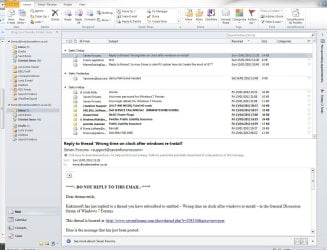
Trying to get Outlook 2010 set up after windows 7 (64bit) reinstall. In the left pane I have two sets of inbox out box etc. One shows a send receive button at the top right the other doesn';t. The one that dioesn';t is the one where new email are coming in. How can I get back to one set of inbox sent etc WITH the send/receive button?
 

My Computer My Computer

At a glance

Windows 7 64bit8 Gb
Computer Manufacturer/Model Number
Dell Inspiron
OS
Windows 7 64bit
Memory
8 Gb
Also trying to recover old pst files from cloud storage system, some of them are shown at C:users\me\AppData\Roaming\Microsoft\Office ... there may be more but i cant see it and some are shown at C:Users\me\Documents\Outlook Files

Whats the difference between the two? And are these the locarions they have to be seperately copied to to get them back?
 

My Computer My Computer

At a glance

Windows 7 64bit8 Gb
Computer Manufacturer/Model Number
Dell Inspiron
OS
Windows 7 64bit
Memory
8 Gb

My Computer My Computer

At a glance

Windows 7 Ultimate SP1 64-BitIntel Core i7 870 @ 2.93GHz8Gb Dual-Channel DDR3 @ 664MHznVidia GeForce GTX 460 1024MB dedicated RAM
Computer Manufacturer/Model Number
HP Pavilion Elite 495UK
OS
Windows 7 Ultimate SP1 64-Bit
CPU
Intel Core i7 870 @ 2.93GHz
Motherboard
MSI 2A9C (CPU1)
Memory
8Gb Dual-Channel DDR3 @ 664MHz
Graphics Card(s)
nVidia GeForce GTX 460 1024MB dedicated RAM
Sound Card
Realtek HD Audio
Monitor(s) Displays
HP2310i
Screen Resolution
1920 x 1080
Hard Drives
1x1954GB Hitachi HDS22020ALA 330 (RAID), 1x1954GB Hitachi External for backup and storage
PSU
460W
Case
HP Elite
Cooling
Air cooled
Keyboard
Logitech K750 solar-powered keyboard
Mouse
Logitech Wireless M180 mouse
Internet Speed
2Mb
Other Info
Pure Avanti Flow Internet Radio with iPod Dock, 64Gb iPod, HP USB Speakers, Sony MDR-V500 Headphones, Sony Vaio F-Series Laptop
I did uninstall and reinstall and got in a worse mess than I am in now - at least I can send and receive email at the moment.
 

My Computer My Computer

At a glance

Windows 7 64bit8 Gb
Computer Manufacturer/Model Number
Dell Inspiron
OS
Windows 7 64bit
Memory
8 Gb
I posted before you made your second comment, which changes things somewhat.

I don't have any experience of working with the Cloud, but I'd stab a guess that you've somehow got two Outlook profiles on the go.

I can't help much further than that so I'm hoping that one of our Office experts will have some answers for you.
 

My Computer My Computer

At a glance

Windows 7 Ultimate SP1 64-BitIntel Core i7 870 @ 2.93GHz8Gb Dual-Channel DDR3 @ 664MHznVidia GeForce GTX 460 1024MB dedicated RAM
Computer Manufacturer/Model Number
HP Pavilion Elite 495UK
OS
Windows 7 Ultimate SP1 64-Bit
CPU
Intel Core i7 870 @ 2.93GHz
Motherboard
MSI 2A9C (CPU1)
Memory
8Gb Dual-Channel DDR3 @ 664MHz
Graphics Card(s)
nVidia GeForce GTX 460 1024MB dedicated RAM
Sound Card
Realtek HD Audio
Monitor(s) Displays
HP2310i
Screen Resolution
1920 x 1080
Hard Drives
1x1954GB Hitachi HDS22020ALA 330 (RAID), 1x1954GB Hitachi External for backup and storage
PSU
460W
Case
HP Elite
Cooling
Air cooled
Keyboard
Logitech K750 solar-powered keyboard
Mouse
Logitech Wireless M180 mouse
Internet Speed
2Mb
Other Info
Pure Avanti Flow Internet Radio with iPod Dock, 64Gb iPod, HP USB Speakers, Sony MDR-V500 Headphones, Sony Vaio F-Series Laptop
Hopefully screenshot here
 

Attachments

  • Clipboard01.jpg
    Clipboard01.jpg
    153.7 KB · Views: 26

My Computer My Computer

At a glance

Windows 7 64bit8 Gb
Computer Manufacturer/Model Number
Dell Inspiron
OS
Windows 7 64bit
Memory
8 Gb
Thanks for the screenshot.

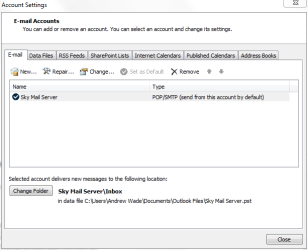
You have two user accounts setup. Just delete the second one marked (1).

Open Outlook, click File then Account Settings.

Click the E-mail tab, highlight the account you don't need and delete it.

Outlook.PNG
 

My Computer My Computer

At a glance

Windows 7 Ultimate SP1 64-BitIntel Core i7 870 @ 2.93GHz8Gb Dual-Channel DDR3 @ 664MHznVidia GeForce GTX 460 1024MB dedicated RAM
Computer Manufacturer/Model Number
HP Pavilion Elite 495UK
OS
Windows 7 Ultimate SP1 64-Bit
CPU
Intel Core i7 870 @ 2.93GHz
Motherboard
MSI 2A9C (CPU1)
Memory
8Gb Dual-Channel DDR3 @ 664MHz
Graphics Card(s)
nVidia GeForce GTX 460 1024MB dedicated RAM
Sound Card
Realtek HD Audio
Monitor(s) Displays
HP2310i
Screen Resolution
1920 x 1080
Hard Drives
1x1954GB Hitachi HDS22020ALA 330 (RAID), 1x1954GB Hitachi External for backup and storage
PSU
460W
Case
HP Elite
Cooling
Air cooled
Keyboard
Logitech K750 solar-powered keyboard
Mouse
Logitech Wireless M180 mouse
Internet Speed
2Mb
Other Info
Pure Avanti Flow Internet Radio with iPod Dock, 64Gb iPod, HP USB Speakers, Sony MDR-V500 Headphones, Sony Vaio F-Series Laptop
When I go to that location there is only one account showing the one marked (1)
 

My Computer My Computer

At a glance

Windows 7 64bit8 Gb
Computer Manufacturer/Model Number
Dell Inspiron
OS
Windows 7 64bit
Memory
8 Gb
Trying to get Outlook 2010 set up after windows 7 (64bit) reinstall. In the left pane I have two sets of inbox out box etc. One shows a send receive button at the top right the other doesn';t. The one that dioesn';t is the one where new email are coming in. How can I get back to one set of inbox sent etc WITH the send/receive button?
The only send/receive box I see in your screenshot is in the top right side of the screen. I am also using Outlook 2010 and used 2003 in my XP computer, and they both look like yours. It's hard to read everything but the only difference I see is your Drafts folder is near the bottom and mine is near the top. I don't know why the side bar lists everything twice either, but it all works so that's what's important to me. :)
 

My Computer My Computer

At a glance

WIN7 x64 Home Premium SP1Intel Core i5-2400 processor(6MB Cache, 3.1GHz)8 GB RAM
Computer Manufacturer/Model Number
DELLXPS 8300
OS
WIN7 x64 Home Premium SP1
CPU
Intel Core i5-2400 processor(6MB Cache, 3.1GHz)
Memory
8 GB RAM
Hard Drives
1.5TB C Drive
Back
Top