Totally remove user name in work 2010

sam49

New member
Member
VIP
Local time
9:58 AM
Messages
140
Hi is it possible to completely remove the user name in word 2010 saved file please

Plus I have just noticed another problem when I save a document that already exists word does no longer warn me that this file is already there and do I want to continue, im almost sure this was the way it was a while ago.
 
Last edited:

My Computer

Computer Manufacturer/Model Number
Custom Made
OS
Windows 7 Professional 64 Bit
CPU
Intel Core I7 920 @ 2.6 GHz
Motherboard
Asus P6T SE
Memory
12 Meg Triple Channel DDR3
Graphics Card(s)
Nvidia Gforce GTX 260
Sound Card
On Board
Monitor(s) Displays
DGM
Hard Drives
500 gig Sata
PSU
Not sure
Case
Thermalite
Cooling
Standard cooling
Keyboard
Usb
Mouse
Usb
Internet Speed
7meg
I use Office 2013 which I think is very similar to 2010. To remove a user name & other sensitive information from Word, open the Word document & click on the "?" up on the right hand top & in the Search box type, "Remove user name from documents" (without the parenthesis) & this will give you a list of options & you can read through & follow the methods. This should help you.

On your second point, open Control Panel, then Programs & Features, select Microsoft Office 2010, right click mouse on it & select Repair from the menu. If you only have Word installed do the same thing with it. Hope this helps.
 

My Computer

Computer type
PC/Desktop
Computer Manufacturer/Model Number
Self built using existing case
OS
Windows 7 Home Premium 64 bit sp1
CPU
Intel i5 3570 3.4Ghz Ivy Bridge SKT 1155 quad core
Motherboard
Gigabyte Z77-HD3 SKT 1155 2xSata 3, 4x USB 3.0
Memory
G-Skill Rip Jaws 16Gb (8x2) DDR3 -1600 PC3 12800 CL 10 red
Graphics Card(s)
Gigabyte NVIDIA GT610 1Gb DDR3 810/1200 PCI-E 2.0 Silent
Sound Card
NVIDIA High Definition & Realtech High Definition Audio
Monitor(s) Displays
2 x Philips 226V4L 16:9 aspect ratio
Screen Resolution
1920 x 1080 HD
Hard Drives
Samsung 840 Pro 256gb SSD, SATA 3.
Hitachi Touro Portable 1tb, USB 3.0 HDD used for image b/ups.
PSU
Corsair VS450
Case
Codeng
Cooling
PSU fan & CPU fan
Keyboard
Logitech
Mouse
Logitech Wireless trackball M570
Internet Speed
Wireless 3G. 3mg down & 550kb up.
Antivirus
Bitdefender Internet Security 2020
Browser
Opera (Current Version) & Firefox
Other Info
MS Office 2013 Pro. Davis weather station software. MGE Nova 600 avr UPS.
Hi Ranger4 thanks for your reply

I have tried both your suggestion's and after a repair of office and I get no warning if it save a file with the same name it just saves over the top of the original file

And the second point after I run the document inspector it still saves with my user name
 

My Computer

Computer Manufacturer/Model Number
Custom Made
OS
Windows 7 Professional 64 Bit
CPU
Intel Core I7 920 @ 2.6 GHz
Motherboard
Asus P6T SE
Memory
12 Meg Triple Channel DDR3
Graphics Card(s)
Nvidia Gforce GTX 260
Sound Card
On Board
Monitor(s) Displays
DGM
Hard Drives
500 gig Sata
PSU
Not sure
Case
Thermalite
Cooling
Standard cooling
Keyboard
Usb
Mouse
Usb
Internet Speed
7meg
This website may help you with removing your user name from Word documents.

Remove hidden data and personal information by inspecting documents - Word - Office.com

I am not quite sure what you saying with the document already existing question. If you create a new document & save is as XYZ & close it, then at a later time you reopen it to do some alterations or additions, then when you close it will ask if you want to save the changes.
Now, if you create a new document & save it also as XYZ, then when you close it will tell you there is already a document called XYZ & do you want to overwrite it.
That is the only time it will warn you that one already exists. When you reopen a document & work on it, you are working on the only copy of that document & not a new one.
I hope what I have said is clear enough for you & it answers your question.
 

My Computer

Computer type
PC/Desktop
Computer Manufacturer/Model Number
Self built using existing case
OS
Windows 7 Home Premium 64 bit sp1
CPU
Intel i5 3570 3.4Ghz Ivy Bridge SKT 1155 quad core
Motherboard
Gigabyte Z77-HD3 SKT 1155 2xSata 3, 4x USB 3.0
Memory
G-Skill Rip Jaws 16Gb (8x2) DDR3 -1600 PC3 12800 CL 10 red
Graphics Card(s)
Gigabyte NVIDIA GT610 1Gb DDR3 810/1200 PCI-E 2.0 Silent
Sound Card
NVIDIA High Definition & Realtech High Definition Audio
Monitor(s) Displays
2 x Philips 226V4L 16:9 aspect ratio
Screen Resolution
1920 x 1080 HD
Hard Drives
Samsung 840 Pro 256gb SSD, SATA 3.
Hitachi Touro Portable 1tb, USB 3.0 HDD used for image b/ups.
PSU
Corsair VS450
Case
Codeng
Cooling
PSU fan & CPU fan
Keyboard
Logitech
Mouse
Logitech Wireless trackball M570
Internet Speed
Wireless 3G. 3mg down & 550kb up.
Antivirus
Bitdefender Internet Security 2020
Browser
Opera (Current Version) & Firefox
Other Info
MS Office 2013 Pro. Davis weather station software. MGE Nova 600 avr UPS.
This website may help you with removing your user name from Word documents.

Remove hidden data and personal information by inspecting documents - Word - Office.com

If you create a new document & save is as XYZ & close it, then at a later time you reopen it to do some alterations or additions, then when you close it will ask if you want to save the changes.
Now, if you create a new document & save it also as XYZ, then when you close it will tell you there is already a document called XYZ & do you want to overwrite it.
That is the only time it will warn you that one already exists. When you reopen a document & work on it, you are working on the only copy of that document & not a new one.

Hi Ranger4 I understand what you are saying about saving documents.

The problem I have is if I have a word document saved on my computer and I then open the document make some changes and then save the document with the same file name it does not warn me that there is already a file with that name at that location, it just saves it (This is a problem for me as I might need to keep the original file).

if I make a new document then close word without saving it then asks do I want to save the file this is what I would expect.

But if a file with that name is already in that location it does not say do you want to overwrite it.

As for your first point about removing personal information from a word file I have had a look at the link you provided and that does explain how to remove personal info from the file, but it seems to only work the one time as next time I wish to save a file I have to do it again.

I was looking at a more permanent way of not saving my personal details at all, if this is possible.
 

My Computer

Computer Manufacturer/Model Number
Custom Made
OS
Windows 7 Professional 64 Bit
CPU
Intel Core I7 920 @ 2.6 GHz
Motherboard
Asus P6T SE
Memory
12 Meg Triple Channel DDR3
Graphics Card(s)
Nvidia Gforce GTX 260
Sound Card
On Board
Monitor(s) Displays
DGM
Hard Drives
500 gig Sata
PSU
Not sure
Case
Thermalite
Cooling
Standard cooling
Keyboard
Usb
Mouse
Usb
Internet Speed
7meg
I have just noticed that Excel 2010 also saves Author details in the file the same as word so I think the problem is in the office 2010 setup and not just with Word.

I have tried saving an excel file with the same name and it then warns me there is a file with that name and do I want to over right it.

So that problem is just in the Word part of office.
 

My Computer

Computer Manufacturer/Model Number
Custom Made
OS
Windows 7 Professional 64 Bit
CPU
Intel Core I7 920 @ 2.6 GHz
Motherboard
Asus P6T SE
Memory
12 Meg Triple Channel DDR3
Graphics Card(s)
Nvidia Gforce GTX 260
Sound Card
On Board
Monitor(s) Displays
DGM
Hard Drives
500 gig Sata
PSU
Not sure
Case
Thermalite
Cooling
Standard cooling
Keyboard
Usb
Mouse
Usb
Internet Speed
7meg
When you save a newly created document that has the same as an existing one are you saving it to the same folder that has the original document in it. I have found that unless you actually save the document to the same folder it will save it in your the main Documents Library.
You could check this by seeing if you actually have 2 documents with the same name somewhere in your Documents Library.
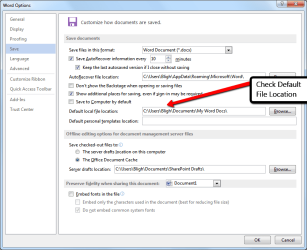
To make sure that all your Word documents get saved to the one folder in your Documents Library. Open Word & select File & then Options, then Save & follow the screen shot below. When you have set the correct place to save all your documents, be sure to click on OK at the bottom to save the changes.

Word_Document.png

I do not use the Remove personal items from Word documents, but it is possible you have to do it for each document, but I really can't help you any more with that.
 

My Computer

Computer type
PC/Desktop
Computer Manufacturer/Model Number
Self built using existing case
OS
Windows 7 Home Premium 64 bit sp1
CPU
Intel i5 3570 3.4Ghz Ivy Bridge SKT 1155 quad core
Motherboard
Gigabyte Z77-HD3 SKT 1155 2xSata 3, 4x USB 3.0
Memory
G-Skill Rip Jaws 16Gb (8x2) DDR3 -1600 PC3 12800 CL 10 red
Graphics Card(s)
Gigabyte NVIDIA GT610 1Gb DDR3 810/1200 PCI-E 2.0 Silent
Sound Card
NVIDIA High Definition & Realtech High Definition Audio
Monitor(s) Displays
2 x Philips 226V4L 16:9 aspect ratio
Screen Resolution
1920 x 1080 HD
Hard Drives
Samsung 840 Pro 256gb SSD, SATA 3.
Hitachi Touro Portable 1tb, USB 3.0 HDD used for image b/ups.
PSU
Corsair VS450
Case
Codeng
Cooling
PSU fan & CPU fan
Keyboard
Logitech
Mouse
Logitech Wireless trackball M570
Internet Speed
Wireless 3G. 3mg down & 550kb up.
Antivirus
Bitdefender Internet Security 2020
Browser
Opera (Current Version) & Firefox
Other Info
MS Office 2013 Pro. Davis weather station software. MGE Nova 600 avr UPS.
Hi thanks for the advice,

I had word setup to always save in the same folder before I noticed this problem.

I have done a little more research into this problem and it seem that is normal for word not to warn you if you load a file then amend the file and save it with the same name in the same location it just save the amended file over the original,

The only way it will warn you is if you make a completely new document and then try and save with a file name that already exists it will then ask if you want to overwrite the file or choose a new name.

But it does not give that option if you just amend a file.


As for removing personal details I guess I will just have to live with that, but in the short term I have changes the user name to a name that does not point to me.

Thanks for all your help and advice its much appreciated.
 

My Computer

Computer Manufacturer/Model Number
Custom Made
OS
Windows 7 Professional 64 Bit
CPU
Intel Core I7 920 @ 2.6 GHz
Motherboard
Asus P6T SE
Memory
12 Meg Triple Channel DDR3
Graphics Card(s)
Nvidia Gforce GTX 260
Sound Card
On Board
Monitor(s) Displays
DGM
Hard Drives
500 gig Sata
PSU
Not sure
Case
Thermalite
Cooling
Standard cooling
Keyboard
Usb
Mouse
Usb
Internet Speed
7meg
Yes you are correct about what happens when you just amend a document.

If you open an existing document & edit or add to it then there is no need to save it with same name, as it is assumed by the system that you wanted to make the alterations & just saving on closing will keep the same document name. Of course you can save it with a new name if you still want to have a copy of the old unedited one as well.
If you use the "Save as' option & save it using the same name, is the same as just saving without renaming it.
 

My Computer

Computer type
PC/Desktop
Computer Manufacturer/Model Number
Self built using existing case
OS
Windows 7 Home Premium 64 bit sp1
CPU
Intel i5 3570 3.4Ghz Ivy Bridge SKT 1155 quad core
Motherboard
Gigabyte Z77-HD3 SKT 1155 2xSata 3, 4x USB 3.0
Memory
G-Skill Rip Jaws 16Gb (8x2) DDR3 -1600 PC3 12800 CL 10 red
Graphics Card(s)
Gigabyte NVIDIA GT610 1Gb DDR3 810/1200 PCI-E 2.0 Silent
Sound Card
NVIDIA High Definition & Realtech High Definition Audio
Monitor(s) Displays
2 x Philips 226V4L 16:9 aspect ratio
Screen Resolution
1920 x 1080 HD
Hard Drives
Samsung 840 Pro 256gb SSD, SATA 3.
Hitachi Touro Portable 1tb, USB 3.0 HDD used for image b/ups.
PSU
Corsair VS450
Case
Codeng
Cooling
PSU fan & CPU fan
Keyboard
Logitech
Mouse
Logitech Wireless trackball M570
Internet Speed
Wireless 3G. 3mg down & 550kb up.
Antivirus
Bitdefender Internet Security 2020
Browser
Opera (Current Version) & Firefox
Other Info
MS Office 2013 Pro. Davis weather station software. MGE Nova 600 avr UPS.
Back
Top