Touch-Sensitive media not working

NanoPad7

Banned
Local time
2:08 PM
Messages
4
Dear Friends,
Hope all is well...I'm new on here...

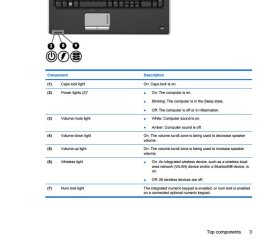
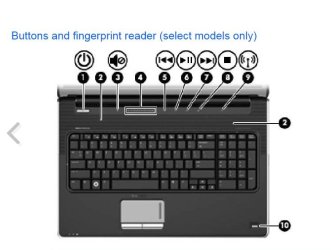
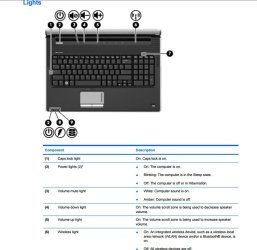
Your supposed to be able to move your fingers over the "illuminated" sound bar at the plus (+) or minus (-) end and change the volume. (Volume Scroll Zone) It's not working. I have to adjust the volume manually from the speaker icon in the lower right corner. Also there are rewind>pause>play>fast forward..All just above the F keys. I have no idea what activates the Num lock light? Which is #7 in the attachment?!

I updated the BIOS to the latest version direct from HP

I installed the quick launch software below...
ftp://ftp.hp.com/pub/softpaq/sp49001-49500/sp49104.exe

Any help or suggestions welcomed.

As Always, Raphael

HP Pavilion dv7-3085dx Entertainment Notebook PC Manuals | HP(R) Customer Support
 

Attachments
  • LightsA.jpg
    LightsA.jpg
    62.6 KB · Views: 1
  • Lights B.jpg
    Lights B.jpg
    54.3 KB · Views: 0
  • Sample Fingerprint reader layout.jpg
    Sample Fingerprint reader layout.jpg
    49.6 KB · Views: 0

My Computer

Computer type
Laptop
Computer Manufacturer/Model Number
HP Pavilion dv7-3085dx
OS
Window 7 64 Bit Home Premium
CPU
Intel(R) Core(TM) i7 CPU Q 720 @ 1.60GHz
Motherboard
Quanta, 363C
Memory
RAM: 6134 Mb
Graphics Card(s)
NVIDIA GeForce GT 230M, 1024 Mb
Hard Drives
C: 450 GB (416 GB Free); D: 15 GB (2 GB Free)
Antivirus
Avira Antivirus
Browser
Google Chrome
Hi and welcome to SevenForums,
Should just be controlled by the Synaptics PS/2 Port TouchPad Driver
HP Software and Driver Downloads for HP Printers, Laptops, Desktops and More | HP(R) Customer Support

http://ftp.hp.com/pub/softpaq/sp46501-47000/sp46509.exe

Have you ever used a wired or wireless mouse ?
Microsoft mice would usually install a mouse and keyboard center that would remove the driver making adjusting the touchpad.... impossible after doing so I had one at one time :)

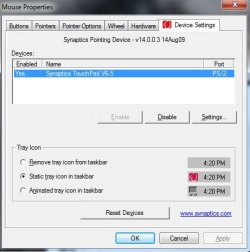
But to adjust the driver setting for the features it has would normally be in your control panel and Mouse settings
You'll see a entry called Device settings and is where all of the adjustments can be made for the features
See if you have device settings listed.

There is also a Validity Fingerprint Sensor Driver too.
 

My Computer

Computer type
PC/Desktop
Computer Manufacturer/Model Number
Custom assembled by me :}
OS
Win-7-Pro64bit 7-H-Prem-64bit
CPU
i7-5930K 2nd i9-9940x both water blocked VRM's too
Motherboard
ASUS SABERTOOTH X99 2nd ASUS x299 Apex
Memory
Trident-z 3200C14 2nd Trident-z 3600C16
Graphics Card(s)
EVGA 1080ti ftw3 2nd Titan Xp both water blocked
Sound Card
Built-in Realtek
Monitor(s) Displays
1-AOC G2460PG 24"G-Sync 144Hz/ 2nd 1-ASUS VG248QE 24" 144Hz
Screen Resolution
1920 x 1080 144Hz
Hard Drives
2-Samsung M.2 Evo & Evo Plus
2-Samsung 850 EVO 500GB SSD's/ 3-2.5 W.D. Black 1tb-&3-1tb/3-3.5 WD Black 1tb hdd's
PSU
EVGA SuperNOVA 1000-P2 2nd 1200-P2
Case
2-Corsair Obsidian Series 450D Black ATX Mid Tower
Cooling
Custom water loops
Keyboard
Logitech G710+/ 2nd Logitech G910
Mouse
2-RedDragon M901 Perdition 16400 dpi Gaming mouse = wired
Internet Speed
Comcast Ping 19ms 89.31mbps download speed 6.12mbps upload
Antivirus
Malwarebytes Pro/ Superantispyware Pro
Browser
FireFox & Pale moon
Other Info
2nd ASUS X299 Apex/Intel i9-9940x with Custom water loop/7H-Prem-x64/Corsair 450D case/Ram Trident-z 3600C16 4x8gb / Samsung970Evo plus 500gb SSD/Dual ssd EZ swap evo/PSU EVGA SuperNova 1200w-P2 80+Platinum/GPU Titan Xp /8-ML-140 on push-pull on 2-280GTX rads
Thank You!
I followed the instructions clearly by uninstalling the older version rebooting and reinstalling the newest version v14.0.0.3. I haven't tried adjusting anything in the mouse settings as I didn't think it applied to this.
The newer version didn't change the the functioning. Is there something in the Mouse settings that needs adjustments? Whatz next?
Best, Raphael
 

Attachments

  • Mouse settings.jpg
    Mouse settings.jpg
    33.8 KB · Views: 11

My Computer

Computer type
Laptop
Computer Manufacturer/Model Number
HP Pavilion dv7-3085dx
OS
Window 7 64 Bit Home Premium
CPU
Intel(R) Core(TM) i7 CPU Q 720 @ 1.60GHz
Motherboard
Quanta, 363C
Memory
RAM: 6134 Mb
Graphics Card(s)
NVIDIA GeForce GT 230M, 1024 Mb
Hard Drives
C: 450 GB (416 GB Free); D: 15 GB (2 GB Free)
Antivirus
Avira Antivirus
Browser
Google Chrome
Hi,
Click on the settings button and scroll through the long list for anything that remotely applies to the features you're missing or non responsive
It's a heck of a list I would imagine if it's anything like mine which for the sound all I have to do is tap the + or - to get it to move.
So you might look for sensitivity / touch options for those features.
 

My Computer

Computer type
PC/Desktop
Computer Manufacturer/Model Number
Custom assembled by me :}
OS
Win-7-Pro64bit 7-H-Prem-64bit
CPU
i7-5930K 2nd i9-9940x both water blocked VRM's too
Motherboard
ASUS SABERTOOTH X99 2nd ASUS x299 Apex
Memory
Trident-z 3200C14 2nd Trident-z 3600C16
Graphics Card(s)
EVGA 1080ti ftw3 2nd Titan Xp both water blocked
Sound Card
Built-in Realtek
Monitor(s) Displays
1-AOC G2460PG 24"G-Sync 144Hz/ 2nd 1-ASUS VG248QE 24" 144Hz
Screen Resolution
1920 x 1080 144Hz
Hard Drives
2-Samsung M.2 Evo & Evo Plus
2-Samsung 850 EVO 500GB SSD's/ 3-2.5 W.D. Black 1tb-&3-1tb/3-3.5 WD Black 1tb hdd's
PSU
EVGA SuperNOVA 1000-P2 2nd 1200-P2
Case
2-Corsair Obsidian Series 450D Black ATX Mid Tower
Cooling
Custom water loops
Keyboard
Logitech G710+/ 2nd Logitech G910
Mouse
2-RedDragon M901 Perdition 16400 dpi Gaming mouse = wired
Internet Speed
Comcast Ping 19ms 89.31mbps download speed 6.12mbps upload
Antivirus
Malwarebytes Pro/ Superantispyware Pro
Browser
FireFox & Pale moon
Other Info
2nd ASUS X299 Apex/Intel i9-9940x with Custom water loop/7H-Prem-x64/Corsair 450D case/Ram Trident-z 3600C16 4x8gb / Samsung970Evo plus 500gb SSD/Dual ssd EZ swap evo/PSU EVGA SuperNova 1200w-P2 80+Platinum/GPU Titan Xp /8-ML-140 on push-pull on 2-280GTX rads
Dear Friend, hope your blessed and doing well.

I could not find anything under Settings that applies to this/Volume Scroll Zone above the f keys. All was related to the touch pad.

"if it's anything like mine which for the sound all I have to do is tap the + or - to get it to move." mine doesn't function.

There are two things I neglected to put in my original post that might help explain this and solve it..

One - the battery is junk and needs replacement. So, it's run off the AC adapter all the time. Should I remove the battery until I get the replacement.. curious?

Two - using the System Recovery Options I ended up doing a Factory restore back to it's original condition a few days ago. I backed up (7) seven dvd's in the process. I did this in part due to this malfunction in the touch scroll zone..other than that the computer was working fine.

Thank You!
Sincerely, Raphaello
 

My Computer

Computer type
Laptop
Computer Manufacturer/Model Number
HP Pavilion dv7-3085dx
OS
Window 7 64 Bit Home Premium
CPU
Intel(R) Core(TM) i7 CPU Q 720 @ 1.60GHz
Motherboard
Quanta, 363C
Memory
RAM: 6134 Mb
Graphics Card(s)
NVIDIA GeForce GT 230M, 1024 Mb
Hard Drives
C: 450 GB (416 GB Free); D: 15 GB (2 GB Free)
Antivirus
Avira Antivirus
Browser
Google Chrome
Any further thoughts or suggestions on this? I think the entire board that houses these features, causes the indicators to glow is no good..even the Wifi light is off completely and won't turn on. HP's engineers ought to have spent more time on this one as this seems to be an issue with several models and configurations. I'm worn out!!!
Ciao. R
 

My Computer

Computer type
Laptop
Computer Manufacturer/Model Number
HP Pavilion dv7-3085dx
OS
Window 7 64 Bit Home Premium
CPU
Intel(R) Core(TM) i7 CPU Q 720 @ 1.60GHz
Motherboard
Quanta, 363C
Memory
RAM: 6134 Mb
Graphics Card(s)
NVIDIA GeForce GT 230M, 1024 Mb
Hard Drives
C: 450 GB (416 GB Free); D: 15 GB (2 GB Free)
Antivirus
Avira Antivirus
Browser
Google Chrome
Hi,
I doubt the battery has anything to do with it.

Looking through the list of media drivers there were it is pretty wild :)
I would of guessed if one had a factory system restore all the functions would at least work after using it so it could very well just be defective hardware :(
 

My Computer

Computer type
PC/Desktop
Computer Manufacturer/Model Number
Custom assembled by me :}
OS
Win-7-Pro64bit 7-H-Prem-64bit
CPU
i7-5930K 2nd i9-9940x both water blocked VRM's too
Motherboard
ASUS SABERTOOTH X99 2nd ASUS x299 Apex
Memory
Trident-z 3200C14 2nd Trident-z 3600C16
Graphics Card(s)
EVGA 1080ti ftw3 2nd Titan Xp both water blocked
Sound Card
Built-in Realtek
Monitor(s) Displays
1-AOC G2460PG 24"G-Sync 144Hz/ 2nd 1-ASUS VG248QE 24" 144Hz
Screen Resolution
1920 x 1080 144Hz
Hard Drives
2-Samsung M.2 Evo & Evo Plus
2-Samsung 850 EVO 500GB SSD's/ 3-2.5 W.D. Black 1tb-&3-1tb/3-3.5 WD Black 1tb hdd's
PSU
EVGA SuperNOVA 1000-P2 2nd 1200-P2
Case
2-Corsair Obsidian Series 450D Black ATX Mid Tower
Cooling
Custom water loops
Keyboard
Logitech G710+/ 2nd Logitech G910
Mouse
2-RedDragon M901 Perdition 16400 dpi Gaming mouse = wired
Internet Speed
Comcast Ping 19ms 89.31mbps download speed 6.12mbps upload
Antivirus
Malwarebytes Pro/ Superantispyware Pro
Browser
FireFox & Pale moon
Other Info
2nd ASUS X299 Apex/Intel i9-9940x with Custom water loop/7H-Prem-x64/Corsair 450D case/Ram Trident-z 3600C16 4x8gb / Samsung970Evo plus 500gb SSD/Dual ssd EZ swap evo/PSU EVGA SuperNova 1200w-P2 80+Platinum/GPU Titan Xp /8-ML-140 on push-pull on 2-280GTX rads
Back
Top