Touchpad issues after Win 7 upgrade

LittleFin

New member
Local time
9:40 PM
Messages
10
Hi,

I completed a clean install of Win 7 from Vista last week. Since this was done, the touchpad functionality has gone.

PackardBell TJ65
The pointer function works but none of the slide functions.

I have installed the drivers from the PB website, I have also contact the TechGuys where I bought the computer and they are at a loss.

Any help would be greatly received.

LF.
:mad:
 

My Computer

OS
Windows 7
Hi there, I work for The Techguys.

You will need the Synaptics Touchpsd Pointing Device Driver.

D/L from here and virtual scrolling should be enabled by default.

Drivers | Synaptics

Choose the correct Bit version for your OS and should be fine.

Post back if needed but should work fine I reckon.
 

My Computer

Computer Manufacturer/Model Number
Packard Bell MH36-U300
OS
Windows 7 Ultimate 64-Bit
CPU
Intel(R) Pentium(R) Dual CPU T3400 @ 2.16GHz
Memory
2GB DDR2
Graphics Card(s)
Mobile Intel(R) 4 Series Express Chipset
Sound Card
Realtek High Definition Audio
Monitor(s) Displays
15" LCD
Screen Resolution
1280 x 800
Hard Drives
320GB Western Digital
Case
Notebook
Internet Speed
10Mbps
"should work fine I reckon."

In short doesn't. But by posting that I have contact the techguys and they are at a loss . . (I have an email from them saying exactly that) I don't think following the same instructions again is going to work.

But for the record, I have tried and it still hasn't worked.
 

My Computer

OS
Windows 7
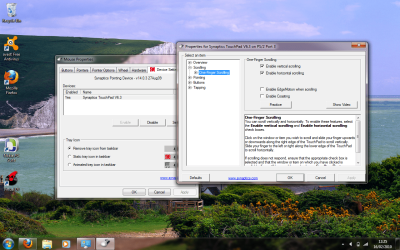
Do you have these boxes ticked on the driver settings?
 

Attachments

  • TP.png
    TP.png
    312.1 KB · Views: 218

My Computer

Computer Manufacturer/Model Number
Packard Bell MH36-U300
OS
Windows 7 Ultimate 64-Bit
CPU
Intel(R) Pentium(R) Dual CPU T3400 @ 2.16GHz
Memory
2GB DDR2
Graphics Card(s)
Mobile Intel(R) 4 Series Express Chipset
Sound Card
Realtek High Definition Audio
Monitor(s) Displays
15" LCD
Screen Resolution
1280 x 800
Hard Drives
320GB Western Digital
Case
Notebook
Internet Speed
10Mbps
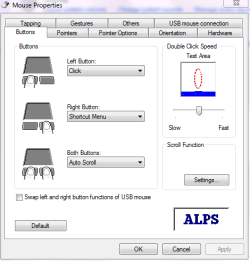
Don't have the option.

Those boxes aren't there.

I have attached a picture of what I see . .
 

My Computer

OS
Windows 7
In the right place mate!!:D Click on settings, then expand scrolling and highlight (not expand) One finger scrolling and tick (if not ticked already) the scrolling for both at the top. When you are there ya screen will look like mine! this should work fine if not ticked!!
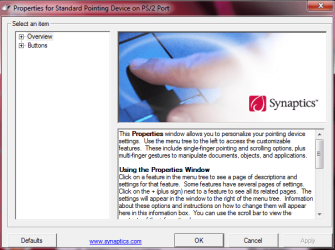
Dont enable Coasting as gets quite annoying!!
 
Last edited:

My Computer

Computer Manufacturer/Model Number
Packard Bell MH36-U300
OS
Windows 7 Ultimate 64-Bit
CPU
Intel(R) Pentium(R) Dual CPU T3400 @ 2.16GHz
Memory
2GB DDR2
Graphics Card(s)
Mobile Intel(R) 4 Series Express Chipset
Sound Card
Realtek High Definition Audio
Monitor(s) Displays
15" LCD
Screen Resolution
1280 x 800
Hard Drives
320GB Western Digital
Case
Notebook
Internet Speed
10Mbps
you just helped me as well. Thank you Tezlewis. When I scroll it goes nuts. I will check on my settings when I get a chance and turn off coasting. Thanks
 

My Computer

Computer type
Laptop
Computer Manufacturer/Model Number
ASUS G60-RBBX05
OS
Win7 Home Premium 64x
CPU
Intel Core 2 Duo P7450 / 2.13 GHz (2.29 with Extreme Turbo)
Memory
4 GB PC-6400 Hyundai (2X2) at 800Mhz
Graphics Card(s)
NVIDIA GeForce GTX 260M 1GB DDR3 VRAM
Monitor(s) Displays
16" LED Backlit
Screen Resolution
1366 x 768 on laptop 1600x1050 max res on 22" external mon
Hard Drives
OCZ Agility 3 60GB SSD / 320 GB - Serial ATA-150 - 7200 rpm
PSU
6-cell Lithium ion { lasts 1.5 hours }
Case
ASUS G60 Laptop
Keyboard
Chicklet type back-lit (white light) keyboard
Mouse
Logitech G9 Laser Mouse 3200dpi and 1000 reports per minute
Internet Speed
Comcast 8.60mb/s up - 3.11mb/s down
Antivirus
MSE
Browser
Firefox
Other Info
General mid-budget gaming Comp. Low batterylife - High FrameRates - currently overheating problems :(

2nd Rig: Case: Rosewill BLACKHAWK Gaming ATX Mid Tower Computer Case

Mobo: GIGABYTE GA-990FXA-UD3
CPU: AMD FX-6200 Zambezi 3.8GHz (4.1GHz Turbo)
Heatsink: COOLER MASTER V8 CPU Cooler
RAM: Patriot Viper 3 8GB (2 x 4GB) 240-Pin DDR3 SDRAM 1866 (PC3 15000)
GPU: SAPPHIRE Radeon HD 6850 1GB 2
1)) remove this synaptics driver, 2)) restart your pc, 3)) go to windows update, check for updates & it'll notify you about synaptics driver being there for you, 4)) select it, install, 5)) restart ... 6)) go to settings as mentioned by "tezlewis" & everything will be fine :) you'll find the option you are seeking for..i hope =)
i had the same problem couple of days ago on a toshiba a200-28m laptop
 

My Computer

OS
Windows 7 Ultimate x64
Thanks . . but still doesn't work!
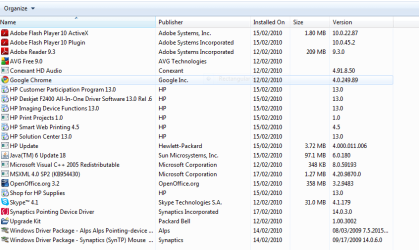
Mouse 3.PNG

This is what's in my Proogrammes and Features.
I can no longer delete the bottom two entries . . .

Any thoughts?

LF
 

My Computer

OS
Windows 7
man, the version you are installing isn't the one from "windows updates"
the one from windows updates is v11.1.18
this is the version that will settle your issue :)
use any advanced uninstaller to remove ALL synaptics drivers, restart & then go to windows updates >> check for updates, select the synaptics driver, install updates, restart again .. >> ENJOY
 

My Computer

OS
Windows 7 Ultimate x64
When I uninstall all drivers and restart I don't have the option to stop the immediate install by Windows of the said drivers.

Can you please advise how I would stop this update happening?

Thanks.
 

My Computer

OS
Windows 7
umm i don't really know how to stop this, try the safe mode first, if still the same
right click on my comp>>properties>>advanced system settings>>device manager>>device installation settings & slect "no,let me choose what to do"
also, go to the windows updates >> change settings >> choose "never check for updates"

i'm not sure if this will fix the immediate install or nah, just try the safe mode first
 

My Computer

OS
Windows 7 Ultimate x64
Thanks but still not working!:cry:
Perhaps uninstalling & clearing Synaptics drivers and next reinstall it would be solution for your problem but you have to estimate even tools for clearing entries are not pernamently precise.If you know what you do the better to clear remains manually.I can help you.,but I need some information about your PC

1.Prepare logs from OTL http://oldtimer.geekstogo.com/OTL.exe (MAIN+EXTRAS),select all (image)

15780d1253342668-hanging-related-updates-i-think-otlsettings.png


2.Run cmd.exe with admin rights (right click on cmd.exe as admin) and type:

cd /d "C:\Windows\System32\DriverStore\FileRepository


press ENTER

dir /s /b >%userprofile%\Desktop\log1.txt

press ENTER

cd /d "C:\Windows\inf"

press ENTER

dir /s /b >%userprofile%\Desktop\log2.txt

press ENTER

on your desktop appear log1.txt and log2.txt

log1.txt ,log2.txt and logs from OTL program attache to post
 

My Computer

Computer Manufacturer/Model Number
Custom made
OS
Windows 7 Professional x64 PL
CPU
AMD Athlon 4450e
Motherboard
Giga-Byte GA-MA69G-S3H
Memory
GoodRam DDR2 2x2048MB (FSB 800MHz)
Graphics Card(s)
nVidia GeForce 9600GT (G94-300) 1024 MB
Monitor(s) Displays
SAMSUNG SyncMaster HS2P301688
Hard Drives
Seagate ST3750330AS 750GB
PSU
Corsair 550W
Cooling
AeroCool ExtremeEngine 3T
Thanks but I got it working before your suggestion!

For the record this is roughly what happened!

Unistalled through programmes and deactivated on settings - plugged in external mouse which allowed by pass of forced restart to gain touchpad control.

Downloaded drivers from Packardbell website - got conflict message and error. Forced restart.
Upon restart touchpad was operational again - I assumed as before no scrolling options.
Toolbar icon looked slightly different double clicked and it appears I am operating from ALPS drivers.
It works!.PNG

Got there in the end but would not like to have to go through all that again!!

Thanks for all the suggestions they may work for someone else!
 

My Computer

OS
Windows 7
I glad to hear your problem has been resolved.Thanks for posting solution -surly it will be helpfull for others :)
 

My Computer

Computer Manufacturer/Model Number
Custom made
OS
Windows 7 Professional x64 PL
CPU
AMD Athlon 4450e
Motherboard
Giga-Byte GA-MA69G-S3H
Memory
GoodRam DDR2 2x2048MB (FSB 800MHz)
Graphics Card(s)
nVidia GeForce 9600GT (G94-300) 1024 MB
Monitor(s) Displays
SAMSUNG SyncMaster HS2P301688
Hard Drives
Seagate ST3750330AS 750GB
PSU
Corsair 550W
Cooling
AeroCool ExtremeEngine 3T
Hi all
Good luck on solving it

However I'd suggest for anybody else there's a MUCH easier solution (Works fine for W7 X-64 as well).

Download and install the Generic SYNAPTICS touchpad driver.

I haven't yet seen a laptop where this DOESN'T work. - Must be about the most compatable piece of software EVER.

Drivers | Synaptics

Cheers
jimbo
 

My Computer

Computer type
PC/Desktop
Computer Manufacturer/Model Number
Custom built, several laptops HP/ASUS
OS
Linux CENTOS 7 / various Windows OS'es and servers
CPU
Intel i7 Intel i5
Memory
8GB, 16GB
Graphics Card(s)
On Motherboard
Sound Card
Realtek HD audio
Monitor(s) Displays
Apple Cinema display, Samsung LCD
Screen Resolution
1920 X 1080
Hard Drives
4 X 1TB SATA
Mouse
Toshiba wireless laser
Internet Speed
> 20MB up
But for the record, I have tried and it still hasn't worked.

Well I must have the first laptop (but I am sure not the last) that the synaptic drivers did not work.

I tried to download them as per my third post and they DIDN'T WORK. :mad:

It's the first bit of advice anyone will give you - try it, but if it doesn't work it's always good to have alternatives and to know that someone else has gone through it too.
:cool:
 

My Computer

OS
Windows 7
Back
Top