Solved Touchpad not working after Internet Explorer 9 install Sony Vaio

Teckniqs

New member
Local time
3:11 AM
Messages
17
Hi all, I recently got hold of a used Sony Vaio VGN-N29VN laptop, everything was working fine until I updated IE from 8-9 and now the touchpad doesn't work!! It works briefly before Windows 7 has fully loaded up on the loading screen but as soon as the desktop appears it stops.

Please help.
 

My Computer My Computer

At a glance

Windows 7 Ultimate x32
OS
Windows 7 Ultimate x32
Hello Teckniqs and welcome to Seven Forums.

See if you can access the Advanced Boot Options menu at startup. Does the touchpad work?

http://www.sevenforums.com/tutorials/666-advanced-boot-options.html

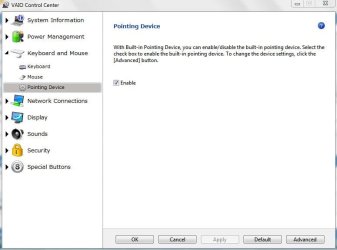
If yes, select Safe Mode and then access the Vaio Control Center. Make sure Pointing Device is enabled.

(Click Start > All Programs > Vaio Control Center > Keyboard and Mouse > Pointing Device > Enable > Apply > OK.)

vaio control center.JPG

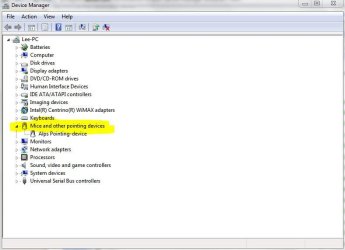
You could also try to access Device Manager through control panel > device manager. Then expand "Mice and other pointing devices" > right-click on the pointing device > select Update driver.

How Do I Open Device Manager in Windows 7?

devmgr.JPG

You may need an external USB mouse if Safe Mode wont allow touchpad to work.

Of course, you could also uninstall IE9 (at least temporarily) and that should automatically reinstall IE8. You can troubleshoot issues using IE8 and then try reinstalling IE9.

http://www.sevenforums.com/tutorials/112121-internet-explorer-9-uninstall.html
 

My Computer My Computer

At a glance

Win 7 Pro 64-bitIntel i5 2.4 Ghz8GB DDR3Intel HD 3000
Computer type
Laptop
Computer Manufacturer/Model Number
Sony Vaio VPCEB47GM Laptop
OS
Win 7 Pro 64-bit
CPU
Intel i5 2.4 Ghz
Memory
8GB DDR3
Graphics Card(s)
Intel HD 3000
Sound Card
IDT High Definition
Monitor(s) Displays
15.6 WGXA Anti-Glare LED
Screen Resolution
1280x800
Hard Drives
640Gb 7200rpm
Antivirus
MSE
Browser
Opera (primary) with IE9 backup
I am very grateful!

Thank you very much, I followed the steps and it has worked!!

I appreciate your kind help!

Touchpad was working on Safemode so I simply uninstalled pointing driver and it asked me to restart so I did, I forgot to push F8 in time and it loaded up to normal Windows and the touchpad was working, it then automatically installed the driver without me doing anything with a speech bubble message on the taskbar to notify me, it then asked me to reboot, I did and it's working fine!

You know your stuff!!
 

My Computer My Computer

At a glance

Windows 7 Ultimate x32
OS
Windows 7 Ultimate x32
That's fantastic news. Glad you got things sorted out. Thanks for posting back! :thumbsup:
 

My Computer My Computer

At a glance

Win 7 Pro 64-bitIntel i5 2.4 Ghz8GB DDR3Intel HD 3000
Computer type
Laptop
Computer Manufacturer/Model Number
Sony Vaio VPCEB47GM Laptop
OS
Win 7 Pro 64-bit
CPU
Intel i5 2.4 Ghz
Memory
8GB DDR3
Graphics Card(s)
Intel HD 3000
Sound Card
IDT High Definition
Monitor(s) Displays
15.6 WGXA Anti-Glare LED
Screen Resolution
1280x800
Hard Drives
640Gb 7200rpm
Antivirus
MSE
Browser
Opera (primary) with IE9 backup
Back
Top