Solved TP-LINK TL-WN350G Wireless card problem

domdomrys

New member
Local time
6:44 PM
Messages
39
Hi, ive got a new computer with windows 7 and i recently brought a TP-LINK TL-WN350G Wireless card and it seems to turn off and on sometimes.eg. when i am talking to my friend on skype, i cant do anything on the internet or else it will stop the conversation. Also sometimes when i download files they stop and then download again. Also sometimes the internet is very slow and sometimes is very fast. Most of the time i have about 2/5 bars of internet. On my old card which i had on my old computer is not compatible with windows 7, on the old one i got abput 4/5 or 5/5 bars of internet. I am thinking about buying a USB adapter not PCI. Shall i buy a new card? If yes, which one do you recommend for under £10. Thanks

I found this: BELKIN F5D7050. is it any good? my friend has got it (the one i talk on skype to) and it seems to be working fine.
 

My Computer

Computer type
PC/Desktop
OS
Windows 7 Home Premium 64bit
CPU
i5-4460
Motherboard
MSI Z97 PC MATE
Memory
Crucial Ballistix Sport XT 2x4GB
Graphics Card(s)
GTX 650 Ti BOOST
Monitor(s) Displays
AOC G2460PQU
Screen Resolution
1920x1080
Hard Drives
Crucial MX100 256GB SSD
Some other 2TB HDD
PSU
OCZ 500W
Case
CM FORCE 500
Keyboard
Steelseries Apex RAW
Mouse
Gigabyte M6900

My Computer

Computer Manufacturer/Model Number
packard bell IXTREME M5722
OS
Operating System : Windows 7 Home Premium Edition 6.01.7600 SP1 (x64)
CPU
Processor : Intel Core 2 Quad Q8300 @ 2500 MHz
Motherboard
Mainboard : Packard Bell (Acer EG43M )
Memory
Physical Memory :8GB Corsair4x 2GB 800MHz C5 DDR2
Graphics Card(s)
Video Card : XFX 6700 AMD
Monitor(s) Displays
Maestro 234DL - BenQ V2220 - BenQ VW2420H
Screen Resolution
Current Display :1920x1080p pixels at 60 Hz in HD LED
Hard Drives
Hard Disks : WDC (1000 GB)
Drive C: (Hard Disk) : 428 GB available on 491 GB
Drive D: (Hard Disk) : 426 GB available on 492 GB
SAMSUNG spinpoint HD103SJ 1000.2 GB
(X 2) KINGSTON SSD NOW V 30GB
PSU
XFX ProSeries 550W PSU
Case
PACKARD BELL IXTREME
Cooling
System Blower Current: 150mA Air Flow16CFM ;Akasa 90mm rear
Keyboard
Gigabyte Aivia K8100
Mouse
TRUST-Wireless Laser Mouse - Carbon edition MI-7770C
Internet Speed
TP-LINK > TL-WN951N / AV500 Gigabit Powerline Adapters
Browser
chrome dev
Other Info
EXTRA COOLING>(FAN CONTROLLER) PC Bay Cooler 3 x 40mm fans; Akasa AK-HD-BL Blue hard drive cooler 2 x 40 mm fan 4500 rpm 29.7 dBA
Bios> American Megatrends Inc.
Version : P01-A1
Date : 08/31/2009
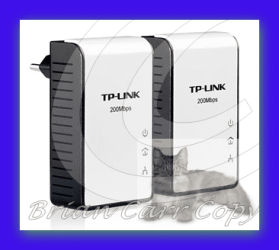
what i have found is POWERLINE very good i recommend them over wireless connections take a look >>> Powerline - Products - Welcome to TP-LINK


TP-LINK's TL-PA211 powerline adapter
takes advantage of your home's existing electrical wires to transfer data while simultaneously transferring traditional power. That means, with no additional wiring required, users can simply plug the TL-PA211 into existing power sockets and instantly establish a networking infrastructure. With high-speed data transfer rates of up to 200Mbps, users can enjoy HD video streaming, online gaming, VoIP or any other bandwidth intensive tasks for work or play.
 

Attachments

  • brys Snap2011.10.0619h44m50s001.png
    brys Snap2011.10.0619h44m50s001.png
    20.9 KB · Views: 12

My Computer

Computer Manufacturer/Model Number
packard bell IXTREME M5722
OS
Operating System : Windows 7 Home Premium Edition 6.01.7600 SP1 (x64)
CPU
Processor : Intel Core 2 Quad Q8300 @ 2500 MHz
Motherboard
Mainboard : Packard Bell (Acer EG43M )
Memory
Physical Memory :8GB Corsair4x 2GB 800MHz C5 DDR2
Graphics Card(s)
Video Card : XFX 6700 AMD
Monitor(s) Displays
Maestro 234DL - BenQ V2220 - BenQ VW2420H
Screen Resolution
Current Display :1920x1080p pixels at 60 Hz in HD LED
Hard Drives
Hard Disks : WDC (1000 GB)
Drive C: (Hard Disk) : 428 GB available on 491 GB
Drive D: (Hard Disk) : 426 GB available on 492 GB
SAMSUNG spinpoint HD103SJ 1000.2 GB
(X 2) KINGSTON SSD NOW V 30GB
PSU
XFX ProSeries 550W PSU
Case
PACKARD BELL IXTREME
Cooling
System Blower Current: 150mA Air Flow16CFM ;Akasa 90mm rear
Keyboard
Gigabyte Aivia K8100
Mouse
TRUST-Wireless Laser Mouse - Carbon edition MI-7770C
Internet Speed
TP-LINK > TL-WN951N / AV500 Gigabit Powerline Adapters
Browser
chrome dev
Other Info
EXTRA COOLING>(FAN CONTROLLER) PC Bay Cooler 3 x 40mm fans; Akasa AK-HD-BL Blue hard drive cooler 2 x 40 mm fan 4500 rpm 29.7 dBA
Bios> American Megatrends Inc.
Version : P01-A1
Date : 08/31/2009
The drivers are the same as i've got
 

My Computer

Computer type
PC/Desktop
OS
Windows 7 Home Premium 64bit
CPU
i5-4460
Motherboard
MSI Z97 PC MATE
Memory
Crucial Ballistix Sport XT 2x4GB
Graphics Card(s)
GTX 650 Ti BOOST
Monitor(s) Displays
AOC G2460PQU
Screen Resolution
1920x1080
Hard Drives
Crucial MX100 256GB SSD
Some other 2TB HDD
PSU
OCZ 500W
Case
CM FORCE 500
Keyboard
Steelseries Apex RAW
Mouse
Gigabyte M6900
ok turn the pc off, turn the mains plug off, pull the mains plug out of the pc, press and hold the power button for 10 seconds, open the case, touch a non painted part of the pc case(to discharge static electricity) gently take the wireless pci card out the slot then gently re-sit it back. now connect power cables and re-boot the pc.
 

My Computer

Computer Manufacturer/Model Number
packard bell IXTREME M5722
OS
Operating System : Windows 7 Home Premium Edition 6.01.7600 SP1 (x64)
CPU
Processor : Intel Core 2 Quad Q8300 @ 2500 MHz
Motherboard
Mainboard : Packard Bell (Acer EG43M )
Memory
Physical Memory :8GB Corsair4x 2GB 800MHz C5 DDR2
Graphics Card(s)
Video Card : XFX 6700 AMD
Monitor(s) Displays
Maestro 234DL - BenQ V2220 - BenQ VW2420H
Screen Resolution
Current Display :1920x1080p pixels at 60 Hz in HD LED
Hard Drives
Hard Disks : WDC (1000 GB)
Drive C: (Hard Disk) : 428 GB available on 491 GB
Drive D: (Hard Disk) : 426 GB available on 492 GB
SAMSUNG spinpoint HD103SJ 1000.2 GB
(X 2) KINGSTON SSD NOW V 30GB
PSU
XFX ProSeries 550W PSU
Case
PACKARD BELL IXTREME
Cooling
System Blower Current: 150mA Air Flow16CFM ;Akasa 90mm rear
Keyboard
Gigabyte Aivia K8100
Mouse
TRUST-Wireless Laser Mouse - Carbon edition MI-7770C
Internet Speed
TP-LINK > TL-WN951N / AV500 Gigabit Powerline Adapters
Browser
chrome dev
Other Info
EXTRA COOLING>(FAN CONTROLLER) PC Bay Cooler 3 x 40mm fans; Akasa AK-HD-BL Blue hard drive cooler 2 x 40 mm fan 4500 rpm 29.7 dBA
Bios> American Megatrends Inc.
Version : P01-A1
Date : 08/31/2009
ill try it......
 

My Computer

Computer type
PC/Desktop
OS
Windows 7 Home Premium 64bit
CPU
i5-4460
Motherboard
MSI Z97 PC MATE
Memory
Crucial Ballistix Sport XT 2x4GB
Graphics Card(s)
GTX 650 Ti BOOST
Monitor(s) Displays
AOC G2460PQU
Screen Resolution
1920x1080
Hard Drives
Crucial MX100 256GB SSD
Some other 2TB HDD
PSU
OCZ 500W
Case
CM FORCE 500
Keyboard
Steelseries Apex RAW
Mouse
Gigabyte M6900
Sorry to ask, but you did attach the antenna to the TP-Link card's antenna jack, right?
I have almost the same card in my PC and haven't had any issues with it...if the antenna is properly attached, maybe you're just too far away from your router?
 

My Computer

Computer type
PC/Desktop
Computer Manufacturer/Model Number
Custom-built
OS
Windows 7 Professional SP1 32-bit
CPU
Intel Core 2 Duo E6600 2.4GHz
Motherboard
Asus PL5D2
Memory
4GB DDR2-667 (4x1GB in dual-channel config)
Graphics Card(s)
nVidia GeForce 9800 GT
Sound Card
Creative X-Fi XtremeMusic
Monitor(s) Displays
Acer P236H
Screen Resolution
1920x1200 (DVI)
Hard Drives
OCZ SSD Vertex Plus 60GB SATA (Firmware 3.55), 64MB cache
Hitachi HD321KJ SATA, 320GB, 7200rpm, 16MB cache
PSU
Antec TruePower 2.0
Case
Cooler Master Centurion
Cooling
Too many fans
Keyboard
Standard
Mouse
Microsoft wireless optical mouse
Internet Speed
AT&T U-verse (18mbit/sec)
Antivirus
Microsoft Security Essentials
Browser
Firefox
Other Info
Other devices:
Compaq CQ-60 laptop
Google Nexus 7 (2012) tablet
Nvidia SHIELD tablet (US/LTE)
Hardkernel ODROID-XU single-board computer (Samsung Exynos 5420)
Sorry to ask, but you did attach the antenna to the TP-Link card's antenna jack, right?
I have almost the same card in my PC and haven't had any issues with it...if the antenna is properly attached, maybe you're just too far away from your router?

Well, the antenna is there and on my old computer i had a different wireless card which had 4/5 bars most of the time (i don't use it because its not compatible with win7), so im not too far from the router
 

My Computer

Computer type
PC/Desktop
OS
Windows 7 Home Premium 64bit
CPU
i5-4460
Motherboard
MSI Z97 PC MATE
Memory
Crucial Ballistix Sport XT 2x4GB
Graphics Card(s)
GTX 650 Ti BOOST
Monitor(s) Displays
AOC G2460PQU
Screen Resolution
1920x1080
Hard Drives
Crucial MX100 256GB SSD
Some other 2TB HDD
PSU
OCZ 500W
Case
CM FORCE 500
Keyboard
Steelseries Apex RAW
Mouse
Gigabyte M6900
I bought the belkin and it works like a charm!!!!!! Thanx to all the people that helped
 

My Computer

Computer type
PC/Desktop
OS
Windows 7 Home Premium 64bit
CPU
i5-4460
Motherboard
MSI Z97 PC MATE
Memory
Crucial Ballistix Sport XT 2x4GB
Graphics Card(s)
GTX 650 Ti BOOST
Monitor(s) Displays
AOC G2460PQU
Screen Resolution
1920x1080
Hard Drives
Crucial MX100 256GB SSD
Some other 2TB HDD
PSU
OCZ 500W
Case
CM FORCE 500
Keyboard
Steelseries Apex RAW
Mouse
Gigabyte M6900
Hi all.
I guess I found the resolution for this issue. When you configure the security settings on your router, where you define if you will use WEP, WPA/WPA2 o WPA-PSK/WPA2-PSK, there is an option like:

Group Key Update Period - Specify the group key update interval in seconds. The value can be either 0 or at least 30. Enter 0 to disable the update.

I had this option with value 30, and I turned it into 0. So, I disabled it. After this, I rebooted the router and the issue was gone.
I hope you can solve it.
Regards.

PS: The real problem is that the connection between the wireless card and the router is up and down all the time. I checked on logs on the router, and the connection lost was every 30 seconds approximately in my case. After this change, I checked logs again and the connection lost stopped happening. I guess this option is causing some issues on the wireless card.
 

My Computer

OS
Windows 7 Ultimate x64
Another thing was causing problems was the channel I was using on the router. It was configured as auto. So I changed to channel 6 (in my case).
The problem is solved in my case after these changes.
Regards.
 

My Computer

OS
Windows 7 Ultimate x64
Back
Top