Tracking cookies

whs

New member
Guru
VIP
Local time
4:27 PM
Messages
26,200
Location
Florida in winter, Black Forest/Germany
On the systems where I use MSE, I notice a big influx of tracking cookies. That is not the case on the systems with NIS. I have no idea where those buggers come from because I am 80% on the forum page and occasionally I go to some other technical website to research information.
Every morning I run SAS and it finds 12 to 35 of those buggers. Questions:

1. Could they be coming from the forum
2. Why with MSE and not with NIS
3. Is it possible that SAS "invents" them

Here is the situation after a couple of hours on the forum with 3 or 4 visits to some technical websites:
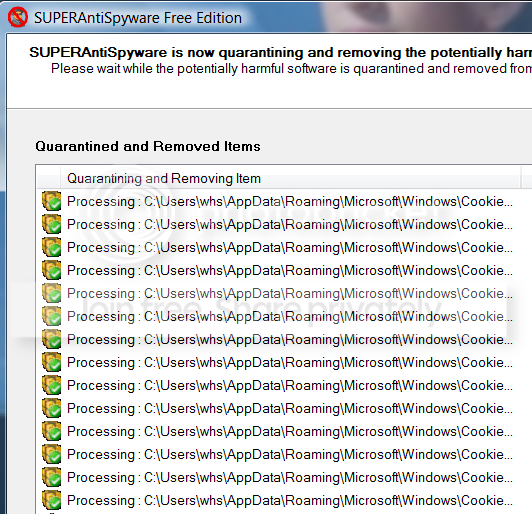
2010-05-26_0212.png
 

My Computer

Computer Manufacturer/Model Number
HP, Dell, Gateway, Toshiba - 4 laptops and 2 desktops
OS
Vista, Windows7, Mint Mate, Zorin, Windows 8
CPU
from 1.6GHz Duo to i7
Monitor(s) Displays
2x HP w2207
Hard Drives
5x HDD, 7x SSD, 12x Externals
Keyboard
with trackball - no mices
Mouse
Trackball mice
Internet Speed
DSL 6000
Doesn't NIS automatically delete tracking cookies after scanning/cleaning?..
 

My Computer

Computer type
PC/Desktop
OS
Win7 Home Premium x64 SP1, Archlinux x86_64. Elementary Luna
Doesn't NIS automatically delete tracking cookies after scanning/cleaning?..
By default, it asks you what to do. You can set it to ignore, ask or automatically delete tracking cookies.

A simple way of reducing the tracking cookies you get is to set your browser to not accept 3rd party cookies.
 

My Computer

OS
Arch Linux 64-bit
Yeah was just wondering as maybe that's the reason he has them with MSE and not NIS. ;)
 

My Computer

Computer type
PC/Desktop
OS
Win7 Home Premium x64 SP1, Archlinux x86_64. Elementary Luna
On the systems where I use MSE, I notice a big influx of tracking cookies. That is not the case on the systems with NIS. I have no idea where those buggers come from because I am 80% on the forum page and occasionally I go to some other technical website to research information.
Every morning I run SAS and it finds 12 to 35 of those buggers. Questions:

1. Could they be coming from the forum
2. Why with MSE and not with NIS
3. Is it possible that SAS "invents" them

whs,
My surfing habits are similar to yours.
I run SuperAntiSpyware Pro, update daily, & scan when offline.
SAS has never found a tracking cookie here.
I would suggest that SF is not responsible for the cookies found on your computer.
On logging out of SF a message is always received saying "All cookies cleared!
As for SAS "inventing" them, I think highly unlikely.
 

My Computer

Computer Manufacturer/Model Number
LAPTOP. HP Pavilion dv7-4010TX .
OS
Win 7 Ultimate 64-bit. SP1.
CPU
Intel i7 -720QM.[1.6GHz Turbo Boost 2.8GHz. 6MB Cache.]
Memory
8 DDR 3 RAM. 1066MHZ
Graphics Card(s)
ATI 1024 MB. DDR3. Radeon HD5650
Monitor(s) Displays
17.3" High Definition Brightview LCD. LED Backlit.
Screen Resolution
1600 x 900.
Hard Drives
640GB
Case
Laptop / notebook.
Mouse
Logitech Anywhere mouse. MX.
Internet Speed
ADSL [ but too slow ]
Like JMH types, it is not likely that one and three are true.

If you want to check whether Norton has removed tracking cookies you can look in 'Resolved Security Risks' in Norton's history. You should already know, though, as Norton is a pain and will pop-up red claiming security risks have been found and fixed even though it has only found tracking cookies.
 
Last edited:

My Computer

OS
Arch Linux 64-bit
Hello Wolfgang,

Could you post the name of the cookie files? This will help ID who they may belong to.

These are the ones from us at VF, EF, and SF:
Cookies.jpg
 

My Computer

Computer type
PC/Desktop
Computer Manufacturer/Model Number
Self built custom
OS
64-bit Windows 11 Pro for Workstations
CPU
Intel i7-8700K OC'd to 5 GHz
Motherboard
ASUS ROG Maximus XI Formula Z390
Memory
64 GB (4x16GB) G.SKILL TridentZ RGB DDR4 3600 MHz
Graphics Card(s)
ASUS ROG-STRIX-GTX1080TI-O11G-GAMING
Sound Card
Integrated
Monitor(s) Displays
2 x Samsung Odyssey G7 27"
Screen Resolution
2560x1440
Hard Drives
1TB Samsung 990 PRO M.2,
4TB Samsung 990 PRO PRO M.2,
TerraMaster F8 SSD Plus NAS
PSU
Seasonic Prime Titanium 850W
Case
Thermaltake Core P3
Cooling
Corsair Hydro H115i
Keyboard
Logitech wireless K800
Mouse
Logitech MX Master 4
Internet Speed
2 Gb/s Download and 100 Mb/s Upload
Antivirus
Malwarebyte Anti-Malware Premium
Browser
Google Chrome
Other Info
Logitech Z625 speaker system,
Logitech BRIO 4K Pro webcam,
HP Color LaserJet Pro MFP M477fdn,
APC SMART-UPS RT 1000 XL - SURT1000XLI,
Galaxy S23 Plus phone
Thanks everybody. Next time I catch them I will try to find their real names in the Roaming folder-
 

My Computer

Computer Manufacturer/Model Number
HP, Dell, Gateway, Toshiba - 4 laptops and 2 desktops
OS
Vista, Windows7, Mint Mate, Zorin, Windows 8
CPU
from 1.6GHz Duo to i7
Monitor(s) Displays
2x HP w2207
Hard Drives
5x HDD, 7x SSD, 12x Externals
Keyboard
with trackball - no mices
Mouse
Trackball mice
Internet Speed
DSL 6000
Here is a selection of those buggers. I really wonder from where they come:

Adware.Tracking Cookie
C:\Users\whs\AppData\Roaming\Microsoft\Windows\Cookies\whs@mediaplex[2].txt
C:\Users\whs\AppData\Roaming\Microsoft\Windows\Cookies\[email protected][2].txt
C:\Users\whs\AppData\Roaming\Microsoft\Windows\Cookies\whs@atwola[2].txt
C:\Users\whs\AppData\Roaming\Microsoft\Windows\Cookies\[email protected][3].txt
C:\Users\whs\AppData\Roaming\Microsoft\Windows\Cookies\whs@bluestreak[2].txt
C:\Users\whs\AppData\Roaming\Microsoft\Windows\Cookies\whs@serving-sys[2].txt
C:\Users\whs\AppData\Roaming\Microsoft\Windows\Cookies\whs@doubleclick[2].txt
C:\Users\whs\AppData\Roaming\Microsoft\Windows\Cookies\[email protected][3].txt
C:\Users\whs\AppData\Roaming\Microsoft\Windows\Cookies\[email protected][1].txt
C:\Users\whs\AppData\Roaming\Microsoft\Windows\Cookies\whs@apmebf[3].txt
C:\Users\whs\AppData\Roaming\Microsoft\Windows\Cookies\[email protected][2].txt
C:\Users\whs\AppData\Roaming\Microsoft\Windows\Cookies\whs@tacoda[1].txt
C:\Users\whs\AppData\Roaming\Microsoft\Windows\Cookies\[email protected][1].txt
C:\Users\whs\AppData\Roaming\Microsoft\Windows\Cookies\whs@advertising[2].txt
 

My Computer

Computer Manufacturer/Model Number
HP, Dell, Gateway, Toshiba - 4 laptops and 2 desktops
OS
Vista, Windows7, Mint Mate, Zorin, Windows 8
CPU
from 1.6GHz Duo to i7
Monitor(s) Displays
2x HP w2207
Hard Drives
5x HDD, 7x SSD, 12x Externals
Keyboard
with trackball - no mices
Mouse
Trackball mice
Internet Speed
DSL 6000
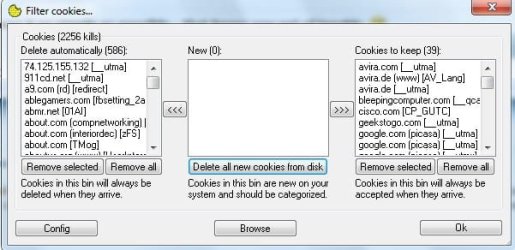
I use CookieWall Network Downloads : CookieWall /// AnalogX

Configure it to 'prompt' and scan every 60 seconds. Delete cookies that you don't want ... save cookies you wand to keep. Click on add/remove and press "ok" so you won't be presented with the same group of cookies over and over again :D
 

Attachments

  • cookiewall.jpg
    cookiewall.jpg
    62 KB · Views: 26

My Computer

Computer type
PC/Desktop
Computer Manufacturer/Model Number
Bruce ... somewhere in his 40's
OS
Windows 7 Ultimate 32bit SP1
CPU
Intel(R) Core(TM)2 Quad CPU @ 2.40GHz, 2400 MHz
Motherboard
INTEL/D975XBX2
Memory
4 GB
Graphics Card(s)
ATI Radeon HD 2600 Pro
Monitor(s) Displays
Samsung SyncMaster 914v
Screen Resolution
1280 x 1024
Hard Drives
2/500GB each ... ST3500630AS ATA Device.
One is not connected
PSU
Rocketfish 700 W
Case
G.Skill Gigabyte Chassis
Keyboard
Standard PS/2 Keyboard
Mouse
Microsoft PS/2 Mouse
Internet Speed
DSL
Antivirus
Avira Internet Security
Browser
IE 11
Other Info
ATI HDMI Audio
Some of the cookies you mentioned are familiar. E.g. Ebay inserts the doubleclick and mediaplex cookies.

I found a very interesting concept- "Opt out cookies". Check it out at

World Privacy Forum: Cookie Opt Out
 

My Computer

Computer Manufacturer/Model Number
Too many to describe...
OS
Windows 7 x64 pro/ Windows 7 x86 Pro/ XP SP3 x86
Wolfgang,

In addition, I have my cookies set to always block and use the Allow or Deny cookies "Per Site" option instead. This way no cookies get on your system unless you allowed them from a specific website.

Hope this helps,
Shawn
 

My Computer

Computer type
PC/Desktop
Computer Manufacturer/Model Number
Self built custom
OS
64-bit Windows 11 Pro for Workstations
CPU
Intel i7-8700K OC'd to 5 GHz
Motherboard
ASUS ROG Maximus XI Formula Z390
Memory
64 GB (4x16GB) G.SKILL TridentZ RGB DDR4 3600 MHz
Graphics Card(s)
ASUS ROG-STRIX-GTX1080TI-O11G-GAMING
Sound Card
Integrated
Monitor(s) Displays
2 x Samsung Odyssey G7 27"
Screen Resolution
2560x1440
Hard Drives
1TB Samsung 990 PRO M.2,
4TB Samsung 990 PRO PRO M.2,
TerraMaster F8 SSD Plus NAS
PSU
Seasonic Prime Titanium 850W
Case
Thermaltake Core P3
Cooling
Corsair Hydro H115i
Keyboard
Logitech wireless K800
Mouse
Logitech MX Master 4
Internet Speed
2 Gb/s Download and 100 Mb/s Upload
Antivirus
Malwarebyte Anti-Malware Premium
Browser
Google Chrome
Other Info
Logitech Z625 speaker system,
Logitech BRIO 4K Pro webcam,
HP Color LaserJet Pro MFP M477fdn,
APC SMART-UPS RT 1000 XL - SURT1000XLI,
Galaxy S23 Plus phone
NIS seems to do an excellent job at keeping after tracking cookies.

If you clicked "automatically remove tracking cookies" when it asked after that first scan, it will continue doing so regularly.

I have similar surfing habits as well, and have found from looking through the NIS logs, theres a ton of similar cookies that have been silently removed, daily.

I think the reason you find them with MSE is its basically a virus scanner. And since tracking cookies arent considered a major threat, it does nothing about them.

Where as NIS has anti spyware built in, and sees tracking cookies as unwanted critters.(depending on your settings)

Its never removed the seven forums cookies though ...
 

My Computer

Computer Manufacturer/Model Number
Custom (Self Build)
OS
Windows 7 Home Premium 64bit
CPU
Intel Core i7 2700k
Motherboard
eVGA P67 SLI
Memory
8GB Mushkin Redline Ridgebacks @1866
Graphics Card(s)
EVGA GTX570 SC
Sound Card
XiFi Titanium HD
Monitor(s) Displays
LG W2453V
Screen Resolution
1920x1080
Hard Drives
Intel 320 80GB -- Intel X25-V 40GB --WD Black 1TB x2 -- WD Blue 640GB
PSU
Seasonic x750
Case
Corsair 600T SE White
Cooling
eVGA Superclocked CPU Cooler
Keyboard
Saitek Cyborg
Antivirus
Kaspersky
Browser
IE
Other Info
LG BD/DVD
Thanks everybody for the excellent links. I will use some of the tools and see how it goes. And Wishmaster you are right. With NIS I do not seem to have this tracking cookie invasion. It is just where I use MSE.
 

My Computer

Computer Manufacturer/Model Number
HP, Dell, Gateway, Toshiba - 4 laptops and 2 desktops
OS
Vista, Windows7, Mint Mate, Zorin, Windows 8
CPU
from 1.6GHz Duo to i7
Monitor(s) Displays
2x HP w2207
Hard Drives
5x HDD, 7x SSD, 12x Externals
Keyboard
with trackball - no mices
Mouse
Trackball mice
Internet Speed
DSL 6000
whs,

Many vendors stopped including tracking cookies in detection as they are not a security threat and modern browsers have controls to block third-party cookies. Just like MRU's, they are only a means of inflating the numbers.
 

My Computer

OS
Windows 7 & Windows Vista Ultimate
Corinne, right, I don't consider them a threat either, just a nuisance.
 

My Computer

Computer Manufacturer/Model Number
HP, Dell, Gateway, Toshiba - 4 laptops and 2 desktops
OS
Vista, Windows7, Mint Mate, Zorin, Windows 8
CPU
from 1.6GHz Duo to i7
Monitor(s) Displays
2x HP w2207
Hard Drives
5x HDD, 7x SSD, 12x Externals
Keyboard
with trackball - no mices
Mouse
Trackball mice
Internet Speed
DSL 6000
Back
Top