
Hello!
I started having this problem for the first time this evening and for 3 hours now i tried googling my way to the solution as i have done for 20 years. But im really at a loss with this one
To make the answers brief and direct, here is a list of things i did already do to try solve this.
So it is no doubt and windows issue.
The issue is like this:
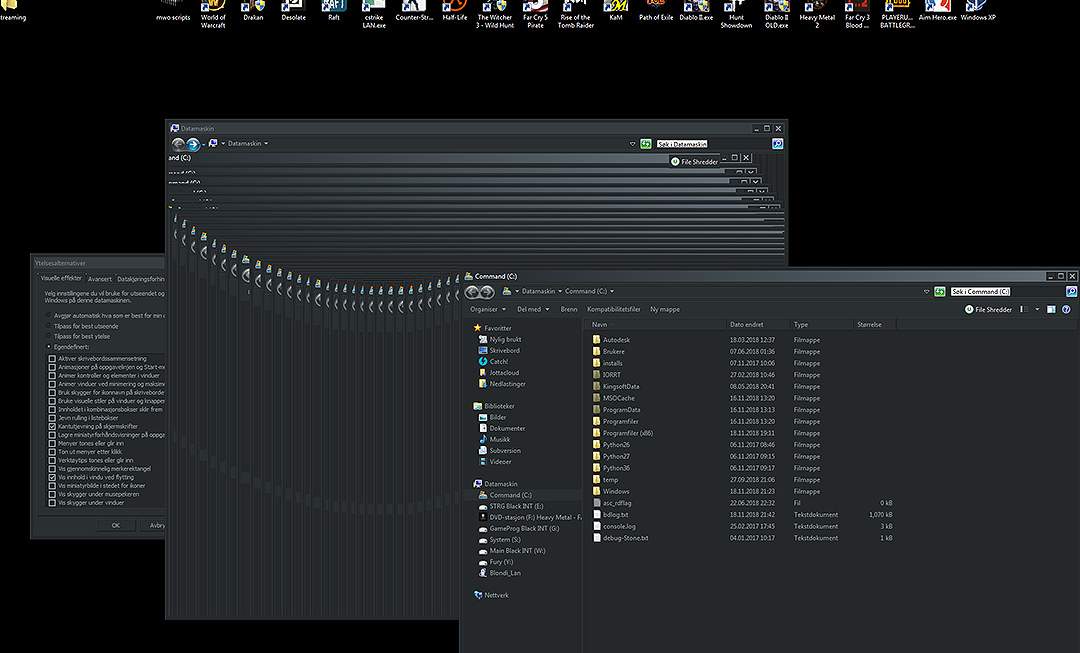 As you all can see, the front window to the right is being moved to the right from left. And leaves a sort of artifact trail on the window behind.
I started having this problem for the first time this evening and for 3 hours now i tried googling my way to the solution as i have done for 20 years. But im really at a loss with this one
To make the answers brief and direct, here is a list of things i did already do to try solve this.
- Reboot
- In the options for performance: On/Off the "Show content in window when dragging" (with reboot)
- sfc /scannow
- disable graphics card in components list
- reinstall graphics card drivers completly
- windows update
- windows update again after AERO theme was set
- Save Aero theme and try with basic windows 7 settings
- Registry clean
- Scanned with: Bitdefender, Superantispyware and anti malwarebytes
- Checked all other drivers
- Did a services.msc check
- Already had a optimized program startup list.
- Windows 7 Pro 64x (on SSD)(pagefile too)(5 year old installation)
- GTX1080 gpu (8gb)
- 3440x1440 x34 Predator monitor
- 32gb ram (3200mhz)
So it is no doubt and windows issue.
The issue is like this:
My Computer
At a glance
Windows 7 64bit PROamd t1090 becorsair dominatorHd 6970
- OS
- Windows 7 64bit PRO
- CPU
- amd t1090 be
- Motherboard
- gigabyte 990 fxa ud5
- Memory
- corsair dominator
- Graphics Card(s)
- Hd 6970
- Sound Card
- SB fatal1ty champion
- Monitor(s) Displays
- simens 27
- Hard Drives
- WD black 1t (x3)
- PSU
- corsair ax 1200
- Case
- haf 932 advanced
- Cooling
- vantage alc