Transfer data from old HDD to new HDD

Wrenches

New member
Member
Local time
12:51 AM
Messages
89
Location
Texas
Hi guys, Comes Feb I'll be getting a new HDD and a new DVD-RW as my drives are 5 years old. They're still working but nothing lasts forever right?

My HDD is partitioned to C: and D: for boot and storage. I'd like to do the same with the new HDD and transfer the data to it. How would I do it? What's really important is making my new HDD bootable and Windows transferred to it. I can work with D: later if need be.

I looked in the tutorials. Either I looked in the wrong place or it's not there.

Thanks fellas. :)
 

My Computer My Computer

At a glance

Windows 7 x64 Home PremiumIntel i3-2105Two 4gig Corsair Vengeance BlueSapphire Radeon HD 6670
Computer type
PC/Desktop
Computer Manufacturer/Model Number
Home Built
OS
Windows 7 x64 Home Premium
CPU
Intel i3-2105
Motherboard
Gigabyte B75M-HD3
Memory
Two 4gig Corsair Vengeance Blue
Graphics Card(s)
Sapphire Radeon HD 6670
Sound Card
Soundblaster Audigy
Monitor(s) Displays
AOC LM742
Screen Resolution
1280 x 1024
Hard Drives
Seagate Constellation 1TB
PSU
Seasonic M12II 520 Bronze
Case
Xigmatek Gigas cube
Cooling
Intel stock
Make an image of C and the 100MB System partition (if any) and restore that to the new HDD.

Here is a tutorial for imaging (read it carefully before watching): http://www.sevenforums.com/tutorials/73828-imaging-free-macrium.html?ltr=I

And here is a tutorial explaining the transfer of an Operating System. I wrote it for transferring to a SSD, but it is the same for a HDD (less the alignment problem): http://www.sevenforums.com/tutorials/149969-ssd-install-transfer-operating-system.html

And regarding the 100MB System partition: If you have one, I recomment to transfer the bootmgr to C (before the move). Then you can forget about the 100MB partition - it is no more needed. http://www.sevenforums.com/tutorials/209885-bootmgr-move-c-easybcd.html

And as you said, with the data on D you can deal later.
 

My Computer My Computer

At a glance

Vista, Windows7, Mint Mate, Zorin, Windows 8from 1.6GHz Duo to i7
Computer Manufacturer/Model Number
HP, Dell, Gateway, Toshiba - 4 laptops and 2 desktops
OS
Vista, Windows7, Mint Mate, Zorin, Windows 8
CPU
from 1.6GHz Duo to i7
Monitor(s) Displays
2x HP w2207
Hard Drives
5x HDD, 7x SSD, 12x Externals
Keyboard
with trackball - no mices
Mouse
Trackball mice
Internet Speed
DSL 6000
Could I use my D: partition to receive the image file?
 

My Computer My Computer

At a glance

Windows 7 x64 Home PremiumIntel i3-2105Two 4gig Corsair Vengeance BlueSapphire Radeon HD 6670
Computer type
PC/Desktop
Computer Manufacturer/Model Number
Home Built
OS
Windows 7 x64 Home Premium
CPU
Intel i3-2105
Motherboard
Gigabyte B75M-HD3
Memory
Two 4gig Corsair Vengeance Blue
Graphics Card(s)
Sapphire Radeon HD 6670
Sound Card
Soundblaster Audigy
Monitor(s) Displays
AOC LM742
Screen Resolution
1280 x 1024
Hard Drives
Seagate Constellation 1TB
PSU
Seasonic M12II 520 Bronze
Case
Xigmatek Gigas cube
Cooling
Intel stock
If you have enough space, yes. Figure the image will be 60 to 65% of the data in the C partition. The total size of the C partition is not relevant, only the amount of data within.

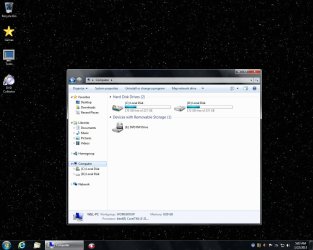
If you post a picture of your disk management where I can see the sizes (total and used) I can tell you. A picture of your Computer window would also be ok.
 

My Computer My Computer

At a glance

Vista, Windows7, Mint Mate, Zorin, Windows 8from 1.6GHz Duo to i7
Computer Manufacturer/Model Number
HP, Dell, Gateway, Toshiba - 4 laptops and 2 desktops
OS
Vista, Windows7, Mint Mate, Zorin, Windows 8
CPU
from 1.6GHz Duo to i7
Monitor(s) Displays
2x HP w2207
Hard Drives
5x HDD, 7x SSD, 12x Externals
Keyboard
with trackball - no mices
Mouse
Trackball mice
Internet Speed
DSL 6000
Here it is.
 

Attachments

  • MyHDD.jpg
    MyHDD.jpg
    106.5 KB · Views: 11

My Computer My Computer

At a glance

Windows 7 x64 Home PremiumIntel i3-2105Two 4gig Corsair Vengeance BlueSapphire Radeon HD 6670
Computer type
PC/Desktop
Computer Manufacturer/Model Number
Home Built
OS
Windows 7 x64 Home Premium
CPU
Intel i3-2105
Motherboard
Gigabyte B75M-HD3
Memory
Two 4gig Corsair Vengeance Blue
Graphics Card(s)
Sapphire Radeon HD 6670
Sound Card
Soundblaster Audigy
Monitor(s) Displays
AOC LM742
Screen Resolution
1280 x 1024
Hard Drives
Seagate Constellation 1TB
PSU
Seasonic M12II 520 Bronze
Case
Xigmatek Gigas cube
Cooling
Intel stock
Yeah, you have plenty of room on D. The image should take about 35GBs. Suggest you make a folder on D and call it e.g. Image and store the image there. Then you can find it easier during the recovery navigation.
 

My Computer My Computer

At a glance

Vista, Windows7, Mint Mate, Zorin, Windows 8from 1.6GHz Duo to i7
Computer Manufacturer/Model Number
HP, Dell, Gateway, Toshiba - 4 laptops and 2 desktops
OS
Vista, Windows7, Mint Mate, Zorin, Windows 8
CPU
from 1.6GHz Duo to i7
Monitor(s) Displays
2x HP w2207
Hard Drives
5x HDD, 7x SSD, 12x Externals
Keyboard
with trackball - no mices
Mouse
Trackball mice
Internet Speed
DSL 6000
Yeah, it was 7.5 Gb so I decided I can put it on two DVDs but I got aborted twice (2 DVDs) by the program. I guess my DVD-RW's getting old.

Then I find out I have to download from Microsoft so I can create a rescue disk. You know what? I'm just gonna do a clean install, it's easier. :cool:
 

My Computer My Computer

At a glance

Windows 7 x64 Home PremiumIntel i3-2105Two 4gig Corsair Vengeance BlueSapphire Radeon HD 6670
Computer type
PC/Desktop
Computer Manufacturer/Model Number
Home Built
OS
Windows 7 x64 Home Premium
CPU
Intel i3-2105
Motherboard
Gigabyte B75M-HD3
Memory
Two 4gig Corsair Vengeance Blue
Graphics Card(s)
Sapphire Radeon HD 6670
Sound Card
Soundblaster Audigy
Monitor(s) Displays
AOC LM742
Screen Resolution
1280 x 1024
Hard Drives
Seagate Constellation 1TB
PSU
Seasonic M12II 520 Bronze
Case
Xigmatek Gigas cube
Cooling
Intel stock
DVDs are no good. And get the rescue WinPE disc from my Skydrive. Just burn it to CD. You can even make the image with it. Reinstall is a drag.
 

My Computer My Computer

At a glance

Vista, Windows7, Mint Mate, Zorin, Windows 8from 1.6GHz Duo to i7
Computer Manufacturer/Model Number
HP, Dell, Gateway, Toshiba - 4 laptops and 2 desktops
OS
Vista, Windows7, Mint Mate, Zorin, Windows 8
CPU
from 1.6GHz Duo to i7
Monitor(s) Displays
2x HP w2207
Hard Drives
5x HDD, 7x SSD, 12x Externals
Keyboard
with trackball - no mices
Mouse
Trackball mice
Internet Speed
DSL 6000
Well, I'm gonna have to table the drives for now. The cable guy came today and knocked out most of my tv channels. I asked the cable guy WTF? and he said more channels are going digital sorry. Duh!

I went to the center and upgraded my TV channels to digital and as a side benefit my phone is upgraded from local to statewide and my internet access will be digital so it should run better or faster. I was told about $20-$25 increase on my bill so I'm waiting to see.
 

My Computer My Computer

At a glance

Windows 7 x64 Home PremiumIntel i3-2105Two 4gig Corsair Vengeance BlueSapphire Radeon HD 6670
Computer type
PC/Desktop
Computer Manufacturer/Model Number
Home Built
OS
Windows 7 x64 Home Premium
CPU
Intel i3-2105
Motherboard
Gigabyte B75M-HD3
Memory
Two 4gig Corsair Vengeance Blue
Graphics Card(s)
Sapphire Radeon HD 6670
Sound Card
Soundblaster Audigy
Monitor(s) Displays
AOC LM742
Screen Resolution
1280 x 1024
Hard Drives
Seagate Constellation 1TB
PSU
Seasonic M12II 520 Bronze
Case
Xigmatek Gigas cube
Cooling
Intel stock
1. The partition to which you restore a Macrium image must be the same size or bigger than from where the image was taken. If for any reason the partition is smaller, you have to resize the VHD of the image.

2. You do need the recovery CD - best is the WinPE version. Else you have no means to restore your image(s).
 

My Computer My Computer

At a glance

Vista, Windows7, Mint Mate, Zorin, Windows 8from 1.6GHz Duo to i7
Computer Manufacturer/Model Number
HP, Dell, Gateway, Toshiba - 4 laptops and 2 desktops
OS
Vista, Windows7, Mint Mate, Zorin, Windows 8
CPU
from 1.6GHz Duo to i7
Monitor(s) Displays
2x HP w2207
Hard Drives
5x HDD, 7x SSD, 12x Externals
Keyboard
with trackball - no mices
Mouse
Trackball mice
Internet Speed
DSL 6000
What I did was put the 2 drives into the system, then let Macrium do the partitioning and copy.
Then pull out the old drive and the PC boots up on the new drive.

I needed no images and no recovery cd.
 

My Computer My Computer

At a glance

Windows 7 Ultimate x64
OS
Windows 7 Ultimate x64
I knew there was a method like that. I used to do that with the disk manager that came with the new drive.
 

My Computer My Computer

At a glance

Windows 7 x64 Home PremiumIntel i3-2105Two 4gig Corsair Vengeance BlueSapphire Radeon HD 6670
Computer type
PC/Desktop
Computer Manufacturer/Model Number
Home Built
OS
Windows 7 x64 Home Premium
CPU
Intel i3-2105
Motherboard
Gigabyte B75M-HD3
Memory
Two 4gig Corsair Vengeance Blue
Graphics Card(s)
Sapphire Radeon HD 6670
Sound Card
Soundblaster Audigy
Monitor(s) Displays
AOC LM742
Screen Resolution
1280 x 1024
Hard Drives
Seagate Constellation 1TB
PSU
Seasonic M12II 520 Bronze
Case
Xigmatek Gigas cube
Cooling
Intel stock
It was easy to do.
And it booted up with no problems at all.
Macrium will clone partitions, including the sizes.
The new drive has to have the same or more space as the old drive.
You can tell Macrium to enlarge the partition or you can format the leftover space as a new partition to do with as you wish. I think win7 can also resize a partition.

One advantage is you can make an exact system copy like a snapshot for backup to save in case your running drive foobars itself. When it does, you will appreciate having a backup to put in. IT wont have recent changes. For that use a sync cloud service, like google drive or ubuntu one.
 

My Computer My Computer

At a glance

Windows 7 Ultimate x64
OS
Windows 7 Ultimate x64
Back
Top