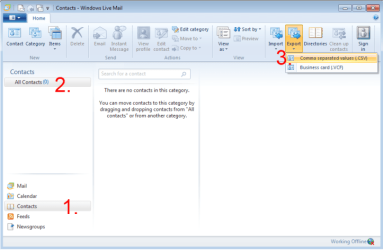
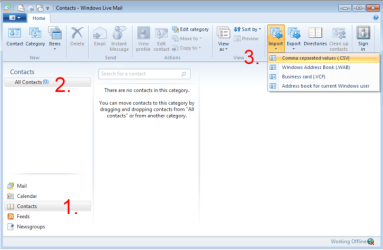
I bought a new netbook w/Win7 Starter. I loaded Win Live & installed Live Mail & IE9. I am try to transfer my contacts frm Live mail & Favorites from IE9 from my other computer that is running Win/7 Home Prem 64 bit to this new Netbook.
It used to be a no-brainer, but now it seems to be a mistery how to do it!
I am 82 & have been in computers all my life. My first computer was a TRS80.
But I think the modern bloatware programs have been "Featured to Death"
Help!
Tullynally
It used to be a no-brainer, but now it seems to be a mistery how to do it!
I am 82 & have been in computers all my life. My first computer was a TRS80.
But I think the modern bloatware programs have been "Featured to Death"
Help!
Tullynally
My Computer
At a glance
Win 7 Home Pro 64 BitI5 2.66 ghz quad4GB III 1332 KitGainward GTX260 896GB
- Computer Manufacturer/Model Number
- Home Built
- OS
- Win 7 Home Pro 64 Bit
- CPU
- I5 2.66 ghz quad
- Motherboard
- ASUS p7p55d
- Memory
- 4GB III 1332 Kit
- Graphics Card(s)
- Gainward GTX260 896GB
- Sound Card
- onboard
- Monitor(s) Displays
- 1- Samung SyncMaster 2333S 2- Samsung T200HD PC/TV
- Screen Resolution
- I 1920 X 1080 2 1024 X 720
- Hard Drives
- Segate 500GB SATA II (3)
- PSU
- FSP Group Inc.
- Case
- Generic Tower
- Cooling
- AIR
- Keyboard
- Microsoft Wireless Multimedia Keyboard 1.1
- Mouse
- Microsoft Wireless Optical 2.0
- Internet Speed
- 2.0
- Other Info
- I am 81 years old & started with Radio Shack TRs 80
(Trash 80) 2 -5 1/4 " Floppies, 640 KB mem, cassette drive, basic language.
My first work desktop was a PDP 8E with high speed tape reader & punch. Teletype input, no monitor.