Transferring Data

julielasky

New member
Local time
4:39 AM
Messages
2
This undoubtedly has been answered, but I can't seem to extract it from all the forums. I have a 3 year old laptop that has microsoft outlook for which I use for contacts and calendar (not email) and it runs windows XP. I recently purchased a new laptop with windows 7 and want to transfer my contacts and calendar to my new machine. I have tried without success using a flash drive. It seems this new laptop does not have outlook? Don't know if that's possible, but in any event I have to go back and forth between computers for now until I can figure out how to set this up. I am not very "Computer Savy," but am trying to learn. Please advise.
 

My Computer

OS
windows 7
The new laptop may not have office suite installed on it. that is an extra purchase that the vendor may not have included in that sale. Please check your "All Programs" for "Microsoft Office".
 

My Computer

OS
7 Pro
I have a 60 day trial of microsoft office, but still can't find the contacts/calendar part and when I transfer the data it doesn't seem to come over right. If I am able to finally do this, what will happen to the info when the trial is up if not purchased or if not purchased right away? Thanks for responding. I've tried gateway and they only have paid support :(
 

My Computer

OS
windows 7
Julie -

Do you not have the office CD's for your old computer? why not install Office on the new machine???
 

My Computer

Computer Manufacturer/Model Number
HP Pavilion dv7
OS
Windows 7
CPU
Core i7
Memory
8 GB
Graphics Card(s)
ATI FireGL
Monitor(s) Displays
Secondary is an HP L1940T
Screen Resolution
1680x1050
Hard Drives
160 GB SSD and 500 GB SATA
Keyboard
G11 Logitech
Mouse
G7 Logitech
Internet Speed
Fiber
Other Info
My rig smegging rules!
Hello julielasky, welcome to Seven Forums!


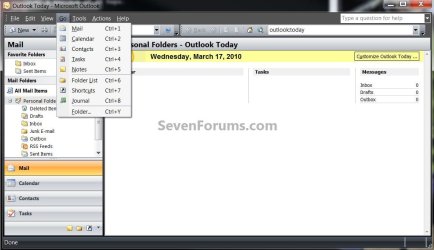
I don't use Outlook but here's "contacts/calendar" for you; I'm sure someone else will be along soon to help you, please keep us informed.

Outlook.jpg
 

My Computer

Computer Manufacturer/Model Number
* BFK Customs *
OS
W 7 64-bit Ultimate
CPU
Intel Q9550 Yorkfield
Motherboard
ASUS P5Q Pro
Memory
8GB Dominator 8500C5D
Graphics Card(s)
ATI : XFX 5870
Sound Card
Realtek HD Audio 7-1
Monitor(s) Displays
1x 47" LCD HDMI & 3x 26" LCD HDMI
Screen Resolution
1920x1080P & 1920x1200
Hard Drives
1x 80GB Intel X25-M G2 SSD : 1x 500GB & 1x 640GB WD Caviar Black(s)
PSU
Corsair 620HX
Case
Cooler Master RC-690
Cooling
Tuniq Tower 120, 2x 140mm and 3x 120mm case fans
Keyboard
Microsoft 500
Mouse
Razer Diamondback 3G
Internet Speed
14 Mb/s
Other Info
1x Koutech 3Gb/s SATA HDD Hot Swap Rack
In order to get your old data into your new outlook client, you'll have to either Import the new data from your saved file or just "open a data file" through the file menu.
 

My Computer

OS
7 Pro
Back
Top