You are using an out of date browser. It may not display this or other websites correctly.
You should upgrade or use an
alternative browser.
Transparency won't turn off
When I try to turn off transparency for a theme, it doesn't turn off when I save the change.
Last edited:
- Computer type
- Laptop
- Computer Manufacturer/Model Number
- Asus
- OS
- W7 Ultimate
- CPU
- 2.2 bh Intel Core i3-2330M
- Motherboard
- Asustek Computer Inc. P53E 1.0
- Memory
- 4MB
- Graphics Card(s)
- On Board
- Sound Card
- On Board
- Monitor(s) Displays
- On Board
- Screen Resolution
- 1366 X 768
- Hard Drives
- ST9500423AS
ST2000DM USB Backup Drive External
have you tried changing to a non aero theme first?
- Computer Manufacturer/Model Number
- HP dv6519tx
- OS
- Windows 7 Ultimate x64
- CPU
- 1.80 GHz Intel Core 2 Duo processor T7100
- Memory
- 3 gig ddr2
- Graphics Card(s)
- NVIDIA GeForce 8400M GS
- Sound Card
- Realtek High Definition Audio
- Monitor(s) Displays
- 15.4” WXGA High Definition BrightView Widescreen
- Screen Resolution
- 1280 x 800
- Hard Drives
- Hitachi 320 GB (5400 rpm)
- PSU
- 90 W AC Power Adapter
- Cooling
- Kitchen plate under the lappy
- Keyboard
- 101 key compatible
- Mouse
- Touch Pad with On/Off button and dedicated vertical Scroll
- Internet Speed
- Three Wireless internet prepaid using E160G USB dongle
New member
Member
VIP
Thread Starter
- Computer type
- Laptop
- Computer Manufacturer/Model Number
- Asus
- OS
- W7 Ultimate
- CPU
- 2.2 bh Intel Core i3-2330M
- Motherboard
- Asustek Computer Inc. P53E 1.0
- Memory
- 4MB
- Graphics Card(s)
- On Board
- Sound Card
- On Board
- Monitor(s) Displays
- On Board
- Screen Resolution
- 1366 X 768
- Hard Drives
- ST9500423AS
ST2000DM USB Backup Drive External
-
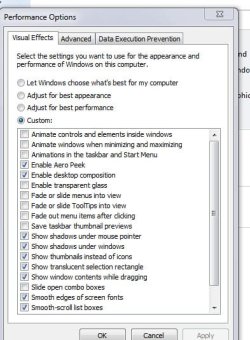
2-05-2010 2-28-28 PM.jpg
40.1 KB
· Views: 7
- Computer Manufacturer/Model Number
- Self
- OS
- W7, Xp Pro
- CPU
- AMD Sempron 2600+
- Motherboard
- K8V-MX
- Memory
- 1GB
- Graphics Card(s)
- Radeon HD3650
- Sound Card
- Soundmax
- Monitor(s) Displays
- 17" HP CRT
- Screen Resolution
- 1024x768
- Hard Drives
- 1x WDC WD800BB
1x HDS728080
- PSU
- ? 460W
- Case
- Coolermaster
- Cooling
- enough
- Keyboard
- M$S
- Mouse
- Optical
- Internet Speed
- 1500kbs
- Other Info
- OLD!!! does the job i need.
New member
Member
VIP
Thread Starter
I cannot find performance on my control panel.
- Computer type
- Laptop
- Computer Manufacturer/Model Number
- Asus
- OS
- W7 Ultimate
- CPU
- 2.2 bh Intel Core i3-2330M
- Motherboard
- Asustek Computer Inc. P53E 1.0
- Memory
- 4MB
- Graphics Card(s)
- On Board
- Sound Card
- On Board
- Monitor(s) Displays
- On Board
- Screen Resolution
- 1366 X 768
- Hard Drives
- ST9500423AS
ST2000DM USB Backup Drive External
Administrator
Staff member
- Computer type
- PC/Desktop
- Computer Manufacturer/Model Number
- Self built custom
- OS
- 64-bit Windows 11 Pro for Workstations
- CPU
- Intel i7-8700K OC'd to 5 GHz
- Motherboard
- ASUS ROG Maximus XI Formula Z390
- Memory
- 64 GB (4x16GB) G.SKILL TridentZ RGB DDR4 3600 MHz
- Graphics Card(s)
- ASUS ROG-STRIX-GTX1080TI-O11G-GAMING
- Sound Card
- Integrated
- Monitor(s) Displays
- 2 x Samsung Odyssey G7 27"
- Screen Resolution
- 2560x1440
- Hard Drives
- 1TB Samsung 990 PRO M.2,
4TB Samsung 990 PRO PRO M.2,
TerraMaster F8 SSD Plus NAS
- PSU
- Seasonic Prime Titanium 850W
- Case
- Thermaltake Core P3
- Cooling
- Corsair Hydro H115i
- Keyboard
- Logitech wireless K800
- Mouse
- Logitech MX Master 4
- Internet Speed
- 2 Gb/s Download and 100 Mb/s Upload
- Antivirus
- Malwarebyte Anti-Malware Premium
- Browser
- Google Chrome
- Other Info
- Logitech Z625 speaker system,
Logitech BRIO 4K Pro webcam,
HP Color LaserJet Pro MFP M477fdn,
APC SMART-UPS RT 1000 XL - SURT1000XLI,
Galaxy S23 Plus phone



