
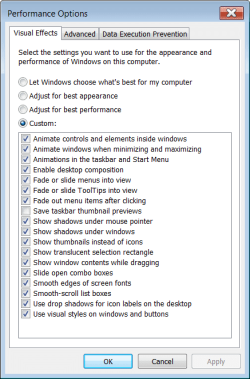
I tried to follow Brink's instructions to enable taskbar transparency for my Win 7 Pro x 64 desktop PC, but was unable to do so because my list of visual effects differs from the one shown by Brink. (I have a Solid Black theme, but assume that is not the cause of the problem because using that theme I had a transparent taskbar until I ran Winaero Tweaker. Maybe I unintentionally chose a wrong option in that program, but if so I can't find the option concerned.
A screenshot of my visual effects window is attached.
Help would be appreciated.
Thanks and regards, Roy
A screenshot of my visual effects window is attached.
Help would be appreciated.
Thanks and regards, Roy
Attachments
My Computer
At a glance
Windows 7 Professsional 32 bitIntel Core 2 Duo [email protected]4GB DDR2ATI RADEON Xpress 1200 Series
- Computer Manufacturer/Model Number
- Desktop System Built by local OEM
- OS
- Windows 7 Professsional 32 bit
- CPU
- Intel Core 2 Duo [email protected]
- Motherboard
- 4Core1333FullHD
- Memory
- 4GB DDR2
- Graphics Card(s)
- ATI RADEON Xpress 1200 Series
- Sound Card
- Realtek High Definition Audio
- Monitor(s) Displays
- BenQ E2200HD D-Sub
- Screen Resolution
- 1440x900
- Hard Drives
- 5 (1 connected via USB)
- PSU
- PC Star
- Keyboard
- Standard PS/2 Keyboard
- Mouse
- Microsoft PS/2 Mouse


