
tcarnevale
New member
- Local time
- 3:20 AM
- Messages
- 1
I have a desktop PC(Gateway Windows 7) that was running fine until yesterday at which time I noticed that none of my browsers would connect to a site even though tray icon said I had internet access, as did Network and Sharing Center.
At same time both a laptop and tablet connected via Wifi have full internet access. Wifi router is connected to a DSL modem as is the problem desktop.
On the problem desktop,
I've tried a number of things to no avail:
Help appreciated.
Thanx!
At same time both a laptop and tablet connected via Wifi have full internet access. Wifi router is connected to a DSL modem as is the problem desktop.
On the problem desktop,
- Google Chrome says "DNS probe finished No Internet"
- Firefox says "Cannot connect to server"
- IE just hangs rendering nothing.
I've tried a number of things to no avail:
- pinged sevenforums.com successfully
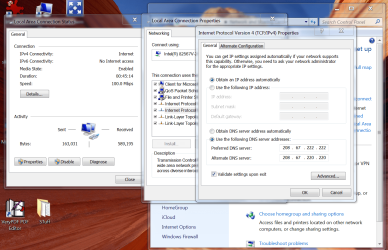
- set TCP/IP version 4 to "Obtain DNS server address automatically"
- deleted Chrome's User Data/Default file and restarted Chrome
- tried netsh winsock reset and restarted computer
- set TCP/IP version 4 DNS addresses to OpenDNS
Help appreciated.
Thanx!
Attachments
My Computer
At a glance
Windows 7 Home Premium 64 bit
- Computer type
- PC/Desktop
- Computer Manufacturer/Model Number
- Gateway
- OS
- Windows 7 Home Premium 64 bit


