TrebleBoot Windows XP-32, XP-64 and Win7 (all pro.)

Domie

New member
Local time
12:19 AM
Messages
8
Location
south England
Really usefull site !.
Perhaps you fellows can help with this, its all quite new to me.
I have a Dell T3500 with Win 7 pro x 64bit pre-installed and want to add
XP pro x 32bit and XP pro x 64bit to boot.

The tutorial deals with dualboot, can it be modified for treble boot ?
The Win7 installed is as supplied and no prog's or apps have been installed by me,
I have a dell reinstallation disc for 7, so could remove 7 and start with XP first if expedient.(would have to reload win7 drivers etc separately)
From some reports on the system it looks like the 7 install wasnt all that clean, guess it was Monday morning in Poland, Ah just keep banging keys till it works.

The hardware as follows,

Controller: Intel ICH8R/ICH9R/ICH10R/DO/5 series/3400 series SATA RAID

Disc 0: 149.01GB 10K-rpm

Partition 0: OEM told its for diagnostic, 2.01GB inaccessible.
Start offset 63x512 .
Partition 1: Recovery, expanded by dell to 950MB, System, Active, Primary.
Start offset 4210688x512 .
Partition 2: C: Win7 os, 146.07GB Boot,Pagefile,Crashdump,Primary.
Start offset 6156288x512 .

Disc 1: 500GB unallocated, for XP-32 and XP-64.

Disc 2 and 3: 2x 1TB unallocated, for Raid 0, data etc. + Ext backup and dock.

Toshiba USB FDD PA3109U-1FDD. USB Floppy drive.

Treble boot ? Would much appreciate some advice.
Regards and thanks
Dom
 

My Computer My Computer

At a glance

win7 pro 64bitXeon W352012 Gb ECC PC3 1066Nvidia Quadro FX1800
Computer Manufacturer/Model Number
Dell precision workstation T3500 (yr.2009/10)
OS
win7 pro 64bit
CPU
Xeon W3520
Motherboard
Dell
Memory
12 Gb ECC PC3 1066
Graphics Card(s)
Nvidia Quadro FX1800
Monitor(s) Displays
Dell wfp24
Screen Resolution
1200x
Hard Drives
1x WD1600HLFS
1x Seagate ST500420AS
2x Hitachi E7K1000
PSU
Dell 525w
Case
std
Cooling
std
Keyboard
MS
Mouse
MS
Internet Speed
Broadband
Other Info
Dell Outlet computer, at present as factory supplyed, no additional apps installed, except Dell Backup and Recovery. One HDD installed (WD1600HLFS [Dell OEM])
Got reinstallation disc (win7 but not drivers etc.)
Hello Domie, welcome to Seven Forums!


Yes it's possible, I've had as many as 7 (if I remember correctly) booting all off the same Windows boot manager.

The best way to do what you want is to disconnect the Windows 7 HDD data cable from the mobo for both of the XP installs, leaving only that HDD connected, install one XP and get it booting good and then install the second to separate partitions, you may need to use Easy BCD to add an entry for the second XP after it's installed.

EasyBCD Free Boot Manager Software

When both XP s are booting, connect the Windows 7 HDD and you can use the Dell one-time boot menu (the F12 hot-key) to select which HDD/OS to boot at PC startup.

This way the HDDs wont be tied together by the use of the Windows boot manager.
 

My Computer My Computer

At a glance

W 7 64-bit UltimateIntel Q9550 Yorkfield8GB Dominator 8500C5DATI : XFX 5870
Computer Manufacturer/Model Number
* BFK Customs *
OS
W 7 64-bit Ultimate
CPU
Intel Q9550 Yorkfield
Motherboard
ASUS P5Q Pro
Memory
8GB Dominator 8500C5D
Graphics Card(s)
ATI : XFX 5870
Sound Card
Realtek HD Audio 7-1
Monitor(s) Displays
1x 47" LCD HDMI & 3x 26" LCD HDMI
Screen Resolution
1920x1080P & 1920x1200
Hard Drives
1x 80GB Intel X25-M G2 SSD : 1x 500GB & 1x 640GB WD Caviar Black(s)
PSU
Corsair 620HX
Case
Cooler Master RC-690
Cooling
Tuniq Tower 120, 2x 140mm and 3x 120mm case fans
Keyboard
Microsoft 500
Mouse
Razer Diamondback 3G
Internet Speed
14 Mb/s
Other Info
1x Koutech 3Gb/s SATA HDD Hot Swap Rack
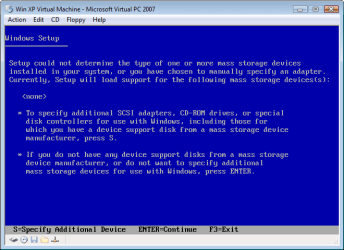
If your Win XP CD, does not support your Sata Controller, you will need to load drivers to use at F6.
Load Sata Controller drivers with a floppy disk is the best way.
http://www.sevenforums.com/tutorials/66010-sata-drivers-load-windows-xp-setup-dual-boot.html
OR
http://www.sevenforums.com/tutorials/72185-sata-drivers-slipstream-into-windows-xp-cd.html

Your Dell T3500 has a Intel Sata Controller.
You can download your F6 Sata Controller drivers from here:

Intel Sata Controller Drivers


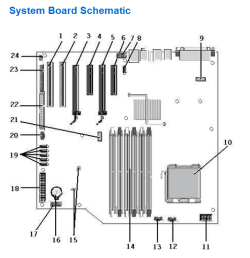
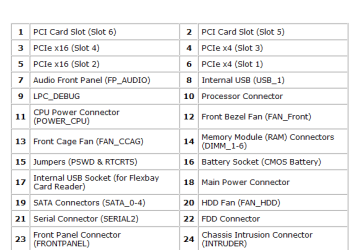
As your MOBO has a interal floppy Controller, you may find that you can not load Sata Controller drivers at F6 using a USB Floppy drive.

Capture1.PNG Capture2.PNG
 

My Computer My Computer

At a glance

ME/XP/Vista/Win7
OS
ME/XP/Vista/Win7
I'm having trouble understanding why you want to install both 32- and 64- bit versions of XP. Do you have any older 64 bit programs that need to run in XP and cant run in 64 bit Win7? If not, I dont see any point. 32 bit apps run fine in either 32 bit windows or 64 bit windows and 16 bit apps dont run at all in 64 bit windows. For the newer 64 bit apps, you already have the preinstalled win7.
 

My Computer My Computer

At a glance

Windows 7 x64 pro/ Windows 7 x86 Pro/ XP SP3 x86
Computer Manufacturer/Model Number
Too many to describe...
OS
Windows 7 x64 pro/ Windows 7 x86 Pro/ XP SP3 x86
Bill2
I use some CAD software that is a bit 'sensitive' it has problems even with the wrong XP service pack! Expensive to upgrade.
Cheers
Dom
 

My Computer My Computer

At a glance

win7 pro 64bitXeon W352012 Gb ECC PC3 1066Nvidia Quadro FX1800
Computer Manufacturer/Model Number
Dell precision workstation T3500 (yr.2009/10)
OS
win7 pro 64bit
CPU
Xeon W3520
Motherboard
Dell
Memory
12 Gb ECC PC3 1066
Graphics Card(s)
Nvidia Quadro FX1800
Monitor(s) Displays
Dell wfp24
Screen Resolution
1200x
Hard Drives
1x WD1600HLFS
1x Seagate ST500420AS
2x Hitachi E7K1000
PSU
Dell 525w
Case
std
Cooling
std
Keyboard
MS
Mouse
MS
Internet Speed
Broadband
Other Info
Dell Outlet computer, at present as factory supplyed, no additional apps installed, except Dell Backup and Recovery. One HDD installed (WD1600HLFS [Dell OEM])
Got reinstallation disc (win7 but not drivers etc.)
theog
You say: As your MOBO has a interal floppy Controller, you may find that you can not load Sata Controller drivers at F6 using a USB Floppy drive.
Ah the old number 22 eh!.

I have tryed the USB Floppy drive under win7. It works ie it reads,formats and responds to safe removal, does this indicate it will work for loading xp sata drivers, or is there a bit more to it.
 

My Computer My Computer

At a glance

win7 pro 64bitXeon W352012 Gb ECC PC3 1066Nvidia Quadro FX1800
Computer Manufacturer/Model Number
Dell precision workstation T3500 (yr.2009/10)
OS
win7 pro 64bit
CPU
Xeon W3520
Motherboard
Dell
Memory
12 Gb ECC PC3 1066
Graphics Card(s)
Nvidia Quadro FX1800
Monitor(s) Displays
Dell wfp24
Screen Resolution
1200x
Hard Drives
1x WD1600HLFS
1x Seagate ST500420AS
2x Hitachi E7K1000
PSU
Dell 525w
Case
std
Cooling
std
Keyboard
MS
Mouse
MS
Internet Speed
Broadband
Other Info
Dell Outlet computer, at present as factory supplyed, no additional apps installed, except Dell Backup and Recovery. One HDD installed (WD1600HLFS [Dell OEM])
Got reinstallation disc (win7 but not drivers etc.)
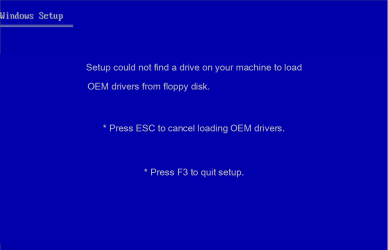
As WinXP setup will find the interal floppy Controller first, with no drive fitted, you may recieve this screen after Pressing "S".

Setup cound not find a drive on your machine to load
OEM drivers from floppy disk.

* Press ESC to cancel loading OEM drivers.
* Press F3 to quit setup.

Win XP F6 2.png

Capture22222.PNG
 

My Computer My Computer

At a glance

ME/XP/Vista/Win7
OS
ME/XP/Vista/Win7
Hi Fellows
Been a while, been away, anyhow back to the triple boot check list.
Have been looking at sata drivers for XP and there seems to be a few, the offerings from the Dell download site for my machine are many but seem to boil down to;

Matrix Storage Manager (OS pre-install driver only):-
8.8.0.1009 (A17) for XP x32 [where A17 is a dell thing]
8.8.0.1009 (A15) for XP x64
8.9.2.1002 (A01) for Win7 [this is not listed on Intel's site]

Rapid Storage Technology (pre-OS install):-
9.6.0.1014 (A04) for Win7 and XP x32 and XP x64.

(pluged an old A: drive into MBo, works OK)

Whats the rub, do I use all of these drivers, or is it RST or MSM for my hardware?
Am I better of using Dell's drivers or the Intel downloads site for the XP installations?

The bios settings give SATA op mode for RAID.
1) RAID autodetect / AHCI =RAID if signed drives, otherwise AHCI.
2) RAID autodetect / ATA =RAID if signed drives, otherwise ATA.
3) RAID on = SATA configured for RAID on every boot.
Option 3) is the current setting, is that the way to go?

How to Download and Install Drivers in the Correct Order | Dell UK
The link above is about the correct order to install drivers, any comments?

Did Charles Darwin discover Plug,n,Play.

Best Regards
Dom
 

My Computer My Computer

At a glance

win7 pro 64bitXeon W352012 Gb ECC PC3 1066Nvidia Quadro FX1800
Computer Manufacturer/Model Number
Dell precision workstation T3500 (yr.2009/10)
OS
win7 pro 64bit
CPU
Xeon W3520
Motherboard
Dell
Memory
12 Gb ECC PC3 1066
Graphics Card(s)
Nvidia Quadro FX1800
Monitor(s) Displays
Dell wfp24
Screen Resolution
1200x
Hard Drives
1x WD1600HLFS
1x Seagate ST500420AS
2x Hitachi E7K1000
PSU
Dell 525w
Case
std
Cooling
std
Keyboard
MS
Mouse
MS
Internet Speed
Broadband
Other Info
Dell Outlet computer, at present as factory supplyed, no additional apps installed, except Dell Backup and Recovery. One HDD installed (WD1600HLFS [Dell OEM])
Got reinstallation disc (win7 but not drivers etc.)
Your F6 drivers are in post3.


Installing drivers when Windows is installed, follow Dell's Correct Order.
 

My Computer My Computer

At a glance

ME/XP/Vista/Win7
OS
ME/XP/Vista/Win7
Well Dom
This should make things clearer.

RST is just the new Intel name for Matrix Storage Manager.

Intel drivers are generic the Dell drivers may be customised to your system, choose Dell

Recommend existing 'raid on' for your system. Changing it may have unforseen problems.

NCQ is supported with RST in RAID and AHCI mode.

Domie
 

My Computer My Computer

At a glance

win7 pro 64bitXeon W352012 Gb ECC PC3 1066Nvidia Quadro FX1800
Computer Manufacturer/Model Number
Dell precision workstation T3500 (yr.2009/10)
OS
win7 pro 64bit
CPU
Xeon W3520
Motherboard
Dell
Memory
12 Gb ECC PC3 1066
Graphics Card(s)
Nvidia Quadro FX1800
Monitor(s) Displays
Dell wfp24
Screen Resolution
1200x
Hard Drives
1x WD1600HLFS
1x Seagate ST500420AS
2x Hitachi E7K1000
PSU
Dell 525w
Case
std
Cooling
std
Keyboard
MS
Mouse
MS
Internet Speed
Broadband
Other Info
Dell Outlet computer, at present as factory supplyed, no additional apps installed, except Dell Backup and Recovery. One HDD installed (WD1600HLFS [Dell OEM])
Got reinstallation disc (win7 but not drivers etc.)
Back
Top