
fubarsnafu2004
New member
- Local time
- 10:19 PM
- Messages
- 1
Hi All
Just found your forum today - I figure I would see if I could get my questions answer here.
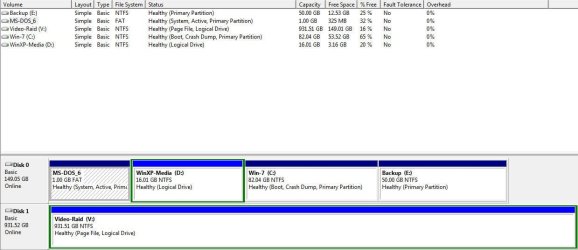
I have 3 O/S on the Hard drive. DOS, XP & Windows 7 in that order.
Dos is 1GB & Primary Partition
Windows XP is 15GB & Logical Driver
Windows 7 is 80GB & is Primary Partition
There is a 4th Primary Partition of 50 GB
The windows 7 \Boot folder is on the DOS Partition.
I attached a screen shot of Drive partitions table.
When Windows 7 comes up it hides the DOS partition & makes itself the C: Drive.
I want to remove the Windows XP Partition - I think I can just delete it and all should be good, though I am not sure.
I will use partition software to move the windows 7 partition to being of free space & then expand it. Keeping the DOS partition is OK since it has the \Boot stuff on it.
Thanks
Fred
Just found your forum today - I figure I would see if I could get my questions answer here.
I have 3 O/S on the Hard drive. DOS, XP & Windows 7 in that order.
Dos is 1GB & Primary Partition
Windows XP is 15GB & Logical Driver
Windows 7 is 80GB & is Primary Partition
There is a 4th Primary Partition of 50 GB
The windows 7 \Boot folder is on the DOS Partition.
I attached a screen shot of Drive partitions table.
When Windows 7 comes up it hides the DOS partition & makes itself the C: Drive.
I want to remove the Windows XP Partition - I think I can just delete it and all should be good, though I am not sure.
I will use partition software to move the windows 7 partition to being of free space & then expand it. Keeping the DOS partition is OK since it has the \Boot stuff on it.
Thanks
Fred
My Computer
- OS
- Windows 7 U


