Trim question

speedlever

New member
Member
VIP
Local time
1:41 AM
Messages
128
I noticed a post here that showed how to check trim status so I tried it but the results are not clear to me.

I run an 80Gb Intel X25M SSD along with multiple other conventional sata HDs.

Can someone interpret my results?
h9gVp.png
 

My Computer

OS
Windows 7 x64 home premium
CPU
Intel core i5-2500k
Motherboard
Asus P8Z68-V Pro
Memory
2x4GB G.Skill DDR3-1333, 2x2GB AData DDR3-1333
Graphics Card(s)
HD3000 graphics
Sound Card
on board
Monitor(s) Displays
Samsung 19" syncmaster
Screen Resolution
1280x1024
Hard Drives
Intel 80 GB X25-M SSD
Samsung HD321KJ 320 GB SATA
Samsung HD204UI 2.0 TB SATA
WD 1.5 TB Green eSATA in an external NexStar enclosure
PSU
Corsair HX520W
Case
Antec Solo
Cooling
CoolerMaster Hyper 212+ with dual fans
Keyboard
MS Natural Ergonomic 4000
Mouse
Logitech
Internet Speed
RoadRunner
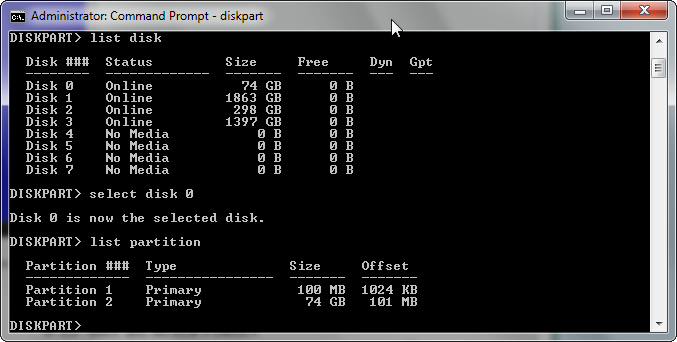
You are OK. The first (100MB) partition is properly aligned. That aligns all the other partitions automatically. I guess you were confused by the "101MB" for C. But if you convert 101MB into KBs, it is also divisible by 4.

PS: I updated the tutorial to explain this particular case.
 
Last edited:

My Computer

Computer Manufacturer/Model Number
HP, Dell, Gateway, Toshiba - 4 laptops and 2 desktops
OS
Vista, Windows7, Mint Mate, Zorin, Windows 8
CPU
from 1.6GHz Duo to i7
Monitor(s) Displays
2x HP w2207
Hard Drives
5x HDD, 7x SSD, 12x Externals
Keyboard
with trackball - no mices
Mouse
Trackball mice
Internet Speed
DSL 6000
Thanks whs. You are exactly right in your guessing.

I'm not clear on why win7/64 divvied up the SSD into two primary partitions either. Oh well.
 

My Computer

OS
Windows 7 x64 home premium
CPU
Intel core i5-2500k
Motherboard
Asus P8Z68-V Pro
Memory
2x4GB G.Skill DDR3-1333, 2x2GB AData DDR3-1333
Graphics Card(s)
HD3000 graphics
Sound Card
on board
Monitor(s) Displays
Samsung 19" syncmaster
Screen Resolution
1280x1024
Hard Drives
Intel 80 GB X25-M SSD
Samsung HD321KJ 320 GB SATA
Samsung HD204UI 2.0 TB SATA
WD 1.5 TB Green eSATA in an external NexStar enclosure
PSU
Corsair HX520W
Case
Antec Solo
Cooling
CoolerMaster Hyper 212+ with dual fans
Keyboard
MS Natural Ergonomic 4000
Mouse
Logitech
Internet Speed
RoadRunner
Well, the 100MB active partition has to be a primary. The C partition can be a logical (because it is not the active partition) - but MS always uses primaries. Just to make our life more difficult.
 

My Computer

Computer Manufacturer/Model Number
HP, Dell, Gateway, Toshiba - 4 laptops and 2 desktops
OS
Vista, Windows7, Mint Mate, Zorin, Windows 8
CPU
from 1.6GHz Duo to i7
Monitor(s) Displays
2x HP w2207
Hard Drives
5x HDD, 7x SSD, 12x Externals
Keyboard
with trackball - no mices
Mouse
Trackball mice
Internet Speed
DSL 6000
Well, typically on hard drives, I think the general convention is to create 3 primary partitions first, then an extended if necessary and logicals within that. That's always how I have done it, seen it done or read about it being done for decades.

So, I would have fully expected this setup to be 2 primary partitions. Not sure why MS doing this would have made anybodies life more difficult.
 

My Computer

Computer Manufacturer/Model Number
Self-Built in July 2009
OS
Windows 7 Ultimate x64
CPU
Intel Q9550 2.83Ghz OC'd to 3.40Ghz
Motherboard
Gigabyte GA-EP45-UD3R rev. 1.1, F12 BIOS
Memory
8GB G.Skill PI DDR2-800, 4-4-4-12 timings
Graphics Card(s)
EVGA 1280MB Nvidia GeForce GTX570
Sound Card
Realtek ALC899A 8 channel onboard audio
Monitor(s) Displays
23" Acer x233H
Screen Resolution
1920x1080
Hard Drives
Intel X25-M 80GB Gen 2 SSD
Western Digital 1TB Caviar Black, 32MB cache. WD1001FALS
PSU
Corsair 620HX modular
Case
Antec P182
Cooling
stock
Keyboard
ABS M1 Mechanical
Mouse
Logitech G9 Laser Mouse
Internet Speed
15/2 cable modem
Other Info
Windows and Linux enthusiast. Logitech G35 Headset.
I quit creating logical drives a long time ago with the advent of NTFS. I didn't find it to offer any advantages that I could see.

I was mainly curious why the Win7/64 HP install process automagically created the two partitions.
 

My Computer

OS
Windows 7 x64 home premium
CPU
Intel core i5-2500k
Motherboard
Asus P8Z68-V Pro
Memory
2x4GB G.Skill DDR3-1333, 2x2GB AData DDR3-1333
Graphics Card(s)
HD3000 graphics
Sound Card
on board
Monitor(s) Displays
Samsung 19" syncmaster
Screen Resolution
1280x1024
Hard Drives
Intel 80 GB X25-M SSD
Samsung HD321KJ 320 GB SATA
Samsung HD204UI 2.0 TB SATA
WD 1.5 TB Green eSATA in an external NexStar enclosure
PSU
Corsair HX520W
Case
Antec Solo
Cooling
CoolerMaster Hyper 212+ with dual fans
Keyboard
MS Natural Ergonomic 4000
Mouse
Logitech
Internet Speed
RoadRunner
So, I would have fully expected this setup to be 2 primary partitions. Not sure why MS doing this would have made anybodies life more difficult.
In many OEM installations, you have 4 primaries out of the box (100MB, C, Recovery and tools). If you then want to create more partitions, you have a problem. Many people not familiar with the NTFS restrictions go ahaead and run into the dreaded dynamics.

We had a lot of examples of this problem and it could be avoided if MS and the OEMs used the primary partitions more sparingly.
 

My Computer

Computer Manufacturer/Model Number
HP, Dell, Gateway, Toshiba - 4 laptops and 2 desktops
OS
Vista, Windows7, Mint Mate, Zorin, Windows 8
CPU
from 1.6GHz Duo to i7
Monitor(s) Displays
2x HP w2207
Hard Drives
5x HDD, 7x SSD, 12x Externals
Keyboard
with trackball - no mices
Mouse
Trackball mice
Internet Speed
DSL 6000
What you show above is alignment which is right at 1024.


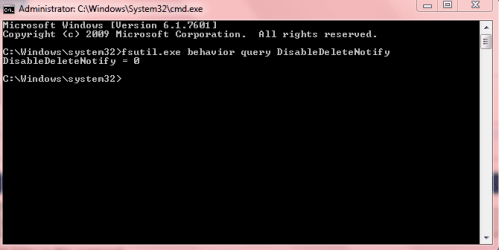
Trim query is this command.

fsutil.exe behavior query DisableDeleteNotify

If enabled it will give: = 0 as in Snip.
 

Attachments

  • Trim.PNG
    Trim.PNG
    8.5 KB · Views: 15

My Computer

Computer Manufacturer/Model Number
Hopalong/ Godzilla
OS
Windows7 Pro 64bit SP-1; Windows XP Pro 32bit
CPU
Intel Core i7-870 Lynnfield 2.93GHz LGA 1156 95W Quad-Core
Motherboard
ASUS P7P55D-E PRO
Memory
8GB@1400MHz Crucial Ballistix DDR3-1600 4x2GB
Graphics Card(s)
ASUS ENGTX460 DirectCU/2DI/1GD5 1GB 256-bit GDDR5
Sound Card
VIA Onboard
Monitor(s) Displays
Asus VS248H-P 24"; Samsung SyncMaster 941BW 19"ws
Screen Resolution
1920x1080; 1440x900
Hard Drives
Samsung 830 120GB SSD
Intel 320 120GB SSD
Western Digital Caviar Black WD7501AALS 750GB 7200 RPM SATA 3.0Gb/s
Western Digital Caviar Black WD6401AALS 640GB 7200 RPM SATA 3.0Gb/s
PSU
COOLER MASTER Silent Pro RS850-AMBAJ3-US 850W Modular
Case
COOLER MASTER HAF 932 RC-932-KKN5-GP Black
Cooling
Scythe "Mugen-2 Rev.B" (2 ScytheKaze-Jyuni PWM fans)
Keyboard
Logitech K-320
Mouse
Kensington
Antivirus
Avast Inernet Suite
Browser
IE 9 ; Chrome
  • Like
Reactions: whs
Back
Top