Triple Boot issue?

fight2fight

New member
Local time
3:03 PM
Messages
18
Hi,

i wanted to give windows 7 ago, and before i installed windows 7 i had dual boot running all fine, like installed XP, and vista later on,

but when i installed windows 7 it doesn't show in the boot up menu only Xp and vista, but if i go into the bios setting and change which hard drive to boot first and swap it, windows 7 boots straight in,


now before i installed windows 7, i partition a drive from my vista HDD and installed windows 7 on that??

now all i need is how do i get windows 7 showing up in the boot menu along with XP & Vista??

thanks...
 

My Computer

OS
XP, Vista
did you have the XP/Vista drive unplugged when you installed Win7? If so, it would explain why there's no boot entry on the XP/Vista disk. Otherwise Windows should have created its own boot menu but then again things have a tendency to go wrong...

you can use bcdedit, EasyBCD, or VistaBootPro to create a new Operating System entry on your XP/Vista drive. You'll want that disk selected as the first boot device in the BIOS again.
 

My Computer

Computer Manufacturer/Model Number
Too many to list.
OS
XP, Seven, 2008R2
CPU
AMD, Intel, VIA
Motherboard
Various
Memory
Corsair, Kingston, etc.
Graphics Card(s)
ATI, NVIDIA
Monitor(s) Displays
Samsung
Hard Drives
Maxtor, Western Digital
Keyboard
qwerty
Internet Speed
22 Mb/s @ home, 1 Gb/s @ server
Other Info
All of my systems still run fastest on XP 32-bit for the most part. Win7 is fun to play with, but I still prefer XP for raw speed, security, and functionality.
no i had the drives plugged in? mind due my vista and windows 7 on same drive, well i partition the drive,

so you want me to have the windows 7 hard drive to boot first then add the xp and vista entries???

thanks for the relpy
 

My Computer

OS
XP, Vista
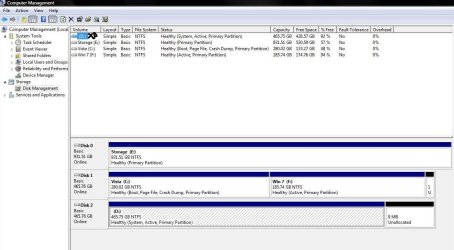
Can you show me a picture of disk management and label which partition has XP, Vista, and 7?

right-click on My Computer and go Manage -> Disk Management

Then take a screenshot (alt+print screen) paste it in paint then save and upload it here.
 

My Computer

Computer Manufacturer/Model Number
Too many to list.
OS
XP, Seven, 2008R2
CPU
AMD, Intel, VIA
Motherboard
Various
Memory
Corsair, Kingston, etc.
Graphics Card(s)
ATI, NVIDIA
Monitor(s) Displays
Samsung
Hard Drives
Maxtor, Western Digital
Keyboard
qwerty
Internet Speed
22 Mb/s @ home, 1 Gb/s @ server
Other Info
All of my systems still run fastest on XP 32-bit for the most part. Win7 is fun to play with, but I still prefer XP for raw speed, security, and functionality.
there already labeled as you can see, just added xp for you..

and i took this from vista...


Untitled.jpg
 

My Computer

OS
XP, Vista
notice that your XP drive and your Win7 drive are set active

this means that your computer will only show the boot manager (menu) from either of these drives, depending on which one is selected first in the BIOS.

However, it doesn't really matter which disk you use so long as you add the Operating System to the boot menu with one of those tools I mentioned earlier. Personally, I would select the disk in the BIOS that shows the most options in the boot menu, then create an additional entry for Windows 7.
 

My Computer

Computer Manufacturer/Model Number
Too many to list.
OS
XP, Seven, 2008R2
CPU
AMD, Intel, VIA
Motherboard
Various
Memory
Corsair, Kingston, etc.
Graphics Card(s)
ATI, NVIDIA
Monitor(s) Displays
Samsung
Hard Drives
Maxtor, Western Digital
Keyboard
qwerty
Internet Speed
22 Mb/s @ home, 1 Gb/s @ server
Other Info
All of my systems still run fastest on XP 32-bit for the most part. Win7 is fun to play with, but I still prefer XP for raw speed, security, and functionality.
i had done this windows 7 will show but when i select it to boot it up i get en error message with some file missing named ntldr?

also do i add the windows 7 entries via using vista???

or do i use windows 7 an add xp and vista entries??


thanks...
 

My Computer

OS
XP, Vista
ntldr is the XP loader. You cannot use that to boot Vista or 7. Vista and 7 uses bootmgr

You can create these entries in any operating system. It doesn't matter.
 

My Computer

Computer Manufacturer/Model Number
Too many to list.
OS
XP, Seven, 2008R2
CPU
AMD, Intel, VIA
Motherboard
Various
Memory
Corsair, Kingston, etc.
Graphics Card(s)
ATI, NVIDIA
Monitor(s) Displays
Samsung
Hard Drives
Maxtor, Western Digital
Keyboard
qwerty
Internet Speed
22 Mb/s @ home, 1 Gb/s @ server
Other Info
All of my systems still run fastest on XP 32-bit for the most part. Win7 is fun to play with, but I still prefer XP for raw speed, security, and functionality.
i added the entry using windows vista, but like i said above i get an error upon selecting this from the boot menu??

any other ideas??
 

My Computer

OS
XP, Vista
like i said above i get an error upon selecting this from the boot menu??

any other ideas??

because you have the boot manager pointing to ntldr. ntldr cannot boot Windows 7. You need to recreate the entry with the proper loader.

Fire up Teamviewer and I'll show you how.
 

My Computer

Computer Manufacturer/Model Number
Too many to list.
OS
XP, Seven, 2008R2
CPU
AMD, Intel, VIA
Motherboard
Various
Memory
Corsair, Kingston, etc.
Graphics Card(s)
ATI, NVIDIA
Monitor(s) Displays
Samsung
Hard Drives
Maxtor, Western Digital
Keyboard
qwerty
Internet Speed
22 Mb/s @ home, 1 Gb/s @ server
Other Info
All of my systems still run fastest on XP 32-bit for the most part. Win7 is fun to play with, but I still prefer XP for raw speed, security, and functionality.
never used teamviewer?

cant u just tell me step by step here???
 

My Computer

OS
XP, Vista
Teamviewer is like the easiest program in the world to use.. Just download it and run it. Then send me User ID and PW in private message

If you are asking for step by step directions, I recommend you use the search function to save time. Because this problem has been addressed many times before.
 

My Computer

Computer Manufacturer/Model Number
Too many to list.
OS
XP, Seven, 2008R2
CPU
AMD, Intel, VIA
Motherboard
Various
Memory
Corsair, Kingston, etc.
Graphics Card(s)
ATI, NVIDIA
Monitor(s) Displays
Samsung
Hard Drives
Maxtor, Western Digital
Keyboard
qwerty
Internet Speed
22 Mb/s @ home, 1 Gb/s @ server
Other Info
All of my systems still run fastest on XP 32-bit for the most part. Win7 is fun to play with, but I still prefer XP for raw speed, security, and functionality.
Back
Top