
Solved Trivial Tricks - Some less known Command Prompt features

Kari

An Angry Old Man
Guru
VIP
SF Team
Local time
5:02 AM
Messages
17,473
Location
A Finnish ex-pat in Leipzig, Germany
Just for fun, here are a few Command Prompt Tips & Tricks which seem to be surprisingly unknown to great many users. Just a few ones, if you have more to add please let me know. All these tricks work on Vista or later versions of Windows in both normal and administrator Command Prompt. I will update this list of more unknown commands and features whenever you geeks let me know of your gems :).

Contents
(In order of which entries have been added.)
  1. How to send text output from any command directly to clipboard
  2. Scroll Command Prompt window with arrow keys
  3. Copy & Paste in Command Prompt window
  4. Change the Command Prompt font
  5. Find your motherboard specifications
  6. List all installed updates, view them as a table in browser
  7. List all services, view them as a table in a browser
  8. List all installed hardware drivers
  9. Browse and use commands in buffer with F keys
  10. List all user profiles with their respective security identifiers (SID)

1. How to send text output from any command directly to clipboard

Let's start with a real practical one. How many of you sometimes asks OP to show for instance the output from IPCONFIG or some other command in their posts? When the output is asked we often tell the OP to send the output to a text file, then copy and paste the content of that file here, so we instruct the OP to give the command like this:

IPCONFIG >C:\Users\UserName\Desktop\MyIPConfig.txt

Now the OP needs to open the MyIPConfig.txt file, select all, copy and finally paste it in his post.

Why not simplify this? Using the Pipe character (|) we can send the output directly to clipboard, bypassing the unnecessary steps of creating a text file and selecting / copying its text. Next time, tell OP to give this command and press CTRL + V in his post, that's it:

IPCONFIG |CLIP

The Pipe + Clip (|clip) at the end of any command line sends the text output of that command directly to clipboard.


2. Scroll Command Prompt window with arrow keys

By default when pressing the up or down arrow keys, Command Prompt goes through the command buffer, commands you have previously given. If you want to scroll the Command Prompt window to see your previous commands and their output you have to use the mouse and the scrollbar.

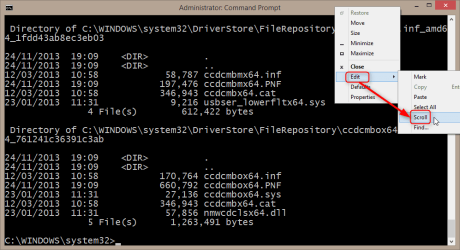
I like to scroll with arrow keys. To do that open the Command Prompt context menu by right clicking its titlebar and select Edit > Scroll:
2014-09-19_16h29_31.png

You will now see the word Scroll in titlebar and can scroll the window using up and down arrows:

2014-09-19_16h31_30.png

Exit the Scroll mode by pressing ESC.


3. Copy & Paste in Command Prompt window

As you certainly know, the keyboard shortcuts CTRL + C to copy and CTRL + V to paste do not work in Command Prompt window.

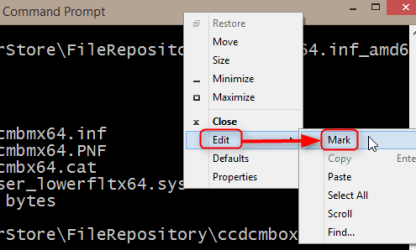
To copy any text from the Command Prompt, open the context menu and select Edit > Mark:
2014-09-19_16h36_34.png

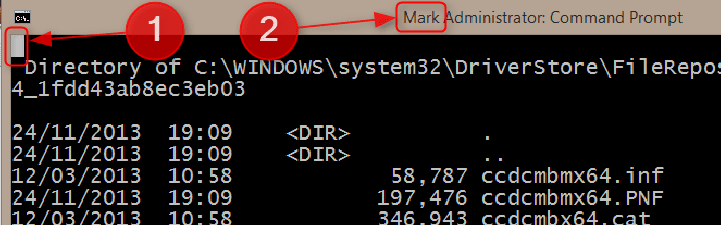
A block cursor appears at top left corner (1) and the titlebar tells you are in Mark mode (2):
2014-09-19_16h38_25.png

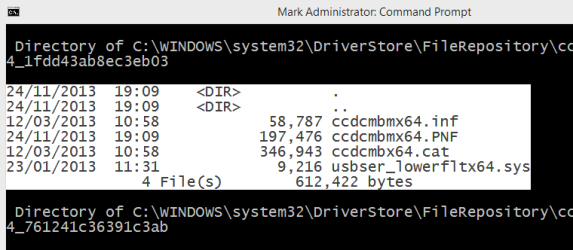
Bring the block cursor to where you want to start marking, press and hold the SHIFT key and using arrow keys go to end of the part you want to mark. Now release the SHIFT key and press Enter to copy the marked region (the text it contains) to clipboard:
2014-09-19_16h40_26.png

You can now paste the marked and copied text normally anywhere you want to.


4. Change the Command Prompt font

Command Prompt context menu, select Properties:
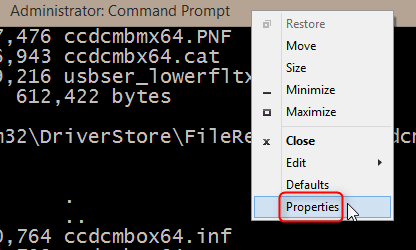
2014-09-19_16h46_37.png

Select Fonts tab, choose you font and text size:
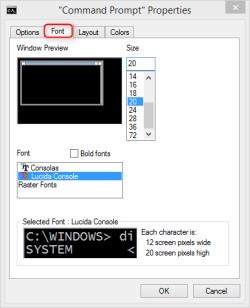
2014-09-19_16h47_06.png


5. Find your motherboard specifications

This one from fellow geeg Maxie: To see the manufacturer, model and serial number of your motherboard, give the following command:

wmic baseboard get product,Manufacturer,version,serialnumber

Like this, input highlighted with yellow, output green:

2014-09-20_12h06_17.png


6. List all installed updates, view them as a table in browser

To create an HTML file containing a list (table) of all installed updates on your system, give this command:

wmic qfe list brief /format:htable > "%USERPROFILE%\Desktop\Updates.html"

This creates a file Updates.html on your desktop. The file can be opened with any browser, it lists all updates installed on your system in a table.


7. List all services on your system, view them as a table in browser

Next two (#7 & #8) are samples taken from the Seven Forums DM Log Collector, thanks for the tip John. To get a table of all services on your system, give the following command:

wmic service list full /format:htable >%USERPROFILE%\Desktop\Services.html

This creates a file Services.html on your desktop. The file can be opened with any browser, it lists all services on your system in a table.


8. List all installed hardware drivers

Sometimes it's handy to get an easy to get a list of all your installed drivers. Luckily it is quite easy using Command Prompt. Give this command to copy the list to clipboard, you can paste it from there to a post or a document:

sc query type= driver state= all |clip

If you want the list in a text file instead, replace the Pipe + CLIP switch (|clip) with path and filename:

sc query type= driver state= all > "%USERPROFILE%\Desktop\Installed_Drivers.txt"

This creates a text file Installed_Drivers.txt on your desktop.


9. Browse and use commands in buffer with F keys

These practical beauties come from fellow member A Guy:

- F1: Pastes the last executed command (character by character)
  • Example: if the last executed command was attrib, first press of F1 pastes an a, next press t, third press another t and so on, each consecutive F1 pastes one more character
- F2: Pastes the last executed command (up to the entered character). When F2 is pressed, a dialog opens to ask a character. When this character is given the last command is pasted to the first appearance of this character. An example:
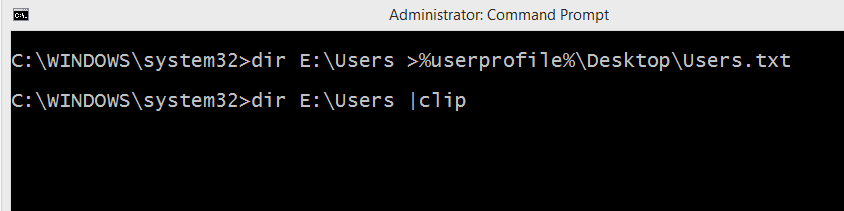
  • User has sent the directory (folder) listing of E:\Users to his desktop to a file. User wants to repeat the command but this time copy the directory listing of E:\Users directly clipboard. He presses F2, a dialog opens to ask a character:
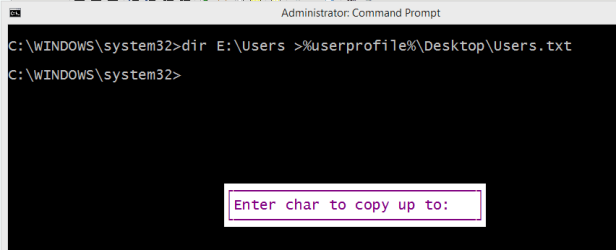
    2014-09-21_12h55_02.png
  • As the beginning of the command is the same, user only wanting to change the target >PATH_AND_FILENAME to |CLIP, user enters the character > to paste the command up to this character. The command is now pasted up to given character:
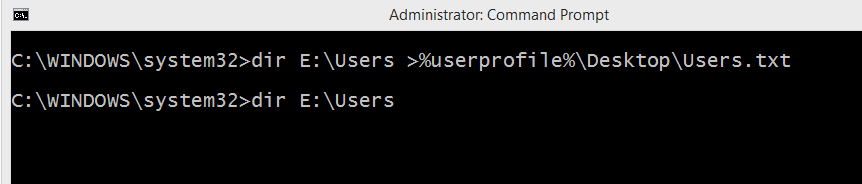
    2014-09-21_12h55_45.png
  • User can now enter his redirection target |CLIP and execute the command:
    2014-09-21_12h56_11.png
- F3: Pastes the last executed command (same than pressing Up arrow once)
- F4: Deletes current prompt text up to the entered character
- F5: Pastes recently executed commands (does not cycle, same than pressing Up arrow repeatedly)
- F6: Pastes ^Z to the prompt
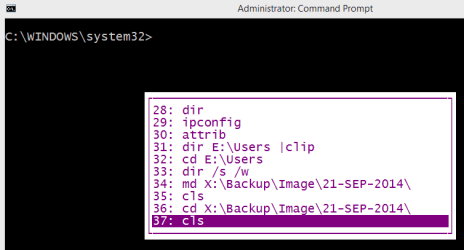
- F7 + F9: F7 and F9 work together:
  • F7 displays a selectable list of previously executed commands:
    2014-09-21_13h14_31.png
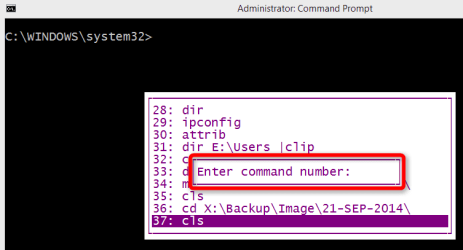
  • F9 lets user then enter the number of command he wants to paste:
    2014-09-21_13h14_57.png
- F8: Pastes recently executed commands (cycles)


10. List all user profiles with their respective security identifiers (SID)

This command lists all available user accounts with their respective security identifiers (SID):

wmic useraccount get name,sid


That's it for now, I will ad more later :).

   Tip
Did you know that launching any program from elevated Command Prompt, the program starts with administrative privileges?

An example: Using Notepad, if you edit any INI or other settings file which is located in C:\Windows, a protected system folder, and try to save it you get an Access Denied error message. To work around this you need to run Notepad by right clicking it and selecting Run as administrator.

If you happen to have the elevated Command Prompt already open, you can run Notepad with admin rights simply by typing Notepad and hitting Enter. As it will now be launched from elevated Command Prompt, it inherits the admin rights and you can edit & save in protected system folder.

This applies to any Windows application and program.


Kari
 
Last edited:

My Computer My Computer

Computer type
Laptop
Computer Manufacturer/Model Number
HP ENVY 17-1150eg
OS
Windows 10 Pro x64 EN-GB
CPU
1.6 GHz Intel Core i7-720QM Processor
Memory
6 GB
Graphics Card(s)
ATI Mobility Radeon HD 5850 Graphics
Sound Card
Beats sound system with integrated subwoofer
Monitor(s) Displays
17" laptop display, 22" LED and 32" Full HD TV through HDMI
Screen Resolution
1600*900 (1), 1920*1080 (2&3)
Hard Drives
Internal: 2 x 500 GB SATA Hard Disk Drive 7200 rpm
External: 2TB for backups, 3TB USB3 network drive for media
Cooling
As Envy runs a bit warm, I have it on a Cooler Master pad
Keyboard
Logitech diNovo Media Desktop Laser (bluetooth)
Mouse
Logitech Performance Mouse MX
Internet Speed
50/10 Mbps VDSL
Antivirus
Windows Defender 4.3.9431.0
Browser
Maxthon 3.5.2., IE11
Pretty cool Kari,
Is it time to change your description An Angry Old Man to something else like Scary Smart :D
 

My Computer My Computer

Computer type
PC/Desktop
Computer Manufacturer/Model Number
Custom assembled by me :}
OS
Win-7-Pro64bit 7-H-Prem-64bit
CPU
i7-5930K 2nd i9-9940x both water blocked VRM's too
Motherboard
ASUS SABERTOOTH X99 2nd ASUS x299 Apex
Memory
Trident-z 3200C14 2nd Trident-z 3600C16
Graphics Card(s)
EVGA 1080ti ftw3 2nd Titan Xp both water blocked
Sound Card
Built-in Realtek
Monitor(s) Displays
1-AOC G2460PG 24"G-Sync 144Hz/ 2nd 1-ASUS VG248QE 24" 144Hz
Screen Resolution
1920 x 1080 144Hz
Hard Drives
2-Samsung M.2 Evo & Evo Plus
2-Samsung 850 EVO 500GB SSD's/ 3-2.5 W.D. Black 1tb-&3-1tb/3-3.5 WD Black 1tb hdd's
PSU
EVGA SuperNOVA 1000-P2 2nd 1200-P2
Case
2-Corsair Obsidian Series 450D Black ATX Mid Tower
Cooling
Custom water loops
Keyboard
Logitech G710+/ 2nd Logitech G910
Mouse
2-RedDragon M901 Perdition 16400 dpi Gaming mouse = wired
Internet Speed
Comcast Ping 19ms 89.31mbps download speed 6.12mbps upload
Antivirus
Malwarebytes Pro/ Superantispyware Pro
Browser
FireFox & Pale moon
Other Info
2nd ASUS X299 Apex/Intel i9-9940x with Custom water loop/7H-Prem-x64/Corsair 450D case/Ram Trident-z 3600C16 4x8gb / Samsung970Evo plus 500gb SSD/Dual ssd EZ swap evo/PSU EVGA SuperNova 1200w-P2 80+Platinum/GPU Titan Xp /8-ML-140 on push-pull on 2-280GTX rads
I learned some new tricks today kari this has the markings of a great tutorial written all over it giving Brink a "run for the money" in the tutorial dept.:D
 

My Computer My Computer

Computer type
PC/Desktop
Computer Manufacturer/Model Number
My own abomination, I call it the Money Pit
OS
Windows 10 Pro x 2/Windows 11 Home
CPU
Intel i7 2600K @ 3.40 GHz
Motherboard
ASUS Sabertooth P67
Memory
Corsair Vengeance 16GB DDR3 1600MHz CL8 Dual Channel Kit
Graphics Card(s)
EVGA GeForce RTX 3080 XC3 ULTRA GAMING 10GB GDDR6X
Sound Card
Onboard Realtek or Nvidia High Definition Audio (HDMI)
Monitor(s) Displays
Samsung JS7000 50" SUHD TV or Samsung 27" FHD 60Hz 8ms GTG V
Screen Resolution
1920 x 1080
Hard Drives
1 x Samsung 870 EVO 250 GB SSD (Windows 10 Pro), 1 x Samsung 850 EVO 250 GB SSD (Windows 10 Pro)
PSU
Corsair AX860 - 860W Modular Power Supply
Case
Phanteks Enthoo Luxe Full Tower Case - Black
Cooling
CORSAIR Hydro Series H150i PRO RGB 360mm Liquid CPU Cooler
Keyboard
Logitech K830 Illuminated Living-Room Keyboard
Mouse
Logitech MX Anywhere 2S Wireless Mouse
Internet Speed
100 Mbps
Antivirus
ESET Internet Security
Browser
Latest Version Of Firefox & Microsoft Edge Chromium Stable
Other Info
LG Super Multi Blue Internal Blu-ray Disk Rewriter - BH10LS30
6x2 HDMI Switcher (6 inputs, 2 outputs) so I can send the output of my Cable Box, Roku, or any my 4 computers to either my TV or Monitor separately or simultaneously.
Thanks MoneyPit. In my opinion this is really trivial, mostly for fun, that's why I posted it here in Chillout :).
 

My Computer My Computer

Computer type
Laptop
Computer Manufacturer/Model Number
HP ENVY 17-1150eg
OS
Windows 10 Pro x64 EN-GB
CPU
1.6 GHz Intel Core i7-720QM Processor
Memory
6 GB
Graphics Card(s)
ATI Mobility Radeon HD 5850 Graphics
Sound Card
Beats sound system with integrated subwoofer
Monitor(s) Displays
17" laptop display, 22" LED and 32" Full HD TV through HDMI
Screen Resolution
1600*900 (1), 1920*1080 (2&3)
Hard Drives
Internal: 2 x 500 GB SATA Hard Disk Drive 7200 rpm
External: 2TB for backups, 3TB USB3 network drive for media
Cooling
As Envy runs a bit warm, I have it on a Cooler Master pad
Keyboard
Logitech diNovo Media Desktop Laser (bluetooth)
Mouse
Logitech Performance Mouse MX
Internet Speed
50/10 Mbps VDSL
Antivirus
Windows Defender 4.3.9431.0
Browser
Maxthon 3.5.2., IE11
Nice work Kari .. I use the one below to get Motherboard Information ..


I am certain you would know it ...


wmic baseboard get product,Manufacturer,version,serialnumber
 

My Computer My Computer

Computer Manufacturer/Model Number
W530-3630QM1
OS
windows 7 home 64bit
CPU
INTEL-CORE I7
Memory
16GB
Hard Drives
750GB
Browser
Chrome
Nice work Kari .. I use the one below to get Motherboard Information ..

I am certain you would know it ...

wmic baseboard get product,Manufacturer,version,serialnumber

That's a good one! Added.

WMIC is really useful, another practical use for it is to create a list (HTML table) of installed Windows Update KB-hotfixes:

wmic qfe list brief /format:htable > "%USERPROFILE%\Desktop\Updates.html"

This creates an HTML file Updates.html on user's desktop. List can then be viewed with any browser. Added this one, too.
 

My Computer My Computer

Computer type
Laptop
Computer Manufacturer/Model Number
HP ENVY 17-1150eg
OS
Windows 10 Pro x64 EN-GB
CPU
1.6 GHz Intel Core i7-720QM Processor
Memory
6 GB
Graphics Card(s)
ATI Mobility Radeon HD 5850 Graphics
Sound Card
Beats sound system with integrated subwoofer
Monitor(s) Displays
17" laptop display, 22" LED and 32" Full HD TV through HDMI
Screen Resolution
1600*900 (1), 1920*1080 (2&3)
Hard Drives
Internal: 2 x 500 GB SATA Hard Disk Drive 7200 rpm
External: 2TB for backups, 3TB USB3 network drive for media
Cooling
As Envy runs a bit warm, I have it on a Cooler Master pad
Keyboard
Logitech diNovo Media Desktop Laser (bluetooth)
Mouse
Logitech Performance Mouse MX
Internet Speed
50/10 Mbps VDSL
Antivirus
Windows Defender 4.3.9431.0
Browser
Maxthon 3.5.2., IE11
Thanks MoneyPit. In my opinion this is really trivial, mostly for fun, that's why I posted it here in Chillout :).

This is not trivial at all kari as I see more entries have been added and with a wealth more of tricks added to make a proper tutorial this would be useful to many members and would not be lost in a couple of weeks because newer threads are posted making this gem less visible.
 

My Computer My Computer

Computer type
PC/Desktop
Computer Manufacturer/Model Number
My own abomination, I call it the Money Pit
OS
Windows 10 Pro x 2/Windows 11 Home
CPU
Intel i7 2600K @ 3.40 GHz
Motherboard
ASUS Sabertooth P67
Memory
Corsair Vengeance 16GB DDR3 1600MHz CL8 Dual Channel Kit
Graphics Card(s)
EVGA GeForce RTX 3080 XC3 ULTRA GAMING 10GB GDDR6X
Sound Card
Onboard Realtek or Nvidia High Definition Audio (HDMI)
Monitor(s) Displays
Samsung JS7000 50" SUHD TV or Samsung 27" FHD 60Hz 8ms GTG V
Screen Resolution
1920 x 1080
Hard Drives
1 x Samsung 870 EVO 250 GB SSD (Windows 10 Pro), 1 x Samsung 850 EVO 250 GB SSD (Windows 10 Pro)
PSU
Corsair AX860 - 860W Modular Power Supply
Case
Phanteks Enthoo Luxe Full Tower Case - Black
Cooling
CORSAIR Hydro Series H150i PRO RGB 360mm Liquid CPU Cooler
Keyboard
Logitech K830 Illuminated Living-Room Keyboard
Mouse
Logitech MX Anywhere 2S Wireless Mouse
Internet Speed
100 Mbps
Antivirus
ESET Internet Security
Browser
Latest Version Of Firefox & Microsoft Edge Chromium Stable
Other Info
LG Super Multi Blue Internal Blu-ray Disk Rewriter - BH10LS30
6x2 HDMI Switcher (6 inputs, 2 outputs) so I can send the output of my Cable Box, Roku, or any my 4 computers to either my TV or Monitor separately or simultaneously.
I already asked admins opinion on this, if the thread should be moved. In all honesty, as there are only the News and Chillout sections where repping is not possible and for some odd reason I wanted this to be "non-reppable", I posted it here.
 

My Computer My Computer

Computer type
Laptop
Computer Manufacturer/Model Number
HP ENVY 17-1150eg
OS
Windows 10 Pro x64 EN-GB
CPU
1.6 GHz Intel Core i7-720QM Processor
Memory
6 GB
Graphics Card(s)
ATI Mobility Radeon HD 5850 Graphics
Sound Card
Beats sound system with integrated subwoofer
Monitor(s) Displays
17" laptop display, 22" LED and 32" Full HD TV through HDMI
Screen Resolution
1600*900 (1), 1920*1080 (2&3)
Hard Drives
Internal: 2 x 500 GB SATA Hard Disk Drive 7200 rpm
External: 2TB for backups, 3TB USB3 network drive for media
Cooling
As Envy runs a bit warm, I have it on a Cooler Master pad
Keyboard
Logitech diNovo Media Desktop Laser (bluetooth)
Mouse
Logitech Performance Mouse MX
Internet Speed
50/10 Mbps VDSL
Antivirus
Windows Defender 4.3.9431.0
Browser
Maxthon 3.5.2., IE11
Learned a couple of new ones. Thanks Kari.
 

My Computer My Computer

Computer Manufacturer/Model Number
HP, Dell, Gateway, Toshiba - 4 laptops and 2 desktops
OS
Vista, Windows7, Mint Mate, Zorin, Windows 8
CPU
from 1.6GHz Duo to i7
Monitor(s) Displays
2x HP w2207
Hard Drives
5x HDD, 7x SSD, 12x Externals
Keyboard
with trackball - no mices
Mouse
Trackball mice
Internet Speed
DSL 6000
You are welcome Wolfgang. My absolute favorite is the ANY_COMMAND |CLIP, to get the command output directly to clipboard:
  • dir |clip
  • ipconfig |clip
  • attrib |clip
  • ... and so on
 

My Computer My Computer

Computer type
Laptop
Computer Manufacturer/Model Number
HP ENVY 17-1150eg
OS
Windows 10 Pro x64 EN-GB
CPU
1.6 GHz Intel Core i7-720QM Processor
Memory
6 GB
Graphics Card(s)
ATI Mobility Radeon HD 5850 Graphics
Sound Card
Beats sound system with integrated subwoofer
Monitor(s) Displays
17" laptop display, 22" LED and 32" Full HD TV through HDMI
Screen Resolution
1600*900 (1), 1920*1080 (2&3)
Hard Drives
Internal: 2 x 500 GB SATA Hard Disk Drive 7200 rpm
External: 2TB for backups, 3TB USB3 network drive for media
Cooling
As Envy runs a bit warm, I have it on a Cooler Master pad
Keyboard
Logitech diNovo Media Desktop Laser (bluetooth)
Mouse
Logitech Performance Mouse MX
Internet Speed
50/10 Mbps VDSL
Antivirus
Windows Defender 4.3.9431.0
Browser
Maxthon 3.5.2., IE11
Very nice thanks!
 

My Computer My Computer

Computer type
PC/Desktop
Computer Manufacturer/Model Number
Custom Built
OS
Windows 10 Pro
CPU
AMD Ryzen 5 2400G Processor with Radeon RX Vega 11 Graphics
Motherboard
ASRock X470 Master SLI/AC AM4 AMD Promontory X470 SATA 6Gb/s
Memory
G.SKILL Ripjaws V Series 16GB (2 x 8GB) 288-Pin DDR4 SDRAM D
Graphics Card(s)
2047MB NVIDIA GeForce GTX 1060 6GB (EVGA)
Sound Card
Motherboard Built in
Monitor(s) Displays
Acer R240HY bidx 23.8-Inch IPS HDMI DVI VGA (1920 x 1080) Wi
Screen Resolution
1920 x 1080
Hard Drives
1TB Sandisk SSD PLUS (Main drive)
500 GB Seagate 7200 RPM (Games)
500 GB Western Digital 7200 RPM (Virtual Machines)
PSU
CORSAIR TX Series TX650M 650W 80+ Gold Modular Power Supply
Case
CORSAIR CARBIDE SPEC-02 Mid-Tower Gaming Case, Red LED Fan
Cooling
220mm, two 120mm, and four 60mm fans
Keyboard
Wired Dell keyboard
Mouse
Wireless Logitech mouse
Internet Speed
250mb down, 30mb up
Antivirus
Panda Cloud Antivirus
Browser
Chrome-ish x64
Other Info
Your awesome for reading this.
Thanks Kari. I don't care what you want, I'm going to rep you any way, so you may as well make it into a tut. I really wish you would, for easy access when I need it. fantastic work. I imagine you know a lot more tricks than this that would help most of us out. Many thanks. That's what Reps are supposed to be for. Someone who posts something that helps someone out. You've helped a lot of us out.
 

My Computers My Computers

System One System Two

  • Computer type
    PC/Desktop
    Computer Manufacturer/Model Number
    ALWAYS UNDER CONSTRUCTION
    OS
    Windows 11 Pro
    CPU
    Ryzen 9 5900X
    Motherboard
    Asus X570 Crosshair Viii Hero
    Memory
    32GB G Skill DDR4-3600
    Graphics Card(s)
    EVGA RTX 3080 FTW 3 Ultra
    Sound Card
    On Board/Sennheiser PC37X Headset
    Monitor(s) Displays
    3 X Asus 27"
    Screen Resolution
    2560x1440
    Hard Drives
    2 X 1 TB NVME drives
    PSU
    EVGA 850
    Case
    Phanteks Eclipse P400A
    Cooling
    EVGA 280 AIO
    Keyboard
    Logitech G510s/ Logitech G13
    Mouse
    Logitech G502
    Internet Speed
    24/1
    Antivirus
    ESET/MBAM Pro/SAS Pro
    Browser
    Chrome/ Firefox/ Edge
  • Computer type
    Laptop
    System Manufacturer/Model Number
    Dell 16 Plus
    OS
    Windows 11 Pro
    CPU
    Intel Ultra 9 288V
    Memory
    32 GB LPDDR5X 8533
    Monitor(s) Displays
    16" Mini-LED HDR600 Touch 90 Hz
    Screen Resolution
    2560X1600
    Hard Drives
    1 TB NVME
:ditto:

Might be trivial,
But allot of people don't know right click dragging offers options copy to/ move to/ create shortcut to/ and my personal favorite Cancel :)
 

My Computer My Computer

Computer type
PC/Desktop
Computer Manufacturer/Model Number
Custom assembled by me :}
OS
Win-7-Pro64bit 7-H-Prem-64bit
CPU
i7-5930K 2nd i9-9940x both water blocked VRM's too
Motherboard
ASUS SABERTOOTH X99 2nd ASUS x299 Apex
Memory
Trident-z 3200C14 2nd Trident-z 3600C16
Graphics Card(s)
EVGA 1080ti ftw3 2nd Titan Xp both water blocked
Sound Card
Built-in Realtek
Monitor(s) Displays
1-AOC G2460PG 24"G-Sync 144Hz/ 2nd 1-ASUS VG248QE 24" 144Hz
Screen Resolution
1920 x 1080 144Hz
Hard Drives
2-Samsung M.2 Evo & Evo Plus
2-Samsung 850 EVO 500GB SSD's/ 3-2.5 W.D. Black 1tb-&3-1tb/3-3.5 WD Black 1tb hdd's
PSU
EVGA SuperNOVA 1000-P2 2nd 1200-P2
Case
2-Corsair Obsidian Series 450D Black ATX Mid Tower
Cooling
Custom water loops
Keyboard
Logitech G710+/ 2nd Logitech G910
Mouse
2-RedDragon M901 Perdition 16400 dpi Gaming mouse = wired
Internet Speed
Comcast Ping 19ms 89.31mbps download speed 6.12mbps upload
Antivirus
Malwarebytes Pro/ Superantispyware Pro
Browser
FireFox & Pale moon
Other Info
2nd ASUS X299 Apex/Intel i9-9940x with Custom water loop/7H-Prem-x64/Corsair 450D case/Ram Trident-z 3600C16 4x8gb / Samsung970Evo plus 500gb SSD/Dual ssd EZ swap evo/PSU EVGA SuperNova 1200w-P2 80+Platinum/GPU Titan Xp /8-ML-140 on push-pull on 2-280GTX rads
Nice info, thank you.
 

My Computer My Computer

Computer type
PC/Desktop
Computer Manufacturer/Model Number
Dell Hell oh Well
OS
Win 7 32 Home Premium, Win 7 64 Pro, Win 8.1, Win 10
CPU
Intel Core 2 Duo 2.93GHz
Memory
Not much with my ADHD
Graphics Card(s)
ATI Radeon HD 4350
Monitor(s) Displays
24" HDTV/Monitor
Screen Resolution
Blurry after a Scotch or 2
Hard Drives
1 HDD 250 GB, 1 HDD 1 TB, 3 - 1 TB Externals
Case
Don't get on my case...man :D
Cooling
I have an Air Conditioner & Diet Pepsi
Keyboard
Saitek Cyborg
Mouse
10 yr old MS optical mouse that still works
Internet Speed
Never fast enough
Antivirus
Various
Browser
Various
Our admin John (z3r010) reminded me of an awesome example of how much and what can be done with command line. Our own DM Log Collector, a batch tool used to collect required information to help members with BSOD and crashes is completely created using command line tool. If interested in learning batch coding and usage, download the DM Log Collector, open it on a text editor and read it carefully through, it contains several examples of commands available for gathering information. Download (and posting instructions if you ever get an unexplained BSOD): http://www.sevenforums.com/bsod-help-support/96879-blue-screen-death-bsod-posting-instructions.html

I took two gems of the DM Log Collector and added to original post in this thread:
  • List all services, view them as a table in a browser
  • List all installed hardware drivers
See the updated original post :).

Kari
 

My Computer My Computer

Computer type
Laptop
Computer Manufacturer/Model Number
HP ENVY 17-1150eg
OS
Windows 10 Pro x64 EN-GB
CPU
1.6 GHz Intel Core i7-720QM Processor
Memory
6 GB
Graphics Card(s)
ATI Mobility Radeon HD 5850 Graphics
Sound Card
Beats sound system with integrated subwoofer
Monitor(s) Displays
17" laptop display, 22" LED and 32" Full HD TV through HDMI
Screen Resolution
1600*900 (1), 1920*1080 (2&3)
Hard Drives
Internal: 2 x 500 GB SATA Hard Disk Drive 7200 rpm
External: 2TB for backups, 3TB USB3 network drive for media
Cooling
As Envy runs a bit warm, I have it on a Cooler Master pad
Keyboard
Logitech diNovo Media Desktop Laser (bluetooth)
Mouse
Logitech Performance Mouse MX
Internet Speed
50/10 Mbps VDSL
Antivirus
Windows Defender 4.3.9431.0
Browser
Maxthon 3.5.2., IE11
When I learned the F3 button pastes the last used command, I went searching for the other Fkey usages (assuming at least F1 and F2 had one)

F1: Pastes the last executed command (character by character)

F2: Pastes the last executed command (up to the entered character)

F3: Pastes the last executed command

F4: Deletes current prompt text up to the entered character

F5: Pastes recently executed commands (does not cycle)

F6: Pastes ^Z to the prompt

F7: Displays a selectable list of previously executed commands

F8: Pastes recently executed commands (cycles)

F9: Asks for the number of the command from the F7 list to paste

A Guy
 

My Computer My Computer

Computer type
PC/Desktop
OS
Windows 10 Home x64
CPU
INTEL Core i5-750 Quad-Core 3.37GHz
Motherboard
ASUS P7P55D
Memory
HyperX Fury Black Series 8GB (2 x 4GB) 1866Mhz
Graphics Card(s)
EVGA GeForce GTX 750 Superclocked 1GB 128-Bit GDDR5
Monitor(s) Displays
LG 32MA68HY 32" IPS
Screen Resolution
1920 x 1080
Hard Drives
Samsung 840 Evo 120GB, SEAGATE 500GB Barracuda® 7200.12, SATA 3 Gb/s, 7200 RPM, 16MB cache
PSU
ANTEC TruePower New TP-550, 80 PLUS, 550W
Case
ANTEC Three Hundred Illusion
Cooling
COOLER MASTER Hyper 212 Plus, 4 x 120mm 1 x 140mm Noctua's
Internet Speed
85 + Mbps
Antivirus
Avast
Browser
Vivaldi
Nice one Kari
 

My Computer My Computer

Computer type
PC/Desktop
Computer Manufacturer/Model Number
Self Built
OS
Windows 10 Pro
CPU
Core i5 9600K
Motherboard
ASUS ROG Strix Z390-F Gaming
Memory
Corsair Vengeance Pro 2x 8GB (16GB) 3200MHz DDR4
Graphics Card(s)
MSI GTX 1070 Gaming X 8GB
Sound Card
ASRock A-Style Purity Sound
Monitor(s) Displays
ASUS VX239H IPS
Screen Resolution
1920x1080
Hard Drives
XPG SPECTRIX S40G 2566GB M.2 NVMe | Patriot P210 512GB SSD | Seagate BarraCuda 4TB 5400RPM
PSU
Thermaltake Smart 600w RGB 80Plus
Case
NZXT H500 with 3x Corsair HD120 RGB w/Node Pro
Cooling
Cryorig H7
Keyboard
Corsair K70 RapidFire RGB (Cherry MX Speed)
Mouse
Logitech G402 Hyperion Fury
Internet Speed
20MB Cable Broadband
Browser
Chrome
Other Info
Corsair MM300 Extended Anti-Fray Mouse Pad | Edifier C2 2.1ch Sound System | XBOX One S Controller | XBOX 360 Wireless Controller for Windows | APC SUA1000i Smart-UPS | PS4 Slim 500GB [Region 1 - USA]
When I learned the F3 button pastes the last used command, I went searching for the other Fkey usages (assuming at least F1 and F2 had one)...
...
...
Added these beauties, thanks Bill :). I only knew F1, F2 and the F7+F9 combo.
 

My Computer My Computer

Computer type
Laptop
Computer Manufacturer/Model Number
HP ENVY 17-1150eg
OS
Windows 10 Pro x64 EN-GB
CPU
1.6 GHz Intel Core i7-720QM Processor
Memory
6 GB
Graphics Card(s)
ATI Mobility Radeon HD 5850 Graphics
Sound Card
Beats sound system with integrated subwoofer
Monitor(s) Displays
17" laptop display, 22" LED and 32" Full HD TV through HDMI
Screen Resolution
1600*900 (1), 1920*1080 (2&3)
Hard Drives
Internal: 2 x 500 GB SATA Hard Disk Drive 7200 rpm
External: 2TB for backups, 3TB USB3 network drive for media
Cooling
As Envy runs a bit warm, I have it on a Cooler Master pad
Keyboard
Logitech diNovo Media Desktop Laser (bluetooth)
Mouse
Logitech Performance Mouse MX
Internet Speed
50/10 Mbps VDSL
Antivirus
Windows Defender 4.3.9431.0
Browser
Maxthon 3.5.2., IE11
Beautiful. Though the motherboard specs one made me a little worried when I got "0000" as my model number. :eek:
 

My Computer My Computer

Computer type
PC/Desktop
Computer Manufacturer/Model Number
Custom
OS
Windows 7 Pro x64
CPU
Intel Core i7-5820k
Motherboard
ASUS X99-PRO
Memory
32GB Kingston HyperX FURY DDR4-2400
Graphics Card(s)
EVGA Geforce GTX970
Monitor(s) Displays
ASUS VC239h
Screen Resolution
1920x1080
Hard Drives
Samsung 850 EVO SSD 250GB x2
750 GB HDD
3TB HDD
PSU
Corsair RM750
Case
Fractal Design Define R5
Cooling
Noctua NH-D15
Keyboard
Corsair Strafe RGB
Mouse
Logitech G502

My Computer My Computer

Computer type
Laptop
Computer Manufacturer/Model Number
HP Elitebook 8540p
OS
Windows 7 Pro 32
CPU
Intel(R) Core(TM) i5 CPU M 540 @ 2.53GHz
Motherboard
Hewlett-Packard 1521
Memory
4,00 GB (Usable 2,98)
Graphics Card(s)
NVIDIA NVS 5100M
Sound Card
NVIDIA High Definition Audio
Screen Resolution
1600x900
Hard Drives
INTEL SSDSA2CW120G3
Antivirus
F-Secure Internet Security
Browser
IE, Firefox, Opera
Other Info
Sandboxie,
SRP (Software Restriction Policy),
EMET (Enhanced Mitigation Experience Toolkit),
WFC (Windows Firewall Control by BiniSoft),
Malwarebytes Premium
Back
Top