Solved Trojan.Agent/Gen-Faldesc

name: ph
Command line : MsiExec.exe /I{185F9795-9663-4F13-9EF9-307A282ADB5A}
\adobe\Adobe Master Collection CS6\Adobe CS6\payloads\SonicWrappers_ph6.0-mul\
Software ID {185F9795-9663-4F13-9EF9-307A282ADB5A}

name : bl
Command line : MsiExec.exe /I{2A075BB4-E976-4278-BF3F-E5C6945D84C0}
\adobe\Adobe Master Collection CS6\Adobe CS6\payloads\SonicWrappers_bl6.0-mul\
Software ID {2A075BB4-E976-4278-BF3F-E5C6945D84C0}

From what I've found, ph and bl is 'free' shared software hosted on an iffy web site ... meaning --> illegal/cracked key :(

Let me know whan you've uninstalled Adobe CS5
 

My Computer My Computer

At a glance

Windows 7 Ultimate 32bit SP1Intel(R) Core(TM)2 Quad CPU @ 2.40GHz, 2400 MHz4 GBATI Radeon HD 2600 Pro
Computer type
PC/Desktop
Computer Manufacturer/Model Number
Bruce ... somewhere in his 40's
OS
Windows 7 Ultimate 32bit SP1
CPU
Intel(R) Core(TM)2 Quad CPU @ 2.40GHz, 2400 MHz
Motherboard
INTEL/D975XBX2
Memory
4 GB
Graphics Card(s)
ATI Radeon HD 2600 Pro
Monitor(s) Displays
Samsung SyncMaster 914v
Screen Resolution
1280 x 1024
Hard Drives
2/500GB each ... ST3500630AS ATA Device.
One is not connected
PSU
Rocketfish 700 W
Case
G.Skill Gigabyte Chassis
Keyboard
Standard PS/2 Keyboard
Mouse
Microsoft PS/2 Mouse
Internet Speed
DSL
Antivirus
Avira Internet Security
Browser
IE 11
Other Info
ATI HDMI Audio
I just uninstalled successfully the cracked apps including ph/bl using Glary Utilities .All done.
 

My Computer My Computer

At a glance

win7 x64
OS
win7 x64
Tell me how the computer is runnung now, and if SAS or Eset find anything suspicious.
If nothing is found, set a "clean" restore point.

Keep TFC by Old Timer ... delete the rest of the applications I had you download earlier. You should be good to go :)
 

My Computer My Computer

At a glance

Windows 7 Ultimate 32bit SP1Intel(R) Core(TM)2 Quad CPU @ 2.40GHz, 2400 MHz4 GBATI Radeon HD 2600 Pro
Computer type
PC/Desktop
Computer Manufacturer/Model Number
Bruce ... somewhere in his 40's
OS
Windows 7 Ultimate 32bit SP1
CPU
Intel(R) Core(TM)2 Quad CPU @ 2.40GHz, 2400 MHz
Motherboard
INTEL/D975XBX2
Memory
4 GB
Graphics Card(s)
ATI Radeon HD 2600 Pro
Monitor(s) Displays
Samsung SyncMaster 914v
Screen Resolution
1280 x 1024
Hard Drives
2/500GB each ... ST3500630AS ATA Device.
One is not connected
PSU
Rocketfish 700 W
Case
G.Skill Gigabyte Chassis
Keyboard
Standard PS/2 Keyboard
Mouse
Microsoft PS/2 Mouse
Internet Speed
DSL
Antivirus
Avira Internet Security
Browser
IE 11
Other Info
ATI HDMI Audio
Hello again,
The PC is running smooth ,Deea just sent you greetings .I'll do a full scan with SAS & Eset asap.
Thanks, I'll keep it .

I've realised something .In Adobe Premiere folder , are left a bunch of .dll's , AdobePremiere .exe file, and other folders.I was trying to install & uninstall the app but without result ,these files remain there and I'm not sure how to get rid of them without scrambling the registry entries .Is there any way to safely clean these files ? The APremiere looks uninstalled in Add/remove apps by the way.
 

My Computer My Computer

At a glance

win7 x64
OS
win7 x64
Download the latest version of CCleaner, 4.03. Download CCleaner 4.03.4151 - FileHippo.com
Uncheck any 'pre-checked'/bundled boxes.

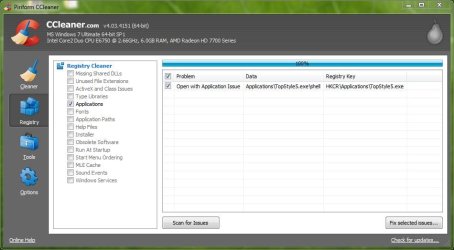
After starting it, click on "Registry"... left column. Click on Application paths, then click 'scan for issues'. Anything with Adobe Premier showing, put a check next to it to be 'fixed'. CCleaner will ask if you'd like to back that up. Say yes! It will be saved in your Documents. Saving a backup of the registry 'fixed' files, is always a good "just-in-case"
 

My Computer My Computer

At a glance

Windows 7 Ultimate 32bit SP1Intel(R) Core(TM)2 Quad CPU @ 2.40GHz, 2400 MHz4 GBATI Radeon HD 2600 Pro
Computer type
PC/Desktop
Computer Manufacturer/Model Number
Bruce ... somewhere in his 40's
OS
Windows 7 Ultimate 32bit SP1
CPU
Intel(R) Core(TM)2 Quad CPU @ 2.40GHz, 2400 MHz
Motherboard
INTEL/D975XBX2
Memory
4 GB
Graphics Card(s)
ATI Radeon HD 2600 Pro
Monitor(s) Displays
Samsung SyncMaster 914v
Screen Resolution
1280 x 1024
Hard Drives
2/500GB each ... ST3500630AS ATA Device.
One is not connected
PSU
Rocketfish 700 W
Case
G.Skill Gigabyte Chassis
Keyboard
Standard PS/2 Keyboard
Mouse
Microsoft PS/2 Mouse
Internet Speed
DSL
Antivirus
Avira Internet Security
Browser
IE 11
Other Info
ATI HDMI Audio
thanks again, kind of strange, nothing about Adobe Premiere shown ...but the dll's are there on C:\Program Files\Adobe\Adobe Premiere Pro CS6 .(?!)
 

Attachments

  • Capture.JPG
    Capture.JPG
    60.7 KB · Views: 5

My Computer My Computer

At a glance

win7 x64
OS
win7 x64
Click on 'obsolete' software, and so forth to find all the Adobe keys to 'fix' and backup. Once this is done, let me know once again how your computer is running. Give it a couple of days.

If all is well, then you can delete all saved Adobe backups --> cc_###### in your documents.
 

My Computer My Computer

At a glance

Windows 7 Ultimate 32bit SP1Intel(R) Core(TM)2 Quad CPU @ 2.40GHz, 2400 MHz4 GBATI Radeon HD 2600 Pro
Computer type
PC/Desktop
Computer Manufacturer/Model Number
Bruce ... somewhere in his 40's
OS
Windows 7 Ultimate 32bit SP1
CPU
Intel(R) Core(TM)2 Quad CPU @ 2.40GHz, 2400 MHz
Motherboard
INTEL/D975XBX2
Memory
4 GB
Graphics Card(s)
ATI Radeon HD 2600 Pro
Monitor(s) Displays
Samsung SyncMaster 914v
Screen Resolution
1280 x 1024
Hard Drives
2/500GB each ... ST3500630AS ATA Device.
One is not connected
PSU
Rocketfish 700 W
Case
G.Skill Gigabyte Chassis
Keyboard
Standard PS/2 Keyboard
Mouse
Microsoft PS/2 Mouse
Internet Speed
DSL
Antivirus
Avira Internet Security
Browser
IE 11
Other Info
ATI HDMI Audio
...unfortunately, still no APremiere entry found. I'll try Adobe CS Cleaner tool and let you know how it works.


LE : Done with Revo uninstaller.I'll come back in a few days after the final full scan with a couple of Anti virus/malware/spyware.

LE2 (10.07): Mark as solved, the PC is running nice and smooth, purring like a Kat :D
Scanned with SAS, ESET, Symantec ...
Thanks for your support .
 
Last edited:

My Computer My Computer

At a glance

win7 x64
OS
win7 x64
Back
Top