Trouble connecting to home wireless network

waynrayn

New member
Local time
12:40 PM
Messages
6
Hi Folks:
I am having trouble connecting to our wireless internet home network with my new Toshiba Satellite laptop.
The network is a venerable Linksys WAP54G access point, not quite a full router, as it does not have a firewall and does not assign static addresses. It allows a dynamic address. It is very basic WEP security. We have a Dell laptop with XP which operates off it just fine.
When I attempt to connect with Windows 7 on the new Toshiba Satellite, it will identify the connection as public and connect, but activity is limited. It says it cannot establish an IP address. However when I connect with the built-in Ethernet port and a cord, it’s fine. Just the wireless part is giving problems.
I have read of one solution for this apparently not rare problem. This is to go into the Device Manager, find the wireless adapter, open it and click on the Advanced tab. This produces a list of properties. Find the property called “Network Address,” and put in the physical address of the wireless adapter found in IPconfig/all. However when I go this far, I don’t even have a property called Network Address, so I can’t do this.
Any suggestions would be appreciated.
Thanks very much,
wayrnayn
 

My Computer My Computer

OS
Windows 7
Hi Folks:
I am having trouble connecting to our wireless internet home network with my new Toshiba Satellite laptop.
The network is a venerable Linksys WAP54G access point, not quite a full router, as it does not have a firewall and does not assign static addresses. It allows a dynamic address. It is very basic WEP security. We have a Dell laptop with XP which operates off it just fine.
When I attempt to connect with Windows 7 on the new Toshiba Satellite, it will identify the connection as public and connect, but activity is limited. It says it cannot establish an IP address. However when I connect with the built-in Ethernet port and a cord, it’s fine. Just the wireless part is giving problems.
I have read of one solution for this apparently not rare problem. This is to go into the Device Manager, find the wireless adapter, open it and click on the Advanced tab. This produces a list of properties. Find the property called “Network Address,” and put in the physical address of the wireless adapter found in IPconfig/all. However when I go this far, I don’t even have a property called Network Address, so I can’t do this.
Any suggestions would be appreciated.
Thanks very much,
wayrnayn


Network address is actually locally administered mac address, and is there.

Are you running "homegroup"?

Have you tried connecting with encryption turned off?
 
Last edited:

My Computer My Computer

Computer Manufacturer/Model Number
HP Pavillion dv-7 1005 Tx
OS
Win 8 Release candidate 8400
CPU
[email protected]
Memory
4 gigs
Graphics Card(s)
Nvidia 9600M
Sound Card
HD built-in
Monitor(s) Displays
17" Wxga
Screen Resolution
1440x900
Cooling
none
Internet Speed
45Mb down 5Mb up
Can you find the Ip address of the access point with the XP computer & then enter it into the win7 computer ?
 

My Computer My Computer

Computer type
PC/Desktop
Computer Manufacturer/Model Number
Built them myself, Science Experiments !
OS
Win7 Enterprise, Win7 x86 (Ult 7600), Win7 x64 Ult 7600, TechNet RTM on AMD x64 (2.8Ghz)
CPU
AMD fx8350 4ghz, AMD-32 2400mhz, AMD-64 3200mhz, AMDx64 2.8G
Motherboard
SIS 755, ECS-K8M890M-M (Ult 7600), GigaByte & others
Memory
2gb, 4gb on the Ult 7600, 4gb on Technet RTM, 32gb on FX8350
Graphics Card(s)
Draw my own Graphics, several nVidia cards
Sound Card
on motherboard
Monitor(s) Displays
19" flat scr, 28" I-Inc widescr,22" Emprex Widescr, 23" Acer
Screen Resolution
1280 x 1024, 1440 x 900, 1920 x 1080
Hard Drives
6 pata Ide HD's & 2 Sata HD's
added 80gb external on Ult 7600 computer,
numerous extra 1tb, 2TB, 3Tb SATA HD's
A collection of ext HD Docks w/ HDs
PSU
430w, 550w, 600w, 700, 800, etc
Case
All Generic Full Towers
Cooling
Open Air & a few fans, some w/ colored LEDs
Keyboard
Compaq & Dell recycled from GoodWill
Mouse
Made in China Optical Wired Mouse
Internet Speed
Fast Cable InterNet
Antivirus
AVG Free on 24 different Desktops, NO Problems!
Browser
IE 8 is preferred, but use FireFox sometimes
Other Info
Linksys Routers, switches, & Hubs
Too Many USB Flash Drives to count, Biggest is 64GB !
Eight computers in my home network.
Sixteen computers at my business network.
Linked via TeamViewer !
Lots of old used spare computer parts everywhere!
Thanks Zigzag 3143:

I am not running Homegroup, as this is apparently best between computers similarly running Windows 7. I have however identified it as a home network. I can in fact connect to the other laptop using an ethernet cable, and can even access the wireless network through the other laptop XP sharing function. It's just accessing it on my own with the Toshiba Satellite that is giving me grief.

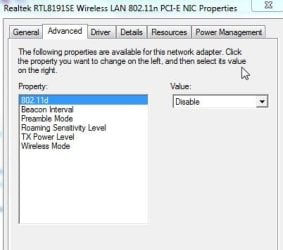
Here is a list of the advanced properties of the wireless adapter:
 

Attachments

  • ScreenHunter_01 Jul. 25 18.51.jpg
    ScreenHunter_01 Jul. 25 18.51.jpg
    18.5 KB · Views: 12

My Computer My Computer

OS
Windows 7
Thanks Doc...

I have tried playing around with inserting the gateway address and IP address of the access point into my wireless adapter's settings, with no luck so far. Any more specific directions?
 

My Computer My Computer

OS
Windows 7

My Computer My Computer

Computer Manufacturer/Model Number
Gateway GT5692
OS
Windows 7 Ulti. x64
CPU
AMD Phenom 8450 triple-core 2.10 ghz
Memory
4GB
Graphics Card(s)
ATI Radion HD 3200
Monitor(s) Displays
Gateway FPD1775W
Screen Resolution
1280x720
Hard Drives
465.6613 Gibibytes
I just had a discussion with our internet provider. He made the interesting point that an access point is transparent, doing little more than changing the internet to wireless. He said that once the XP laptop assigned itself an IP address, another laptop couldn't do so.

However, I remember pretty clearly that we used this same access point at my place for a while, and we had two laptops (both with Xp) going on it.

Any thoughts?
 

My Computer My Computer

OS
Windows 7
myzr7:

At this point, I haven't upgraded the software in the access point, which has been re-set to factory default many times. I'm not quite sure yet that this would be the issue; I think it's my Toshiba laptop.
 

My Computer My Computer

OS
Windows 7
Your access point needs a router in order to use DHCP. The access point alone is not enough to have a network. You have the equivilent of a wireless switch but without the router it can't make DHCP ip assignments. Doesn't matter that it worked before, wireless access points need a router in order to work properly.

You need to plug your access point into a DHCP capible router or into a wired switch which is plugged into a router, either way you need a router in your network. :)
 

My Computer My Computer

Computer type
PC/Desktop
Computer Manufacturer/Model Number
Home built
OS
Windows 7 Ult, Windows 8.1 Pro,
CPU
Q9650-4.275GHz, E8600 4.5GHz, E6750-3.8GHz
Motherboard
Evga 780i FTW
Memory
G.Skill PC2 9600 1200Mhz 5 5 5 15 2T
Graphics Card(s)
GTX480
Sound Card
Asus Xonar D2
Monitor(s) Displays
HannsG
Screen Resolution
1680X1050
Hard Drives
GSkill Phoenix Pro 120GB SSD
PSU
ThermalTake Toughpower 1000Watt modular
Case
ThermalTake XaserV
Cooling
Xigmatek S1283
Keyboard
Logitech G15
Mouse
Logitech G9
Internet Speed
T1
chev 65:

Thanks for your suggestion. I do in fact have an old non-wireless router, so I might try plugging the access point into it. I'll let you know.
 

My Computer My Computer

OS
Windows 7
Back
Top