JavaScript is disabled. For a better experience, please enable JavaScript in your browser before proceeding.
You are using an out of date browser. It may not display this or other websites correctly.
You should upgrade or use an
alternative browser .
Solved Trouble doing a tutorial "repair install"
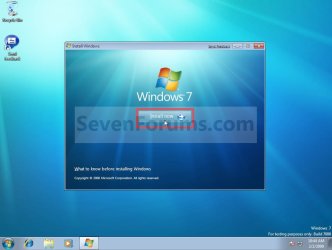
In trying to do a repair install according to the Seven Forums tutorial I am running into a loop of some kind.
Step1.jpg
48.3 KB
· Views: 13
Computer type PC/Desktop Computer Manufacturer/Model Number Self built OS Windows 7 Pro 64bit SP1 CPU AMD FX-6100 Six-Core Processor Motherboard M5A78L-M LX PLUS Memory 2ea Corsair-1333MHz-PC3-10666-240-pin-CMX4GX3M1A1333C9 Graphics Card(s) NVIDIA GeForce GT 630 - 1023MB (EVGA) Sound Card OnBoard Via High Def Audio Monitor(s) Displays Samsung 204B main - ASUS VS228 secondary Screen Resolution 1920x1080 main - 1920x1080 secondary Hard Drives Samsung SSD 840 128GB Win7 Pro 64bit - Western Digital WDC 465GB - Seagate 640GB Sata B/U - Maxtor 500GB Sata B/U - Maxtor 200GB Sata PSU Antec 650 watt Cooling Multiple case fans Keyboard MS USB dual Wireless Keyboard - IntelliType Pro Mouse MS USB dual Wireless Mouse - IntelliPoint Internet Speed Cox Cable Antivirus Bitdefender IS 2014 Browser FireFox Primary - IE 11 Other Info Hauppaguge Win TV HVR-1250 (Model 22xxx, Hybrid ATSC/QAM)
New member
Guru
Gold Member
VIP
YTS GEEK
Guru
Gold Member
VIP
SF Team
Did you try taking the dvd out before you get to that stage?
Computer type PC/Desktop OS 7 X64 CPU i5 8400 Motherboard gigabyte b365m ds3h Memory 2x8gb 3200mhz Hard Drives various PSU pure power 11 400w cm Case Coolermaster Cooling cryorig m9i
Computer type PC/Desktop OS 7x64 CPU g5400 Motherboard ga b365m ds3h Memory 8gb ddr4 2400 PSU xfx pro 450w
New member
Member
VIP
Thread Starter
Thanks...have not taken the dvd out...looked through the tuorial again and can not find anything on removing the dvd ?
Computer type PC/Desktop Computer Manufacturer/Model Number Self built OS Windows 7 Pro 64bit SP1 CPU AMD FX-6100 Six-Core Processor Motherboard M5A78L-M LX PLUS Memory 2ea Corsair-1333MHz-PC3-10666-240-pin-CMX4GX3M1A1333C9 Graphics Card(s) NVIDIA GeForce GT 630 - 1023MB (EVGA) Sound Card OnBoard Via High Def Audio Monitor(s) Displays Samsung 204B main - ASUS VS228 secondary Screen Resolution 1920x1080 main - 1920x1080 secondary Hard Drives Samsung SSD 840 128GB Win7 Pro 64bit - Western Digital WDC 465GB - Seagate 640GB Sata B/U - Maxtor 500GB Sata B/U - Maxtor 200GB Sata PSU Antec 650 watt Cooling Multiple case fans Keyboard MS USB dual Wireless Keyboard - IntelliType Pro Mouse MS USB dual Wireless Mouse - IntelliPoint Internet Speed Cox Cable Antivirus Bitdefender IS 2014 Browser FireFox Primary - IE 11 Other Info Hauppaguge Win TV HVR-1250 (Model 22xxx, Hybrid ATSC/QAM)
YTS GEEK
Guru
Gold Member
VIP
SF Team
Whenever you like after it has finished "copying files" step.
Computer type PC/Desktop OS 7 X64 CPU i5 8400 Motherboard gigabyte b365m ds3h Memory 2x8gb 3200mhz Hard Drives various PSU pure power 11 400w cm Case Coolermaster Cooling cryorig m9i
Computer type PC/Desktop OS 7x64 CPU g5400 Motherboard ga b365m ds3h Memory 8gb ddr4 2400 PSU xfx pro 450w
New member
Member
VIP
Thread Starter
Think I found the culprit causing all my issues....will post again after a little more testing....
Well...wierd problem solved...it wasn't Windows...it wasn't anything I was doing was wrong...and I don't believe I screwed anything up...
What it was was a loose connection inside my box that was causing intermittent errors in the DVD drive !!
A couple times in the last year my system wouldn't boot up...and I discovered (aka...remembered) that I Had a similar issue a decade or so ago.
Seems somehow or some reason the cables on the HDD in the case came...or would come....loose. In the original case years and years ago...some forum said that "heat" can cause this from time to time.
Sure enough...I reseated the sata and power cables to the DVD and presto...everything worked fine...no boot errors...and no issues with repair install !!!
Thanks to all that helped on this !!
Computer type PC/Desktop Computer Manufacturer/Model Number Self built OS Windows 7 Pro 64bit SP1 CPU AMD FX-6100 Six-Core Processor Motherboard M5A78L-M LX PLUS Memory 2ea Corsair-1333MHz-PC3-10666-240-pin-CMX4GX3M1A1333C9 Graphics Card(s) NVIDIA GeForce GT 630 - 1023MB (EVGA) Sound Card OnBoard Via High Def Audio Monitor(s) Displays Samsung 204B main - ASUS VS228 secondary Screen Resolution 1920x1080 main - 1920x1080 secondary Hard Drives Samsung SSD 840 128GB Win7 Pro 64bit - Western Digital WDC 465GB - Seagate 640GB Sata B/U - Maxtor 500GB Sata B/U - Maxtor 200GB Sata PSU Antec 650 watt Cooling Multiple case fans Keyboard MS USB dual Wireless Keyboard - IntelliType Pro Mouse MS USB dual Wireless Mouse - IntelliPoint Internet Speed Cox Cable Antivirus Bitdefender IS 2014 Browser FireFox Primary - IE 11 Other Info Hauppaguge Win TV HVR-1250 (Model 22xxx, Hybrid ATSC/QAM)