
Solved Trouble downloading Visual C + + 2008 SP1 Redistributable pkg

total confusion

New member
Member
VIP
Local time
11:37 AM
Messages
188
Location
NY
I have tried numerous times to download this but it fails every time. When I boot my PC it is in the notification box as update to install. Even if I don't try to install it, when I go to shut down my PC it goes through the motions as if it had downloaded it. I have tried just about everything I can think of to resolve this. I ran Mr. Fixit, it didn't even though it said it did. I clicked on the link I found dealing with this particular problem. http://www.microsoft.com/download/en/details.aspx?displaylang=en&id=26368 That didn't help much either. Should I try downloading and installing it from the link below or is that going to fail too?

windows 7 update fails KB2538243, KB2467173 and KB2533552 - Microsoft Answers
 

Attachments
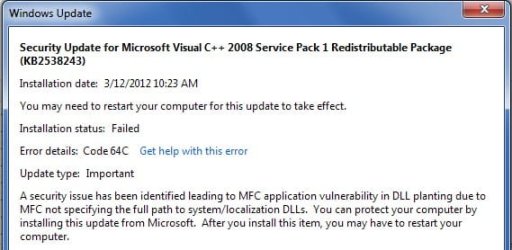
  • failed update.jpg
    failed update.jpg
    27.9 KB · Views: 8

My Computer My Computer

Computer type
PC/Desktop
Computer Manufacturer/Model Number
Acer Aspire E700 dsktop
OS
Windows 7 Pro
CPU
Intel 2 quad Q6600
Motherboard
Acer fg965M
Memory
4 GB
Graphics Card(s)
Nvidia GeForce GTS 450 1TB
Sound Card
RealTek
Monitor(s) Displays
Acer 22" X223w
Hard Drives
1TB WD Caviar Black (internal)
1TB WD My Book Essential
PSU
500W coolmaster Extreme Power Plus
Case
Acer
Cooling
case fan
Keyboard
acer
Mouse
acer
Internet Speed
56k
Antivirus
Microsoft Security Essentials
Browser
IE 8
Other Info
I hate IE 9 10 & 11
I just realized that the publication date for that download is 6/7/2011. Shouldn't that have already been updated a long time ago?
 

My Computer My Computer

Computer type
PC/Desktop
Computer Manufacturer/Model Number
Acer Aspire E700 dsktop
OS
Windows 7 Pro
CPU
Intel 2 quad Q6600
Motherboard
Acer fg965M
Memory
4 GB
Graphics Card(s)
Nvidia GeForce GTS 450 1TB
Sound Card
RealTek
Monitor(s) Displays
Acer 22" X223w
Hard Drives
1TB WD Caviar Black (internal)
1TB WD My Book Essential
PSU
500W coolmaster Extreme Power Plus
Case
Acer
Cooling
case fan
Keyboard
acer
Mouse
acer
Internet Speed
56k
Antivirus
Microsoft Security Essentials
Browser
IE 8
Other Info
I hate IE 9 10 & 11
Well the link you provided has some good info.

When updated fail via windows update, downloading the stand-alone installer usually works. If not take the advice for the .NET "fix" tool from microsoft about half way down that second link you provided...
 

My Computer My Computer

Computer Manufacturer/Model Number
Scratch built
OS
Windows 7 x64 Ultimate
CPU
i7 960
Motherboard
Asus P6X58D
Memory
12 Gig Corsair Dominator
Graphics Card(s)
Nvidia 480
Sound Card
Maudio Delta 44 + breakout box
Monitor(s) Displays
Dell UltraSharp U2410 24in and Samsung 21 dual monitors
Screen Resolution
1920x1200 and 1280x1024
Hard Drives
Primary: Intel X-25M G2 160G SSD
Secondary: Segate baracuda 1.0 TB
HDs in AHCI mode.
PSU
Corasair TX850
Case
Cooler Master HAF
Cooling
Corsair H50
Keyboard
Logitech G15 + N52 game pad
Mouse
Logitech MX518
Internet Speed
15kbs down 4.5kbps up
Other Info
WEI 7.6
CPU & RAM 7.6
Graphics 7.9
Hard disk 7.7
I read the blog and glad I did, I have some programs that require NetFrame 1 and 2 to be there. If this removes them or parts of them then I will lose my MicrosoftWorks program and some programs I have set to run on earlier versions of Windows.
 

My Computer My Computer

Computer type
PC/Desktop
Computer Manufacturer/Model Number
Acer Aspire E700 dsktop
OS
Windows 7 Pro
CPU
Intel 2 quad Q6600
Motherboard
Acer fg965M
Memory
4 GB
Graphics Card(s)
Nvidia GeForce GTS 450 1TB
Sound Card
RealTek
Monitor(s) Displays
Acer 22" X223w
Hard Drives
1TB WD Caviar Black (internal)
1TB WD My Book Essential
PSU
500W coolmaster Extreme Power Plus
Case
Acer
Cooling
case fan
Keyboard
acer
Mouse
acer
Internet Speed
56k
Antivirus
Microsoft Security Essentials
Browser
IE 8
Other Info
I hate IE 9 10 & 11
It is merely a tool to help when it appears that there has been some sort of corruption with the .net libs by allowing you to completely uninstall one or more versions and then reinstall them.

Though this never was about .NET I guess. Not sure why that got in there, sorry for not noticing that.

Did you DL and install the stand alone VS2008 redistributable installer though?
 

My Computer My Computer

Computer Manufacturer/Model Number
Scratch built
OS
Windows 7 x64 Ultimate
CPU
i7 960
Motherboard
Asus P6X58D
Memory
12 Gig Corsair Dominator
Graphics Card(s)
Nvidia 480
Sound Card
Maudio Delta 44 + breakout box
Monitor(s) Displays
Dell UltraSharp U2410 24in and Samsung 21 dual monitors
Screen Resolution
1920x1200 and 1280x1024
Hard Drives
Primary: Intel X-25M G2 160G SSD
Secondary: Segate baracuda 1.0 TB
HDs in AHCI mode.
PSU
Corasair TX850
Case
Cooler Master HAF
Cooling
Corsair H50
Keyboard
Logitech G15 + N52 game pad
Mouse
Logitech MX518
Internet Speed
15kbs down 4.5kbps up
Other Info
WEI 7.6
CPU & RAM 7.6
Graphics 7.9
Hard disk 7.7
No, I didn't download the standalone, I wasn't sure if that link was to the original package or for the update to it?? Because of the date on it, I thought it was the original package.
 

My Computer My Computer

Computer type
PC/Desktop
Computer Manufacturer/Model Number
Acer Aspire E700 dsktop
OS
Windows 7 Pro
CPU
Intel 2 quad Q6600
Motherboard
Acer fg965M
Memory
4 GB
Graphics Card(s)
Nvidia GeForce GTS 450 1TB
Sound Card
RealTek
Monitor(s) Displays
Acer 22" X223w
Hard Drives
1TB WD Caviar Black (internal)
1TB WD My Book Essential
PSU
500W coolmaster Extreme Power Plus
Case
Acer
Cooling
case fan
Keyboard
acer
Mouse
acer
Internet Speed
56k
Antivirus
Microsoft Security Essentials
Browser
IE 8
Other Info
I hate IE 9 10 & 11
The date on the file is a little old but that IS the correct KB number so yes, I'd DL and install it and see if the update for KB2538243 goes away in windows update. (The first link in your original post and the link in the first post of your second link both point to the same file)
 

My Computer My Computer

Computer Manufacturer/Model Number
Scratch built
OS
Windows 7 x64 Ultimate
CPU
i7 960
Motherboard
Asus P6X58D
Memory
12 Gig Corsair Dominator
Graphics Card(s)
Nvidia 480
Sound Card
Maudio Delta 44 + breakout box
Monitor(s) Displays
Dell UltraSharp U2410 24in and Samsung 21 dual monitors
Screen Resolution
1920x1200 and 1280x1024
Hard Drives
Primary: Intel X-25M G2 160G SSD
Secondary: Segate baracuda 1.0 TB
HDs in AHCI mode.
PSU
Corasair TX850
Case
Cooler Master HAF
Cooling
Corsair H50
Keyboard
Logitech G15 + N52 game pad
Mouse
Logitech MX518
Internet Speed
15kbs down 4.5kbps up
Other Info
WEI 7.6
CPU & RAM 7.6
Graphics 7.9
Hard disk 7.7
I got it downloaded to my desktop, jumped through a few hoops, but I finally got it installed. For some unknown reason :huh: it put the installer on my external HD. I kept getting a message that it was on a different path than the one being shown. I realized after about 10 minutes hunting for a vs_red.msi file on my C drive that the letter in front of the path was to a drive I had change the letter for. So I went to my external drive and up it popped. I clicked on it and it put it in the box, when I clicked on retry it installed. Is there anyway to remove all of the failed attempts from the update history? or is that not necessary.

Thank you ever so much for your help. Now if I could only get the problem with the backup straightened out I'd be really really happy!!
 

My Computer My Computer

Computer type
PC/Desktop
Computer Manufacturer/Model Number
Acer Aspire E700 dsktop
OS
Windows 7 Pro
CPU
Intel 2 quad Q6600
Motherboard
Acer fg965M
Memory
4 GB
Graphics Card(s)
Nvidia GeForce GTS 450 1TB
Sound Card
RealTek
Monitor(s) Displays
Acer 22" X223w
Hard Drives
1TB WD Caviar Black (internal)
1TB WD My Book Essential
PSU
500W coolmaster Extreme Power Plus
Case
Acer
Cooling
case fan
Keyboard
acer
Mouse
acer
Internet Speed
56k
Antivirus
Microsoft Security Essentials
Browser
IE 8
Other Info
I hate IE 9 10 & 11
Good luck :)

Hm I don't know if the update history can be edited... but as long as the update doesn't show up again in WU then it's all good.
 

My Computer My Computer

Computer Manufacturer/Model Number
Scratch built
OS
Windows 7 x64 Ultimate
CPU
i7 960
Motherboard
Asus P6X58D
Memory
12 Gig Corsair Dominator
Graphics Card(s)
Nvidia 480
Sound Card
Maudio Delta 44 + breakout box
Monitor(s) Displays
Dell UltraSharp U2410 24in and Samsung 21 dual monitors
Screen Resolution
1920x1200 and 1280x1024
Hard Drives
Primary: Intel X-25M G2 160G SSD
Secondary: Segate baracuda 1.0 TB
HDs in AHCI mode.
PSU
Corasair TX850
Case
Cooler Master HAF
Cooling
Corsair H50
Keyboard
Logitech G15 + N52 game pad
Mouse
Logitech MX518
Internet Speed
15kbs down 4.5kbps up
Other Info
WEI 7.6
CPU & RAM 7.6
Graphics 7.9
Hard disk 7.7
No, the problem seems to be gone. It now shows it as a sucessful installation. I ran the update just to be sure and it didn't come up again.
Thanks again
 

My Computer My Computer

Computer type
PC/Desktop
Computer Manufacturer/Model Number
Acer Aspire E700 dsktop
OS
Windows 7 Pro
CPU
Intel 2 quad Q6600
Motherboard
Acer fg965M
Memory
4 GB
Graphics Card(s)
Nvidia GeForce GTS 450 1TB
Sound Card
RealTek
Monitor(s) Displays
Acer 22" X223w
Hard Drives
1TB WD Caviar Black (internal)
1TB WD My Book Essential
PSU
500W coolmaster Extreme Power Plus
Case
Acer
Cooling
case fan
Keyboard
acer
Mouse
acer
Internet Speed
56k
Antivirus
Microsoft Security Essentials
Browser
IE 8
Other Info
I hate IE 9 10 & 11
Back
Top