Trouble getting sound to speakers W7 Pro 32 bit??

klxdrt

New member
Member
VIP
Local time
4:11 PM
Messages
188
Trouble getting sound to speakers W7 Pro 32 bit??

I have been trying every combination to get speakers (sound) from my W& Pro 32 bit PC with Nivda sound card. If you guys need more details, I can supply screen shots of what I tried.

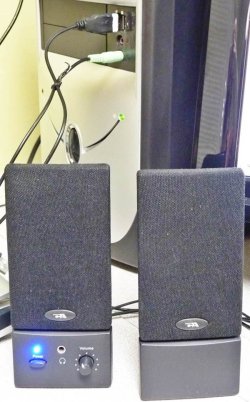
I have a set of USB speakers with a single lite green RCA jack and these work. How do I set them up?

I'm not a techie, but an experienced user but this has me stumped. So please be clear.

cheers,

klx.
 

My Computer My Computer

At a glance

w7 pro 32 bit w/XP virt enabled.AMD A6-36504 GB DDR3 RAMNVIDIA GeForce 210
Computer type
PC/Desktop
Computer Manufacturer/Model Number
locally made
OS
w7 pro 32 bit w/XP virt enabled.
CPU
AMD A6-3650
Motherboard
ASUS F1A55-M CSM
Memory
4 GB DDR3 RAM
Graphics Card(s)
NVIDIA GeForce 210
Sound Card
NVIDIA High Definition Audio
Monitor(s) Displays
28" HD monitor
Screen Resolution
1680 x 1050 x 32 bits (4294967296 colors) @ 59 Hz
Hard Drives
2 x 500 GB Western Digital Blue Hard Drive
PSU
?
Case
?
Cooling
3-4 fans
Keyboard
big yellow keys
Mouse
logitec
Internet Speed
60 mb
Antivirus
panda
Browser
ff
Other Info
scanner, webcam, bw printer, fax modem, cd/dvd burner, PC usb ports: 2 usb3, 6 usb2 plus 7 port usb hub, 2 tb usb3, 1 Tb usb3, 500Mb usb2, 120Mb USB2 portable drives, asst of flash drives 250 Mb to 32 Gb. backup PC, office
Some model numbers might help to identify your hardware/accessories. Your specs say no sound card. ???

What "Nivda" sound card? Is the "sound card" internal or external? Did you load any drivers for the sound card?

What USB speakers?
 

My Computer My Computer

At a glance

Windows 7 Pro-x64i7-2600 3.4GHz - 3.8GHz Turbo8Gb - 2x4GB, Muskin 991770 PC3-1333Integrated Intel HD 2000
Computer type
PC/Desktop
Computer Manufacturer/Model Number
Built 2/11/2011
OS
Windows 7 Pro-x64
CPU
i7-2600 3.4GHz - 3.8GHz Turbo
Motherboard
Intel DH67BL-B3
Memory
8Gb - 2x4GB, Muskin 991770 PC3-1333
Graphics Card(s)
Integrated Intel HD 2000
Sound Card
Integrated Intel 10.1 HD, RealTek ALC892
Monitor(s) Displays
Asus LCD VH222H, Haier HL24XSL2a
Screen Resolution
1920x1080, 1920x1080
Hard Drives
Crucial SSD C300-128Gb,
Western Digital WD5002AALX - 500Gb,
Western Digital WD7501AALS - 750Gb
PSU
Seasonic 650W 80+ Gold Modular
Case
Rosewill Defender
Cooling
Stock CPU, Four 120mm case fans, PCH fan added
Keyboard
Logitech EX100 Y-RBH94 Wireless
Mouse
Logitech EX100 M-RCE95 Wireless
Internet Speed
3.0/1.5 Mbs
Antivirus
Microsoft Security Essentials
Browser
Microsoft Internet Explorer 11
Other Info
Antec Veris Premier-Multimedia IR Station,
Cyber Accoustics-3602 Speakers,
AFT XM-5U Card Reader,
Hauppauge TV-HVR-2250,
Sony LX300 USB Turntable
I knew this wasn't going to be simple??

carwiz

Thanks much for your quick response. I will get back with more info, busy in sveral other projects so it will be next wk. I was able to get the tiny speakers in my monitor working so I'm ok until then.

cheers,

klx
 

My Computer My Computer

At a glance

w7 pro 32 bit w/XP virt enabled.AMD A6-36504 GB DDR3 RAMNVIDIA GeForce 210
Computer type
PC/Desktop
Computer Manufacturer/Model Number
locally made
OS
w7 pro 32 bit w/XP virt enabled.
CPU
AMD A6-3650
Motherboard
ASUS F1A55-M CSM
Memory
4 GB DDR3 RAM
Graphics Card(s)
NVIDIA GeForce 210
Sound Card
NVIDIA High Definition Audio
Monitor(s) Displays
28" HD monitor
Screen Resolution
1680 x 1050 x 32 bits (4294967296 colors) @ 59 Hz
Hard Drives
2 x 500 GB Western Digital Blue Hard Drive
PSU
?
Case
?
Cooling
3-4 fans
Keyboard
big yellow keys
Mouse
logitec
Internet Speed
60 mb
Antivirus
panda
Browser
ff
Other Info
scanner, webcam, bw printer, fax modem, cd/dvd burner, PC usb ports: 2 usb3, 6 usb2 plus 7 port usb hub, 2 tb usb3, 1 Tb usb3, 500Mb usb2, 120Mb USB2 portable drives, asst of flash drives 250 Mb to 32 Gb. backup PC, office
Carwiz,

To answer your orig questions, drivers were loaded when I installed the sound card 1 1/2 yr ago and was able to get sound until recently.

As promised, I published a 1 pg web with with screen shots & additional commentary of my sound problem that should answer all your questions at: sound problem

Look forward to hearing from you and anyone on this forum with a solution.

cheers
[:}]::

klx
 

My Computer My Computer

At a glance

w7 pro 32 bit w/XP virt enabled.AMD A6-36504 GB DDR3 RAMNVIDIA GeForce 210
Computer type
PC/Desktop
Computer Manufacturer/Model Number
locally made
OS
w7 pro 32 bit w/XP virt enabled.
CPU
AMD A6-3650
Motherboard
ASUS F1A55-M CSM
Memory
4 GB DDR3 RAM
Graphics Card(s)
NVIDIA GeForce 210
Sound Card
NVIDIA High Definition Audio
Monitor(s) Displays
28" HD monitor
Screen Resolution
1680 x 1050 x 32 bits (4294967296 colors) @ 59 Hz
Hard Drives
2 x 500 GB Western Digital Blue Hard Drive
PSU
?
Case
?
Cooling
3-4 fans
Keyboard
big yellow keys
Mouse
logitec
Internet Speed
60 mb
Antivirus
panda
Browser
ff
Other Info
scanner, webcam, bw printer, fax modem, cd/dvd burner, PC usb ports: 2 usb3, 6 usb2 plus 7 port usb hub, 2 tb usb3, 1 Tb usb3, 500Mb usb2, 120Mb USB2 portable drives, asst of flash drives 250 Mb to 32 Gb. backup PC, office

My Computer My Computer

At a glance

Windows 7 Pro-x64i7-2600 3.4GHz - 3.8GHz Turbo8Gb - 2x4GB, Muskin 991770 PC3-1333Integrated Intel HD 2000
Computer type
PC/Desktop
Computer Manufacturer/Model Number
Built 2/11/2011
OS
Windows 7 Pro-x64
CPU
i7-2600 3.4GHz - 3.8GHz Turbo
Motherboard
Intel DH67BL-B3
Memory
8Gb - 2x4GB, Muskin 991770 PC3-1333
Graphics Card(s)
Integrated Intel HD 2000
Sound Card
Integrated Intel 10.1 HD, RealTek ALC892
Monitor(s) Displays
Asus LCD VH222H, Haier HL24XSL2a
Screen Resolution
1920x1080, 1920x1080
Hard Drives
Crucial SSD C300-128Gb,
Western Digital WD5002AALX - 500Gb,
Western Digital WD7501AALS - 750Gb
PSU
Seasonic 650W 80+ Gold Modular
Case
Rosewill Defender
Cooling
Stock CPU, Four 120mm case fans, PCH fan added
Keyboard
Logitech EX100 Y-RBH94 Wireless
Mouse
Logitech EX100 M-RCE95 Wireless
Internet Speed
3.0/1.5 Mbs
Antivirus
Microsoft Security Essentials
Browser
Microsoft Internet Explorer 11
Other Info
Antec Veris Premier-Multimedia IR Station,
Cyber Accoustics-3602 Speakers,
AFT XM-5U Card Reader,
Hauppauge TV-HVR-2250,
Sony LX300 USB Turntable
W7 sound config problem images.

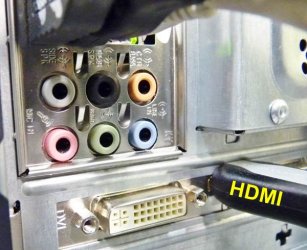
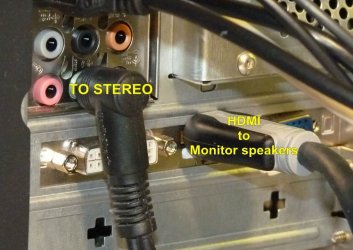
Currently, I am able to get sound thru my monitor's tiny speakers with only a HDMI cord to the monitor.
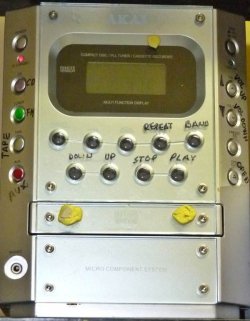
I want to be able to get sound thru the small stereo but I'm not sure of how to set it up? Something tells me that the current HDMI connection overrides any other independent sound connection to the stereo receiver.

I have tried many combos to no avail.

Below images are all specs, etc. about my PC's sound setup that I could find so you guys would have plenty info. Hope this helps.

Sorry the images are not in any order even though they were numbered. Also, built a well organized web page but this forum suggested I use this method.
cheers
[:}]::

klx
 

Attachments

  • 1video card specs.jpg
    1video card specs.jpg
    42.1 KB · Views: 0
  • 2sound cards.jpg
    2sound cards.jpg
    16.3 KB · Views: 10
  • 3vol cntrl options.jpg
    3vol cntrl options.jpg
    23.2 KB · Views: 10
  • 4Bmanage audio devices.jpg
    4Bmanage audio devices.jpg
    8.8 KB · Views: 10
  • 9Bworks with monitor speakers.jpg
    9Bworks with monitor speakers.jpg
    25.1 KB · Views: 10
  • 8Bsound test=no sound.jpg
    8Bsound test=no sound.jpg
    31.2 KB · Views: 10
  • 7Bsound sliders speaker.jpg
    7Bsound sliders speaker.jpg
    5.8 KB · Views: 10
  • 6Bsound sliders 3.jpg
    6Bsound sliders 3.jpg
    9.3 KB · Views: 10
  • 5Bpc devices all.jpg
    5Bpc devices all.jpg
    30.3 KB · Views: 10
  • 14D stereo back.jpg
    14D stereo back.jpg
    103.9 KB · Views: 0
  • 13D stereo front.jpg
    13D stereo front.jpg
    62.8 KB · Views: 0
  • 12C speakers usb front.JPG
    12C speakers usb front.JPG
    88.9 KB · Views: 0
  • 11C PC back input panel.JPG
    11C PC back input panel.JPG
    54.5 KB · Views: 10
  • 10C PC front output to stereo.JPG
    10C PC front output to stereo.JPG
    74.5 KB · Views: 0
  • 15D stereo pc jack.jpg
    15D stereo pc jack.jpg
    72.1 KB · Views: 10

My Computer My Computer

At a glance

w7 pro 32 bit w/XP virt enabled.AMD A6-36504 GB DDR3 RAMNVIDIA GeForce 210
Computer type
PC/Desktop
Computer Manufacturer/Model Number
locally made
OS
w7 pro 32 bit w/XP virt enabled.
CPU
AMD A6-3650
Motherboard
ASUS F1A55-M CSM
Memory
4 GB DDR3 RAM
Graphics Card(s)
NVIDIA GeForce 210
Sound Card
NVIDIA High Definition Audio
Monitor(s) Displays
28" HD monitor
Screen Resolution
1680 x 1050 x 32 bits (4294967296 colors) @ 59 Hz
Hard Drives
2 x 500 GB Western Digital Blue Hard Drive
PSU
?
Case
?
Cooling
3-4 fans
Keyboard
big yellow keys
Mouse
logitec
Internet Speed
60 mb
Antivirus
panda
Browser
ff
Other Info
scanner, webcam, bw printer, fax modem, cd/dvd burner, PC usb ports: 2 usb3, 6 usb2 plus 7 port usb hub, 2 tb usb3, 1 Tb usb3, 500Mb usb2, 120Mb USB2 portable drives, asst of flash drives 250 Mb to 32 Gb. backup PC, office
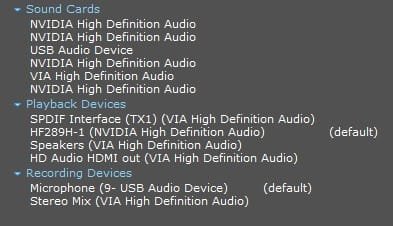
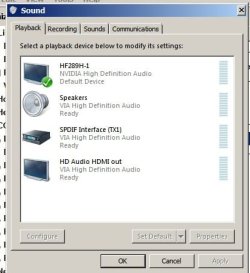
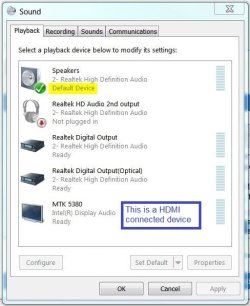
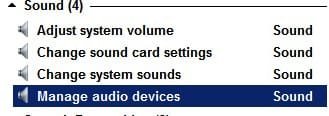
The HDMI (display) is selected as the default output. If you want sound to appear at the speakers, select them as the default in the Playback Devices screen. Do your speakers have an A/C adapter for power or is the power drawn from the USB socket?

Your Akai shows AUX-IN. These are usually for high impedance devices like turntables. You can't attach the PC speaker output to these jacks since the PC speaker output is low impedance. You would need some type of converter/matcher.

Added: http://www.amazon.com/PYLE-PLVHL60-...=1407277569&sr=8-3&keywords=speaker+converter

The above link shows one type of converter. You would have to add the input 3.5mm jack to plug into the PC speaker jack.
 
Last edited:

My Computer My Computer

At a glance

Windows 7 Pro-x64i7-2600 3.4GHz - 3.8GHz Turbo8Gb - 2x4GB, Muskin 991770 PC3-1333Integrated Intel HD 2000
Computer type
PC/Desktop
Computer Manufacturer/Model Number
Built 2/11/2011
OS
Windows 7 Pro-x64
CPU
i7-2600 3.4GHz - 3.8GHz Turbo
Motherboard
Intel DH67BL-B3
Memory
8Gb - 2x4GB, Muskin 991770 PC3-1333
Graphics Card(s)
Integrated Intel HD 2000
Sound Card
Integrated Intel 10.1 HD, RealTek ALC892
Monitor(s) Displays
Asus LCD VH222H, Haier HL24XSL2a
Screen Resolution
1920x1080, 1920x1080
Hard Drives
Crucial SSD C300-128Gb,
Western Digital WD5002AALX - 500Gb,
Western Digital WD7501AALS - 750Gb
PSU
Seasonic 650W 80+ Gold Modular
Case
Rosewill Defender
Cooling
Stock CPU, Four 120mm case fans, PCH fan added
Keyboard
Logitech EX100 Y-RBH94 Wireless
Mouse
Logitech EX100 M-RCE95 Wireless
Internet Speed
3.0/1.5 Mbs
Antivirus
Microsoft Security Essentials
Browser
Microsoft Internet Explorer 11
Other Info
Antec Veris Premier-Multimedia IR Station,
Cyber Accoustics-3602 Speakers,
AFT XM-5U Card Reader,
Hauppauge TV-HVR-2250,
Sony LX300 USB Turntable
Carwiz,

Thanks for your quick response & patience in responding to my question. As my post mentioned, I can get sound thru my tiny monitor speakers so I'll just live that setup for now. And I have been able to use the small stereo with success for a yr by plugging in the black RCA jack into either back or front green speaker input.

Last week I used USB speakers plugged in as shown in my PC, they worked fine. HOWEVER, I was using a new monitor with the std blue monitor plug, NOT an HDMI cord and they worked fine with NO external power supply. Me thinks the problem is that I'm using an HDMI cord between PC & monitor at it provides both sound & video. That setup seems to supersedes connecting the stereo unit??

I originally built a visually merchandised 1 pg web, then was told by the form I should upload the images bit they were not in order even tho I numbered them, so I'm dropping this post question.

Cheers & thanks for all your help.

klx

I have been an avid audio enthusiast, music lover for 50+ yr. Below are some pix of my listing room. You won't believe how Pink Floyd's "Welcome to the machine" reproduces --- breathtaking. You are tempted to get out of the way of the machine as it advances.
 

Attachments

  • panorama 1200 listening end B.jpg
    panorama 1200 listening end B.jpg
    102 KB · Views: 1
  • panorama 1200 speaker end B.jpg
    panorama 1200 speaker end B.jpg
    82.4 KB · Views: 0

My Computer My Computer

At a glance

w7 pro 32 bit w/XP virt enabled.AMD A6-36504 GB DDR3 RAMNVIDIA GeForce 210
Computer type
PC/Desktop
Computer Manufacturer/Model Number
locally made
OS
w7 pro 32 bit w/XP virt enabled.
CPU
AMD A6-3650
Motherboard
ASUS F1A55-M CSM
Memory
4 GB DDR3 RAM
Graphics Card(s)
NVIDIA GeForce 210
Sound Card
NVIDIA High Definition Audio
Monitor(s) Displays
28" HD monitor
Screen Resolution
1680 x 1050 x 32 bits (4294967296 colors) @ 59 Hz
Hard Drives
2 x 500 GB Western Digital Blue Hard Drive
PSU
?
Case
?
Cooling
3-4 fans
Keyboard
big yellow keys
Mouse
logitec
Internet Speed
60 mb
Antivirus
panda
Browser
ff
Other Info
scanner, webcam, bw printer, fax modem, cd/dvd burner, PC usb ports: 2 usb3, 6 usb2 plus 7 port usb hub, 2 tb usb3, 1 Tb usb3, 500Mb usb2, 120Mb USB2 portable drives, asst of flash drives 250 Mb to 32 Gb. backup PC, office
Ops, you're right. I forgot about the "new" PCs actually needing amplified speakers. I went to them years ago and never looked back. Sorry. (The converter/matcher is not required.)

Nice room! Wish I had the space. Most of my music is '67 and before. When "flower power" broke out, I lost interest. ;) But I did go through a Disco and Pat Benatar period. :)

By default, yes, HDMI connections are set but they shouldn't be persistent. As I mentioned, you need to select the speakers as the default output. From then on, they should stay set as the PC output--Unless you disconnect them. That's how I'm set up now.
 

Attachments

  • Sound - Default.JPG
    Sound - Default.JPG
    45.4 KB · Views: 5
Last edited:

My Computer My Computer

At a glance

Windows 7 Pro-x64i7-2600 3.4GHz - 3.8GHz Turbo8Gb - 2x4GB, Muskin 991770 PC3-1333Integrated Intel HD 2000
Computer type
PC/Desktop
Computer Manufacturer/Model Number
Built 2/11/2011
OS
Windows 7 Pro-x64
CPU
i7-2600 3.4GHz - 3.8GHz Turbo
Motherboard
Intel DH67BL-B3
Memory
8Gb - 2x4GB, Muskin 991770 PC3-1333
Graphics Card(s)
Integrated Intel HD 2000
Sound Card
Integrated Intel 10.1 HD, RealTek ALC892
Monitor(s) Displays
Asus LCD VH222H, Haier HL24XSL2a
Screen Resolution
1920x1080, 1920x1080
Hard Drives
Crucial SSD C300-128Gb,
Western Digital WD5002AALX - 500Gb,
Western Digital WD7501AALS - 750Gb
PSU
Seasonic 650W 80+ Gold Modular
Case
Rosewill Defender
Cooling
Stock CPU, Four 120mm case fans, PCH fan added
Keyboard
Logitech EX100 Y-RBH94 Wireless
Mouse
Logitech EX100 M-RCE95 Wireless
Internet Speed
3.0/1.5 Mbs
Antivirus
Microsoft Security Essentials
Browser
Microsoft Internet Explorer 11
Other Info
Antec Veris Premier-Multimedia IR Station,
Cyber Accoustics-3602 Speakers,
AFT XM-5U Card Reader,
Hauppauge TV-HVR-2250,
Sony LX300 USB Turntable
carwiz,

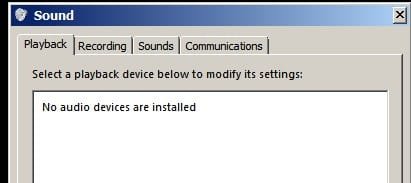
When I enabled the "speakers" as default and that wouldn't work. screen wnt blank & I had to reset my audio devices.

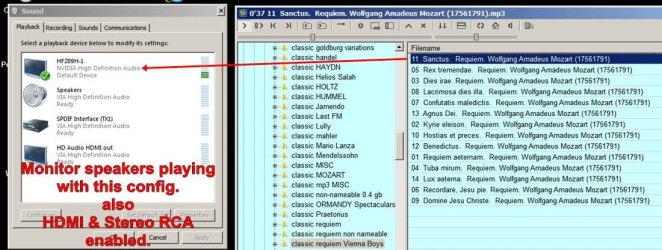
The images below represent my current config. I can only get sound thru monitor speakers.

Hope this helps??

cheers,

klx
 

Attachments

  • 1 back of PC P1040514.JPG
    1 back of PC P1040514.JPG
    94.1 KB · Views: 1
  • 2 sound playing config.jpg
    2 sound playing config.jpg
    95.8 KB · Views: 3
  • 3 no audio devices installed 2014-08-07_103605.jpg
    3 no audio devices installed 2014-08-07_103605.jpg
    9 KB · Views: 5
  • 4 re-enable audio devices2014-08-07_103709.jpg
    4 re-enable audio devices2014-08-07_103709.jpg
    13.8 KB · Views: 5

My Computer My Computer

At a glance

w7 pro 32 bit w/XP virt enabled.AMD A6-36504 GB DDR3 RAMNVIDIA GeForce 210
Computer type
PC/Desktop
Computer Manufacturer/Model Number
locally made
OS
w7 pro 32 bit w/XP virt enabled.
CPU
AMD A6-3650
Motherboard
ASUS F1A55-M CSM
Memory
4 GB DDR3 RAM
Graphics Card(s)
NVIDIA GeForce 210
Sound Card
NVIDIA High Definition Audio
Monitor(s) Displays
28" HD monitor
Screen Resolution
1680 x 1050 x 32 bits (4294967296 colors) @ 59 Hz
Hard Drives
2 x 500 GB Western Digital Blue Hard Drive
PSU
?
Case
?
Cooling
3-4 fans
Keyboard
big yellow keys
Mouse
logitec
Internet Speed
60 mb
Antivirus
panda
Browser
ff
Other Info
scanner, webcam, bw printer, fax modem, cd/dvd burner, PC usb ports: 2 usb3, 6 usb2 plus 7 port usb hub, 2 tb usb3, 1 Tb usb3, 500Mb usb2, 120Mb USB2 portable drives, asst of flash drives 250 Mb to 32 Gb. backup PC, office
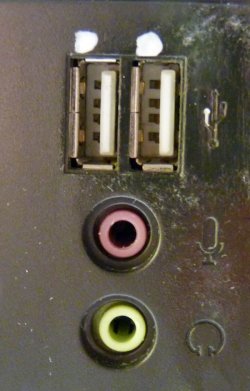
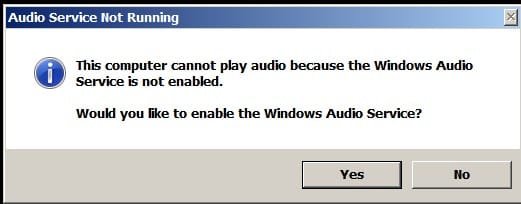
What happened when you clicked Yes in the above message? Where are USB, Mic and Headphone jacks located that you show separate from the PC output panel?

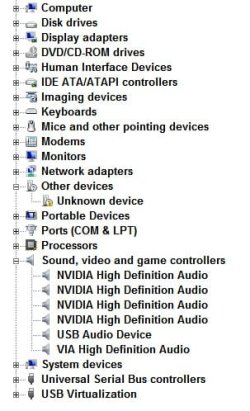
Also, does the Nvidia Console show any sound properties? You may have some type of driver conflict. What does the VIA Control Console look like?

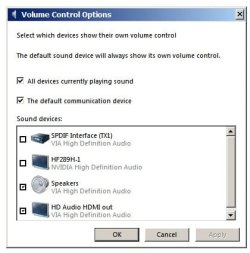
Change your Volume Control Options and check only "All devices currently playing sound". Uncheck all other boxes in that window.
 

Attachments

  • Volumn Control Options.JPG
    Volumn Control Options.JPG
    35.6 KB · Views: 1

My Computer My Computer

At a glance

Windows 7 Pro-x64i7-2600 3.4GHz - 3.8GHz Turbo8Gb - 2x4GB, Muskin 991770 PC3-1333Integrated Intel HD 2000
Computer type
PC/Desktop
Computer Manufacturer/Model Number
Built 2/11/2011
OS
Windows 7 Pro-x64
CPU
i7-2600 3.4GHz - 3.8GHz Turbo
Motherboard
Intel DH67BL-B3
Memory
8Gb - 2x4GB, Muskin 991770 PC3-1333
Graphics Card(s)
Integrated Intel HD 2000
Sound Card
Integrated Intel 10.1 HD, RealTek ALC892
Monitor(s) Displays
Asus LCD VH222H, Haier HL24XSL2a
Screen Resolution
1920x1080, 1920x1080
Hard Drives
Crucial SSD C300-128Gb,
Western Digital WD5002AALX - 500Gb,
Western Digital WD7501AALS - 750Gb
PSU
Seasonic 650W 80+ Gold Modular
Case
Rosewill Defender
Cooling
Stock CPU, Four 120mm case fans, PCH fan added
Keyboard
Logitech EX100 Y-RBH94 Wireless
Mouse
Logitech EX100 M-RCE95 Wireless
Internet Speed
3.0/1.5 Mbs
Antivirus
Microsoft Security Essentials
Browser
Microsoft Internet Explorer 11
Other Info
Antec Veris Premier-Multimedia IR Station,
Cyber Accoustics-3602 Speakers,
AFT XM-5U Card Reader,
Hauppauge TV-HVR-2250,
Sony LX300 USB Turntable
Back
Top