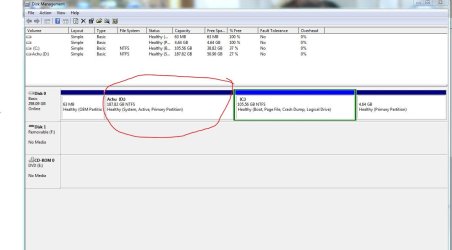
I'd move the System boot files to Win7 partition which works better, but first you must convert it to a Primary partition so that it can be marked Active and receive it's own boot files, because Win7 was installed to a Logical partition which cannot be marked Active.
To do this, boot into free
Partition Wizard bootable CD, rightclick on C, select Modify>Convert to Primary, click OK, then Apply.
Once it completes and is now a Primary partition, rightclick on C to Modify>set to Active, OK. Then I'd delete the small empty partition to it's right so you can Resize Win7 into that space. Apply all steps.
Now click on the Disk # to highlight it, from Disk tab select Rebuild MBR, Apply. Reboot to see if Win7 will start. If not boot into
System Recovery Options on Win7 DVD or
System Repair Disk to run
Startup Repair - Run 3 Separate Times until Win7 starts on its own and is labeled System Active.
Now you can install EasyBCD 2.02 to Win7 to Add XP, Save and reboot to see if it will boot from new Dual Boot menu. If not you may need to run
XP Repair Install or reinstall XP.