
Hello,
I would like to remove windows XP from my current dual boot setup and have had a few failed attempts already.
My system:
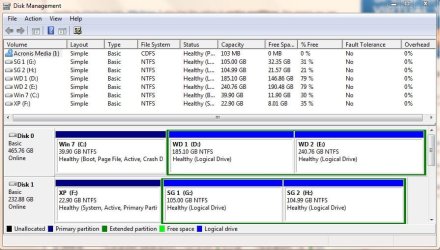
- Originally 1 HDD in 3 partitions, primary having XP
- Added 2nd HDD in 3 partitions, primary having Win7
I've included an image from Win7 Disk Manager.
My first attempt to remove XP I followed this guide:
Video: Remove Windows XP from a dual-boot configuration with Windows 7 | TechRepublic
I was following the steps fine until I tried the BootRec /fixboot command which returned an "element not found" message. After quitting the process there, I could not boot into either OS.
My second attempt, I tried to follow the steps provided by gregrocker under post 5 of this thread:
http://www.sevenforums.com/installa...ing-windows-xp-sp3-dual-boot-windows-7-a.html
After I deleted the XP partition and booted off the Win7 disk, Win7 did not recognize any drives that had Win7 installed. I could not select anything to repair as a result.
I have my Win7 and XP partitions backed up with Acronis and have restored both partitions after each attempt. I'm posting this from the same box.
I'll continue to read through posts/guides on the site here. Any suggestions in the mean time would be appreciated.
I would like to remove windows XP from my current dual boot setup and have had a few failed attempts already.
My system:
- Originally 1 HDD in 3 partitions, primary having XP
- Added 2nd HDD in 3 partitions, primary having Win7
I've included an image from Win7 Disk Manager.
My first attempt to remove XP I followed this guide:
Video: Remove Windows XP from a dual-boot configuration with Windows 7 | TechRepublic
I was following the steps fine until I tried the BootRec /fixboot command which returned an "element not found" message. After quitting the process there, I could not boot into either OS.
My second attempt, I tried to follow the steps provided by gregrocker under post 5 of this thread:
http://www.sevenforums.com/installa...ing-windows-xp-sp3-dual-boot-windows-7-a.html
After I deleted the XP partition and booted off the Win7 disk, Win7 did not recognize any drives that had Win7 installed. I could not select anything to repair as a result.
I have my Win7 and XP partitions backed up with Acronis and have restored both partitions after each attempt. I'm posting this from the same box.
I'll continue to read through posts/guides on the site here. Any suggestions in the mean time would be appreciated.
Attachments
My Computer
- OS
- Win 7 Ultimate 64


