Trouble Shooting A System Event Error Advice Please

Severity7

New member
Local time
9:46 PM
Messages
10
The PC just shuts off in an instant randomly.
No warnings just cuts off and attempts to restart.

OS: Windows 7 64 bit
Processor: i5 2500K 3.30GHz
Ram: Ripjaws 8GB
Graphics: Ge-force GT430

I get the error message as in the image link below.
Can anyone explain the error message and explain how I can troubleshoot it?

I have Googled for a solution but the results I've found are vague and inconclusive
with respect to my sotware and hardware installation

There have been no changes to the system, it's been fine for a year.

VDiskbus Error
 

My Computer My Computer

OS
Windows 7 64Bit
Hello seventy7, can you boot into the computer normally or in safe mode (with networking)?

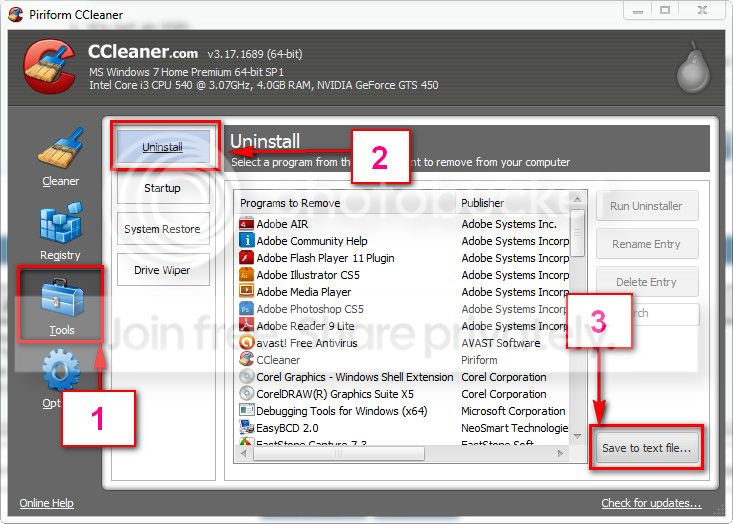
If so, download and install CCleaner. Then run it.
Go to "Tools" .... by default it will open the "uninstall" tab.
Click on save as text file. Save it on your desktop.
Upload the text file for us.
2012-11-02_224417.jpg
 

My Computer My Computer

Computer type
PC/Desktop
Computer Manufacturer/Model Number
Self Assembled
OS
Microsoft Windows 10 Pro Insider Preview 64-bit
CPU
Intel(R) Core(TM) i3-4130 CPU @ 3.40GHz
Motherboard
Gigabyte Technology Co., Ltd. B85M-D3H
Memory
Corsair Vengence 4GB x2 (8.00GB Dual-Channel DDR3 @ 798MHz)
Graphics Card(s)
2047MB GeForce GTS 450 (ZOTAC International)
Sound Card
Onboard (Realtek High Definition Audio)
Monitor(s) Displays
LG Flatron E2040T
Screen Resolution
1600x900
Hard Drives
Western Digital 1 TB
Seagate 500 GB
PSU
Corsair VS550
Case
Cooler Master K380
Cooling
Cooler Master Seidon 120V Plus
Keyboard
Logitech MK260r
Mouse
Logitech MK260r
Internet Speed
PMPL Broadband
Antivirus
Windows Defender + MBAM
Browser
Firefox
Other Info
Dell Studio 15" Laptop
Hello Arc

Thanks for the reply.
I can boot as normal in between crashes.... as I am now.
Sometimes I need to leave the PC off for a minute.

Here's the CCleaner Text file you requested.

Thanks
 
Last edited:

My Computer My Computer

OS
Windows 7 64Bit

My Computer My Computer

Computer type
PC/Desktop
Computer Manufacturer/Model Number
Self Assembled
OS
Microsoft Windows 10 Pro Insider Preview 64-bit
CPU
Intel(R) Core(TM) i3-4130 CPU @ 3.40GHz
Motherboard
Gigabyte Technology Co., Ltd. B85M-D3H
Memory
Corsair Vengence 4GB x2 (8.00GB Dual-Channel DDR3 @ 798MHz)
Graphics Card(s)
2047MB GeForce GTS 450 (ZOTAC International)
Sound Card
Onboard (Realtek High Definition Audio)
Monitor(s) Displays
LG Flatron E2040T
Screen Resolution
1600x900
Hard Drives
Western Digital 1 TB
Seagate 500 GB
PSU
Corsair VS550
Case
Cooler Master K380
Cooling
Cooler Master Seidon 120V Plus
Keyboard
Logitech MK260r
Mouse
Logitech MK260r
Internet Speed
PMPL Broadband
Antivirus
Windows Defender + MBAM
Browser
Firefox
Other Info
Dell Studio 15" Laptop
Hello Arc
Thanks for the reply.

You Wrote:

No virtual disc emaluator is present there
What were you looking for?
Could it be other software I had installed at sometime, I'm not sure what that would be.

Could it have anything to do with changes to services.
I remember about 2 months ago I changed some service to speed up windows but what I changed I can't remember. The PC didn't play up after making those changes.

I'll scan the registry with CCleaner.... having not used the program before....what am I looking for?
It would be nice to identify the issue before fixing selected issues.

I'll scan again with MBAM and Avast Free ..... Although I don't hold out on that being an issue as I've been through scans many times in hope of finding something.
If you have any scanning recommendations please advise.

Thanks again
 

My Computer My Computer

OS
Windows 7 64Bit
VDiskBus is usually a mechanism to control virtual hardware. Acronis and some other programs use it,to mount virtual drives.

I asked you to scan the registry, if you have installed a similar program earlier and now reinstalled, but the registry entry is still present and causing troubles. But, dont use any program other than CCleaner to do that.

I asked for virus scan, if it is a malware/rootkit faking as vdiskbus.sys. For that scan, you need specialist programs, those I suggested. Malwarebytes also has similar utility aside of MBAM, that is MBAR, Malwarebytes : Malwarebytes Anti-Rootkit.
 

My Computer My Computer

Computer type
PC/Desktop
Computer Manufacturer/Model Number
Self Assembled
OS
Microsoft Windows 10 Pro Insider Preview 64-bit
CPU
Intel(R) Core(TM) i3-4130 CPU @ 3.40GHz
Motherboard
Gigabyte Technology Co., Ltd. B85M-D3H
Memory
Corsair Vengence 4GB x2 (8.00GB Dual-Channel DDR3 @ 798MHz)
Graphics Card(s)
2047MB GeForce GTS 450 (ZOTAC International)
Sound Card
Onboard (Realtek High Definition Audio)
Monitor(s) Displays
LG Flatron E2040T
Screen Resolution
1600x900
Hard Drives
Western Digital 1 TB
Seagate 500 GB
PSU
Corsair VS550
Case
Cooler Master K380
Cooling
Cooler Master Seidon 120V Plus
Keyboard
Logitech MK260r
Mouse
Logitech MK260r
Internet Speed
PMPL Broadband
Antivirus
Windows Defender + MBAM
Browser
Firefox
Other Info
Dell Studio 15" Laptop
Thanks again for taking the time.
I apologise,:o.......I see now that you did suggest:

I've been staring at this issue for a while now so losing concentration.:sleepy:
I'll leave it for now and follow up with your suggestions with a fresh head.

Thanks Again I'll let you know how I get on.

Edit
This was a malware issue, thanks.
A lot going on back then.

:)
 
Last edited:

My Computer My Computer

OS
Windows 7 64Bit
Back
Top