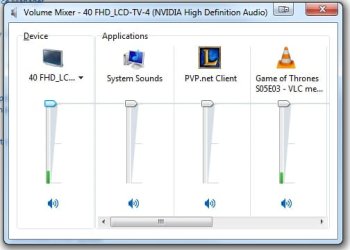
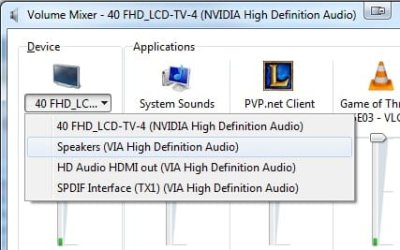
I am watching Game of Thrones and at the same time I would like to play a game. I have Game of Thrones on my tv through a HDMI cable. The sound is also coming through the tv. I want to play some League of Legends but the sound also comes out of the tv. I have some headphones plugged in but have the tv set to default as I want the sound of Game of Thrones to be played through the tv. How can I separate audio so that the League of Legends is playing through the headphones and Game of Thrones continues to play through the tv?
Windows only allows one default audio playback device. I've seen reports that there are third party programs that will separate the sound but don't recall any postings of the actual programs. Do a Google search and see if you can find anything.
My Computer
Computer type
PC/Desktop
Computer Manufacturer/Model Number
My Own Build
OS
Windows 10 64 bit
CPU
Intel i7 6700K
Motherboard
ASUS ROG Maximus VIII Hero
Memory
16GB Corsair Dominator
Graphics Card(s)
Intel CPU Graphics
Sound Card
RealTek
Monitor(s) Displays
27" Dell S2719dgf
Screen Resolution
2560X1440
Hard Drives
1 TB Samsung 850 EVO SSD for Win 10 Pro
500GB Samsung 850 EVO SSD for Win 10 Insider
2 TB drive for backup
PSU
EVGA Supernova 750G2
Case
BeQuiet Silent Base 600
Cooling
Deepcool Captain 120EX
Keyboard
Microsoft Wireless 2000
Mouse
Microsoft wireless
Internet Speed
100 MB/sec (Cable)
Antivirus
Microsoft Defender and Malwarebytes
Browser
Edge/Firefox
Other Info
Cakewalk (Sonar) by BandLab and Studio One 4.1 Pro recording studio software. MOTU 896Mk3 Hybrid recording interface, Frontier Tranzport wireless control unit, Behringer X-Touch Control Surface.
Five USB connected optical drives for CD Audio production using Nero BurningROM
Give this a try. Under your Volume Control Options within the Windows Audio properties, check both your HDMI out and your Realtek Audio driver. VLC media player allows you to choose your output device as does Windows Media Player (from what I’ve read) but I will use VLC for this example. Under the Audio options in VLC, choose DirectX Audio Output in the drop down Audio Module. Under Device then choose your HDMI out.
Your games should then be configured to use the Realtek output.
My Computer
Computer type
PC/Desktop
Computer Manufacturer/Model Number
Misfits Machine!
OS
Windows 7 Professional
CPU
Intel i7 4790K
Motherboard
ASUS Maximus VII Hero
Memory
32 GB G.SKILL TridentX F3-2400C10D-GTX
Graphics Card(s)
EVGA GeForce GTX 980 Superclocked X2 SLI
Sound Card
Teac UD-501 External USB DAC/Bryston BHA-1 Headphone Amp
Monitor(s) Displays
BenQ BL3200PT
Screen Resolution
2560x1440
Hard Drives
Samsung 850 Pro Series 256GB SSD
Western Digital Red 3TB