
Trouble upgrading from HDD to new SSD

dsscottage

New member
Member
Local time
4:19 PM
Messages
49
I have a Win 7 system with an AMI V1.3 01/05/2007 BIOS.

I am attempting to upgrade my HDD to a Samsung 850 EVO SSD and do a fresh install of Windows 7.
I disconnected the HDD and connected the SSD to the same SATA port on the MB. (Port 1)
I have changed the BIOS of SATA port #1 to AHCI and did a fresh Windows installation. Windows seems to install but when I get to the point that says "Preparing Windows for first use", the computer freezes with the message "There is no disk in the drive. Please insert a disk into drive /DEVICE/HARDDISK1/DR1".

I reverted to the HDD and installed the SSD as a secondary drive. The windows files are there but the original HDD had only one partition with windows installed in it. The SSD has 2 partitions, one is "System reserved", the other has Windows installed. I've uploaded a screen shot of the Disk Management window. I can only see this when the SSD is installed as the secondary drive since I am unable to complete the Win installation on the SSD.

Is there some other BIOS setting that need to be changed?
Is there anything else that I should have done?
 

Attachments
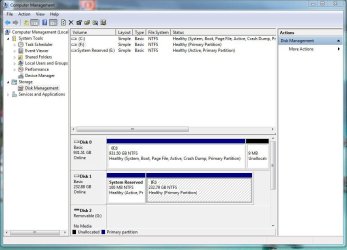
  • SSD1.jpg
    SSD1.jpg
    97.8 KB · Views: 1
Last edited:

My Computer My Computer

At a glance

Windows 10 ProIntel Core i7-377016MBNVIDIA GeForce GT 640
Computer type
PC/Desktop
Computer Manufacturer/Model Number
ASUS
OS
Windows 10 Pro
CPU
Intel Core i7-3770
Motherboard
ASUS CM6870
Memory
16MB
Graphics Card(s)
NVIDIA GeForce GT 640
Sound Card
Onboard HD Audio
Monitor(s) Displays
Hanns.G HZ281
Screen Resolution
1920x1200
Hard Drives
Samsung 850 EVO 512GB SSD and
ST2000DM 2TB HDD
Internet Speed
Gigabit
Antivirus
Windows Defender
Browser
Chrome
Other Info
Second desktop computer - Intel Core 2 Duo - Win 7 Ultimate,
Laptop - ASUS Intel Core i5-3317U - Win 10 Home
Try removing the active flag from Disk0 partition1.
 

My Computers My Computers

  • At a glance

    7 X64i5 84002x8gb 3200mhz
    Computer type
    PC/Desktop
    OS
    7 X64
    CPU
    i5 8400
    Motherboard
    gigabyte b365m ds3h
    Memory
    2x8gb 3200mhz
    Hard Drives
    various
    PSU
    pure power 11 400w cm
    Case
    Coolermaster
    Cooling
    cryorig m9i
  • At a glance

    7x64g54008gb ddr4 2400
    Computer type
    PC/Desktop
    OS
    7x64
    CPU
    g5400
    Motherboard
    ga b365m ds3h
    Memory
    8gb ddr4 2400
    PSU
    xfx pro 450w
When installing Win 7, you did the right thing by disconnecting the HDD leaving on only the SSD.

On the installation wizard, did you deleted ALL partitions on the SSD?
System Reserved (not M$ Reserved) is used on OEM computers to store the boot loader and the recovery program.

Try, as Siw suggested, to take the Active flag from E: and assign one to F:, then disconnect the HDD and try to boot.
If it doesn't boot, insert the Win 7 installation disk, go to repair and do a Boot repair.
 

My Computers My Computers

  • At a glance

    Windows 7 HP 64i5 6600K - 800MHz to 4200MHz4+4G GSkill DDR4 3000IG - Intel 530
    Computer type
    PC/Desktop
    Computer Manufacturer/Model Number
    custom build
    OS
    Windows 7 HP 64
    CPU
    i5 6600K - 800MHz to 4200MHz
    Motherboard
    GA-Z170-HD3P
    Memory
    4+4G GSkill DDR4 3000
    Graphics Card(s)
    IG - Intel 530
    Monitor(s) Displays
    Samsung 226BW
    Screen Resolution
    1680x1050
    Hard Drives
    (1) -1 SM951 – 128GB M.2 AHCI PCIe SSD drive for Windows 7 and Lubuntu
    (2) -1 WD SATA 3 - 1T for Data
    (3) -1 WD SATA 3 - 1T for backup
    PSU
    Thermaltake 450W TR2 gold
    Keyboard
    Old and good Chicony mechanical keyboard
    Mouse
    Logitech mX performance - 9 buttons (had to disable some)
    Internet Speed
    500Mb/s
    Browser
    Firefox 64
    Other Info
    TinyWall firewall
  • At a glance

    Windows 7 Proi7-4500U 800MHz to 3.0GHz(4+4)G DDR3 1600IG intel 4400 + NVIDIA GeForce GT 745M
    Computer type
    Laptop
    System Manufacturer/Model Number
    Asus Q550LF
    OS
    Windows 7 Pro
    CPU
    i7-4500U 800MHz to 3.0GHz
    Motherboard
    Asus Q550LF
    Memory
    (4+4)G DDR3 1600
    Graphics Card(s)
    IG intel 4400 + NVIDIA GeForce GT 745M
    Sound Card
    Realtek
    Monitor(s) Displays
    LG Display LP156WF4-SPH1
    Screen Resolution
    1920 x 1080
    Hard Drives
    BX500 120G SSD for Windows and programs +
    1T HDD for data
    Internet Speed
    500 Mb/s
    Browser
    Firefox
    Other Info
    TinyWall firewall
Thank you for the suggestions. Here is the result of those suggestions:

1. You suggested that I remove the Active flag from Disk O partition 1.
  • When I'm trying to boot to the SSD, I have the old HDD (Disk 0) disconnected. Therefore, with only the SSD connected it would become Disk 0
  • Thinking this is what you meant, I removed the active flag from the SSD System Reserved partition, thereby making the larger partition active.
  • When I booted with this configuration, I get the following error message "BOOTMGR is missing. Press Ctrl+Alt+Del to restart".
  • I assume that the boot sector is in the System Reserved partition and will not boot

2. I attempted to do a Boot Repair.
  • I restored the System Reserved partition to Active and booted with the installation DVD
  • The DVD does not give me the option to "Repair your computer"
  • Instead, it starts the installation process
  • I assume that the DVD doesn't see a valid Win installation and starts the installation process.

One more bit of information that might explain one difference...
This computer originally had Win XP and was upgraded to Win 7 using this DVD. That may be the reason that Win 7 was originally installed in the single partition where Win XP was installed.
When attempting a fresh install the installation DVD creates 2 partitions on the SSD. However, I can't see why this would cause any problems.

I'm wondering is there is some other BIOS setting that should be changed. On the BIOS page where I change from IDE to AHCI, there are other options.
SATA #1 can be set as Enabled, Disabled or Compatible. It is set to Enabled

Any other ideas?
 

My Computer My Computer

At a glance

Windows 10 ProIntel Core i7-377016MBNVIDIA GeForce GT 640
Computer type
PC/Desktop
Computer Manufacturer/Model Number
ASUS
OS
Windows 10 Pro
CPU
Intel Core i7-3770
Motherboard
ASUS CM6870
Memory
16MB
Graphics Card(s)
NVIDIA GeForce GT 640
Sound Card
Onboard HD Audio
Monitor(s) Displays
Hanns.G HZ281
Screen Resolution
1920x1200
Hard Drives
Samsung 850 EVO 512GB SSD and
ST2000DM 2TB HDD
Internet Speed
Gigabit
Antivirus
Windows Defender
Browser
Chrome
Other Info
Second desktop computer - Intel Core 2 Duo - Win 7 Ultimate,
Laptop - ASUS Intel Core i5-3317U - Win 10 Home
Thinking this is what you meant

That is not what I meant.

If you now only have the new disk connected, the partition containing the boot crirtical files needs to be marked active. From your screenshot, it looks like the 100mb partition should be active.

Have you now reinstalled with only the new disk connected ?
 

My Computers My Computers

  • At a glance

    7 X64i5 84002x8gb 3200mhz
    Computer type
    PC/Desktop
    OS
    7 X64
    CPU
    i5 8400
    Motherboard
    gigabyte b365m ds3h
    Memory
    2x8gb 3200mhz
    Hard Drives
    various
    PSU
    pure power 11 400w cm
    Case
    Coolermaster
    Cooling
    cryorig m9i
  • At a glance

    7x64g54008gb ddr4 2400
    Computer type
    PC/Desktop
    OS
    7x64
    CPU
    g5400
    Motherboard
    ga b365m ds3h
    Memory
    8gb ddr4 2400
    PSU
    xfx pro 450w
That is not what I meant.

If you now only have the new disk connected, the partition containing the boot crirtical files needs to be marked active. From your screenshot, it looks like the 100mb partition should be active.

Have you now reinstalled with only the new disk connected ?

Think that the short answer to your question is Yes.

Anytime that I have attempted to boot from the SSD with the new installation of Win 7, only the SSD is connected. I have never had the HDD connected at the same time. The only time that both the HDD and SSD are connected at the same time is when I have rebooted to the HDD so that I can take a look at the SSD in Disk Management (as a secondary drive). When I have done this, the System Reserved partition of the SSD is marked active. I assume that, after I remove the HDD, move the SSD to SATA#1 and reboot, the System Reserved partition will be active.

Have I misunderstood your suggestion?
 

My Computer My Computer

At a glance

Windows 10 ProIntel Core i7-377016MBNVIDIA GeForce GT 640
Computer type
PC/Desktop
Computer Manufacturer/Model Number
ASUS
OS
Windows 10 Pro
CPU
Intel Core i7-3770
Motherboard
ASUS CM6870
Memory
16MB
Graphics Card(s)
NVIDIA GeForce GT 640
Sound Card
Onboard HD Audio
Monitor(s) Displays
Hanns.G HZ281
Screen Resolution
1920x1200
Hard Drives
Samsung 850 EVO 512GB SSD and
ST2000DM 2TB HDD
Internet Speed
Gigabit
Antivirus
Windows Defender
Browser
Chrome
Other Info
Second desktop computer - Intel Core 2 Duo - Win 7 Ultimate,
Laptop - ASUS Intel Core i5-3317U - Win 10 Home
Please answer:
On the installation wizard, did you deleted ALL partitions on the SSD?
System Reserved (not M$ Reserved) is used on OEM computers to store the boot loader and the recovery program. Was this disk on a OEM (Dell, HP etc) computer?
 

My Computers My Computers

  • At a glance

    Windows 7 HP 64i5 6600K - 800MHz to 4200MHz4+4G GSkill DDR4 3000IG - Intel 530
    Computer type
    PC/Desktop
    Computer Manufacturer/Model Number
    custom build
    OS
    Windows 7 HP 64
    CPU
    i5 6600K - 800MHz to 4200MHz
    Motherboard
    GA-Z170-HD3P
    Memory
    4+4G GSkill DDR4 3000
    Graphics Card(s)
    IG - Intel 530
    Monitor(s) Displays
    Samsung 226BW
    Screen Resolution
    1680x1050
    Hard Drives
    (1) -1 SM951 – 128GB M.2 AHCI PCIe SSD drive for Windows 7 and Lubuntu
    (2) -1 WD SATA 3 - 1T for Data
    (3) -1 WD SATA 3 - 1T for backup
    PSU
    Thermaltake 450W TR2 gold
    Keyboard
    Old and good Chicony mechanical keyboard
    Mouse
    Logitech mX performance - 9 buttons (had to disable some)
    Internet Speed
    500Mb/s
    Browser
    Firefox 64
    Other Info
    TinyWall firewall
  • At a glance

    Windows 7 Proi7-4500U 800MHz to 3.0GHz(4+4)G DDR3 1600IG intel 4400 + NVIDIA GeForce GT 745M
    Computer type
    Laptop
    System Manufacturer/Model Number
    Asus Q550LF
    OS
    Windows 7 Pro
    CPU
    i7-4500U 800MHz to 3.0GHz
    Motherboard
    Asus Q550LF
    Memory
    (4+4)G DDR3 1600
    Graphics Card(s)
    IG intel 4400 + NVIDIA GeForce GT 745M
    Sound Card
    Realtek
    Monitor(s) Displays
    LG Display LP156WF4-SPH1
    Screen Resolution
    1920 x 1080
    Hard Drives
    BX500 120G SSD for Windows and programs +
    1T HDD for data
    Internet Speed
    500 Mb/s
    Browser
    Firefox
    Other Info
    TinyWall firewall
Please answer:
On the installation wizard, did you deleted ALL partitions on the SSD?
Yes

Was this disk on a OEM (Dell, HP etc) computer?
Ah Ha! I think that's the key but I'm not sure why it didn't work.
When I upgraded from Win XP to Win 7, I bought a Win 7 certificate with the installation key from a local computer store. That didn't come with an installation DVD but the store burned one for me. It worked fine for the upgrade to Win 7. Because of your question, I ran Belarc Advisor and the report indicates that my Win 7 installation is indeed an OEM but it is still in one partition.

Therefore, I downloaded a fresh copy of Win 7 (MS no longer provides this ability) but I found a German site that has stored many versions from MS. I formatted my SSD and installed Win 7 using this new DVD and it worked (in one partition). I'm doing this while I'm watching the football game so I haven't spent a lot of time on it. I just hope that the installation key that I bought will work and that I didn't get scammed.

I'll report further after I get more time to work on this tomorrow.
 

My Computer My Computer

At a glance

Windows 10 ProIntel Core i7-377016MBNVIDIA GeForce GT 640
Computer type
PC/Desktop
Computer Manufacturer/Model Number
ASUS
OS
Windows 10 Pro
CPU
Intel Core i7-3770
Motherboard
ASUS CM6870
Memory
16MB
Graphics Card(s)
NVIDIA GeForce GT 640
Sound Card
Onboard HD Audio
Monitor(s) Displays
Hanns.G HZ281
Screen Resolution
1920x1200
Hard Drives
Samsung 850 EVO 512GB SSD and
ST2000DM 2TB HDD
Internet Speed
Gigabit
Antivirus
Windows Defender
Browser
Chrome
Other Info
Second desktop computer - Intel Core 2 Duo - Win 7 Ultimate,
Laptop - ASUS Intel Core i5-3317U - Win 10 Home
As the installation has a problem and the SSD doesn't have any personal data, my suggestion is to start from scratch.
- Detach the HDD, leaving only the SSD.
- As you have only 1.5 G of memory, use a 32 bits Win 7 HB installation disk. Boot from the Win 7 HB installation disk, go to install - advanced - delete all partitions. You will end with only one unallocated partition. Create new partition. It will create:
- A 100M M$ (RAW) reserved partition.
- A Big (~232G) NTFS partition.
Install on the Big NTFS partition.
 

My Computers My Computers

  • At a glance

    Windows 7 HP 64i5 6600K - 800MHz to 4200MHz4+4G GSkill DDR4 3000IG - Intel 530
    Computer type
    PC/Desktop
    Computer Manufacturer/Model Number
    custom build
    OS
    Windows 7 HP 64
    CPU
    i5 6600K - 800MHz to 4200MHz
    Motherboard
    GA-Z170-HD3P
    Memory
    4+4G GSkill DDR4 3000
    Graphics Card(s)
    IG - Intel 530
    Monitor(s) Displays
    Samsung 226BW
    Screen Resolution
    1680x1050
    Hard Drives
    (1) -1 SM951 – 128GB M.2 AHCI PCIe SSD drive for Windows 7 and Lubuntu
    (2) -1 WD SATA 3 - 1T for Data
    (3) -1 WD SATA 3 - 1T for backup
    PSU
    Thermaltake 450W TR2 gold
    Keyboard
    Old and good Chicony mechanical keyboard
    Mouse
    Logitech mX performance - 9 buttons (had to disable some)
    Internet Speed
    500Mb/s
    Browser
    Firefox 64
    Other Info
    TinyWall firewall
  • At a glance

    Windows 7 Proi7-4500U 800MHz to 3.0GHz(4+4)G DDR3 1600IG intel 4400 + NVIDIA GeForce GT 745M
    Computer type
    Laptop
    System Manufacturer/Model Number
    Asus Q550LF
    OS
    Windows 7 Pro
    CPU
    i7-4500U 800MHz to 3.0GHz
    Motherboard
    Asus Q550LF
    Memory
    (4+4)G DDR3 1600
    Graphics Card(s)
    IG intel 4400 + NVIDIA GeForce GT 745M
    Sound Card
    Realtek
    Monitor(s) Displays
    LG Display LP156WF4-SPH1
    Screen Resolution
    1920 x 1080
    Hard Drives
    BX500 120G SSD for Windows and programs +
    1T HDD for data
    Internet Speed
    500 Mb/s
    Browser
    Firefox
    Other Info
    TinyWall firewall
Solved but not really fixed

Win 7 is now working on my new SSD. The problems aren't really fixed but the problem is solved.

To make a very long story less long.....
This is my 4th day attempting to get a fresh install of Win 7 on my SSD. I've made about 6 different attempts of different alternatives and each one failed in some way. I spent a lot of time searching the net for solutions including posting here. Nothing worked. Therefore, out of frustration I did what I didn't really want to do. I got EaseUS ToDo Backup Home and cloned my old Win 7 to the new SSD. This appears to be working.

Thank you to everyone who took their valuable time and provided me with suggestions.

OMG - As I'm typing this note, my wife came to me to say that her computer had frozen. (It's her computer that I was working on) A reboot got it working again but this worries me. I may be back with another post if the freezing continues.

Thanks again!
 

My Computer My Computer

At a glance

Windows 10 ProIntel Core i7-377016MBNVIDIA GeForce GT 640
Computer type
PC/Desktop
Computer Manufacturer/Model Number
ASUS
OS
Windows 10 Pro
CPU
Intel Core i7-3770
Motherboard
ASUS CM6870
Memory
16MB
Graphics Card(s)
NVIDIA GeForce GT 640
Sound Card
Onboard HD Audio
Monitor(s) Displays
Hanns.G HZ281
Screen Resolution
1920x1200
Hard Drives
Samsung 850 EVO 512GB SSD and
ST2000DM 2TB HDD
Internet Speed
Gigabit
Antivirus
Windows Defender
Browser
Chrome
Other Info
Second desktop computer - Intel Core 2 Duo - Win 7 Ultimate,
Laptop - ASUS Intel Core i5-3317U - Win 10 Home
On a SSD, trim must be enabled:

Type this cmd
fsutil behavior query DisableDeleteNotify

It will give you one of two results, either a 0 or a 1. A zero indicates that TRIM is enabled correctly, a one means that it is not. If you have a TRIM-compatible SSD, but find that Windows 7 hasn't enabled the command, you can easily do so by running this command:

fsutil behavior set DisableDeleteNotify 0
 

My Computers My Computers

  • At a glance

    Windows 7 HP 64i5 6600K - 800MHz to 4200MHz4+4G GSkill DDR4 3000IG - Intel 530
    Computer type
    PC/Desktop
    Computer Manufacturer/Model Number
    custom build
    OS
    Windows 7 HP 64
    CPU
    i5 6600K - 800MHz to 4200MHz
    Motherboard
    GA-Z170-HD3P
    Memory
    4+4G GSkill DDR4 3000
    Graphics Card(s)
    IG - Intel 530
    Monitor(s) Displays
    Samsung 226BW
    Screen Resolution
    1680x1050
    Hard Drives
    (1) -1 SM951 – 128GB M.2 AHCI PCIe SSD drive for Windows 7 and Lubuntu
    (2) -1 WD SATA 3 - 1T for Data
    (3) -1 WD SATA 3 - 1T for backup
    PSU
    Thermaltake 450W TR2 gold
    Keyboard
    Old and good Chicony mechanical keyboard
    Mouse
    Logitech mX performance - 9 buttons (had to disable some)
    Internet Speed
    500Mb/s
    Browser
    Firefox 64
    Other Info
    TinyWall firewall
  • At a glance

    Windows 7 Proi7-4500U 800MHz to 3.0GHz(4+4)G DDR3 1600IG intel 4400 + NVIDIA GeForce GT 745M
    Computer type
    Laptop
    System Manufacturer/Model Number
    Asus Q550LF
    OS
    Windows 7 Pro
    CPU
    i7-4500U 800MHz to 3.0GHz
    Motherboard
    Asus Q550LF
    Memory
    (4+4)G DDR3 1600
    Graphics Card(s)
    IG intel 4400 + NVIDIA GeForce GT 745M
    Sound Card
    Realtek
    Monitor(s) Displays
    LG Display LP156WF4-SPH1
    Screen Resolution
    1920 x 1080
    Hard Drives
    BX500 120G SSD for Windows and programs +
    1T HDD for data
    Internet Speed
    500 Mb/s
    Browser
    Firefox
    Other Info
    TinyWall firewall
On a SSD, trim must be enabled:

Type this cmd
fsutil behavior query DisableDeleteNotify

It will give you one of two results, either a 0 or a 1. A zero indicates that TRIM is enabled correctly, a one means that it is not. If you have a TRIM-compatible SSD, but find that Windows 7 hasn't enabled the command, you can easily do so by running this command:

fsutil behavior set DisableDeleteNotify 0

I did as you suggested and TRIM is enabled. It looks like EaseUS Backup did a pretty good job.

Thank you for the suggestion!!!
 

My Computer My Computer

At a glance

Windows 10 ProIntel Core i7-377016MBNVIDIA GeForce GT 640
Computer type
PC/Desktop
Computer Manufacturer/Model Number
ASUS
OS
Windows 10 Pro
CPU
Intel Core i7-3770
Motherboard
ASUS CM6870
Memory
16MB
Graphics Card(s)
NVIDIA GeForce GT 640
Sound Card
Onboard HD Audio
Monitor(s) Displays
Hanns.G HZ281
Screen Resolution
1920x1200
Hard Drives
Samsung 850 EVO 512GB SSD and
ST2000DM 2TB HDD
Internet Speed
Gigabit
Antivirus
Windows Defender
Browser
Chrome
Other Info
Second desktop computer - Intel Core 2 Duo - Win 7 Ultimate,
Laptop - ASUS Intel Core i5-3317U - Win 10 Home
Back
Top