Trouble Viewing Adobe Flash Settings Panel

balsa

New member
Local time
1:35 PM
Messages
8
I am having issues with playing videos on my computer. You Tube works fine, but most flash player videos don't work. I have been reading through a bunch of old threads on here and I really think that if I could just change my global settings on flash player to allow 3rd party flash content to share data on my computer that it would solve the problem (well here is hoping anyways).
But when I go to the settings panel, the screen is blank where the settings panel should obviously be. I have no idea how to get it to show up...or why it isn't.


Things I have tried:
1)Correctly and completely uninstalling and reinstalling Adobe Flash Player. I have Flash Player 16 ActiveX
2)Ensuring that ActiveX Filtering is off
 

Attachments
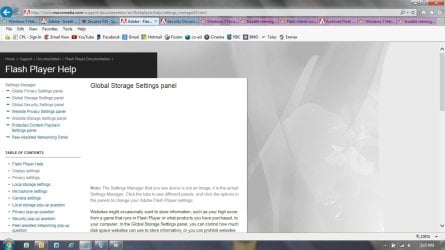
  • Global Settings.jpg
    Global Settings.jpg
    90.9 KB · Views: 1

My Computer

Computer type
PC/Desktop
Computer Manufacturer/Model Number
HP
OS
Windows 7 64 bit
Antivirus
Norton
Browser
EI
I would suggest going into the add/remove programs in the control panel; uninstalling flash player, then go to adobe's site and re-downloading the latest version of flash and install that. Give that a shot and see if that helps ya out any. If not; post back here and we can take it from there.

EDIT: I just noticed you have already tried uninstalling and reinstalling flash. At this point i would try uninstalling flash completely including the folder and files by downloading, installing, and running a program called revo uninstaller which should get rid of everything including folder, files, and registry entries. Go to the following link below to get it:

Download Revo Uninstaller Freeware - Free and Full Download - Uninstall software, remove programs, solve uninstall problems

Download, install, and run the program to get rid of the flash program. After that; re-download and re-install flash and see what happens. post back if further issues.
 
Last edited:

My Computer

Computer type
PC/Desktop
Computer Manufacturer/Model Number
custom built
OS
Windows 7 ultimate 64-bit
CPU
Intel I7 2600K 3.4ghz
Motherboard
Asus Evo P8P67
Memory
Corsair 16gb ddr3 1600mhz
Graphics Card(s)
Nvidia Geforce gt 430
Sound Card
Sound Blaster Titanium x-fi pci express
Monitor(s) Displays
Dell E198WFP
Hard Drives
1 western digital 2TB drive.
PSU
Antec 1200 watt
Case
Inwin Dragon Rider
Cooling
6 case supplied cooling fans
Keyboard
logitech mk700
Mouse
logitech m705
Internet Speed
25-50mbps download; 10mbps upload(i think)
Antivirus
avg free 2014
Browser
mozilla firefox
Other Info
Also have a pretty bad speaker setup which is a klipsch promedia 5.1 surround speaker setup with huge subwoofer and lg blu ray player/writer. Also a hp officejet pro 8600 plus wireless all in one and a logitech s7500 webcam.
Hi Matts6887, I used the Revo Uninstaller to uninstall Flash Player and then I re-installed, and both my issues still remain.
 

My Computer

Computer type
PC/Desktop
Computer Manufacturer/Model Number
HP
OS
Windows 7 64 bit
Antivirus
Norton
Browser
EI
Flash Player remove

The only reliable way to remove flash player that I know of is to run the dedicated uninstall tool downloadable from here:

https://helpx.adobe.com/flash-player/kb/uninstall-flash-player-windows.html

Follow all instructions including deleting leftovers:

C:\Windows\system32\Macromed\Flash
C:\Windows\SysWOW64\Macromed\Flash
%appdata%\Adobe\Flash Player
%appdata%\Macromedia\Flash Player

Then reboot to flush system cache.

After reboot - get the latest flash player from here and install it:

Adobe Flash Player Distribution | Adobe

Windows IE .exe version is needed for your IE browser. If you've got other installed browsers let us know.

After the clean install of flash player - if you still have the same issue it means that IE settings related to Active X content and security zones need fixing.
 

My Computer

Computer type
Laptop
Computer Manufacturer/Model Number
ASUS
OS
Microsoft Windows 7 Home Premium 64-bit 7601 Multiprocessor Free Service Pack 1
CPU
AMD C-60 APU with Radeon(tm) HD Graphics
Motherboard
ASUSTeK COMPUTER INC. X501U
Memory
4.00 GB
Graphics Card(s)
AMD Radeon HD 6290 Graphics
Sound Card
(1) AMD High Definition Audio Device (2) Realtek High Defi
Screen Resolution
1366 x 768 x 32 bits (4294967296 colors) @ 60 Hz
Hard Drives
Hitachi HTS545050A7E380 SATA Disk Device
Antivirus
Comodo CIS & FW, SecureAplus App Whitelisting, Threatfire
Browser
Cyberfox 64bit, Opera 64bit, Airfox
Other Info
Spy-The-Spy, HitmanPro.Alert, Norton Connect Safe, MJRegWatcher, BitDefender TrafficLight, Voodoo Shield, Zemana AntiMalware
Hi balsa, welcome to 7F! :)

First, make sure you have flash player installed correctly, you can go here to check: https://Adobe Flash Player Version Checker | www.adobe.com
You may even find the settings manager there in the right panel under support. Make sure you don't have any flash blocker add-ons enabled.
One other way is to right click on any flash video when it's not running, global settings are there in the context menu second from the bottom.

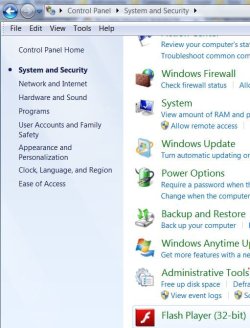
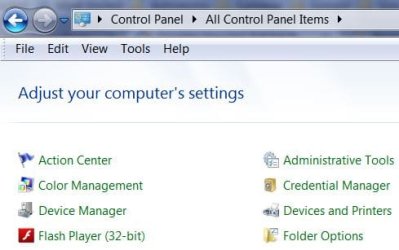
If not, try checking Control Panel\All Control Panel Items:

  • In the category view you may find it listed under System and Security at the bottom.
fpcat.JPG


  • In either Icon view, in alphabetical order.
fpicons.JPG


I didn't see any 3rd party flash content settings in settings manager but there are settings for local storage on the storage tab, and trusted sites on the advanced tab.
The global settings you are looking for does have a third-party setting on the second tab from the left. I'm not sure what's going on with the global site, it's taking an awful long time to load.

I'm not sure how the settings manager got in Control Panel, it happened after a flash player update a while back.
 

My Computer

Computer type
PC/Desktop
Computer Manufacturer/Model Number
Gateway DX4831-01e (Mid-Tower Desktop)
OS
Originally Win 7 Hm Prem x64 Ver 6.1.7600 Build 7601-SP1 | Upgraded to Windows 10 December 14, 2019
CPU
Intel i3 530 2.93GHz, 2933MHz 2 Cores 4 Logical Processors
Motherboard
Gateway H57M01 133 megahertz
Memory
6GB of 1,333MHz DDR3 SDRAM
Graphics Card(s)
32MB Intel Graphics Media Accelerator HD IGChip
Sound Card
Realtek High Definition Audio
Monitor(s) Displays
Gateway HX2000 20inch TFT active matrix TN
Screen Resolution
1600 x 900 x 59 hertz
Hard Drives
WDC WD10EADS-00M2B0 [HDD] (1000.20 GB) -- drive 0,
HL-DT-ST DVDRAM GH41N [CD-ROM dr]
Four card readers, and Four USB 2.0
PSU
300watts.
Case
Mid-Tower Desktop
Cooling
Stock from Gateway
Keyboard
Natural Ergonomic Keyboard 4000, see Other Info
Mouse
Orig. Gateway wore out now using Insignia USB wired optical
Internet Speed
Vz FIOS 10ms png 57.64Mbps down 65.53Mbps up Speedtest.org
Antivirus
Zamana Anti-logger with Anti-malware, MSE, Windows Firewall,
Browser
IE11.0.9600.19399-Upd ver11.0.135, Firefox 68.0.1 x64
Other Info
System Specs by Belarc.

BIOS: American Megatrends Inc. P01-A0 11/17/2009

Replaced the MS 'Natural' Standard PS/2 Enhanced 101-102 Keyboard with a new Natural Ergonomic Keyboard 4000 on August 1st 2014.

Canon Pixma MG3222 Printer.

Updated to IE11 on 12102015 | Fios Quantum Router g1100

Additional AV: SpywareBlaster, manual Mbam, SAS
The only reliable way to remove flash player that I know of is to run the dedicated uninstall tool downloadable from here:

https://helpx.adobe.com/flash-player/kb/uninstall-flash-player-windows.html

Follow all instructions including deleting leftovers:

C:\Windows\system32\Macromed\Flash
C:\Windows\SysWOW64\Macromed\Flash
%appdata%\Adobe\Flash Player
%appdata%\Macromedia\Flash Player

Then reboot to flush system cache.

After reboot - get the latest flash player from here and install it:

Adobe Flash Player Distribution | Adobe

Windows IE .exe version is needed for your IE browser. If you've got other installed browsers let us know.

After the clean install of flash player - if you still have the same issue it means that IE settings related to Active X content and security zones need fixing.

Hi Callendar,
I have followed those same steps in one of my multiple attempts to uninstall and reinstall in the past, but I tried again just to be sure. Then I reinstalled from the site you posted, and even used the install checker suggested by Anak. According to the Adobe site, flash player is installed correctly and working properly. However all of my previous problems still remain. :(
I don't have any other installed browsers, just IE. And just to clarify, I do have Active X Filtering turned off.
 

My Computer

Computer type
PC/Desktop
Computer Manufacturer/Model Number
HP
OS
Windows 7 64 bit
Antivirus
Norton
Browser
EI
Hi balsa, welcome to 7F! :)

First, make sure you have flash player installed correctly, you can go here to check: https://Adobe Flash Player Version Checker | www.adobe.com
You may even find the settings manager there in the right panel under support. Make sure you don't have any flash blocker add-ons enabled.
One other way is to right click on any flash video when it's not running, global settings are there in the context menu second from the bottom.

If not, try checking Control Panel\All Control Panel Items:

  • In the category view you may find it listed under System and Security at the bottom.
View attachment 349386


  • In either Icon view, in alphabetical order.
View attachment 349387


I didn't see any 3rd party flash content settings in settings manager but there are settings for local storage on the storage tab, and trusted sites on the advanced tab.
The global settings you are looking for does have a third-party setting on the second tab from the left. I'm not sure what's going on with the global site, it's taking an awful long time to load.

I'm not sure how the settings manager got in Control Panel, it happened after a flash player update a while back.

Hi Anak,
As I said to Callendar, I did check to make sure that Flash Player was installed correctly and everything is fine there.
And I can find the settings manager on the Adobe site, but the problem remains that I cannot see actual global settings manager to make any adjustments, it is just a blank space at the top of my screen.
I don't have any flash blocker add-on's enabled. At least not that I can tell. I went to manage my add-ons and everything looks okay (at least to my very untrained eye). I don't have pop up blocker turned on either.
I can get to the settings manager that you describe below, but it doesn't have the 3rd party setting that I am looking for. But even so, if I add the site I want to view video on to the trusted site it still doesn't work.
 

My Computer

Computer type
PC/Desktop
Computer Manufacturer/Model Number
HP
OS
Windows 7 64 bit
Antivirus
Norton
Browser
EI
Flash Player issues

Okay well first check that you've still got a flash player settings cookie. You find it here:

%appdata%\Roaming\Macromedia\Flash Player\macromedia.com\support\flashplayer\sys\settings.sol

Maybe you've got a cookie cleaner or that's deleting it? Or a flash cookie blocker?

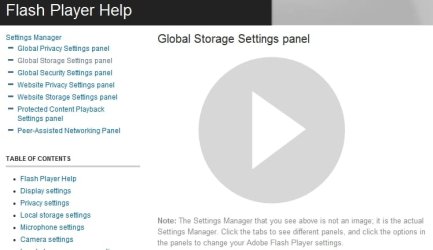
So on my machine when I try to access the panel - flash content is blocked by default and I see this:

Global Storage Settings Panel.jpg

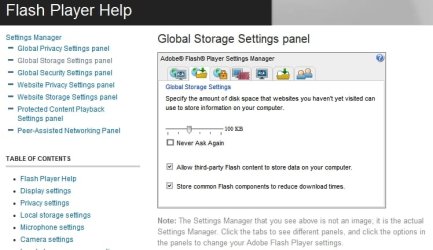
With flash activated I see this and I think that's what you're looking for?

Global Storage Settings Panel 2.jpg

So if you've got a settings.sol cookie also try the following:

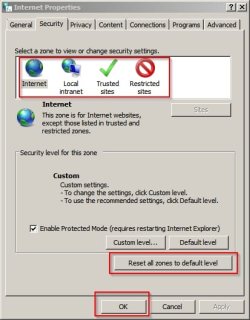
Control Panel > Internet Options

On the Security Tab choose to reset all zones to default and click OK:

Security Zones.jpg

Try rebooting and see if the problem is resolved. If it's still not working try:

Advanced tab > Restore Advanced Settings > OK

Reset IE.jpg

Don't try Reset Internet Explorer settings to their default condition just yet. That's the next step though - if you've still got problems. If you choose that last option you'll need to reboot and the re-enable any add ons that you still need.

Programs Tab > Manage Add Ons
 

My Computer

Computer type
Laptop
Computer Manufacturer/Model Number
ASUS
OS
Microsoft Windows 7 Home Premium 64-bit 7601 Multiprocessor Free Service Pack 1
CPU
AMD C-60 APU with Radeon(tm) HD Graphics
Motherboard
ASUSTeK COMPUTER INC. X501U
Memory
4.00 GB
Graphics Card(s)
AMD Radeon HD 6290 Graphics
Sound Card
(1) AMD High Definition Audio Device (2) Realtek High Defi
Screen Resolution
1366 x 768 x 32 bits (4294967296 colors) @ 60 Hz
Hard Drives
Hitachi HTS545050A7E380 SATA Disk Device
Antivirus
Comodo CIS & FW, SecureAplus App Whitelisting, Threatfire
Browser
Cyberfox 64bit, Opera 64bit, Airfox
Other Info
Spy-The-Spy, HitmanPro.Alert, Norton Connect Safe, MJRegWatcher, BitDefender TrafficLight, Voodoo Shield, Zemana AntiMalware
Hi Callendar,

Tried everything that you suggested, and still nothing. I even did the Reset Internet Explorer settings.
 

My Computer

Computer type
PC/Desktop
Computer Manufacturer/Model Number
HP
OS
Windows 7 64 bit
Antivirus
Norton
Browser
EI
Would you mind trying another browser to see if you get the same problem? Here's a portable browser that will run without installation:

SRWare Iron - The Browser of the Future - download the portable version.

Extract the files into a new folder and run ironportable.exe

When the browser has launched try visiting:

Adobe - Flash Player : Settings Manager - Global Storage Settings Panel

Let us know if you can see the panel using this browser.

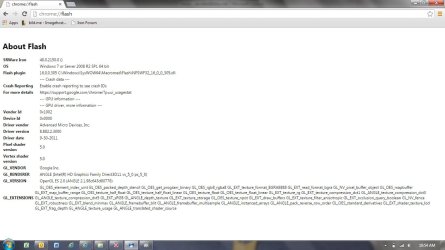
Copy this into the address bar and press enter:

chrome://plugins/

and

chrome://flash/

Post screenshots of both.
 

My Computer

Computer type
Laptop
Computer Manufacturer/Model Number
ASUS
OS
Microsoft Windows 7 Home Premium 64-bit 7601 Multiprocessor Free Service Pack 1
CPU
AMD C-60 APU with Radeon(tm) HD Graphics
Motherboard
ASUSTeK COMPUTER INC. X501U
Memory
4.00 GB
Graphics Card(s)
AMD Radeon HD 6290 Graphics
Sound Card
(1) AMD High Definition Audio Device (2) Realtek High Defi
Screen Resolution
1366 x 768 x 32 bits (4294967296 colors) @ 60 Hz
Hard Drives
Hitachi HTS545050A7E380 SATA Disk Device
Antivirus
Comodo CIS & FW, SecureAplus App Whitelisting, Threatfire
Browser
Cyberfox 64bit, Opera 64bit, Airfox
Other Info
Spy-The-Spy, HitmanPro.Alert, Norton Connect Safe, MJRegWatcher, BitDefender TrafficLight, Voodoo Shield, Zemana AntiMalware

My Computer

Computer type
Laptop
Computer Manufacturer/Model Number
ASUS
OS
Microsoft Windows 7 Home Premium 64-bit 7601 Multiprocessor Free Service Pack 1
CPU
AMD C-60 APU with Radeon(tm) HD Graphics
Motherboard
ASUSTeK COMPUTER INC. X501U
Memory
4.00 GB
Graphics Card(s)
AMD Radeon HD 6290 Graphics
Sound Card
(1) AMD High Definition Audio Device (2) Realtek High Defi
Screen Resolution
1366 x 768 x 32 bits (4294967296 colors) @ 60 Hz
Hard Drives
Hitachi HTS545050A7E380 SATA Disk Device
Antivirus
Comodo CIS & FW, SecureAplus App Whitelisting, Threatfire
Browser
Cyberfox 64bit, Opera 64bit, Airfox
Other Info
Spy-The-Spy, HitmanPro.Alert, Norton Connect Safe, MJRegWatcher, BitDefender TrafficLight, Voodoo Shield, Zemana AntiMalware
Hi Callendar,

Okay, so I tried the iron portable browser and videos worked, and I can see the global settings. I had to install Adobe again, and then I was able to see and change the global settings, and select the Third Party setting.
Here are the screenshots that you asked for (NOTE: I used the iron portable for these links, not IE...let me know if you wanted them in IE).
 

Attachments

  • plugins.jpg
    plugins.jpg
    73.4 KB · Views: 4
  • flash.jpg
    flash.jpg
    83.7 KB · Views: 1

My Computer

Computer type
PC/Desktop
Computer Manufacturer/Model Number
HP
OS
Windows 7 64 bit
Antivirus
Norton
Browser
EI
Flash Settings Panel

Well the SRWare Iron browser request was just to see if you got the same problem using another browser. You can remove SRWare Iron if you like. What do you see if you look at:

Control Panel (small icons view) then "Flash Player 33 bit" > Advanced Tab ?

Flash Player Settings Manager.jpg

Which versions are shown?

Also check the Storage Tab and as a test choose "Allow sites to save information on this computer" then see if you still get the same problem. Another question - which version of IE do you ave installed?
 

My Computer

Computer type
Laptop
Computer Manufacturer/Model Number
ASUS
OS
Microsoft Windows 7 Home Premium 64-bit 7601 Multiprocessor Free Service Pack 1
CPU
AMD C-60 APU with Radeon(tm) HD Graphics
Motherboard
ASUSTeK COMPUTER INC. X501U
Memory
4.00 GB
Graphics Card(s)
AMD Radeon HD 6290 Graphics
Sound Card
(1) AMD High Definition Audio Device (2) Realtek High Defi
Screen Resolution
1366 x 768 x 32 bits (4294967296 colors) @ 60 Hz
Hard Drives
Hitachi HTS545050A7E380 SATA Disk Device
Antivirus
Comodo CIS & FW, SecureAplus App Whitelisting, Threatfire
Browser
Cyberfox 64bit, Opera 64bit, Airfox
Other Info
Spy-The-Spy, HitmanPro.Alert, Norton Connect Safe, MJRegWatcher, BitDefender TrafficLight, Voodoo Shield, Zemana AntiMalware
So my Flash Player version is the same as your screen shot...16.0.0.305
And when I select "Allow sites to save information on this computer" it does not fix the issue.

I have IE 11 installed.

And I took a look at the other thread you showed and tried everything it mentioned...no luck.
 

My Computer

Computer type
PC/Desktop
Computer Manufacturer/Model Number
HP
OS
Windows 7 64 bit
Antivirus
Norton
Browser
EI
Flash Player issues

When you reset IE did you also re-enable add ons? They're disabled by default after the reset.

Other than that I've got no more ideas except perhaps try rolling back to IE 10:

http://www.sevenforums.com/tutorials/313358-internet-explorer-11-uninstall-windows-7-a.html?ltr=I

Then if it works reinstall IE 11 via Windows Updates.

Also do you have a system image backup and do you know how to restore a system image backup? If so, there's a repair tool for IE that you could try.
 

My Computer

Computer type
Laptop
Computer Manufacturer/Model Number
ASUS
OS
Microsoft Windows 7 Home Premium 64-bit 7601 Multiprocessor Free Service Pack 1
CPU
AMD C-60 APU with Radeon(tm) HD Graphics
Motherboard
ASUSTeK COMPUTER INC. X501U
Memory
4.00 GB
Graphics Card(s)
AMD Radeon HD 6290 Graphics
Sound Card
(1) AMD High Definition Audio Device (2) Realtek High Defi
Screen Resolution
1366 x 768 x 32 bits (4294967296 colors) @ 60 Hz
Hard Drives
Hitachi HTS545050A7E380 SATA Disk Device
Antivirus
Comodo CIS & FW, SecureAplus App Whitelisting, Threatfire
Browser
Cyberfox 64bit, Opera 64bit, Airfox
Other Info
Spy-The-Spy, HitmanPro.Alert, Norton Connect Safe, MJRegWatcher, BitDefender TrafficLight, Voodoo Shield, Zemana AntiMalware
Hi Callender,

Sorry it has taken me so long to get back to you. I tried rolling back to EI10, and still no luck.
No I do not have a system image backup, so that isn't an option.
Thanks for all your help. I am just going to accept that if I want to watch certain videos I will have to use an alternate browser.
I really do appreciate you coming up with all these ideas!
 

My Computer

Computer type
PC/Desktop
Computer Manufacturer/Model Number
HP
OS
Windows 7 64 bit
Antivirus
Norton
Browser
EI
Back
Top