Solved Trouble with IE10

carlsonart

New member
Local time
5:40 PM
Messages
3
I recently downloaded Internet Explorer 10 and all I get is "This page can't be displayed". It had a button to "fix the connection" but it doesn't detect any problem. Any help would be appreciated.
 

My Computer

Computer type
PC/Desktop
Computer Manufacturer/Model Number
HP Touchsmart 600-1050
OS
Windows 7 Home Premium x64
I recently downloaded Internet Explorer 10 and all I get is "This page can't be displayed".
Just to make sure I'm understanding things, you tried to download IE10 but got the error message. Is that correct?

This is the official Microsoft download site for IE10 for Windows 7. You need to have SP1 installed and you need to know if your computer is running a 64-bit or 32-bit version of Windows 7.

Download Internet Explorer 10

It's possible that when you tried to download IE10 the Microsoft servers were at their busiest and your request didn't go through. You could try again now that the initial rush has subsided. Please post back if you're still unable to connect.
 

My Computer

Computer type
Laptop
Computer Manufacturer/Model Number
Sony Vaio VPCEB47GM Laptop
OS
Win 7 Pro 64-bit
CPU
Intel i5 2.4 Ghz
Memory
8GB DDR3
Graphics Card(s)
Intel HD 3000
Sound Card
IDT High Definition
Monitor(s) Displays
15.6 WGXA Anti-Glare LED
Screen Resolution
1280x800
Hard Drives
640Gb 7200rpm
Antivirus
MSE
Browser
Opera (primary) with IE9 backup
same problem here. I tried the beta back in October I think and had the problem, so I went back to IE9. Now the final release comes out and I have the exact same problem. It will work randomly and then no problems with it, if I shut down though, it starts all over again. Nothing opens up only "this page can't be displayed. Chrome/Firefox works no problem.
 

My Computer

Computer type
PC/Desktop
OS
windows 7 64
I recently downloaded Internet Explorer 10 and all I get is "This page can't be displayed".
Just to make sure I'm understanding things, you tried to download IE10 but got the error message. Is that correct?

This is the official Microsoft download site for IE10 for Windows 7. You need to have SP1 installed and you need to know if your computer is running a 64-bit or 32-bit version of Windows 7.

Download Internet Explorer 10

It's possible that when you tried to download IE10 the Microsoft servers were at their busiest and your request didn't go through. You could try again now that the initial rush has subsided. Please post back if you're still unable to connect.

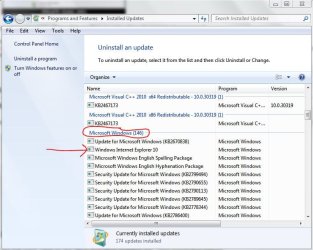
Yeah I hit a button too fast I think. I tried to re-download it but it would let me, can't find it to uninstall it, can't go back to a previous version and tried to do a system restore. I just can't get off of this page.
 

My Computer

Computer type
PC/Desktop
Computer Manufacturer/Model Number
HP Touchsmart 600-1050
OS
Windows 7 Home Premium x64

My Computer

Computer type
Laptop
Computer Manufacturer/Model Number
Sony Vaio VPCEB47GM Laptop
OS
Win 7 Pro 64-bit
CPU
Intel i5 2.4 Ghz
Memory
8GB DDR3
Graphics Card(s)
Intel HD 3000
Sound Card
IDT High Definition
Monitor(s) Displays
15.6 WGXA Anti-Glare LED
Screen Resolution
1280x800
Hard Drives
640Gb 7200rpm
Antivirus
MSE
Browser
Opera (primary) with IE9 backup
Thank you, marsmimar, your option two worked! Found where IE10 was and uninstalled it then reverted back to IE9, just what I wanted to do. I'll try reinstalling IE10 but with more attention.
 

My Computer

Computer type
PC/Desktop
Computer Manufacturer/Model Number
HP Touchsmart 600-1050
OS
Windows 7 Home Premium x64
I installed the correct version both times and both times same results. I have run through all of MS's suggestions and no luck at all. If I revert back to 9 now, they are going to update it in a few weeks anyway. Not sure what to do on this one.
 

My Computer

Computer type
PC/Desktop
OS
windows 7 64
Back
Top