JavaScript is disabled. For a better experience, please enable JavaScript in your browser before proceeding.
You are using an out of date browser. It may not display this or other websites correctly.
You should upgrade or use an
alternative browser .
Solved Trouble with Netgen, missing dll
Same old, same old
Power User
VIP
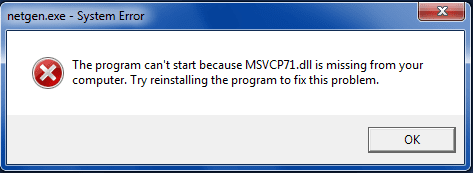
Hi, I tried to install Netgen (Netgen-4.9.13_Win32) on my laptop. It installs without errors but when I run it I get the following message:
I don't know why this is. The same installer work perfectly on my other PC. I uninstalled and reinstalled, repeat, but got the same message each time. How do I fix this?
Thanks.
Computer type PC/Desktop Computer Manufacturer/Model Number Own build OS Windows 7 x64 Professional CPU Intel Core i7-870 Lynnfield 2.93 GHz Motherboard Intel Whitesburg P55 LGA1156 Memory Kingston Hyper X 1333MHz DDR3 4x4Gb Graphics Card(s) Nvidia GTS 250 Monitor(s) Displays AOC Q3279VWF 31.5" Screen Resolution 2560x1440 Hard Drives Western Digital 1000GB Hard Drive (SATA 3.0Gb/s, 7200rpm, 32MB Cache) PSU 650W Case Coolermaster HAF 912 Cooling Stock Keyboard Logitech Mouse Logitech Antivirus Avira Browser Firefox Other Info LG OptDrive 24x SATA DVDRW Lightscribe
Same old, same old
Power User
VIP
Thread Starter
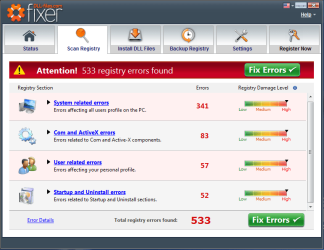
Ok that didn't help. It couldn't install the missing dll. Then it did a scan and gave me this:
Computer type PC/Desktop Computer Manufacturer/Model Number Own build OS Windows 7 x64 Professional CPU Intel Core i7-870 Lynnfield 2.93 GHz Motherboard Intel Whitesburg P55 LGA1156 Memory Kingston Hyper X 1333MHz DDR3 4x4Gb Graphics Card(s) Nvidia GTS 250 Monitor(s) Displays AOC Q3279VWF 31.5" Screen Resolution 2560x1440 Hard Drives Western Digital 1000GB Hard Drive (SATA 3.0Gb/s, 7200rpm, 32MB Cache) PSU 650W Case Coolermaster HAF 912 Cooling Stock Keyboard Logitech Mouse Logitech Antivirus Avira Browser Firefox Other Info LG OptDrive 24x SATA DVDRW Lightscribe
Computer type PC/Desktop Computer Manufacturer/Model Number Custom OS Windows 8.1 Pro x64 CPU Intel Core i5-4570 CPU @ 3.20GHz Motherboard Gigabyte Z87-D3HP-CF Memory 8GB DDR3-1596 - Dual Channel Graphics Card(s) NVIDIA GeForce GTX 750 Ti SC Sound Card Onboard Monitor(s) Displays Samsung Screen Resolution 1920x1080 Hard Drives SSD - 120GB Antivirus MSE Browser Chrome
Same old, same old
Power User
VIP
Thread Starter
Last time I did a registry clean I lost several of my licenses for my software. So I'm cautious... and this still doesn't solve the missing dll issue...
Computer type PC/Desktop Computer Manufacturer/Model Number Own build OS Windows 7 x64 Professional CPU Intel Core i7-870 Lynnfield 2.93 GHz Motherboard Intel Whitesburg P55 LGA1156 Memory Kingston Hyper X 1333MHz DDR3 4x4Gb Graphics Card(s) Nvidia GTS 250 Monitor(s) Displays AOC Q3279VWF 31.5" Screen Resolution 2560x1440 Hard Drives Western Digital 1000GB Hard Drive (SATA 3.0Gb/s, 7200rpm, 32MB Cache) PSU 650W Case Coolermaster HAF 912 Cooling Stock Keyboard Logitech Mouse Logitech Antivirus Avira Browser Firefox Other Info LG OptDrive 24x SATA DVDRW Lightscribe
Same old, same old
Power User
VIP
Thread Starter
^^^ By the way I see there are two posts missing by some other user that recommended I install a dll fixer. That's what my second post is about.
Computer type PC/Desktop Computer Manufacturer/Model Number Own build OS Windows 7 x64 Professional CPU Intel Core i7-870 Lynnfield 2.93 GHz Motherboard Intel Whitesburg P55 LGA1156 Memory Kingston Hyper X 1333MHz DDR3 4x4Gb Graphics Card(s) Nvidia GTS 250 Monitor(s) Displays AOC Q3279VWF 31.5" Screen Resolution 2560x1440 Hard Drives Western Digital 1000GB Hard Drive (SATA 3.0Gb/s, 7200rpm, 32MB Cache) PSU 650W Case Coolermaster HAF 912 Cooling Stock Keyboard Logitech Mouse Logitech Antivirus Avira Browser Firefox Other Info LG OptDrive 24x SATA DVDRW Lightscribe
Try downloading the file manually(the zip link) from here:
msvcr71.dll free download - DLL-files.com
It might be what you just tried, but just to make sure.
Then place it into: C:\Windows\System32 or C:\Windows\SysWOW64 if you using a 64-bit Windows.
Let me know if that works!
PS. Yeah i noticed that. I seen the post so i knew what was going on.
Computer type PC/Desktop Computer Manufacturer/Model Number Custom OS Windows 8.1 Pro x64 CPU Intel Core i5-4570 CPU @ 3.20GHz Motherboard Gigabyte Z87-D3HP-CF Memory 8GB DDR3-1596 - Dual Channel Graphics Card(s) NVIDIA GeForce GTX 750 Ti SC Sound Card Onboard Monitor(s) Displays Samsung Screen Resolution 1920x1080 Hard Drives SSD - 120GB Antivirus MSE Browser Chrome
Same old, same old
Power User
VIP
Thread Starter
It worked. Thanks a million!
Computer type PC/Desktop Computer Manufacturer/Model Number Own build OS Windows 7 x64 Professional CPU Intel Core i7-870 Lynnfield 2.93 GHz Motherboard Intel Whitesburg P55 LGA1156 Memory Kingston Hyper X 1333MHz DDR3 4x4Gb Graphics Card(s) Nvidia GTS 250 Monitor(s) Displays AOC Q3279VWF 31.5" Screen Resolution 2560x1440 Hard Drives Western Digital 1000GB Hard Drive (SATA 3.0Gb/s, 7200rpm, 32MB Cache) PSU 650W Case Coolermaster HAF 912 Cooling Stock Keyboard Logitech Mouse Logitech Antivirus Avira Browser Firefox Other Info LG OptDrive 24x SATA DVDRW Lightscribe
Computer type PC/Desktop Computer Manufacturer/Model Number Custom OS Windows 8.1 Pro x64 CPU Intel Core i5-4570 CPU @ 3.20GHz Motherboard Gigabyte Z87-D3HP-CF Memory 8GB DDR3-1596 - Dual Channel Graphics Card(s) NVIDIA GeForce GTX 750 Ti SC Sound Card Onboard Monitor(s) Displays Samsung Screen Resolution 1920x1080 Hard Drives SSD - 120GB Antivirus MSE Browser Chrome