Trouble with printer sharing

LJ34

New member
Local time
1:07 PM
Messages
3
Hi all!

I have a strange problem that has been bugging me for a while.

In the office we have several computers running on several OS's: Win 7, Vista and XP. On one of the computers that runs on Win 7 we have a printer OKI C5650, working with no problems. It is shared on local network and computers running Vista and XP have no problem connecting and printng from it. However, the problem occurs when I try to print from a computer running on Win 7.

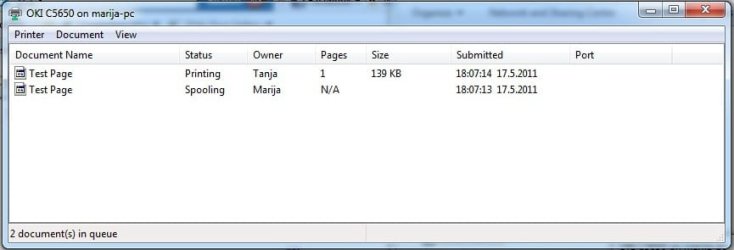
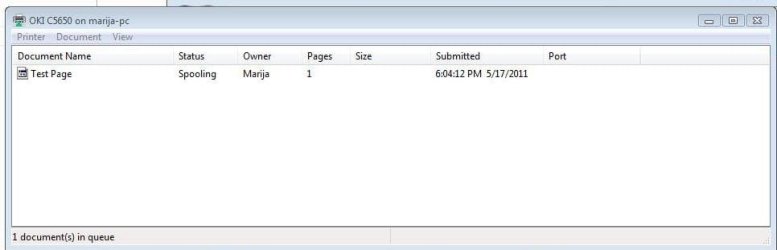
Let's say that the printer is installed on computer A, running on Win 7. Computer B, running on Vista (or XP), can connect to the printer and print with no problems (see attached Vista.jpg). Computer C, running on Win 7, can connect to the printer but cannot print. When I try to print a test page, there are two documents in the queue (see attached Win7.jpg), Tanja is local user on C, while Marija is local user on A.

I am absolutely clueless, have tried to reinstall drivers, but still the same problem happens.

Any help would be greatly appreciated.

Cheers!
 

Attachments
  • Vista.jpg
    Vista.jpg
    32.1 KB · Views: 25
  • Win7.jpg
    Win7.jpg
    95.6 KB · Views: 20

My Computer

OS
Windows 7 64 bit
Delete the printer from the Win 7 computer. Open Network and navigate to the computer the printer is connected top. Double click on the printer. Thet will install the correct driver.

See if that helps.
 

My Computer

Computer type
PC/Desktop
Computer Manufacturer/Model Number
Lenovo IdeaCenter 450
OS
Windows 10 Pro X64
CPU
Intel Quad Core i7-4770 @ 3.4Ghz
Memory
16.0GB PC3-12800 DDR3 SDRAM 1600 MHz
Graphics Card(s)
Intel Integrated HD Graphics
Sound Card
Realtek HD Audio
Monitor(s) Displays
HP 22" LCD
Screen Resolution
1680 x 1050
Hard Drives
250GB Samsung EVO SATA-3 SSD
2TB Seagate ST2000DM001 SATA-2
1.5TB Seagate ST3150041AS SATA
Keyboard
Dell USB
Mouse
Lenovo USB
Internet Speed
Cable via Road Runner 3MB Upload, 30MB Download
Antivirus
Windows Defender, MBAM Pro, MBAE
Browser
Seamonkey
Other Info
UEFI/GPT
PLDS DVD-RW DH16AERSH
Tried it a million times. Today I connected the printer to an XP computer and the same thing: Win 7 computers cannot print, while others can.
 

My Computer

OS
Windows 7 64 bit
What if you connected the printer to the problematic Windows 7 desktop, can you print locally?
so, connect printer to computer C and see what driver it pulls... there might be a 32 vs 64 bit driver conflict, is computer C running a different version?

edit:

CompatibilityCompatibilityEmulation: Enhanced Windows® Printing (GDI)
Operating Systems: Windows Vista®, XP, 2003 Server, 2000 (all 32- and 64-bit); Mac® OS X 10.2.8 and higher; UNIX®; Linux

edit 2:
Manual installation required for Win 7 os
http://malta.oki.com/support/printer/printer-drivers/results.aspx?prodid=tcm:179-2933&search=1&OSId=Windows%207&languageId=English&type=%7cDrivers
 

My Computer

OS
7 Pro
Tried it multiple times, doesn't work.

Locally it prints fine on every computer. In the network, it only prints when connecting from a compuer not running on Win 7.
 

My Computer

OS
Windows 7 64 bit
Hi there
I posted ages ago an instruction on sharing printers between XP and W7 -- even with a mix of 32 and 64 bit machines.


My post went something like this ..................


Hi Mods
Maybe you can make this a sticky -- often comes up and I posted a solution yesterday which works.
..............extract from previous post .....
Hi there
I've posted on this before but to share Printers attached to XP computers with either X-64 or X-32 versions of Windows 7 is SIMPLE. These instructions are for the Printer attached to the XP machine (but works in reverse as well).

("Stand alone" Network printers can be done slightly similarly BTW).

assume the computers are call XPMACHINE and W7MACHINE.

1) Ensure Printer on XP machine is shared - assume it's called SHAREDPRINTER.

2) On the Network Browsing on your Windows 7 machine ensure you can "See" the Printer share.

Now on the Windows 7 machine do the following (doesn't matter if it's X-86 or x-64).

3) Control Panel==> add LOCAL (Yes LOCAL) printer. I know it's on a Network but hold your horses -- what we are actually doing is "Poodlefaking" the Windows 7 machine into thinking it's running the printer.

4) Create NEW port==>Local port

5) Portname is \\XPMACHINE\SHAREDPRINTER

6) Now Windows 7 will load a driver and you'll be able to print on the XP machine.

Simple

(For a "Network stand alone printer") at 4) chose TCPIP port
and at 5) enter the IP address.


If the printer is on the Windows 7 machine and you want to print on the XP machine then do the same instructions on the XP machine --
port name in this case will be \\W7MACHINE\SHAREDPRINTER

Cheers


jimbo
 

My Computer

Computer type
PC/Desktop
Computer Manufacturer/Model Number
Custom built, several laptops HP/ASUS
OS
Linux CENTOS 7 / various Windows OS'es and servers
CPU
Intel i7 Intel i5
Memory
8GB, 16GB
Graphics Card(s)
On Motherboard
Sound Card
Realtek HD audio
Monitor(s) Displays
Apple Cinema display, Samsung LCD
Screen Resolution
1920 X 1080
Hard Drives
4 X 1TB SATA
Mouse
Toshiba wireless laser
Internet Speed
> 20MB up
Thank you Jimbo........I wandered in here and saw your original post and then the "solve" that you posted today........I will certainly give that a try because I can't seem to hook the XP desktop up to the new eprinter via network.

Thanks......and I will report back.

Figgs :D
 

My Computer

Computer Manufacturer/Model Number
HP Pavilion dv6 Notebook
OS
Windows 7 Home Premium 64 bit
Sound Card
ATI High Definition
Mouse
HP Wireless Mouse
i've tried jimbo solution on my win 7 computer and the printer worked fine till i restart the computer, the printer become offline. and i have to install printer again from the start. every time i restart my computer, the printer become offline,,, on the other computer that using win XP the printer work fine.

any help?
 

My Computer

OS
Windows 7 Ultimate X86
Back
Top