
Husky Hoskulds
New member
- Local time
- 11:34 AM
- Messages
- 6
Trouble with Security "interfering" with Mapped Network drive access
Hello all!
I've just recently added a Synology 4 bay NAS device to my WIN 7 system (running via Bootcamp on my Mac Mini).
I've mapped all drives successfully and they all mount on startup - and seem to work nicely, for most things, like backups, drag n' drop, etc.
However, I'm having a hard time with WIN7 interfering with me moving files from the NAS (mapped drives) to either one of my internal SATA drives ("C" and "D")
My typical workflow (i mix records) is to download files from a server, that my clients send me, on my Macbook Pro laptop, then (via the network) drop said files onto the NAS and work from there (on the PC - or WIN7 on the Mac Mini, really - but for all intents and purposes, we'll call it "the PC)
I noticed that my audio program did not like this workflow AT ALL, and it consistently crashed.. full on.. blue screen and all.
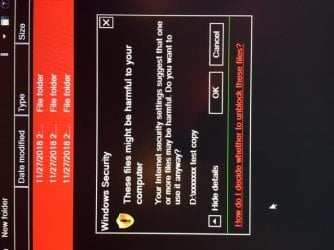
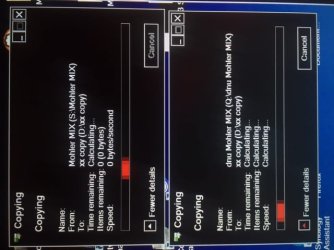
So.. i decided to see about working off the internal SATA drive (this was my old workflow, for YEARS, and extremely stable - no crashes what so ever, and CERTAINLY never the BSOD) but when i tried to copy the files from the NAS (mapped drive) to the internal drive "D" i get the "security" notification (see attached) and then, if i click "OK" the computer hangs indefinitely and doesn't complete the copy.
I've tried this several times, and always get the same result.
Is it possible to turn off these "security warnings"? Or is there another issue here, perhaps?
I can work without problems off Mapped Drives using files that i've generated there (e.g. when i record audio straight to the NAS, and then go on to mix the song) but it seems there is some sort of a "flag" raised when i bring files from the internet, OR when i bring them from the MAC Laptop, perhaps??
Thoughts??
thank you
Husky
Hello all!
I've just recently added a Synology 4 bay NAS device to my WIN 7 system (running via Bootcamp on my Mac Mini).
I've mapped all drives successfully and they all mount on startup - and seem to work nicely, for most things, like backups, drag n' drop, etc.
However, I'm having a hard time with WIN7 interfering with me moving files from the NAS (mapped drives) to either one of my internal SATA drives ("C" and "D")
My typical workflow (i mix records) is to download files from a server, that my clients send me, on my Macbook Pro laptop, then (via the network) drop said files onto the NAS and work from there (on the PC - or WIN7 on the Mac Mini, really - but for all intents and purposes, we'll call it "the PC)
I noticed that my audio program did not like this workflow AT ALL, and it consistently crashed.. full on.. blue screen and all.
So.. i decided to see about working off the internal SATA drive (this was my old workflow, for YEARS, and extremely stable - no crashes what so ever, and CERTAINLY never the BSOD) but when i tried to copy the files from the NAS (mapped drive) to the internal drive "D" i get the "security" notification (see attached) and then, if i click "OK" the computer hangs indefinitely and doesn't complete the copy.
I've tried this several times, and always get the same result.
Is it possible to turn off these "security warnings"? Or is there another issue here, perhaps?
I can work without problems off Mapped Drives using files that i've generated there (e.g. when i record audio straight to the NAS, and then go on to mix the song) but it seems there is some sort of a "flag" raised when i bring files from the internet, OR when i bring them from the MAC Laptop, perhaps??
Thoughts??
thank you
Husky
Attachments
My Computer
At a glance
Win 7 Home Premium 64 SP1
- Computer type
- PC/Desktop
- OS
- Win 7 Home Premium 64 SP1
