
trevolution11
New member
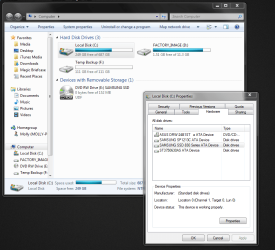
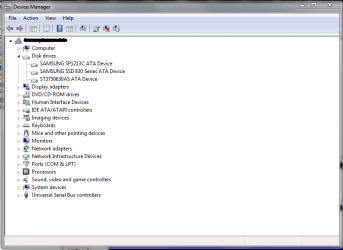
I just bought a new Samsung 830 Series 128 GB SSD. I have installed it into my desktop and I'm using a SATA III Cable to one of the two 6Gb/s SATA ports on my motherboard. When I booted up my computer, Win 7 went through the process of automatically updating the drivers, and "My device is ready for use." This is where there is a problem. The new drive doesn't show up under the Computer portion of Windows Explorer. I also can't save to it, because its not an option in Windows Explorer. I can see the SSD under Device Manager, and Disk Management. Not really sure what the next step is to activating this drive; I think it may have something to do with a BIOS setting, but I'm not really sure. Any wisdom from you gurus out there would be well received on my end. Thanks for any assistance you can provide.
Attachments

My Computer
- OS
- Windows 7 Ultimate x64
- CPU
- Intel Core i5 2500k OC'd @4.0GHz
- Motherboard
- Biostar TZ68a+
- Memory
- 16 GB G.SKILL Ripjaws F3-12800CL9Q-16GBRL
- Graphics Card(s)
- EVGA NVIDIA GeForce GTX 670
- Monitor(s) Displays
- Samsung P2770FH 27" Widescreen LCD Monitor
- Screen Resolution
- 1920x1080
- Hard Drives
- Samsung SSD 830 Series 128GB /
Seagate 750GB @7200.0 rpm /
Samsung SP1213C 120GB
- PSU
- Corsair Enthusiast Series 750TX V2
- Case
- Apevia X-Jupiter S-Type
- Cooling
- CoolerMaster Hyper 101i CPU cooler
- Keyboard
- Logitech 920-000914R Illuminated Keyboard
- Mouse
- Logitech MX Performance
- Internet Speed
- 15 Mb/s
